

The right full-size RGB gaming keyboard depends on whether you value quiet keys, mechanical customization, wireless flexibility, or dedicated controls. For a wired mechanical option with switch swapping, consider the Redragon K668; for more elaborate customization, compare the AULA F108 PRO and HyperX Alloy Rise.
This roundup compares listed specifications and compatibility, not independent performance measurements. Confirm your preferred layout, operating system support, connection method, and switch type before choosing.
Full-Size RGB Keyboard Picks

Pros
- IP32 water resistance guards against liquid spills
- Whisper-quiet switches rated for 20 million presses
- Included magnetic wrist rest for palm support
- Dedicated on-the-fly multimedia controls
- Broad compatibility with PC and major consoles
Pros
- Tactile hybrid switches rated for 20 million clicks
- Built-in customizable OLED smart display
- Durable aircraft-grade aluminum alloy frame
- Dynamic per-key RGB backlighting with reactive effects
- Detachable magnetic wrist rest included

Pros
- Universal 3-pin and 5-pin hot-swappable switch sockets
- Quiet pre-installed linear red switches
- Dedicated productivity shortcut keys
- Includes two distinct keycap sets
- Customizable RGB lighting with audio synchronization
Cons
- Tethered wired operation with no wireless connectivity
- Large full-size footprint requires substantial desk space

Pros
- Tri-mode connectivity via Bluetooth, 2.4GHz, and USB-C
- Single 2-in-1 USB receiver operates both peripherals
- Ten dedicated multimedia keys for direct playback control
- Mouse supports up to 1000Hz polling rate
- Keyboard battery rated up to 300 hours without RGB
Cons
- Configuration software is limited to Windows systems
- Mouse sensor tops out at 4800 DPI

Pros
- Durable spill-resistant build for simple cleanup
- Dedicated media and volume control buttons
- Tuned tactile keys with gaming anti-ghosting
- Integrated palm rest enhances typing comfort
- Customizable five-zone RGB via Logitech G HUB
Cons
- RGB illumination is limited to five zones
- Integrated palm rest cannot be removed
Pros
- Full-size layout with dedicated number pad
- Hot-swappable 3-pin and 5-pin switch support
- Three connection modes across multiple platforms
- Large 8000mAh battery capacity
- Built-in display and multifunction control knob
Cons
- Screen customization requires Windows software and wired mode
- Macro and RGB software supports Windows in wired mode
- Linux may have abnormal F-zone functionality with incompatible drivers

Pros
- Hot-swappable switch design for easy personalization
- Cushioned gasket-mounted interior
- Factory-lubed switches rated for 80 million actuations
- Built-in ambient light sensor for automatic brightness adjustment
- Dedicated media keys with a rotary volume knob
Cons
- Full-size layout demands substantial desk space
- Sensor profile adjustments require NGENUITY software

Pros
- Durable aluminum alloy brushed top panel
- Integrated phone and pen holder
- Adjustable mouse sensitivity up to 7200 DPI
- 26-key anti-ghosting for reliable gaming input
- Detachable floating keycaps with included puller
Cons
- Membrane switches rather than mechanical hardware
- Fixed rainbow backlighting instead of per-key RGB

Pros
- Tri-mode wireless and wired USB-C connectivity
- Hot-swappable sockets accept 3-pin and 5-pin switches
- Five dedicated hardware macro keys
- Integrated dedicated media control wheel
- Full 104-key anti-ghosting matrix
Cons
- Full-size 104-key frame requires substantial desk space
- Advanced lighting and macro customizations require software
How to Choose a Full-Size RGB Gaming Keyboard
A full-size layout keeps the number pad alongside the function and arrow keys, which can help with data entry and games that use many commands. It also occupies more desk space than a tenkeyless or compact board, so check your available room and mouse area.
Decide between membrane and mechanical keys
The Apex 3 uses quiet gaming switches, while Logitech’s G213 is a wired full-size keyboard with keys tuned for tactile feedback. Mechanical options here include the Apex 5’s hybrid blue switches and hot-swappable models from Redragon, AULA, and HyperX. Switch feel and sound are personal preferences, so advertised descriptions cannot guarantee an ideal fit.
Match connectivity and software to your setup
Wired keyboards avoid the need to manage a keyboard battery. The AULA F108 PRO and Redragon K580 PRO offer USB-C wired, Bluetooth, and 2.4 GHz modes; the Redragon S101M-KS also lists tri-mode connectivity. Check the stated operating-system support and software requirements, especially if you use macOS, Linux, or a console.
Choose lighting and controls you will use
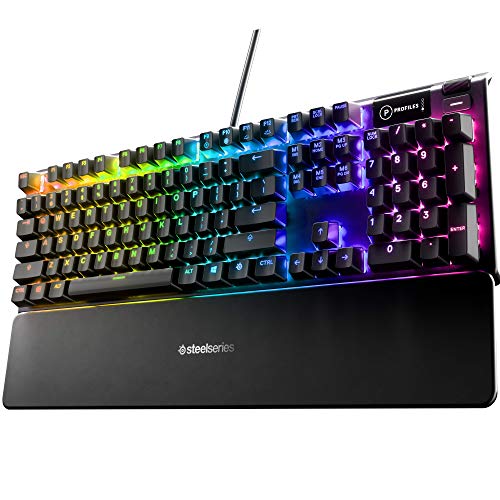
RGB implementation varies: the Apex 3 has 10 lighting zones, while the Apex 5 supports per-key illumination. The Logitech G213 has five customizable zones. If you want macro controls or a media wheel, the Redragon K580 PRO includes dedicated macro keys and a wheel; the Apex 3 and G213 instead list dedicated media controls.
Product Assessments
SteelSeries Apex 3 Gaming Keyboard: quiet, spill-resistant design
The Apex 3 combines quiet switches rated for 20 million keypresses with 10-zone RGB, a magnetic wrist rest, and dedicated media controls. Its IP32 water resistance is intended to help prevent accidental liquid-spill damage, but it is not a waterproofing claim. Listed compatibility includes Windows, Mac OS X, Xbox Series S and X, PS4, and PS5.
Pros: Quiet switch design, wrist support, media controls, and broad stated platform compatibility. Cons: RGB is zone-based rather than per-key, and the listed switch type is not mechanical. Who should skip it: Shoppers seeking mechanical switches or individually customizable key lighting.
SteelSeries Apex 5 Hybrid Mechanical: tactile clicks and OLED display
The Apex 5 pairs hybrid blue switches with per-key RGB and an OLED display that can show supported game information, GIFs, and Discord messages. Its aluminum alloy frame and magnetic wrist rest add practical features, while the hybrid switch construction differs from a conventional fully mechanical design.
Pros: Per-key lighting, an onboard display, tactile click-style switches, and a wrist rest. Cons: Blue-style clicks may not suit quiet rooms, and the supplied details do not state operating-system or console compatibility. Who should skip it: Users who need a quiet keyboard or verified compatibility for a specific platform.
Redragon K668: wired hot-swappable mechanical value
The K668 is a 108-key wired board with hot-swap sockets listed as compatible with most 3-pin and 5-pin switches. It offers 19 lighting modes, four extra configurable keys, anti-ghosting, and software for macros and lighting. The stock linear switches are described as smooth and quiet, which may suit shared spaces better than clicky switches.
Pros: Switch customization without soldering, extra shortcut keys, and adjustable RGB effects. Cons: It is wired, and the supplied compatibility details do not identify supported operating systems. Who should skip it: Anyone requiring wireless connectivity or confirmed console support.
Redragon S101M-KS: wireless keyboard and mouse bundle
This bundle includes a tri-mode wireless keyboard and mouse, with wired, Bluetooth, and 2.4 GHz options. The keyboard has RGB effects, 10 independent multimedia keys, combination media shortcuts, and a rechargeable battery listed for up to 300 hours with RGB off. That battery figure is an advertised condition, not a general runtime estimate for lighting-on use.
Pros: Keyboard and mouse arrive together, multiple connection modes are specified, and the set includes shortcut keys. Cons: The keyboard’s switch type and detailed layout dimensions are not specified, and the stated battery life applies with RGB off. Who should skip it: Buyers focused on mechanical switches or a keyboard-only package.
Logitech G213 Prodigy: wired RGB for gaming and everyday use
The G213 is a full-size wired keyboard with five customizable lighting zones, dedicated media controls, an integrated palm rest, and adjustable feet. Its anti-ghosting gaming matrix is intended to register multiple inputs during play. Logitech G HUB provides lighting, game mode, and macro customization; the listed details do not specify console compatibility.
Pros: Media controls, palm support, configurable lighting zones, and software customization. Cons: Lighting is organized into zones, and the listed key design is not identified as mechanical. Who should skip it: Those wanting per-key RGB or a mechanical switch platform.
AULA F108 PRO: wireless mechanical customization
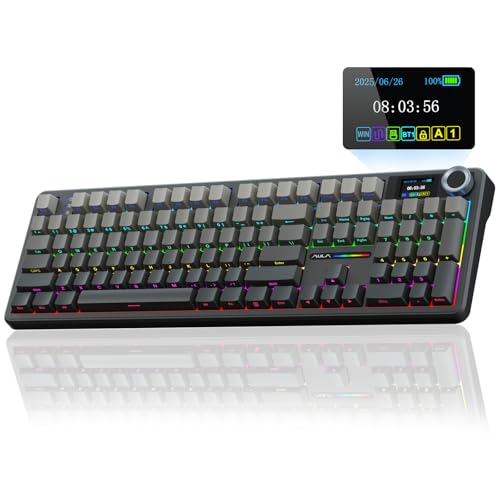
The F108 PRO has a 104-key full-size layout, hot-swappable 3-pin or 5-pin switches, PBT keycaps, and an 8,000 mAh battery. It connects by Bluetooth 5.0, 2.4 GHz, or USB-C cable and can save up to five devices. The display and knob provide settings and status controls; setting its screen image and calibrating time require Windows software in wired mode.
Pros: Multiple connection options, switch swapping, a full number pad, and a configurable display. Cons: Driver support is Windows-only in wired mode, and the listing notes possible Linux F-zone incompatibility with some driver versions. Who should skip it: Linux users who rely on every function-row feature or buyers who do not need wireless and customization options.
HyperX Alloy Rise: hot-swappable board with adaptive lighting
The Alloy Rise combines a full-size layout with hot-swappable switches, gasket mounting, factory-lubed linear switches, and PBT keycaps. An ambient light sensor adjusts RGB according to surrounding light, with preferences set in NGENUITY. Dedicated media controls and a rotary volume knob add convenience, while optional top plates, badges, and knobs support appearance changes.
Pros: Switch swapping, linear switches, adaptive lighting, and dedicated media controls. Cons: The supplied information does not specify connection modes or operating-system compatibility, and customization depends partly on NGENUITY. Who should skip it: Buyers who need confirmed wireless support or detailed compatibility information before choosing.
Redragon K580 PRO: wireless macros and media wheel
The K580 PRO offers a full-size 104-key layout, five dedicated macro keys, a media wheel, and tri-mode USB-C, Bluetooth, and 2.4 GHz connectivity. Its hot-swap sockets support listed 3-pin and 5-pin switches, and full anti-ghosting is specified. Onboard macro recording avoids requiring software for that function, while companion software adds RGB and keybinding customization.
Pros: Dedicated macros, multiple connection choices, hot-swappable switches, and a physical media wheel. Cons: Detailed operating-system compatibility and battery specifications are not supplied. Who should skip it: Buyers who need confirmed console support or a stated wireless runtime.
AULA wired keyboard and mouse combo: basic full-size bundle
This wired set pairs a 104-key membrane keyboard with a mouse. The keyboard lists three rainbow lighting modes, multimedia shortcuts, a Windows-key lock, and simultaneous input support for up to 26 keys. Its aluminum alloy panel and included phone and pen holder may appeal to shoppers wanting a simple desk bundle rather than switch customization.
Pros: Keyboard and mouse are included, lighting can be adjusted, and the keyboard has a full-size layout. Cons: Lighting offers three modes rather than per-key RGB, and the listed compatibility focuses on Windows versions. Who should skip it: Users seeking mechanical switches, wireless connectivity, or confirmed Mac and console support.
Which Full-Size RGB Keyboard Fits Your Setup?
For a quieter wired board with a wrist rest and stated console compatibility, the Apex 3 is the clearest fit. Choose the K668 if wired mechanical switch customization matters, or the F108 PRO if you want a full-size wireless mechanical board and accept its Windows-specific configuration caveats.
The Apex 5 suits users who want tactile clicks and an OLED display, while the Alloy Rise emphasizes hot-swapping and adaptive RGB. Consider the K580 PRO for onboard macro keys, the G213 for straightforward wired controls, and either Redragon or AULA bundle if a mouse is also needed. For more options, browse our gaming and typing keyboard guide or the broader Gaming Keyboards category.


Write Your Review
No reviews yet. Be the first to share your experience!