

For a dedicated clicky mechanical keyboard, start with the Logitech G PRO Mechanical TKL for a compact layout or the full-size RisoPhy for blue switches and a number pad. The Razer BlackWidow V3 and V4 offer clicky green mechanical switches, while the SteelSeries Apex 5 uses hybrid switches and several Redragon and GEODMAER models are mechanical-feeling or membrane designs rather than equivalent mechanical clicky keyboards.
This comparison is based on the specifications provided, not claims of personal use. Before choosing, decide whether audible click and tactile feedback matter more than a quieter membrane design, compact mouse space, wireless flexibility, or dedicated controls.
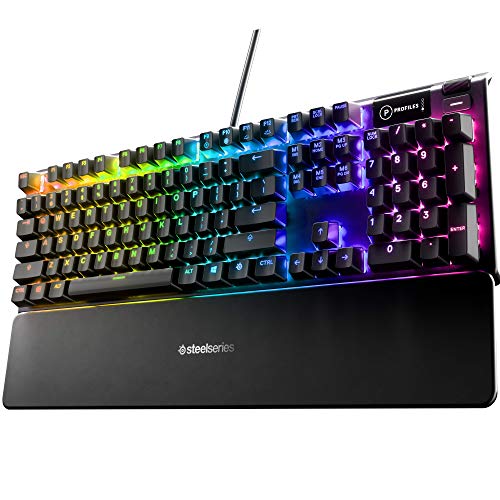
Pros
- Tactile hybrid switches rated for 20 million clicks
- Built-in customizable OLED smart display
- Durable aircraft-grade aluminum alloy frame
- Dynamic per-key RGB backlighting with reactive effects
- Detachable magnetic wrist rest included

Pros
- Space-saving tenkeyless design frees mouse room
- Tactile, audible GX Blue clicky mechanical switches
- Detachable 1.8-meter cable ensures easy transport
- Onboard memory stores static LIGHTSYNC profiles
- Three-step tilt adjustment provides stable ergonomics
Cons
- Key and lighting programming requires Logitech G HUB
- Macro assignments are restricted to F1 through F12
- Equipped with an older Micro USB connection

Pros
- Tactile, clicky Razer Green mechanical switches
- Dedicated digital roller and media control key
- Ergonomic wrist rest included
- Transparent switch housings enhance Chroma RGB backlighting
- Built-in multi-directional cable routing channels

Pros
- Dedicated one-touch lighting toggle button
- 19-key anti-ghosting for essential gaming inputs
- Full 104-key layout with multimedia shortcuts
- Plug-and-play setup across PC and consoles
- Adjustable backlighting brightness and breathing modes
Cons
- Simulates mechanical feel rather than true mechanical switches
- Anti-ghosting is limited to 19 keys
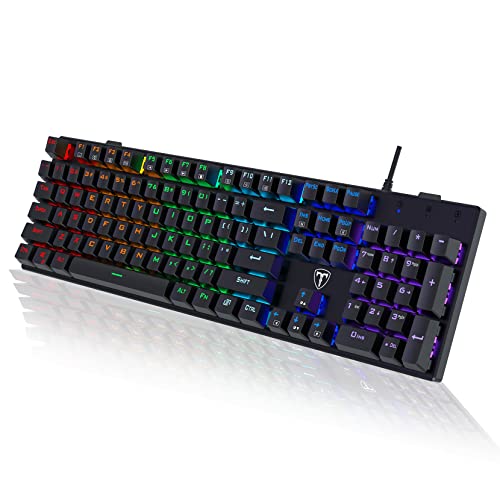
Pros
- Tactile blue switches provide clear actuation feedback
- Full anti-ghosting supports rapid simultaneous keypresses
- Spill-resistant design with integrated liquid drainage holes
- Convenient 12 multimedia shortcuts and Windows lock
- Double-shot ABS keycaps resist legend wear
Cons
- Audible clicky switches may disturb quiet shared spaces
- Preset rainbow backlighting lacks individual per-key RGB customization

Pros
- Tri-mode connectivity via Bluetooth, 2.4GHz, and USB-C
- Single 2-in-1 USB receiver operates both peripherals
- Ten dedicated multimedia keys for direct playback control
- Mouse supports up to 1000Hz polling rate
- Keyboard battery rated up to 300 hours without RGB
Cons
- Configuration software is limited to Windows systems
- Mouse sensor tops out at 4800 DPI

Pros
- Space-saving 68-key layout with dedicated arrows
- Detachable Type-C cable for easy travel
- Quiet membrane operation suitable for shared rooms
- 26-key anti-ghosting for accurate key registration
Cons
- Uses membrane switches instead of authentic mechanical switches
- No integrated number pad for data entry

Pros
- Durable wear-resistant PBT keycaps
- Sturdy aluminum-magnesium alloy top plate
- Tactile mechanical switches for responsive feedback
- Convenient FN-layer media and lighting controls
Cons
- Lighting limited to single-color white LEDs
- Key rollover capped at six simultaneous inputs

Pros
- Tactile Razer Green switches with 50g actuation
- Six dedicated programmable macro keys
- Detachable magnetic plush leatherette wrist rest
- Durable doubleshot ABS keycaps
- Per-key RGB lighting with dual-side underglow
Cons
- Clicky switches can be loud in quiet settings
- Large footprint requires substantial desk space
- ABS keycap construction instead of PBT
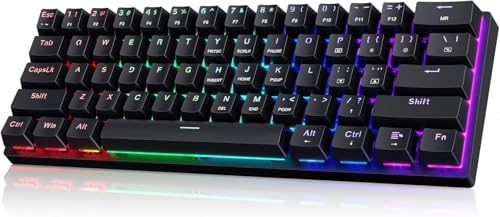
Pros
- Compact 61-key layout maximizes desk space
- Tactile and clicky mechanical switch feedback
- Detachable USB-C cable simplifies transport
- Full-key anti-ghosting prevents input conflicts
- Double-shot keycaps provide clear legend backlighting
Cons
- Lacks dedicated arrow and navigation keys
- Fixed rainbow lighting lacks full RGB customization
How These Clicky Keyboard Options Differ
Switch descriptions matter: the Logitech G PRO, Razer BlackWidow V3 and V4, RisoPhy, and CACKBIRD models are described with clicky mechanical switches. The Apex 5 is explicitly hybrid, while the Redragon K521 and GEODMAER use mechanical-feeling designs, and the S101M-KS listing does not establish a clicky switch type.
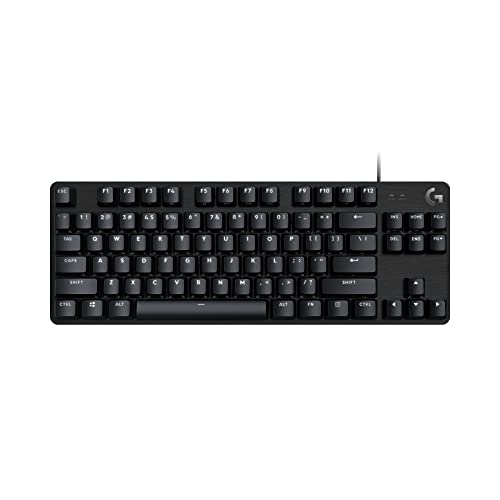
Logitech G PRO Mechanical TKL Tenkeyless
The Logitech G PRO Mechanical TKL uses GX Blue switches, a tenkeyless layout, and a detachable 1.8-meter Micro USB cable. Its smaller footprint leaves more desk room for mouse movement, and its onboard lighting patterns can be useful on tournament systems where G HUB is unavailable.
Pros: Clicky tactile switches, compact TKL footprint, adjustable typing angle, and detachable cable. Cons: No number pad, and programming F-key functions or lighting requires Logitech G HUB. Who should skip it: Users who need a full-size layout or prefer a quiet keyboard.
Product link: Logitech G PRO Mechanical TKL Tenkeyless
SteelSeries USB Apex 5 Hybrid Mechanical
The Apex 5 combines a tactile click with a membrane component, rather than using a conventional fully mechanical switch. It adds per-key RGB, an OLED display, an aluminum-alloy frame, and a magnetic wrist rest, making it a feature-rich full-size option for users who value controls and display customization.
Pros: OLED display, per-key lighting, wrist rest, and a stated 20-million-keypress switch guarantee. Cons: Hybrid switches are not the same as conventional clicky mechanical switches, and the listed dimensions indicate a broad desk footprint. Who should skip it: Purists seeking standard blue or green mechanical switches.
Product link: SteelSeries USB Apex 5 Hybrid Mechanical
Razer BlackWidow V3 Mechanical Gaming Keyboard
This BlackWidow V3 configuration has Razer green mechanical switches described as clicky and tactile, plus Chroma RGB, media controls, and an ergonomic wrist rest. Its UV-coated ABS keycaps are specified as more resistant to wear than regular keycaps, and the advertised switch lifespan is 80 million keystrokes.
Pros: Clicky switches, dedicated media roller, wrist support, and extensive RGB features. Cons: The listing identifies a full-size keyboard, which takes more desk space than a TKL or compact model. Who should skip it: Shoppers who want a smaller board or do not need the media controls and lighting features.
Product link: Razer BlackWidow V3 Mechanical Gaming Keyboard
Redragon S101M-KS Gaming Keyboard and Mouse
This bundle is the wireless-flexibility pick, with wired, Bluetooth, and 2.4 GHz connection modes for the keyboard and mouse. The keyboard includes ten independent multimedia keys, combination shortcuts, RGB lighting, and a rechargeable battery specified for up to 300 hours with RGB off.
Pros: Multiple connection modes, bundled mouse, multimedia keys, and a detachable USB-C cable. Cons: The supplied details do not identify its switch type as clicky mechanical, so it is not a safe choice for buyers prioritizing that feel. Who should skip it: Anyone who wants a confirmed blue or green mechanical switch.
Product link: Redragon S101M-KS Gaming Keyboard and Mouse
Redragon K521 Upgrade Rainbow LED Gaming Keyboard
The K521 is a wired, full-size keyboard described as mechanical-feeling, not as a mechanical clicky-switch model. It offers 19-key anti-ghosting, multimedia combinations, and plug-and-play compatibility listed for Windows, MacOS, PS4, PS5, and Xbox.
Pros: Full-size layout, lighting controls, multimedia shortcuts, and stated compatibility across several platforms. Cons: Its mechanical-feeling keys are not documented as clicky mechanical switches, and anti-ghosting is specified for 19 keys rather than all keys. Who should skip it: Buyers who require true blue-switch feedback or all-key anti-ghosting.
Product link: Redragon K521 Upgrade Rainbow LED Gaming Keyboard
RisoPhy Mechanical Gaming Keyboard
The RisoPhy is a wired, full-size keyboard with blue switches, RGB lighting, and a stated 100% anti-ghosting feature. Its number pad supports productivity alongside gaming, while the foldable feet, pluggable keycaps, and included puller address positioning and cleaning.
Pros: Clicky blue switches, full-size layout, all-key anti-ghosting claim, and a stated 50-million-keystroke lifespan. Cons: The wired full-size design occupies more desk area than compact alternatives, and its lighting is rainbow rather than described as per-key RGB. Who should skip it: Users who need wireless operation or a smaller board.
Product link: RisoPhy Mechanical Gaming Keyboard
GEODMAER 65% Gaming Keyboard
The GEODMAER uses a compact 68-key membrane layout with separate arrow keys, a detachable Type-C cable, and 26-key no-conflict input. Its mechanical-feeling description refers to an imitation-mechanical design, so this is a space-saving alternative rather than a confirmed clicky mechanical keyboard.
Pros: Small footprint, arrow keys, detachable cable, and backlight controls. Cons: It is a membrane keyboard, and the listed no-conflict specification covers 26 keys rather than every key. Who should skip it: Shoppers specifically seeking audible mechanical click switches or a number pad.
Product link: GEODMAER 65% Gaming Keyboard
Razer BlackWidow V4 Mechanical Gaming Keyboard
The BlackWidow V4 pairs green clicky mechanical switches with six dedicated macro keys, per-key RGB, two-side underglow, and a magnetic cushioned wrist rest. Razer specifies a 1.9 mm actuation point and 50 g actuation force, which gives buyers concrete switch figures to compare.
Pros: Dedicated macro keys, wrist rest, clicky switches, and detailed lighting features. Cons: The supplied specifications do not state its layout size, and macro programming may not suit tournament rules that prohibit macros. Who should skip it: Users who need a confirmed compact layout or avoid programmable macros.
Product link: Razer BlackWidow V4 Mechanical Gaming Keyboard
Logitech G413 SE Full-Size Mechanical
The G413 SE is a full-size wired mechanical keyboard with tactile switches, PBT keycaps, white backlighting, and six-key rollover anti-ghosting. Its product details do not identify the switches as clicky, so consider it when durable keycaps and tactile input matter more than an explicitly audible click.
Pros: PBT keycaps, aluminum-alloy top case, media shortcuts, and a full-size layout. Cons: The switch type is described as tactile, not clicky, and six-key rollover is narrower than the all-key claims on some alternatives. Who should skip it: Buyers who require confirmed blue or green clicky switches.
Product link: Logitech G413 SE Full-Size Mechanical
60% Wired Mechanical Gaming Keyboard with Blue
This 61-key CACKBIRD keyboard uses blue mechanical switches and a compact 60% layout, leaving more desk space for mouse movement. It includes a detachable Type-C cable, 18 rainbow lighting effects, and all-key anti-ghosting; arrow-key operation uses an Fn shortcut.
Pros: Confirmed blue clicky switches, compact footprint, detachable cable, and all-key anti-ghosting claim. Cons: Its 61-key layout omits dedicated arrow keys and a number pad, requiring function-layer use for direction keys. Who should skip it: Users who rely on full-size navigation keys or frequent number entry.
Product link: 60% Wired Mechanical Gaming Keyboard with Blue
How to Choose a Clicky Gaming Keyboard
Confirm the switch type
For an unmistakable clicky mechanical feel, favor products that explicitly name blue or green mechanical switches. Hybrid, tactile-only, mechanical-feeling, and membrane descriptions do not establish the same switch construction or sound, so check the exact model rather than relying on a gaming label.
Match the layout to your desk and games
Tenkeyless and 60% layouts reclaim space for mouse movement but remove some keys. A full-size board retains a number pad, while the GEODMAER 65% keeps separate arrow keys despite omitting the number pad.
Check rollover, software, and connection details
Anti-ghosting coverage varies: some listings claim all-key operation, while others specify 19-key, 26-key, or six-key rollover. Software-dependent features also differ; Logitech requires G HUB for specified programming, whereas the CACKBIRD listing describes plug-and-play operation without drivers.
Clicky switches produce audible feedback by design, so they may be distracting in shared rooms or during voice calls. For a complete setup, compare these boards with our guides to keyboards for StarCraft II and keyboard and mouse combinations for PC gaming.
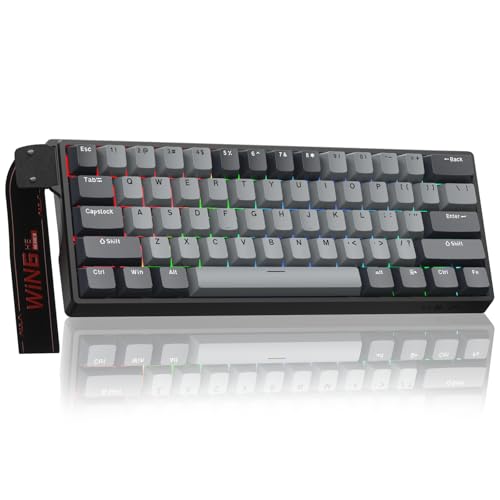





Write Your Review
No reviews yet. Be the first to share your experience!