

For competitive play, AULA WIN60 HE PRO stands out on listed features: Hall Effect switches, adjustable actuation, Rapid Trigger, and up to 8000Hz polling. For a lower-cost mechanical option with hot-swap support, consider Redragon K617. Prefer arrow keys? MageGee MK-Box uses a 68-key layout rather than a strict 60% arrangement.
This roundup compares documented specifications and advertised features, not independently measured performance. A 60% layout saves desk space by removing dedicated arrow, function, and navigation key rows; those functions may require Fn combinations. Check each model’s layout and connection before choosing.

Pros
- Single shared 2.4GHz USB receiver saves ports
- Compact 60% footprint frees up mouse space
- Lightweight 65g honeycomb mouse structure
- Rechargeable battery power via USB
- Double-shot ABS keycaps resist legend fading
Cons
- Advertised continuous battery life is only eight hours with lighting
- Simulated mechanical feel rather than genuine mechanical switches
- Compact layout omits dedicated numeric keypad and arrow cluster

Pros
- Compact 60% space-saving layout
- Customizable RGB backlighting
- Plug-and-play wired operation
- Laser-engraved characters
- Windows compatibility
Cons
- No numeric keypad
- Membrane switches are not mechanical switches
- Wired connection limits cable-free setup

Pros
- Hot-swappable linear red mechanical switches
- Open-source VIA key remapping and macro support
- Integrated multi-layer sound-dampening fillings
- Durable Cherry profile PBT pudding keycaps
- Broad compatibility with PC and major consoles
Cons
- Key remapping requires a wired connection to configure
- Compact 60% layout lacks dedicated arrow and function keys
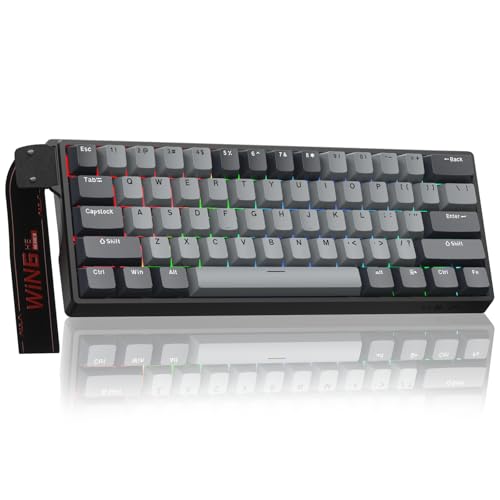
Pros
- Hall Effect switches with adjustable actuation
- Rapid Trigger mode down to 0.02mm
- High 8000Hz polling rate
- No-install web-based driver
- Compact footprint maximizes mouse space
Cons
- Compact 60% layout omits dedicated navigation keys
- Wired-only design lacks wireless connectivity

Pros
- Space-saving 61-key layout
- Detachable USB-C connection
- Multiple RGB lighting options
- Full-key anti-ghosting
- Adjustable ergonomic design
Cons
- Wired connection limits cable-free setups
- Compact layout has fewer dedicated keys

Pros
- Compact layout retains dedicated arrow keys
- Smooth linear red mechanical switches
- Full anti-ghosting across all keys
- Detachable cable simplifies transport
- Dual adjustable kickstands for ergonomics
Cons
- Single-color blue lighting without RGB customization
- Lacks wireless connectivity options
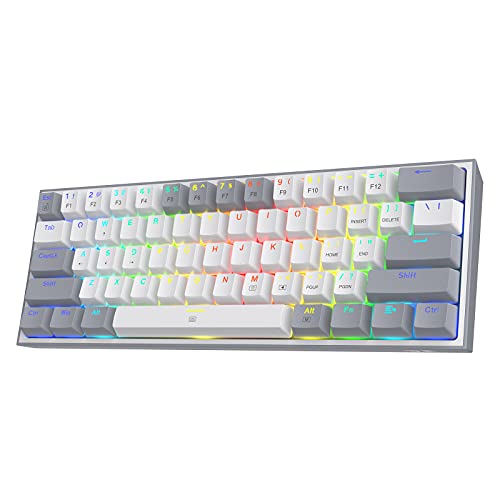
Pros
- Compact 60% layout maximizes mouse room
- Hot-swappable PCB supports 3-pin and 5-pin switches
- Smooth linear red switches rated for 50M clicks
- Customizable RGB backlighting with software support
Cons
- No dedicated numpad or navigation cluster
- Restricted to wired connection
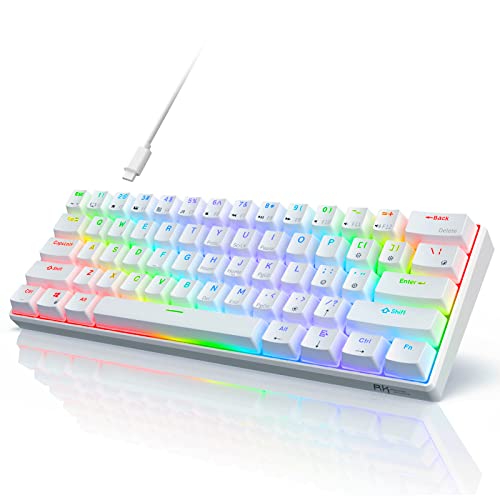
Pros
- Hot-swappable PCB compatible with 3-pin and 5-pin switches
- Compact 60% design maximizes mouse movement space
- Detachable USB Type-C wired connection
- Smooth linear red mechanical switches
- Full-key anti-ghosting support
Cons
- Compact 61-key layout omits dedicated arrow keys
- Restricted to wired operation without wireless modes

Pros
- Compact 60% layout maximizes mouse room
- Smooth 45g linear red switches
- Detachable USB-C cable enhances portability
- Durable double-shot keycaps resist fading
- Full 61-key anti-ghosting rollover
Cons
- Lacks dedicated arrow and navigation keys
- Limited to wired USB-C operation

Pros
- Space-saving 68-key layout with dedicated arrows
- Detachable Type-C cable for easy travel
- Quiet membrane operation suitable for shared rooms
- 26-key anti-ghosting for accurate key registration
Cons
- Uses membrane switches instead of authentic mechanical switches
- No integrated number pad for data entry
How to Choose a Compact Gaming Keyboard
Start with layout. Traditional 60% boards usually omit dedicated arrow keys and function-row keys, so confirm whether Fn-layer shortcuts suit your games and everyday work. MageGee’s 68-key MK-Box keeps separate arrow keys and F1-F12, while GEODMAER is a 65% board with separate arrows.
Next, choose switch technology and connection. Mechanical linear switches offer a different feel from membrane designs; Hall Effect switches add adjustable actuation and Rapid Trigger on the AULA model. Wired USB models avoid charging, while RedThunder’s combo uses a shared 2.4GHz receiver and rechargeable batteries.
For customization, verify what the product specifically supports. Hot-swap sockets allow switch changes without soldering on the Redragon K617 and RK61. Womier supports VIA remapping in wired mode, while AULA provides a web-based driver. Software features and switch compatibility vary by model.
Product Comparisons and Trade-Offs
AULA WIN60 HE PRO: Hall Effect Features for Fast-Input Games
AULA advertises magnetic Hall Effect switches, adjustable actuation, a 0.02mm Rapid Trigger step distance, and polling rates up to 8000Hz. Its web-based driver supports remapping, macros, and RGB customization. Those listed features suit players seeking fine input adjustments for fast-paced games.
Pros: Adjustable actuation, Rapid Trigger, stated 8000Hz maximum polling rate, and web-based customization. Cons: Wired connection; no dedicated arrow keys in its 60% layout. Advertised specifications do not establish measured input performance. Who should skip it: Buyers wanting wireless operation, dedicated arrows, or conventional mechanical switches.
Redragon K617: Hot-Swappable Mechanical Value
The K617 has a wired 60% layout, linear Red switches, RGB lighting with up to 20 preset modes, and sockets for 3-pin or 5-pin switches. Switch swapping gives owners a route to change typing feel without soldering. Redragon software supports custom lighting and macros.
Pros: Hot-swap support, stated 50-million-keystroke switch rating, and lighting and macro customization. Cons: Wired only, with no dedicated arrow keys. Confirm replacement switch compatibility before buying. Who should skip it: Shoppers who need wireless use or want dedicated arrow keys.
RK ROYAL KLUDGE RK61: Hot-Swap Support and Onboard Lighting
This wired 61-key mechanical model uses linear Red switches, a detachable Type-C cable, and a hot-swappable PCB for 3-pin or 5-pin switches. It offers 18 RGB modes and eight monochrome modes, with additional customization through RK software. Listed compatibility includes Windows, Linux, and Mac.
Pros: Detachable cable, hot-swap sockets, and full-key anti-ghosting as specified. Cons: Arrow keys are not dedicated, and advanced lighting customization uses software. Who should skip it: Buyers who need a standalone arrow-key cluster or a wireless keyboard.
Womier 60% Percent Keyboard: VIA Remapping and Themed Design
Womier pairs POM linear Red switches with multi-layer sound-dampening filling, PBT pudding keycaps, and RGB backlighting. VIA can remap keys and customize layouts, but remapping must be done in wired mode. The listed compatibility includes PC, PS4, Xbox Series X|S, and Xbox One.
Pros: VIA remapping, stated 50-million-keypress switch rating, and support for the listed consoles. Cons: Key remapping requires wired mode, and the 60% layout lacks dedicated arrows. Who should skip it: Anyone seeking wireless remapping or a plain, unthemed appearance.
MageGee Portable 60% Mechanical Gaming Keyboard: Arrow Keys Included
The MK-Box has 68 keys, separate arrow keys, and F1-F12 functions, making it less restrictive than a typical 61-key 60% layout. Linear Red switches, full anti-ghosting, adjustable feet, and a detachable USB cable support gaming and general computer use. Listed compatibility covers Windows, Linux, and Mac.
Pros: Dedicated arrows, function keys, detachable cable, and no software requirement. Cons: It is not a strict 60% layout, and its backlight is blue rather than RGB. Who should skip it: Buyers who require per-key RGB or the smallest possible 61-key footprint.
TMKB 60% Mechanical Gaming Keyboard: Straightforward Wired Choice
TMKB lists linear Red switches with 45g actuation, a detachable USB-C cable, white LED backlighting, and anti-ghosting with 61-key rollover. Double-shot keycaps and a stated 50-million-keystroke switch rating are useful durability details. Plug-and-play compatibility is listed for Windows, Linux, and macOS.
Pros: Detachable cable, 61-key rollover, and stated switch durability. Cons: White LED lighting is not RGB, and dedicated arrow keys are absent. Who should skip it: Shoppers wanting hot-swappable switches, wireless connectivity, or RGB effects.
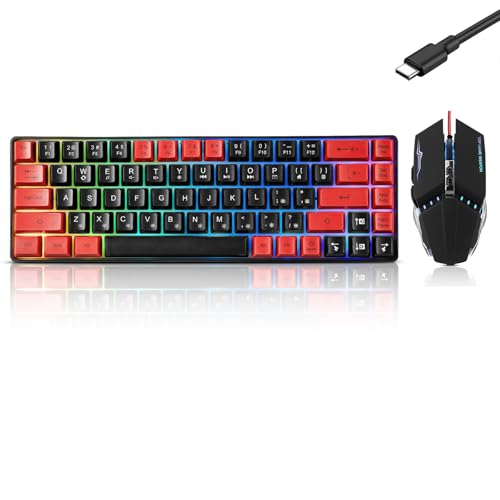
RedThunder 60% Wireless Gaming Keyboard and Mouse: Shared-Receiver Convenience
This bundle pairs a compact keyboard with a honeycomb-shell mouse. Both connect through one shared 2.4GHz USB receiver stored in the mouse. The supplied description lists a 1,850mAh keyboard battery, a 500mAh mouse battery, and up to eight hours of use with lighting on.
Pros: Wireless keyboard and mouse in one bundle, rechargeable batteries, and several lighting modes. Cons: Both devices share one receiver, and the supplied information describes a mechanical-feel keyboard rather than specifying mechanical switches. The stated battery duration depends on lighting use. Who should skip it: Buyers who prefer a wired connection, need separately connected peripherals, or require confirmed mechanical switch specifications.
Snpurdiri 60% Wired Gaming Keyboard: Basic Membrane Option
Snpurdiri uses a membrane design with a mechanical-feel description, RGB backlighting, and plug-and-play wired connection. Its compact layout suits users prioritizing desk space and simple setup. Listed operating-system compatibility includes Windows 10, Windows 8, and Windows 7.
Pros: Wired plug-and-play setup, compact size, and multiple lighting modes. Cons: It is a membrane keyboard, not a mechanical-switch model; the supplied compatibility details focus on Windows. Who should skip it: Buyers seeking mechanical switches, hot-swap support, or documented macOS compatibility.
abucow 60% Percent Gaming Keyboard Minimalist: Compact Wired Membrane-Style Choice
abucow lists a 61-key wired design, detachable USB-C cable, RGB lighting, and full-key anti-ghosting. Its description identifies compatibility with Windows, Linux, Mac, PS5, and Xbox. The supplied details do not identify mechanical switches, so treat it as a membrane-style or imitation design rather than assume a mechanical build.
Pros: Detachable cable, broad stated device compatibility, and full-key anti-ghosting. Cons: Switch construction is not specified clearly, and the 61-key layout lacks dedicated arrows. Who should skip it: Buyers who require confirmed mechanical switches or documented hot-swap support.
GEODMAER 65% Gaming Keyboard: Separate Arrow Keys
GEODMAER is a 65% membrane keyboard, not a 60% board. Its 68-key layout has separate arrow keys, a detachable Type-C cable, and 11 media buttons. The product description specifies 26 no-conflict keys, so do not assume full-key rollover.
Pros: Dedicated arrows, media buttons, compact size, and stated Windows compatibility. Cons: Membrane construction and 26-key rollover may not suit buyers requiring mechanical switches or full-key rollover. Who should skip it: Shoppers who specifically need a strict 60% layout or mechanical switches.
Frequently Asked Questions
Are 60% keyboards suitable for gaming?
They can suit gaming when compact size and extra mouse room matter more than dedicated arrows and function keys. Check rollover and switch details for the exact model, since these specifications differ across the list.
Is a 65% keyboard the same as a 60% keyboard?
No. Layouts vary, but 65% models commonly retain dedicated arrow keys. GEODMAER is explicitly listed as 65%, while its 68-key layout includes arrows; MageGee’s 68-key MK-Box also includes arrows but is presented as a 60% product.
Which option suits someone who needs arrow keys?
MageGee MK-Box and GEODMAER both list separate arrow keys. Choose MageGee for specified mechanical Red switches, or GEODMAER if a membrane design and extra media buttons better fit your needs.






Write Your Review
No reviews yet. Be the first to share your experience!