

Choosing the best tenkeyless keyboards comes down to balancing switch response, build quality, and desk ergonomics. Removing the numeric keypad frees up space so your mouse can sit closer to your natural typing position, improving comfort during long sessions.
Modern TKL options feature diverse switch hardware ranging from quiet membrane layers to rapid-trigger Hall-effect sensors. Pairing the right layout with suitable switches depends entirely on whether your priority is competitive esports, quiet office typing, or wireless flexibility.
Quick Comparison of Top Tenkeyless Keyboards

Pros
- Space-saving tenkeyless design
- IP32 spill and dust resistance
- Quiet keystrokes for shared spaces
- Dedicated media buttons and volume roller
- Wide PC and console compatibility
Cons
- Non-mechanical switches lack distinct mechanical tactile response
- RGB illumination is limited to 8 zones instead of per-key

Pros
- Sturdy aluminum-magnesium alloy top plate
- Durable wear-resistant PBT keycaps
- Space-saving tenkeyless layout
- Integrated FN media and lock shortcuts
- Tactile switches provide clear physical feedback
Cons
- Single-color white LED backlighting without RGB
- Rollover limited to 6 keys instead of full NKRO
- Fixed wired connection lacks a detachable cable

Pros
- Space-saving tenkeyless design frees mouse room
- Tactile, audible GX Blue clicky mechanical switches
- Detachable 1.8-meter cable ensures easy transport
- Onboard memory stores static LIGHTSYNC profiles
- Three-step tilt adjustment provides stable ergonomics
Cons
- Key and lighting programming requires Logitech G HUB
- Macro assignments are restricted to F1 through F12
- Equipped with an older Micro USB connection

Pros
- Compact tenkeyless form factor
- 300ml spill-resistant protection
- Dedicated media and brightness controls
- Quiet membrane key operation
- Responsive 1,000Hz polling rate
Cons
- Membrane switches instead of mechanical switches
- Limited to 12-key rollover rather than full rollover
- Zone-based lighting instead of per-key RGB
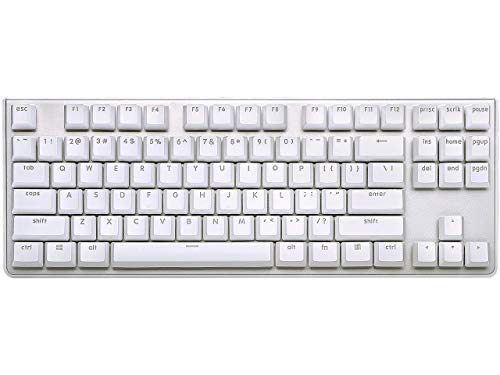
Pros
- Authentic Cherry MX Red switches
- Rigid aluminum top plate build
- Wear-resistant dual-injection keycaps
- Detachable USB Type-C cable
- Full n-key rollover support
Cons
- Lighting limited to single-color white LEDs
- Lacks a dedicated number pad

Pros
- Durable aircraft-grade aluminum body
- HyperX Red switches rated for 80 million keystrokes
- Compact 80% tenkeyless form factor
- Detachable cable for easy travel
- Customizable dynamic RGB lighting
Cons
- Tenkeyless layout lacks a dedicated numeric keypad
- Advanced customization requires HyperX Ngenuity software

Pros
- Magnetic Hall-Effect switches with light 35g actuation
- Rapid Trigger allows instant key reactivation
- Onboard FN shortcuts for actuation adjustments without software
- Deep key customization across layers via KEYCONTROL
- Dynamic LIGHTSYNC RGB backlighting
Cons
- Advanced feature access requires Logitech G HUB software
- Wired-only design limits cable-free desk setups

Pros
- Smooth linear red mechanical switches
- Space-saving 87-key tenkeyless footprint
- Durable metal top plate design
- Full anti-ghosting and N-key rollover
- Dedicated software for macros and remapping
Cons
- Fixed rainbow colors without full RGB customization
- Backlight effects cannot be adjusted through software

Pros
- Low-profile design with factory-lubed tactile switches
- Versatile tri-mode wireless and wired connectivity
- Durable double-shot PBT keycaps resist shine
- Extensive key remapping with KEYCONTROL support
- Supports 2:1 receiver pairing with compatible mice
Cons
- Wireless runtime is limited to 36 hours
- Tenkeyless layout excludes a dedicated numeric keypad
Key Hardware Factors When Choosing a TKL Board
Mechanical switches define the typing response, actuation travel, and noise profile of each keyboard. If you are deciding between linear, tactile, and clicky stems, our mechanical keyboard switches guide outlines how those internal mechanisms change daily typing feel.
Keycap plastic is another vital factor that directly influences durability and surface shine over time. Double-shot PBT keycaps resist skin oils and heavy friction far longer than standard ABS plastic, which can smooth down quickly during intense sessions.
Wired connections deliver dependable polling rates without requiring battery management, making them ideal for stationary desks. Wireless models provide a cleaner look and portable convenience, pairing well with low-latency peripherals like those found in our best gaming mice guide.
Individual TKL Keyboard Breakdowns
Logitech G PRO X TKL Rapid
The Logitech G PRO X TKL Rapid Tenkeyless targets competitive players who demand analog input control. It utilizes magnetic Hall-effect switches with a light 35-gram actuation force, providing rapid trigger functionality that resets keystrokes without requiring a full upward release.
Players can configure exact actuation travel depths through Logitech G HUB software or switch profiles directly via function shortcuts. The primary trade-off is the wired-only configuration and premium price tag, which makes it over-engineered for casual typing workloads.
Logitech G515 Lightspeed TKL Wireless
The Logitech G515 Lightspeed TKL Wireless offers a slim, low-profile design combined with versatile tri-mode connectivity. It supports Lightspeed 2.4 GHz wireless, Bluetooth, and wired USB data transfer, giving users flexible pairing choices across multiple systems.
Its factory-lubricated GL Brown tactile switches deliver quiet physical feedback while maintaining smooth stem movement. The low-profile keycaps reduce wrist elevation, though the advertised 36-hour wireless battery life requires periodic charging if RGB lighting remains active.
HyperX Alloy Origins Core
The HyperX Alloy Origins Core features a rigid aircraft-grade aluminum casing that eliminates deck flex during aggressive keypresses. It runs on proprietary linear HyperX Red mechanical switches, which are rated for up to 80 million keystrokes.
A detachable USB Type-C cable makes packing and transport simple for travel or tournament use. Advanced RGB lighting profiles and macro layers require HyperX NGENUITY software, but the core onboard memory stores three profiles for driverless setups.
Logitech G PRO Mechanical TKL (Clicky)
The Logitech G PRO Mechanical TKL Tenkeyless uses GX Blue clicky switches that provide clear acoustic feedback with every stroke. The sturdy frame includes three-step angle adjustment feet and a detachable three-pronged micro-USB cable for stable tournament transport.
Internal memory stores static lighting profiles, which assists players competing on systems where software installations are forbidden. The pronounced audible click provides positive confirmation, though it may prove distracting in shared living or office environments.
Logitech G413 TKL SE
The Logitech G413 TKL SE Mechanical Gaming Keyboard focuses on functional durability rather than decorative RGB illumination. It features wear-resistant PBT keycaps and a brushed aluminum-magnesium top plate illuminated solely by clean white backlighting.
Tactile mechanical switches provide subtle bump feedback without generating excessive noise during work sessions. Note that its anti-ghosting matrix is rated for six-key rollover, which handles standard gaming but falls short of full N-key rollover boards.
G.SKILL KM360 Professional
The G.SKILL USB KM360 Professional Tenkeyless stands out by including genuine Cherry MX Red linear switches at an accessible price. Its clean white aesthetic is highlighted by white LED backlighting and durable ABS dual-injection keycaps that prevent legend fading.
An aluminum top plate keeps the chassis stiff, while a detachable USB Type-C connector allows straightforward cable replacements. It omits complex macro suites and RGB lighting, making it best suited for straightforward office work or uncluttered gaming rigs.
Redragon K552 Mechanical Keyboard
The Redragon K552 Mechanical Keyboard combines linear red switches with full N-key rollover across all 87 keys. Its compact metal frame provides rigid desk placement, supported by anti-slip rubber pads that resist sliding during rapid inputs.
Fixed rainbow LED backlighting offers six animated lighting modes, but individual key colors cannot be customized through software. It represents an entry-level mechanical solution with broad operating system compatibility across Windows, macOS, and Linux systems.
SteelSeries Apex 3 TKL
The SteelSeries Apex 3 TKL RGB Gaming Keyboard uses whisper-quiet membrane switches rated for over 20 million presses. It carries an IP32 water and dust resistance rating, protecting internal components from accidental liquid splashes or dust buildup.
Dedicated media controls include an integrated clickable volume roller, giving users direct control over desktop sound without opening system menus. While extremely quiet, membrane domes lack the crisp actuation point and rapid reset speeds of true mechanical switches.
Corsair K55 CORE TKL
The Corsair K55 CORE TKL RGB Gaming Keyboard is another spill-resistant option with protection rated for up to 300 milliliters of liquid. It features eight-zone RGB backlighting, a standard 1,000 Hz polling rate, and twelve-key rollover anti-ghosting.
Four independent media keys allow quick adjustment of volume, playback, Windows lock, and brightness levels during matches. Like the Apex 3, membrane keys create a cushioned bottom-out feel that favors quiet operation over sharp mechanical actuation.
Keyboard Specifications Comparison
| Keyboard Model | Switch Type | Top Plate Material | Connectivity | Backlighting |
|---|---|---|---|---|
| Logitech G PRO X TKL Rapid | Magnetic Hall-Effect | Not specified | Detachable USB-C | LIGHTSYNC RGB |
| Logitech G515 Lightspeed TKL | Low-Profile GL Brown Tactile | Not specified | Lightspeed, Bluetooth, USB | LIGHTSYNC RGB |
| HyperX Alloy Origins Core | HyperX Red Linear | Aircraft Aluminum | Detachable USB-C | Per-Key RGB |
| Logitech G PRO TKL (Clicky) | GX Blue Clicky | Steel/Plastic Hybrid | Detachable Micro-USB | LIGHTSYNC RGB |
| Logitech G413 TKL SE | Tactile Mechanical | Aluminum-Magnesium | Wired USB | White LED |
| G.SKILL KM360 Professional | Cherry MX Red Linear | Solid Aluminum | Detachable USB-C | White LED |
| Redragon K552 | Linear Red Mechanical | Metal Top Plate | Wired USB | Rainbow LED |
| SteelSeries Apex 3 TKL | Quiet Membrane | Polymer | Wired USB | 8-Zone RGB |
| Corsair K55 CORE TKL | Quiet Membrane | Polymer | Wired USB | 8-Zone RGB |
Frequently Asked Questions
Why should I choose a tenkeyless keyboard over a full-size layout?
Tenkeyless keyboards remove the ten-key numeric keypad, cutting roughly three inches off total board width. This compact footprint lets you position your mouse closer to your body, creating a more ergonomic posture and leaving ample room for large mouse swipes.
Are Hall-effect switches worth it compared to traditional mechanical switches?
Hall-effect switches use magnetic sensors to measure exact key position rather than relying on bending metal contact leaves. They enable rapid trigger resets and customizable actuation points, providing an advantage in fast-paced first-person shooters that demand rapid counter-strafing.
What is the difference between PBT and ABS keycaps?
PBT plastic is denser and more textured than standard ABS, resisting shiny wear spots from fingerprint oils. Double-shot molding fuses two plastic layers together, ensuring printed legends never wear off even after years of daily typing.





Write Your Review
No reviews yet. Be the first to share your experience!