

The best custom keyboards for gaming depend on whether you prioritize adjustable actuation, wireless flexibility, compact layouts, or full-size productivity.
Among these options, the AULA WIN68 HE is the strongest fit for competitive players wanting Hall Effect controls and adjustable actuation. The AULA F75 Pro, Womier Q61 V2, AULA F99 Pro, and GravaStar Mercury K1 Lite offer more conventional hot-swappable mechanical designs with different layouts and connection options.

Pros
- Hall Effect switches with adjustable actuation
- Fast 8000Hz polling rate
- Compact 68-key layout preserves arrow keys
- Detachable wired USB connection
- South-facing RGB with web-based configuration
Cons
- Web configuration driver does not support macOS
- Wired-only connection with no wireless functionality

Pros
- Versatile tri-mode wireless and wired connectivity
- Hot-swap PCB compatible with 3-pin and 5-pin switches
- Five-layer acoustic dampening with gasket mount design
- Large 8000mAh rechargeable battery capacity
- Integrated rotary knob for multimedia and lighting control
Cons
- Full macro and lighting customization requires driver software
- Condensed 96% layout clusters navigation and typing clusters tightly

Pros
- Tri-mode connectivity on both devices
- Customizable keyboard TFT display
- Nine programmable mouse buttons
- Shared software for both devices
- Matching anime-themed artwork
Cons
- Battery life is not specified
- Platform compatibility is not specified
- Keyboard layout is not specified

Pros
- QMK and VIA programmability across major operating systems
- Versatile tri-mode wireless and wired connectivity
- Hot-swappable sockets support 3-pin and 5-pin switches
- Vibration-dampening gasket mount design
- Dedicated rotary knob on a compact 60% layout
Cons
- Key remapping requires an initial wired connection
- Compact 60% layout lacks dedicated navigation keys

Pros
- Versatile tri-mode wireless and wired connectivity
- Space-saving 96% layout retains numeric keypad
- Convenient dual-mode rotary control knob
- Full-key macro customization support
- Two-stage adjustable feet for ergonomic positioning
Cons
- Uses membrane switches instead of mechanical switches
- Does not support hot-swappable switches

Pros
- Versatile 2.4GHz, Bluetooth, and wired USB-C connectivity
- Hot-swappable sockets support 3-pin and 5-pin switches
- Multi-function knob for volume and lighting control
- High-capacity 4000mAh rechargeable internal battery
- Compact 75% layout retains dedicated arrow keys
Cons
- Lacks a dedicated numeric keypad
- Full macro programming requires optional driver software
- Side-printed legends may reduce visibility from certain angles
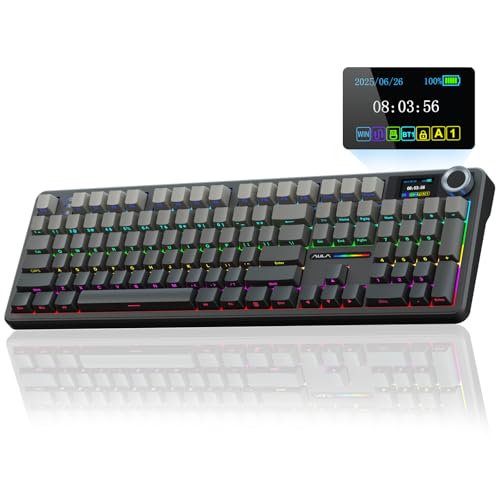
Pros
- Full-size layout with dedicated number pad
- Hot-swappable 3-pin and 5-pin switch support
- Three connection modes across multiple platforms
- Large 8000mAh battery capacity
- Built-in display and multifunction control knob
Cons
- Screen customization requires Windows software and wired mode
- Macro and RGB software supports Windows in wired mode
- Linux may have abnormal F-zone functionality with incompatible drivers

Pros
- Full-key macro programmability
- Integrated LCD streaming controls
- Hot-swappable mechanical switches
- Windows and macOS compatibility
- Adjustable ergonomic typing angles
Cons
- Display customization requires software and wired connection
- USB-C to USB-C cable is not included
- No wireless connection is documented

Pros
- Five dedicated macro keys for rapid command input
- Quiet membrane switches suitable for shared workspaces
- Adjustable mouse sensitivity from 800 to 7200 DPI
- Integrated wrist rest helps reduce typing fatigue
- Onboard memory retains lighting and DPI profiles
Cons
- Uses membrane keys rather than mechanical switches
- Wired design restricts flexible cable-free placement
- Full software customization limited to Windows systems

Pros
- Versatile tri-mode wireless and wired connectivity
- Gasket-mounted design with five layers of sound foam
- Smooth, responsive 40gf linear mechanical switches
- Compact 75% footprint optimizes desk space
- Built-in 4000mAh rechargeable battery
Cons
- Lacks a dedicated numeric keypad
- Transparent exoskeleton styling may not suit understated desks
How These Keyboards Differ
| Keyboard | Layout | Connection | Customization | Best suited to |
|---|---|---|---|---|
| AULA WIN68 HE Mechanical Gaming Keyboard 60% | 60%, 68 keys | Wired USB | Hall Effect actuation, RT, SOCD, DKS, macros | Competitive gaming and Windows users |
| AULA F99 Pro Wireless Mechanical Keyboard-Silent | 96% | Bluetooth, 2.4GHz, USB-C | Hot-swap 3-pin and 5-pin switches, macros | Quiet work and gaming setups |
| Redragon Anime Keyboard & Mouse Combo | Not specified | Bluetooth, 2.4GHz, USB-C | Macros, mouse buttons, display customization | Users wanting a coordinated keyboard and mouse |
| Womier Wireless Gaming Keyboard 60 Percent | 60% | Bluetooth, 2.4GHz, USB-C | QMK/VIA, hot-swap 3-pin and 5-pin switches | Open-source remapping and compact desks |
| AULA S99 Gaming Keyboard | 96%, membrane | Bluetooth, 2.4GHz, USB-C | Macros and three programmable keys | Budget buyers needing a number pad |
| AULA F75 Pro Wireless Mechanical Keyboard,75% Hot | 75%, 81 keys | Bluetooth, 2.4GHz, USB-C | Hot-swap 3-pin and 5-pin switches, macros | Balanced gaming and everyday use |
| AULA F108 PRO – Wireless Mechanical Keyboard | 100%, 104 keys | Bluetooth, 2.4GHz, USB-C | Hot-swap switches, macros, screen controls | Full-size gaming and office work |
| VSD K1 Pro 87-Key Macro Mechanical Keyboard | 87 keys | Wired USB | Hot-swap switches, LCD macro deck, software pages | Streaming, productivity, and macro-heavy workflows |
| Redragon S101-3 PRO Gaming Keyboard and Mouse | Full-size | Wired USB | Five dedicated macro keys and software | Entry-level gaming with included mouse |
| GravaStar Mercury K1 Lite 75% Wireless Mechanical | 75%, 80 keys | Bluetooth, 2.4GHz, wired | RGB modes and gasket-mounted mechanical design | Compact wireless gaming setups |
Best Custom Keyboards for Gaming by Use Case
AULA WIN68 HE: Best for Adjustable Hall Effect Controls
AULA WIN68 HE Mechanical Gaming Keyboard 60% uses Hall Effect magnetic switches with adjustable actuation from 0.02mm to 3.44mm.
Its advertised 8,000Hz polling rate, 0.3ms latency, and adjustable rapid-trigger behavior target fast-response competitive gaming. The 68-key layout retains arrow keys while keeping a compact footprint, which may suit players who need mouse space without losing directional controls.
The main limitation is software compatibility. Its web driver supports Windows but not Mac, and the keyboard is wired only, so it is less suitable for multi-device wireless setups.
AULA F75 Pro: Best Balanced Wireless Custom Keyboard
AULA F75 Pro Wireless Mechanical Keyboard,75% Hot combines an 81-key layout with arrow keys, a control knob, and tri-mode connectivity.
Its hot-swap PCB accepts three-pin and five-pin switches, while pre-lubricated stabilizers and Reaper linear switches provide a ready-to-use mechanical configuration. Bluetooth, 2.4GHz wireless, and USB-C wired modes support PCs, laptops, tablets, phones, PlayStation, and Xbox according to the supplied specifications.
This is a practical middle ground for gaming and general typing, although the supplied specifications do not identify a dedicated high-polling competitive mode.
Womier Q61 V2: Best for QMK/VIA Remapping
Womier Wireless Gaming Keyboard 60 Percent is the clearest choice for users who value open-source keyboard remapping through QMK and VIA.
The 60% design uses hot-swappable 3-pin and 5-pin switches, a gasket mount, POM linear switches, south-facing RGB, and PBT keycaps. Its tri-mode connection supports Bluetooth, 2.4GHz wireless, and USB-C wired operation, with up to three connected devices.
QMK and VIA remapping must be completed in wired mode, although the resulting keymap works in both wireless and wired modes. Buyers who require dedicated function or navigation keys may find the 60% layout restrictive.
AULA F99 Pro: Best for Quiet Wireless Gaming and Work
AULA F99 Pro Wireless Mechanical Keyboard-Silent uses a 96% layout that keeps arrow keys and a number area while reducing some desktop width.
Pre-lubricated quiet switches, five layers of dampening, a gasket structure, and N-key rollover make it suitable for shared spaces and mixed gaming or office use. The hot-swap PCB accepts three-pin and five-pin switches, and the keyboard offers Bluetooth, 2.4GHz, and USB wired connections.
The silent switch configuration favors reduced noise rather than the distinctive sound many mechanical keyboard enthusiasts seek. Its extensive features also depend partly on software and shortcut configuration.
GravaStar Mercury K1 Lite: Best for a Compact Wireless Setup
GravaStar Mercury K1 Lite 75% Wireless Mechanical uses an 80-key 75% layout with linear switches rated at 40gf actuation, 2mm pre-travel, and 3.6mm total travel.
Its gasket-mounted design, five-layer foam dampening, 4,000mAh battery, and tri-mode connectivity make it suitable for users wanting a compact board without moving to a 60% layout. The 75% arrangement preserves function and navigation keys that smaller keyboards often place behind function-layer shortcuts.
The transparent case and keycaps create a distinctive visual style, but buyers who prefer understated designs may want a more conventional keyboard. The supplied information also does not specify hot-swap switch support.
AULA F108 Pro: Best Full-Size Custom Mechanical Keyboard
AULA F108 PRO – Wireless Mechanical Keyboard is a 104-key full-size keyboard with a number pad, function row, display, knob, and hot-swappable switch support.
It supports three-pin and five-pin switches, Bluetooth, 2.4GHz wireless, and USB-C wired connectivity. The TFT display can show or control items such as GIFs, date, time, battery status, lighting, and connection mode, while the five-layer dampening structure targets a softer and quieter typing feel.
Screen image and GIF configuration requires Windows software and wired mode. The full-size layout also occupies more desk space, which can reduce room for broad mouse movements.
VSD K1 Pro: Best for Macros and Streaming Controls
VSD K1 Pro 87-Key Macro Mechanical Keyboard combines an 87-key layout with a programmable streaming deck built into the keyboard.
Its software can create switchable pages containing six LCD keys and three knobs, allowing users to assign game commands, application shortcuts, media controls, or multi-step macros. The board also supports hot-swappable three-pin and five-pin switches, RGB controls, adjustable stands, and five-layer dampening.
This is more specialized than a standard gaming keyboard and may suit streamers or productivity-focused users best. Screen and macro configuration requires software, while the included cable is USB-A to USB-C rather than USB-C to USB-C.
Redragon Anime Combo: Best for a Coordinated Keyboard and Mouse
Redragon Anime Keyboard & Mouse Combo pairs the K719 PRO keyboard with an M612AK mouse, giving buyers a matched peripheral setup.
The keyboard includes a TFT display for connection mode, battery, typing status, and custom GIFs or images. Both devices support Bluetooth, 2.4GHz wireless, and USB-C, while the mouse provides an 8,000 DPI sensor rating, nine programmable buttons, and dedicated macro controls.
This option is useful when a coordinated keyboard and mouse matter more than selecting each device independently. The supplied specifications do not identify the keyboard layout, switch type, or whether its software supports every operating system equally.
AULA S99: Best for a Budget-Friendly Number Pad Layout
AULA S99 Gaming Keyboard uses a 96% membrane design with an integrated number pad, three programmable shortcut keys, and a dual-mode control knob.
Bluetooth, 2.4GHz wireless, and USB-C connections support PC, mobile, and office use, while full-key macro programming can assign multi-step commands. The foldable two-stage stand provides angle adjustment, and the keyboard is listed as compatible with Windows, Mac, Android, and iOS.
This is not a mechanical custom keyboard and does not support hot-swapping. It belongs in this roundup as a lower-complexity alternative for buyers who want programmable controls and a number pad without changing switches.
Redragon S101-3 Pro: Best Basic Wired Keyboard and Mouse Bundle
Redragon S101-3 PRO Gaming Keyboard and Mouse is a full-size wired membrane keyboard bundled with a gaming mouse.
It provides five dedicated macro keys, six keyboard lighting modes, anti-ghosting, a wrist rest, and software-based customization. The included mouse has adjustable sensitivity settings listed from 800 to 7,200 DPI, making the bundle suitable for users upgrading from basic office peripherals.
Its membrane construction and fixed wired design make it less customizable than the hot-swappable mechanical models here. The supplied compatibility information focuses on Windows 10 and Windows 11.
How to Choose the Best Custom Keyboards for Gaming
Choose the Layout Before the Switches
A 60% board saves the most desk space but usually places function, navigation, and media controls behind Fn combinations. A 75% layout preserves more navigation keys, while 96% and full-size boards suit users who regularly enter numbers or use dedicated function keys.
For competitive FPS play, compact layouts can leave more room for the mouse. For spreadsheets, streaming, or office work, a number pad and separate function row may save repeated shortcuts.
Compare Hall Effect and Conventional Mechanical Switches
Hall Effect switches, as used by the AULA WIN68 HE, allow adjustable actuation and rapid-trigger settings when supported by compatible software. These controls are most relevant to players who want to tune key response for movement-heavy games.
Conventional hot-swappable mechanical keyboards are more flexible for changing switch feel, sound, and actuation characteristics later. However, hot-swap support alone does not guarantee compatibility with every switch, so check whether the PCB accepts three-pin, five-pin, or both designs.
Check Wireless and Software Requirements
Tri-mode keyboards can connect through Bluetooth, 2.4GHz wireless, or USB wired operation, but features may differ by connection method. The Womier Q61 V2 requires wired mode for remapping, while several AULA models require Windows software for advanced configuration.
Confirm operating-system support before buying, especially if you use macOS or Linux. Hardware may function as a basic keyboard while advanced macros, screen controls, lighting, or rapid-trigger settings remain unavailable.
Consider Noise, Dampening, and Switch Replacement
Silent switches and multi-layer dampening are better suited to shared rooms, offices, or late-night use than louder linear or clicky configurations. Gasket structures can change the feel and sound, but they do not provide a universal advantage for every typist.
Hot-swappable boards make experimentation easier because switch changes do not require soldering. The AULA S99 and Redragon S101-3 Pro are exceptions because both use membrane designs and are not intended for switch replacement.
Related Gaming Peripheral Guides
After choosing a keyboard, compare it with the rest of your setup using our guides to wired gaming keyboards and gaming mice for COD. Mac users can also review our recommendations for gaming headsets compatible with Mac systems.
Frequently Asked Questions
What makes a keyboard custom for gaming?
A custom gaming keyboard usually offers programmable keys, switch replacement, remapping, adjustable lighting, or multiple layout options. The term does not always mean a fully self-built keyboard, and some listed models are ready-made boards with customization features.
Are 60% keyboards suitable for PC gaming?
Yes, if you are comfortable using Fn combinations for missing function and navigation keys. The AULA WIN68 HE and Womier Q61 V2 retain compact footprints, while the AULA F75 Pro or GravaStar Mercury K1 Lite provide more dedicated keys.
Which keyboard is best for competitive gaming?
The AULA WIN68 HE has the most specialized competitive features in this selection, including Hall Effect switches, adjustable actuation, rapid-trigger functions, and an advertised 8,000Hz polling rate. Its wired-only operation and Windows-focused software should be acceptable before choosing it.
Can these keyboards work with Mac computers?
Compatibility varies by model and feature. The AULA S99 lists Mac support, the Womier Q61 V2 supports macOS remapping through QMK and VIA in wired mode, and several wireless models list Mac connectivity, but Windows-only configuration tools may limit advanced controls.
Final Recommendation
The AULA WIN68 HE is the best custom keyboards for gaming choice for players who specifically want adjustable Hall Effect actuation and rapid-trigger controls on Windows.
Choose the Womier Q61 V2 for QMK/VIA remapping, the AULA F75 Pro for a balanced wireless 75% layout, or the AULA F99 Pro when quieter typing and a number area matter. The AULA F108 Pro is better for full-size use, the VSD K1 Pro suits streaming macros, and the AULA S99 or Redragon S101-3 Pro make more sense when membrane simplicity and bundled peripherals take priority.


Write Your Review
No reviews yet. Be the first to share your experience!