

For most Call of Duty PC players, the Logitech G305 is the straightforward wireless pick: it pairs a 1 ms LIGHTSPEED report rate with a lightweight 3.4-ounce design. Choose the wired Logitech G502 Hero if you want adjustable weights and 11 programmable buttons, or the Razer Basilisk V3 for an ergonomic thumb rest and configurable controls.
The right fit depends on grip, preferred weight, and whether extra buttons help your setup. This specification-based comparison uses the supplied product details, not hands-on testing or independent performance measurements.
Top Gaming Mice for COD

Pros
- Fast 1 ms wireless report rate
- Long-lasting battery life from single AA cell
- Precise 12,000 DPI HERO optical sensor
- Integrated internal storage for USB nano receiver
Cons
- Requires replaceable AA batteries instead of internal recharging
- Accessing extended Endurance mode requires Logitech G HUB software

Pros
- Up to 7200 adjustable DPI
- Nine programmable buttons with macro editing
- Ergonomic contouring with finger rest design
- Customizable seven-mode RGB backlighting
Cons
- Full macro customization requires separate software download
- Tethered wired connection limits freedom of movement

Pros
- Fast 1 ms Lightspeed wireless connectivity
- Efficient 12,000 DPI HERO optical sensor
- Up to 250 hours on one AA battery
- Built-in storage slot for the wireless USB receiver
- Lightweight build for rapid mouse movements
Cons
- Requires replaceable AA batteries instead of integrated recharging
- Compact dimensions may not suit users preferring large mice

Pros
- High-precision Hero 25K optical sensor
- 11 programmable buttons for custom macros
- Low-latency Lightspeed wireless connection
- Dual-mode hyper-fast scroll wheel
- Compatible with PowerPlay wireless charging
Cons
- PowerPlay wireless charging system sold separately
- Full 25,600 DPI requires Logitech G HUB update

Pros
- 18 programmable buttons including 12-key side grid
- Pixart PAW3327 sensor with up to 12400 DPI
- Includes eight-piece modular weight tuning set
- Five onboard memory profiles for rapid switching
Cons
- Macro remapping software is incompatible with macOS
- Lacks wireless connectivity options

Pros
- 11 programmable buttons for comprehensive macro control
- Dual-mode HyperScroll tilt wheel enhances versatility
- High-resolution 26K DPI optical sensor
- Responsive optical switches rated for 70 million clicks
- 11 independently customizable RGB lighting zones
Cons
- Tethered wired cable restricts cable-free mobility
- Ergonomic thumb rest form factor excludes left-handed users

Pros
- High-precision HERO sensor up to 25,600 DPI
- Eleven fully programmable buttons
- Adjustable balance with five removable weights
- Dual-mode hyper-fast scroll wheel
- Tensioned mechanical switches for crisp clicks
Cons
- Tethered wired design restricts cable-free movement
- Full RGB customization requires Logitech Gaming Software

Pros
- 17 fully programmable macro buttons
- Repositionable 12-button side slider system
- Accurate 18,000 DPI PixArt optical sensor
- Durable 50-million-click Omron switches
- Contoured ergonomic shape with a finger rest
Cons
- Tethered wired-only connection
- Right-hand ergonomic design limits ambidextrous use
Which Mouse Fits Your Call of Duty Setup?
Call of Duty involves aiming, movement, and frequent in-game actions, so a mouse should feel manageable during repeated adjustments. Sensor sensitivity is only one specification: shape, weight, connection type, and button placement also affect whether a model suits your preferences.
Best lightweight wireless option: Logitech G305
The Logitech G305 combines a HERO sensor rated up to 12,000 DPI and 400 IPS with LIGHTSPEED wireless and a 1 ms report rate. Its 3.4-ounce weight and single-AA battery design suit players who want a compact wireless mouse without a cable across the desk.
Logitech lists up to 250 hours of continuous gameplay from one AA battery, with a longer-lasting Endurance mode available through G HUB. Battery life is an advertised figure, not a guaranteed result for every setup. The compact shape may not suit every hand or grip, so consider fit before choosing it.
The black and white listings share the G305 name and core specifications. Choose by color and the listed model identifier rather than expecting a performance difference based on the supplied details.
Best wired pick with adjustable weight: Logitech G502 Hero
The G502 Hero is a wired alternative with a HERO sensor rated up to 25,600 DPI, 11 programmable buttons, and an adjustable weight system. Its feature set suits players who want configurable controls and the option to alter mouse balance rather than a minimal, lightweight design.
The included weights let you tune the mouse, but that flexibility does not make it the lightest choice in this selection. Its wired connection avoids battery charging, while the cable may be a drawback if you prefer an unobstructed desk or wireless movement.
Best ergonomic controls: Razer Basilisk V3
The wired Basilisk V3 has a right-hand ergonomic shape with a thumb rest, 11 programmable buttons, and a Focus+ sensor rated up to 26,000 DPI. Those controls may suit players who want to assign secondary actions without reaching for the keyboard, while the thumb rest supports a more palm-oriented fit.
Its configurable scroll wheel switches between tactile and free-spinning modes, and the mouse uses Razer Synapse for further performance settings. The right-hand shape and wired connection are important trade-offs: it is not a symmetrical wireless option for left-handed users.
Best budget wired option with programmable controls: Redragon M602
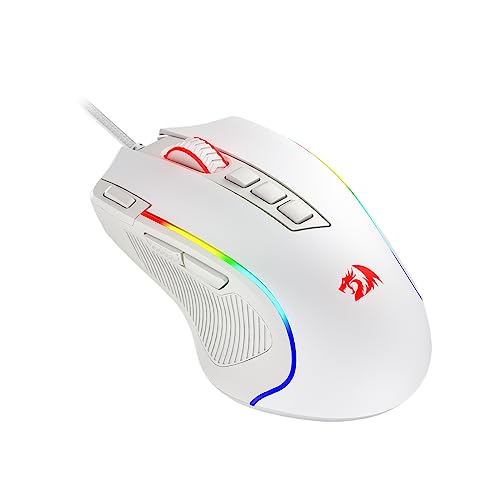
The Redragon M602 offers an ergonomic design, a wired connection, adjustable sensitivity up to 7,200 DPI, and nine programmable buttons. It is a practical fit for players seeking configurable controls and RGB lighting, provided its shape works for their hand and grip.
Button remapping and macro editing require Redragon software, which the product information directs users to download from the company website. The supplied details do not specify a polling rate or sensor model, so those figures should not be assumed when comparing it with other mice.
For players who want extensive side-button assignments: Redragon M908
The wired Redragon M908 has 18 programmable buttons, including 12 side buttons, five memory profiles, and a Pixart PAW3327 sensor with a stated 1,000 Hz polling rate. Its numerous controls may appeal to players who want many remapped inputs, though a large side-button array can be unnecessary for a simpler FPS layout.
The mouse includes removable weights and requires software for programmable functions; the supplied compatibility details list Windows for programming and Mac OS for normal use. Its MMO-oriented layout is a more specialized choice than the simpler G305 or G502 options.
Other options: G502 Lightspeed and Corsair Scimitar RGB Elite
The Logitech G502 Lightspeed combines wireless operation with a HERO 25K sensor, 11 customizable buttons, and a hyper-fast scroll wheel. It suits players seeking a feature-rich wireless design, but its supplied details do not state mouse weight or battery runtime. PowerPlay charging requires a separately sold compatible charging system.
The Corsair Scimitar RGB Elite is a wired MMO/MOBA mouse with 17 programmable buttons and a repositionable 12-button side panel. That layout provides extensive input customization but may be more than most players need for Call of Duty. The supplied information does not specify its software requirements or operating-system compatibility.
How to Choose a Mouse for COD
- Choose a comfortable shape: An ergonomic thumb rest, compact body, or MMO-style side panel will not suit every hand. Consider how you hold a mouse and whether you prefer a right-hand-specific design.
- Compare connection types: The G305 and G502 Lightspeed are wireless; the other listed models are wired. The G305 advertises a 1 ms report rate. Do not assume an unlisted polling rate for other models.
- Treat DPI as a range, not a score: A larger maximum sensitivity does not by itself establish better aim. The products list different sensor specifications, but no independent tracking comparisons are provided here.
- Decide how many buttons you need: Programmable buttons can hold secondary actions, but extra controls add complexity. For a simple FPS setup, compare a conventional layout against the M908 or Scimitar’s extensive side buttons.
- Check software needs: The M602 uses Redragon software for remapping and macros; the G502 Hero lists Logitech software for lighting, and G HUB supports the G305’s Endurance mode. Install the relevant utility if you need those functions.
A suitable mouse pad also affects the surface available for aiming, so compare sizes and surface types in our gaming mouse pad guide. For more pointer options focused on aiming, see our gaming mouse picks for aim.
Frequently Asked Questions
Is a wireless mouse suitable for Call of Duty on PC?
The G305 lists LIGHTSPEED wireless with a 1 ms report rate, while the G502 Lightspeed uses Logitech LIGHTSPEED technology. These advertised specifications make them relevant wireless choices, but they do not replace independent testing of performance in a particular setup.
Should I use the highest DPI setting?
Not necessarily. A mouse’s maximum DPI describes a sensitivity capability, not a measure of aim quality. Choose a setting that feels controllable in your game and operating system, and adjust it to your preference rather than selecting a model solely for its maximum number.


Write Your Review
No reviews yet. Be the first to share your experience!