

For a compact wireless mechanical option, consider the DIERYA DK63; for a fuller feature set, compare the ASUS ROG Strix Scope II 96 and AULA F75 models. If you want a low-cost wired keyboard and mouse set, the CHONCHOW 1910 or AULA T102 combines both peripherals. These recommendations are based on supplied specifications, not hands-on testing.
First decide which keys you need. A 60% board saves desk space but omits dedicated navigation and function-key rows, while 75% and 96% layouts keep more controls. Then choose between mechanical switches and membrane or mechanical-feel designs, and check whether the connection and operating-system support fit your setup.
White Gaming Keyboards to Compare

Pros
- Full-size layout with 12 multimedia shortcut combinations
- 19-key anti-ghosting prevents key rollover conflicts
- Four adjustable mouse sensitivity presets up to 4800 DPI
- Dedicated Windows key lock function for uninterrupted gaming
- Broad compatibility across PCs and supported consoles
Cons
- Keyboard backlighting cannot be set to single colors
- Lacks wireless connectivity options

Pros
- Compact 60% layout retains dedicated arrow keys
- Flexible 2.4GHz, Bluetooth 5.0, and wired connections
- Light and quiet 45g linear red switches
- Large 3000mAh rechargeable battery capacity
- Customizable 16.8-million-color RGB backlighting
Cons
- Battery life drops significantly with full RGB enabled
- Compact layout requires FN key combos for standard functions
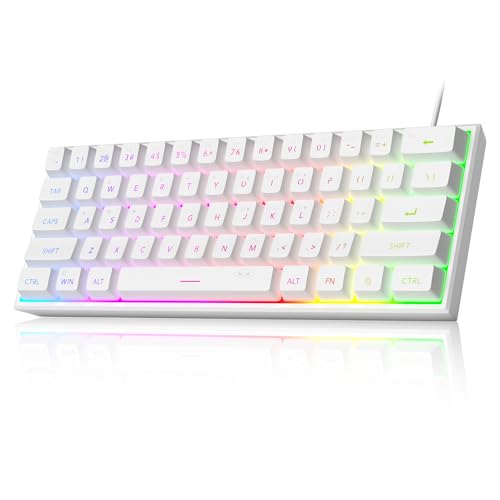
Pros
- Space-saving 61-key layout
- Adjustable RGB lighting
- Mechanical-like membrane feel
- IPX4-rated circuit board
Cons
- No dedicated numpad
- Membrane keyboard, not mechanical
- Connector is not waterproof

Pros
- Compact form factor maximizes mouse movement space
- Fast optical switches with zero debounce delay
- Flexible tri-mode connectivity including LIGHTSPEED and Bluetooth
- Comprehensive five-layer key customization support
- Includes travel case for safe transport
Cons
- Lacks dedicated arrow keys and function row
- Requires multi-layer key shortcuts for standard navigation
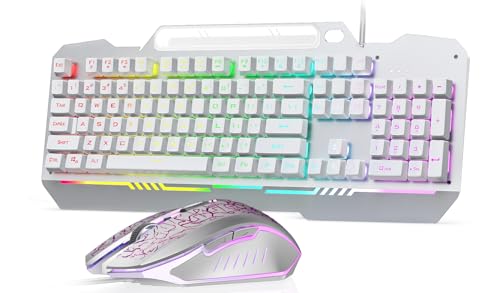
Pros
- Full-size layout with number pad
- Keyboard and mouse included
- No additional driver or software required
- Adjustable mouse DPI settings
- Multiple keyboard lighting effects
Cons
- Membrane keyboard, not mechanical
- Wired connection limits cable-free placement

Pros
- Hot-swappable PCB compatible with 3-pin and 5-pin switches
- Compact 96% layout includes dedicated numpad
- Gasket mount and acoustic foam dampen typing noise
- Durable double-shot PBT keycaps
- Detachable USB-C to USB-A cable
Cons
- Wired-only operation lacks wireless connectivity

Pros
- Space-saving layout retains complete numeric keypad
- Flexible tri-mode wireless and wired operation
- Hot-swappable PCB for easy switch customization
- Integrated dampening foam improves typing acoustics
- Browser-based software setup requires no downloads
Cons
- Relatively heavy 2.78-pound chassis limits portability
- Clicky mechanical switches generate audible typing noise

Pros
- Flexible tri-mode wireless and USB-C wired connectivity
- Universal 3-pin and 5-pin hot-swap switch sockets
- Integrated five-layer acoustic dampening construction
- Multi-function knob for quick audio and lighting adjustment
- Pre-lubricated mechanical switches and stabilizers
Cons
- Compact layout lacks a dedicated numeric keypad
- Full macro and rhythm lighting require external driver software

Pros
- Compact 60% layout maximizes mouse room
- Smooth 45g linear red switches
- Detachable USB-C cable enhances portability
- Durable double-shot keycaps resist fading
- Full 61-key anti-ghosting rollover
Cons
- Lacks dedicated arrow and navigation keys
- Limited to wired USB-C operation
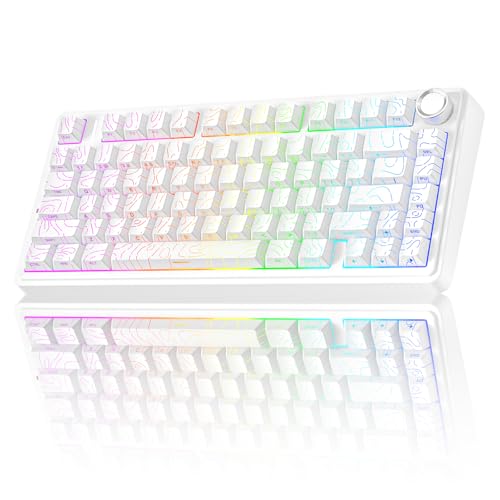
Pros
- Three connection modes
- Hot-swappable switch support
- Compact layout with arrow keys
- Side-printed PBT keycaps
- Programmable keys and Windows key lock
Cons
- No dedicated numpad in compact layout
- Hot-swap support limited to 3-pin and 5-pin switches
How These White Keyboards Differ
DIERYA DK63 60% Wireless Mechanical
The DIERYA DK63 is a 63-key mechanical board with linear red switches and Bluetooth 5.0, 2.4GHz, and wired USB connections. That combination suits players who want a compact desk setup and the option to switch between a PC and other devices. Its smaller layout relies on Fn-layer access for functions, so it is less convenient if you regularly use dedicated navigation keys.
The listed battery capacity is 3000mAh, with advertised runtimes of about eight hours at maximum backlight brightness or 90 hours with lighting off. Those figures are manufacturer specifications, not independently verified results. Its RGB lighting offers 18 modes, and customization is described as using control software.
CHONCHOW 1910 White Gaming Keyboard and Mouse LED
This wired full-size 104-key combo is a practical choice if you need both a keyboard and mouse in one package. The keyboard has rainbow backlighting, multimedia shortcuts, and stated 19-key simultaneous input support. The lighting is rainbow rather than single-color adjustable RGB, so color customization is limited.
The included mouse has four selectable DPI settings, from 800 to 4800. The product listing names Windows, Mac, PS4, and Xbox One compatibility, but console keyboard support can vary by game and setup. Check the requirements of the specific console game before relying on the combo.
MageGee Mini 60% Gaming Keyboard
The MageGee is a wired 61-key compact keyboard that uses membrane switches designed to provide a mechanical feel. It offers adjustable RGB lighting and an IPX4-rated circuit board, but the connector is not waterproof. This is a space-saving alternative for buyers who do not require a true mechanical switch mechanism.
Its 60% layout lacks a dedicated number pad and standard rows of full-size controls, so check the manual for accessing secondary functions. The supplied compatibility information covers Windows versions and names PC, Mac, PS4, and Xbox One use. Confirm platform and game support before purchase, especially for console play.
Logitech G PRO X 60% Wireless Gaming Keyboard
Logitech’s compact wireless model uses GX optical switches, offered in tactile or linear versions, and supports LIGHTSPEED wireless, Bluetooth, and USB. The 1ms response figure is the stated LIGHTSPEED adapter specification, not an independent test result. Its carrying case and small layout may appeal to players who transport a keyboard or want more mouse room.
G HUB provides LIGHTSYNC lighting and KEYCONTROL customization, including five layers. The compact format means fewer dedicated keys than a full-size board, so consider whether your games or work depend on a number pad or separate navigation cluster. Select the switch type that matches your preference for linear or tactile feedback.
ASUS ROG Strix Scope II 96 Wireless Mechanical
The ASUS ROG Strix Scope II 96 keeps a number pad and full keyboard functionality in a layout described as only slightly wider than an 80% board. It supports Bluetooth for up to three devices, 2.4GHz ROG SpeedNova, and wired USB, making it a strong fit for users who want wireless flexibility without giving up the numpad.
It has hot-swappable, pre-lubed ROG NX Snow linear or NX Storm clicky switches, per-key RGB, sound-dampening materials, a multi-function wheel, and a detachable wrist rest. The listed battery life is up to 1,500 hours in 2.4GHz mode, an advertised maximum rather than a guaranteed runtime. Verify the exact switch version when choosing between the available options.
HUO JI E-Yooso Creamy Mechanical Keyboard Wired
This wired 99-key, 96% mechanical keyboard retains a number pad in a smaller footprint than a conventional full-size layout. Its hot-swap PCB supports compatible three-pin or five-pin switches, and the included cable connects USB-C to USB-A. The five-layer sound treatment and pre-lubed linear switches suit buyers interested in a customizable typing feel.
The manufacturer specifies full-key anti-ghosting and N-key rollover, useful when multiple keys are pressed together. It also has 15 lighting effects and double-shot PBT keycaps. Unlike the wireless boards in this roundup, it requires a wired connection, so it is not the choice for a cable-free desk.
AULA Gaming Keyboard, T102 104 Keys Keyboard
The AULA T102 is a full-size wired membrane keyboard bundled with a programmable wired mouse. Its 104-key layout includes a number pad, and the listing describes 16 RGB lighting effects, an aluminum-alloy brushed panel, and 26-key simultaneous input support. It fits buyers seeking a complete, plug-and-play desktop set rather than a mechanical keyboard.
The mouse offers four DPI settings up to 7200, according to the product information. The keyboard is described as built to withstand an average liquid spill, which should not be treated as waterproofing. Confirm that its wired USB connection and stated device support suit your computer or gaming platform.
AULA F75 75% Wireless Mechanical Keyboard
The AULA F75 has 81 keys, including arrow keys, in a compact 75% layout. It connects over Bluetooth 5.0, 2.4GHz, or USB and can pair with up to five devices, according to the listing. Pre-lubed Reaper linear switches, hot-swap support, and a control knob make it a versatile option for gaming and everyday typing.
Other listed features include a 4000mAh battery, N-key rollover, macro programming, and RGB effects. The stated device range includes PC, laptops, tablets, phones, PlayStation, and Xbox, but console support may depend on the game and connection mode. Check the product documentation for the relevant platform before assuming every feature works across devices.
TMKB 60% Mechanical Gaming Keyboard
The TMKB is a wired 60% model with linear red switches rated at 45g actuation and 50 million keystrokes. Its compact ANSI layout, detachable USB-C cable, and foldable feet make it suitable for a simple PC setup where desk space matters. The listed compatibility includes Windows, Linux, and macOS.
It provides 15 LED lighting modes, double-shot keycaps, and 61-key rollover. Since this 60% layout does not provide the full set of dedicated keys, consider whether you are comfortable using function-layer shortcuts. It is wired only, unlike the multi-mode compact options above.
AULA F75 Pro Wireless Mechanical Keyboard
The AULA F75 Pro is an 81-key, 75% wireless mechanical keyboard with Bluetooth 5.0, 2.4GHz, and USB connectivity. Its hot-swappable PCB supports three-pin and five-pin switches, and the listed pre-lubed LEOBOG Star Vector switches are paired with a knob for media or lighting control. It suits players who want a compact layout with arrow keys and customization options.
The Pro adds side-printed PBT keycaps and describes a gasket structure with five layers of sound-dampening material. The supplied details list a 4000mAh battery and multi-device switching, but do not give a specific battery-runtime figure. Compare its switch and keycap configuration with the standard F75 before deciding whether the differences matter for your setup.
How to Choose a White Gaming Keyboard
Match the layout to your games and daily use
Compact 60% options such as the DIERYA, MageGee, Logitech, and TMKB free up desk space but rely more on secondary key functions. A 75% board keeps arrow keys, while 96% and full-size choices retain a number pad. If you enter numbers often or depend on dedicated keys, favor a larger layout.
Choose switch type and keyboard construction
Mechanical models here include linear, tactile, and clicky switch options, while the MageGee and AULA T102 use membrane designs. Hot-swap support on selected boards lets owners replace compatible switches without soldering, but it does not mean every switch is compatible. Check pin type and switch specifications before buying replacements.
Decide between wired and wireless connections
Wired boards avoid wireless pairing and charging, while tri-mode models offer USB, Bluetooth, and 2.4GHz connections. For gaming, check which wireless receiver is included and use the connection mode supported by your device. Do not assume that a product listing’s broad console compatibility guarantees support in every game.
Check lighting, rollover, and software needs
Backlighting ranges from fixed rainbow effects to per-key RGB and configurable lighting. Rollover and anti-ghosting details are specifically listed for several models, but are not provided for every keyboard. Software-based customization is also model-dependent, so check whether the features you want require an app or driver.
For more layout comparisons, see our guides to small gaming keyboards and wireless mechanical keyboards. Readers prioritizing reduced typing noise can also compare quiet keyboards for gaming.
Which White Gaming Keyboard Should You Choose?
Choose the DIERYA DK63 if you want a compact mechanical keyboard with three connection modes, or the Logitech G PRO X 60 if optical switches and tournament-oriented portability matter more. For a number pad in a compact footprint, compare the ASUS ROG Strix Scope II 96 and HUO JI 99-key board. The AULA F75 models suit users seeking a wireless 75% layout and hot-swap features, while the CHONCHOW and AULA T102 bundles make sense when you also need a mouse. Prioritize layout and connection first, then select switch type and lighting features that fit your routine.


Write Your Review
No reviews yet. Be the first to share your experience!