

The graphics chip is the key decision when choosing among the best laptops for under $1000 for gaming. The HP Victus and Acer Nitro V include RTX 4050 graphics, while two Victus configurations use RTX 3050 graphics; the Lenovo and KAIGERR listings do not specify a dedicated GPU.
For a dedicated gaming GPU and a high-refresh display, compare the RTX 4050 options first. The Acer has a 165Hz panel and 8GB of DDR5 memory, while the HP pairs its RTX 4050 with 16GB of DDR4 and a 144Hz panel. Refresh rate describes the display, not the frame rate a game will reach.
This is a specification-based comparison, not a report of hands-on testing or benchmark results. The listed products span dedicated and integrated graphics, so consider your games and performance expectations before choosing by processor, storage, or screen refresh rate alone.
At a Glance: Graphics, Memory, and Display
| Model | Graphics specified | Memory | Display | Storage |
|---|---|---|---|---|
| HP Victus with RTX 4050 | RTX 4050, 6GB | 16GB DDR4 | 15.6-inch FHD, 144Hz | 512GB PCIe Gen4 NVMe SSD |
| Acer Nitro V | RTX 4050 Laptop GPU | 8GB DDR5 | 15.6-inch FHD IPS, 165Hz | 512GB Gen4 SSD |
| HP Victus with RTX 3050 | RTX 3050, 6GB | 16GB DDR4 | 15.6-inch FHD IPS, 144Hz | 512GB PCIe SSD |
| Lenovo 15-inch | Not specified | 16GB DDR5 | 15.3-inch WUXGA IPS, 60Hz | 1TB PCIe NVMe SSD |
| KAIGERR | Integrated UHD graphics | 16GB DDR4 | 16-inch, resolution described inconsistently | 512GB M.2 SSD |
Best Laptops for Under $1000 for Gaming
HP Victus 15.6 inch FHD 144Hz Gaming Laptop Intel: RTX 4050 Graphics
This Victus combines an Intel Core i5-13420H with an NVIDIA GeForce RTX 4050 laptop GPU with 6GB of GDDR6 memory. Its 16GB of DDR4, 512GB PCIe Gen4 NVMe SSD, and 144Hz FHD IPS display make it the most balanced listed configuration for shoppers prioritizing dedicated graphics without starting with an 8GB memory configuration.
It suits players seeking an entry-level dedicated-GPU gaming laptop and a higher-refresh built-in screen. The specifications do not establish game-specific frame rates, and the 512GB drive may leave less room for a large game library than the Lenovo’s 1TB SSD.
Compare more gaming laptop options under $1,000 if you want additional specification-based picks.

Lenovo 15.3" Laptop Ryzen 5 7535HS 1TB SSD



As an Amazon Associate we earn from qualifying purchases. Product prices and availability are accurate as of the date/time indicated.
Acer Nitro V Gaming Laptop: RTX 4050 and 165Hz Display
The Nitro V pairs an Intel Core i5-13420H and RTX 4050 laptop GPU with a 15.6-inch FHD IPS screen rated at 165Hz. Its 512GB Gen4 SSD and Wi-Fi 6 are useful for a gaming setup, and the listing also specifies Killer Gigabit Ethernet and Thunderbolt 4.
The central trade-off is its 8GB of DDR5 memory, compared with 16GB in the HP RTX 4050 option. The product listing specifies two DDR5 slots and a maximum of 32GB, but upgrading requires compatible memory and installation; check the laptop documentation and warranty terms before opening it. The 165Hz panel does not guarantee that games will run at 165 frames per second.
Lenovo 15.3" Laptop Ryzen 5 7535HS 1TB SSD
As an Amazon Associate we earn from qualifying purchases. Product prices and availability are accurate as of the date/time indicated.
HP Victus 15.6-inch RTX 3050: Dedicated Graphics at a Lower Tier
This Victus configuration lists an Intel Core i5-12450H, RTX 3050 with 6GB of GDDR6, 16GB of DDR4, and a 512GB PCIe SSD. Its 15.6-inch FHD IPS display supports a 144Hz refresh rate, making it a reasonable alternative if you want a dedicated GPU but do not need the listed RTX 4050 configuration.
The RTX 3050 is a different GPU tier from the RTX 4050, but the supplied specifications do not include benchmark comparisons. One listing names Windows 11 Pro and Wi-Fi 6. The product data describes memory and storage upgrade limits, but confirm the exact configuration and upgrade support for the specific listing before buying.
Lenovo 15.3" Laptop Ryzen 5 7535HS 1TB SSD
As an Amazon Associate we earn from qualifying purchases. Product prices and availability are accurate as of the date/time indicated.
Lenovo 15-inch Gaming Laptop: More SSD Space, Graphics Not Specified
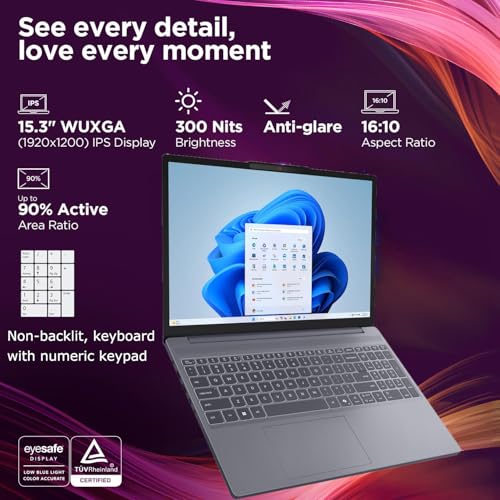
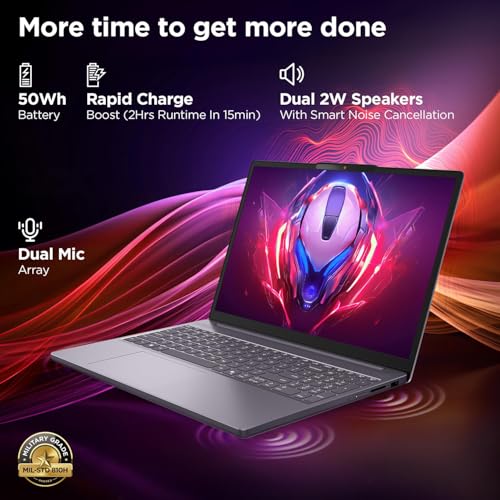
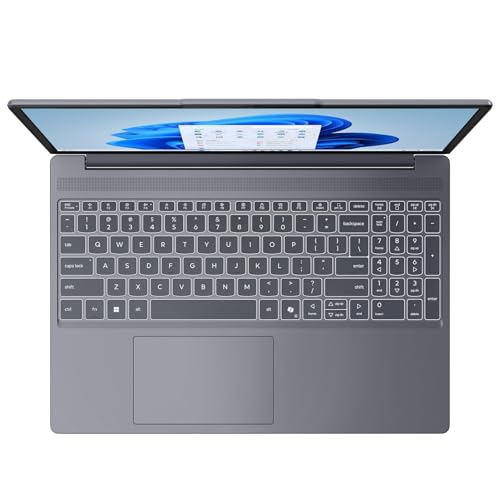
The Lenovo uses an AMD Ryzen 5 7535HS with 16GB of DDR5 and a 1TB PCIe NVMe SSD. Its 15.3-inch WUXGA IPS display has a 1920-by-1200 resolution, anti-glare finish, 300-nit brightness rating, and 60Hz refresh rate.
Its larger listed SSD and 16GB of memory suit general multitasking and a larger collection of installed files. However, the supplied product specifications do not identify a dedicated graphics card, so do not assume it matches the gaming capability of an RTX-equipped laptop. The 60Hz screen is also a more modest fit for players specifically seeking a high-refresh display.
Lenovo 15.3" Laptop Ryzen 5 7535HS 1TB SSD
As an Amazon Associate we earn from qualifying purchases. Product prices and availability are accurate as of the date/time indicated.
KAIGERR Gaming Laptop: Integrated Graphics for Lighter Gaming
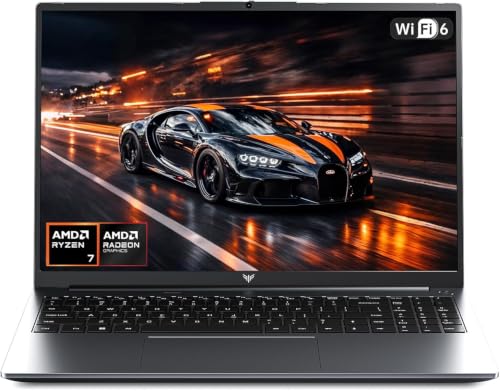
KAIGERR lists a six-core, 12-thread Ryzen 7430U processor, 16GB of DDR4, and a 512GB M.2 SSD. Its integrated UHD graphics are specified at up to 1200MHz, but there is no dedicated gaming GPU in the supplied description.
This configuration is better suited to everyday computing and lighter games than to buyers seeking the dedicated graphics in the HP Victus or Acer Nitro V. The listing’s display information is inconsistent: the title says 1920P FHD, while the feature text describes a 16-inch panel without confirming its resolution. Verify display details before purchase, and treat the stated battery-life claim as manufacturer-provided rather than independently measured.
Lenovo 15.3" Laptop Ryzen 5 7535HS 1TB SSD
As an Amazon Associate we earn from qualifying purchases. Product prices and availability are accurate as of the date/time indicated.
How to Choose a Gaming Laptop Under $1000
Start with the graphics hardware
A dedicated RTX 4050 or RTX 3050 is the clearest choice in this group for gaming that depends on graphics performance. The Acer and HP RTX 4050 models share a GPU family but differ in listed memory and display refresh rate; the Victus RTX 3050 offers another dedicated-GPU option. The Lenovo and KAIGERR listings do not provide equivalent dedicated-GPU specifications.
Balance memory, storage, and display
Among the listed gaming-focused models, 16GB of memory is specified for both HP Victus options, while the Acer starts with 8GB. Storage ranges from 512GB to 1TB, which matters if you plan to keep multiple large games installed. A 144Hz or 165Hz screen can display higher refresh rates than a 60Hz panel, but actual game frame rates depend on the game, settings, and laptop performance.
Check the exact configuration before purchase
Product names and listings can cover similar configurations, so confirm the GPU, memory, operating system, and display for the exact item selected. For the Acer, check whether its initial 8GB of RAM suits your games or whether you are prepared to investigate a supported upgrade. Do not infer charging or video output from USB-C alone; confirm port capabilities in the manufacturer’s documentation.
Frequently Asked Questions
Which listed laptop has the strongest documented gaming graphics?
The Acer Nitro V and HP Victus configuration both specify an RTX 4050 laptop GPU. The supplied data does not include benchmark results, power limits, or game tests to establish how their real-world performance compares.
Is 8GB of RAM enough for a gaming laptop?
The Acer listing starts with 8GB of DDR5 and specifies two slots with a 32GB maximum. Whether 8GB is adequate depends on the games and other applications you run; compare their requirements and confirm supported memory before planning an upgrade.
Does a 144Hz or 165Hz screen mean games run at that frame rate?
No. Those figures describe the display’s maximum refresh rate, not a guaranteed in-game frame rate. Actual results depend on the graphics hardware, game, settings, and other system factors, none of which are quantified here with test results.
Which Laptop Should You Choose?
Choose the HP Victus with RTX 4050 if you want dedicated graphics alongside 16GB of listed memory and a 144Hz screen. Consider the Acer Nitro V if its 165Hz display and specified RTX 4050 appeal to you and you are comfortable evaluating its 8GB starting memory. The RTX 3050 Victus is another dedicated-GPU option; the Lenovo prioritizes 1TB of storage but does not specify a dedicated GPU, while KAIGERR is the integrated-graphics choice. Compare these with the site’s gaming laptop options for different needs and browse the Gaming Laptops category for related guides.





Write Your Review
No reviews yet. Be the first to share your experience!