

Among these best gaming laptop deals, the Acer Nitro V is the gaming-focused choice because it pairs an RTX 4050 laptop GPU with a 165Hz display. The NIMO is better suited to everyday work and lighter gaming, with Radeon 680M integrated graphics and 16GB of memory.
These recommendations come from the supplied specifications, not independent performance or battery testing. Neither the display refresh rate nor the graphics specifications establish a particular frame rate in any game.
- For gaming with a dedicated GPU: The Acer Nitro V pairs an Intel Core i5-13420H with an NVIDIA GeForce RTX 4050 Laptop GPU. Its 8GB RAM is a notable limitation for demanding multitasking and may make a memory upgrade worth investigating.
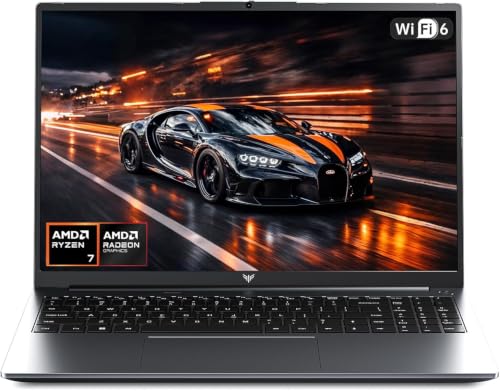
- For study, general work, and lighter gaming: The NIMO combines a Ryzen 7 7735HS, Radeon 680M integrated graphics, and 16GB DDR5. Its graphics are not equivalent to the Acer’s dedicated GPU, and its 256GB SSD leaves less room for a large game library.

Pros
- Fast 8-core AMD Ryzen 7 7735HS processor
- 16GB high-speed 5600MHz DDR5 memory
- Dual full-function USB-C ports with 100W PD
- Generous port selection including HDMI and USB-A
- Built-in fingerprint reader and backlit keyboard
Cons
- Small 256GB solid-state drive capacity
- Integrated Radeon 680M graphics restricts heavy gaming

Pros
- Smooth 165Hz Full HD IPS display
- NVIDIA GeForce RTX 4050 with DLSS 3.5
- Thunderbolt 4 port with charging and display support
- Dual DDR5 slots upgradeable to 32GB
- Fast Wi-Fi 6 and Killer Ethernet networking
Cons
- Base memory limited to 8GB DDR5
- Modest 512GB internal storage capacity
How These Gaming Laptops Differ
The Acer Nitro V is the clearer fit for players who want dedicated graphics hardware. Its RTX 4050 is intended for gaming workloads, while its 15.6-inch Full HD IPS screen supports refresh rates up to 165Hz. That refresh rate is a display capability, not a promise that games will reach 165 frames per second.
The NIMO’s Radeon 680M is integrated graphics, sharing the laptop platform rather than serving as a dedicated gaming GPU. It is a more appropriate match for casual games and everyday visual tasks than for shoppers prioritizing demanding modern games. Game support and performance vary, so check requirements for specific titles before buying.
Acer Nitro V Gaming Laptop: Better Fit for Dedicated-GPU Gaming
The Acer combines an Intel Core i5-13420H processor and GeForce RTX 4050 Laptop GPU with a 512GB PCIe Gen 4 SSD. Wi-Fi 6 and Killer Ethernet E2600 Gigabit Ethernet provide wireless and wired networking options, while Thunderbolt 4 supports data transfer and video display according to the listed specifications.
The main drawback is its listed 8GB of DDR5 memory. The product information specifies two DDR5 slots and a maximum of 32GB, but does not confirm the exact memory configuration or upgrade process. Check the laptop’s service documentation and warranty terms before planning an upgrade.
NIMO 15.6" Light-Gaming-Laptop: Better Fit for Everyday Use
The NIMO uses an AMD Ryzen 7 7735HS processor, Radeon 680M integrated graphics, 16GB of DDR5-5600 memory, and a 256GB PCIe 4.0 SSD. This configuration is geared toward multitasking, study, office work, and light creative tasks, with casual gaming as a secondary use rather than its strongest case.
Its 15.6-inch display has a 1920 by 1080 resolution, and its ports include two full-function USB-C ports, HDMI 2.0, three USB-A ports, and a Micro SD reader. The specifications also list a 53.58Wh battery and a separate 100W PD charger, but do not provide runtime figures. At 256GB, storage may fill quickly if you install several large games.
Buying Guide: Match the Laptop to Your Games
- Prioritize graphics for gaming: The Acer’s dedicated RTX 4050 makes it the more suitable option for gaming-focused use. Look up the requirements of your specific games and review independent benchmarks for the exact configuration if frame rates matter.
- Consider memory and storage together: The Acer lists 8GB RAM and a 512GB SSD; the NIMO lists 16GB RAM and a 256GB SSD. More memory can help with multitasking, while available storage determines how many games and files fit locally.
- Check upgrade details: Acer lists two DDR5 slots and a 32GB maximum, but confirm the supplied configuration, access requirements, and warranty implications before attempting an upgrade. No memory upgrade details are provided for the NIMO.
- Choose the right display expectation: The Acer’s 165Hz panel can display refreshes up to that rate, but actual gaming frame rates depend on the game, settings, and system performance.
- Review your connections: The Acer lists Thunderbolt 4, Wi-Fi 6, and Gigabit Ethernet. The NIMO lists full-function USB-C ports and HDMI 2.0. Confirm the specific peripheral or display connection you need before purchase.
For more options organized by screen size and budget, compare our guides to 15-inch gaming laptops under $1000 and gaming laptops under $1500. Readers focused on a particular game can also see our guide to gaming laptops for Fortnite.
Which Laptop Should You Choose?
Choose the Acer Nitro V if dedicated graphics and gaming are your priority, while accounting for its listed 8GB of RAM and checking upgrade details. Choose the NIMO for study, general productivity, and lighter gaming if its smaller SSD suits your storage needs. For either model, confirm the requirements of your games and peripherals before deciding.





Write Your Review
No reviews yet. Be the first to share your experience!