

Targeting the sub-$1500 price bracket for portable hardware allows buyers to secure dedicated mid-tier graphics, high refresh displays, and modern hybrid processors. Within this segment, shoppers no longer need to settle for low-tier hardware compromises, as current architectures bring hardware ray tracing and DLSS frame generation within reach.
Choosing between competing configurations requires balancing discrete GPU tiers against screen resolution and memory capacity. For broader context on portable gaming hardware, explore our Gaming Laptops overview or check our guide to the best 17-inch gaming laptops under $1500.

Pros
- Spacious 17.3-inch 144Hz display for fast gameplay
- Modern Intel Core 7-240H and RTX 5060 configuration
- Fast 16GB DDR5 RAM paired with 1TB SSD
- Relatively slim chassis for a 17-inch gaming laptop
- Versatile physical I/O including RJ45 Ethernet and HDMI
Cons
- 1080p resolution offers modest pixel density at 17.3 inches
- Display color accuracy and brightness are not specified

Pros
- Fast 180Hz refresh rate with 100% sRGB coverage
- Equipped with latest generation NVIDIA GeForce RTX 5060 graphics
- Pre-installed with 32GB high-speed DDR5 RAM
- Includes an open M.2 slot for storage upgrades
Cons
- System memory is capped at the installed 32GB limit
- Display is limited to 1920 x 1200 resolution

Pros
- NVIDIA RTX 5060 GPU with modern architecture
- Detailed 16-inch WQXGA 16:10 display
- Streamlined chassis without a rear thermal shelf
- Cryo-Chamber cooling targets core hardware directly
- Includes one year of Dell onsite support
Cons
- Display peak brightness is limited to 300 nits
- Relatively heavy chassis at 5.49 pounds


Pros
- 16-inch WQXGA panel with smooth 120Hz refresh rate
- NVIDIA RTX 5050 GPU with Blackwell architecture
- Intel Core 7 240H processing performance
- Slim 0.73-inch profile without a rear thermal shelf
- Included one-year onsite hardware service
Cons
- Modest 300 nits maximum display brightness
- Relatively heavy at 5.49 pounds

Pros
- Fluid 165Hz 16:10 display with Dolby Vision support
- Tool-free latch provides simple internal upgrade access
- Advanced cooling includes vapor chamber and three fans
- MUX Switch with Advanced Optimus optimizes GPU performance
- Latest Wi-Fi 7 standard for fast wireless connections
Cons
- Modest 512GB base solid-state drive capacity
- Relatively heavy chassis weighing 5.84 pounds
Technical Specifications Comparison
| Model | GPU | CPU | RAM / Storage | Display |
|---|---|---|---|---|
| msi Cyborg 17 17.3″ FHD 144Hz Gaming Laptop | GeForce RTX 5060 | Intel Core 7-240H | 16GB DDR5 / 1TB SSD | 17.3″ FHD 144Hz |
| Acer Nitro V 16S AI Gaming Laptop | GeForce RTX 5060 | AMD Ryzen 7 260 | 32GB DDR5 / 1TB SSD | 16″ WUXGA 180Hz |
| Alienware 16 Aurora Gaming Laptop | GeForce RTX 5060 | Intel Core 7 240H | Not specified / Not specified | 16″ WQXGA 16:10 |
| ASUS TUF Gaming F16 Gaming Laptop | GeForce RTX 4050 | Intel Core 5 210H | 16GB DDR5 / 512GB SSD | 16″ FHD+ 144Hz |
| Alienware 16 Aurora Gaming Laptop, RTX 5050 | GeForce RTX 5050 | Intel Core 7 240H | Not specified / Not specified | 16″ WQXGA 120Hz |
| ASUS ROG Strix G16 Gaming Laptop | GeForce RTX 5050 | Intel Core i5-14450HX | 16GB DDR5 / 512GB SSD | 16″ FHD+ 165Hz |
Detailed Evaluations: Best Laptops Under $1500 for Gaming
msi Cyborg 17 17.3″ FHD 144Hz Gaming Laptop
The msi Cyborg 17 17.3″ FHD 144Hz Gaming Laptop targets players who prioritize a larger viewing area without adding extreme bulk. It pairs the Intel Core 7-240H processor with an NVIDIA GeForce RTX 5060 graphics card, delivering modern processing architecture in an 0.83-inch thin chassis weighing 5.5 pounds.
Visual output is handled by a 17.3-inch Full HD panel running at 144Hz, which reduces motion blur during fast competitive titles. MSI incorporates a Cooler Boost shared-pipe thermal configuration alongside 16GB of DDR5 memory and a 1TB NVMe solid-state drive. A clear compromise is the 1080p resolution stretched over a 17.3-inch screen, which yields lower pixel density than smaller panels.
Acer Nitro V 16S AI Gaming Laptop
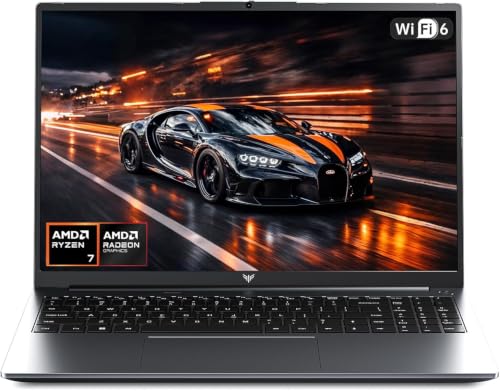
Equipped with 32GB of 5600MHz DDR5 RAM, the Acer Nitro V 16S AI Gaming Laptop offers substantial memory bandwidth out of the box. The internal hardware combines an AMD Ryzen 7 260 processor with an NVIDIA GeForce RTX 5060 GPU, handling demanding simulation games and background productivity smoothly.
Its 16-inch WUXGA display operates at 1920 x 1200 with an accelerated 180Hz refresh rate and full 100% sRGB color gamut coverage. Expansion remains practical with a secondary open M.2 PCIe slot alongside the included 1TB Gen 4 drive. Keep in mind that 32GB represents the maximum documented memory ceiling for this mainboard architecture.
Alienware 16 Aurora Gaming Laptop
The Alienware 16 Aurora Gaming Laptop delivers enthusiast design cues paired with an Intel Core 7 240H chip and an RTX 5060 GPU. A primary draw is the 16-inch 16:10 WQXGA screen with 300 nits brightness, providing crisp definition and generous vertical workspace.
Dell relies on a Cryo-Chamber thermal structure that directs internal airflow specifically over processing cores, removing the bulky rear shelf found on older variants. Buyers also receive one year of onsite hardware service for remote issue resolution. Driving a high WQXGA resolution requires heavier reliance on DLSS in graphic-heavy scenarios compared to basic 1080p screens.
ASUS TUF Gaming F16 Gaming Laptop
Built with durability in mind, the ASUS TUF Gaming F16 Gaming Laptop complies with MIL-STD-810H standards to withstand standard travel wear. Processing duties fall to an Intel Core 5 210H and an NVIDIA GeForce RTX 4050 running at an uncapped 115W maximum TGP with NVIDIA Advanced Optimus.
The 16-inch FHD+ 144Hz panel covers 100% sRGB and supports Adaptive-Sync to remove screen tearing during framerate dips. Five heat pipes, four exhaust vents, and anti-dust filters help maintain thermal stability during long sessions. However, the 512GB PCIe Gen4 storage capacity will fill quickly under multiple modern game installs.
Alienware 16 Aurora Gaming Laptop, RTX 5050
For shoppers seeking high chassis build quality at a lower sub-$1500 entry tier, the Alienware 16 Aurora Gaming Laptop, RTX 5050 delivers an accessible configuration. It retains the Intel Core 7 240H processor while pairing it with an entry RTX 5050 GPU.
It carries a 16-inch WQXGA panel running at 120Hz with 300 nits brightness, maintaining the premium display resolution of its higher-tier sibling. The Cryo-Chamber thermal layout and standard one-year onsite support provide reliable operational support. The main trade-off is the lower shader allocation of the RTX 5050, which restricts native rendering limits at 1600p.
ASUS ROG Strix G16 Gaming Laptop
The ASUS ROG Strix G16 Gaming Laptop is designed around esports responsiveness and advanced thermal dissipation. It deploys an Intel Core i5-14450HX processor alongside an RTX 5050 GPU, cooled by Conductonaut extreme liquid metal and an end-to-end vapor chamber.
The 16-inch FHD+ screen runs at 165Hz with a rapid 3ms response time and anti-glare low-reflection film for clean sightlines. System maintenance is streamlined through tool-free access latches for memory and storage swaps, supplemented by Wi-Fi 7 networking. Like other entry configs, the included 512GB SSD requires early expansion to accommodate large game libraries.
Key Hardware Factors in the Sub-$1500 Category
When selecting best laptops under $1500 for gaming, the primary budget allocation must focus on the graphics processor. The GPU cannot be upgraded after purchase, making an RTX 5060 or high-wattage alternative the most durable long-term investment. If your budget is more constrained, our guide to the best laptops under $800 for gaming outlines entry-level compromises.
Display choice also influences day-to-day usability. While high-resolution WQXGA screens provide crisp visual detail for work and media, Full HD or WUXGA panels match better with mid-range laptop graphics chips to maintain high framerates without severe upscaling.
- Memory Capacity: Aim for 16GB DDR5 as a baseline, prioritizing setups like 32GB for heavy multitasking and simulation workloads.
- Storage Expandability: Verify whether the chassis provides a secondary M.2 slot if you choose a model equipped with a 512GB boot drive.
- Cooling Infrastructure: Look for multi-pipe or vapor chamber cooling solutions that prevent thermal throttling during continuous compute loads.
For players exploring broader ecosystem setups, pairing your rig with reliable gear matters. Consider our evaluations of the best wireless gaming headsets for PC under $100 or explore the Gaming Monitors category for stationary multi-screen play.
Frequently Asked Questions
Is 16GB of RAM enough for modern gaming laptops under $1500?
Yes, 16GB of DDR5 RAM remains sufficient for the vast majority of current titles. However, configurations offering 32GB provide added headroom for modded titles, simultaneous streaming, and demanding background applications without relying on page files.
Can an RTX 5060 drive games at 1440p or WQXGA?
The RTX 5060 can run modern games at 1440p or 1600p, but intensive titles typically require DLSS upscaling or reduced shadow presets. For pure native rendering at very high framerates, 1080p and 1200p displays offer more stable performance margins.
Final Recommendation
For shoppers seeking the most balanced hardware package straight out of the box, the Acer Nitro V 16S AI Gaming Laptop delivers an RTX 5060 paired with 32GB of DDR5 RAM and an accurate 180Hz display. If a larger viewing area is your main priority, the msi Cyborg 17 17.3″ FHD 144Hz Gaming Laptop offers big-screen play within a manageable chassis weight.
Buyers looking for premium build quality and high-density panels should review the Alienware 16 Aurora Gaming Laptop. Alternatively, the ASUS ROG Strix G16 Gaming Laptop suits esports players who prefer liquid metal cooling, tool-free serviceability, and high panel response speeds.



Write Your Review
No reviews yet. Be the first to share your experience!