

The best gaming laptops for under $1000 usd are not interchangeable. A laptop with an NVIDIA GeForce RTX GPU is generally a better starting point for modern 3D games, while integrated Radeon graphics can suit lighter games, schoolwork, and general productivity.
Based on the documented specifications, the Lenovo LOQ Essential and Acer Nitro V offer the strongest graphics foundations here because both use an RTX 4050. The MSI Thin A15 uses an RTX 3050, while the two Ryzen-based systems without a listed discrete GPU are better considered for lighter gaming and mixed everyday use.

Pros
- 6-core AMD Ryzen 5 7535HS processor
- 16GB high-bandwidth DDR5 memory
- Generous 1TB PCIe NVMe storage
- Taller 16:10 WUXGA IPS panel
- Fast Wi-Fi 6 and Bluetooth 5.3
Cons
- Standard 60Hz display refresh rate
- Limited 45% NTSC color gamut
- No dedicated graphics card specified

Pros
- Six-core AMD Ryzen 5 6600H processor
- High-speed 16GB DDR5 system memory
- User-upgradable RAM and SSD slots
- Dual full-function USB-C connections
- Included 100W Type-C fast charger
Cons
- Small 256GB internal storage capacity
- Integrated Radeon 660M limits demanding modern gaming
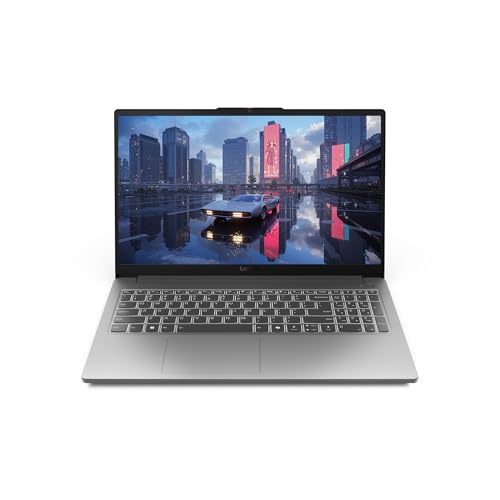
Pros
- 144Hz FHD IPS display with 100% sRGB coverage
- NVIDIA GeForce RTX 4050 with DLSS 3 support
- Intel Core i5-12450HX multi-core processor
- Full-sized keyboard with 1.3mm travel
- Dedicated cooling setup with 100mm fan
Cons
- Limited 8GB base memory capacity
- Modest 512GB solid-state drive storage

Pros
- Fluid 144Hz Full HD gaming display
- Current-generation 16GB DDR5 memory included
- Dedicated GeForce RTX 3050 graphics
- Cooler Boost dual-fan cooling system
- Fast Wi-Fi 6E wireless connectivity
Cons
- Modest 512GB internal solid-state storage
- Entry-level GPU limits performance in demanding titles

Pros
- Smooth 165Hz Full HD IPS display
- NVIDIA GeForce RTX 4050 with DLSS 3.5
- Thunderbolt 4 port with charging and display support
- Dual DDR5 slots upgradeable to 32GB
- Fast Wi-Fi 6 and Killer Ethernet networking
Cons
- Base memory limited to 8GB DDR5
- Modest 512GB internal storage capacity
| Model | Processor | Graphics | Memory and storage | Display | Best suited to |
|---|---|---|---|---|---|
| Lenovo 15" Gaming Laptop Computer | AMD Ryzen 5 7535HS, 6 cores and 12 threads | Not specified | 16GB DDR5, 1TB PCIe NVMe SSD | 15.3-inch WUXGA IPS, 1920×1200, 60Hz, 300 nits | General use, schoolwork, and lighter gaming |
| NIMO 15.6" IPS FHD-Light Gaming-Laptop,AMD Ryzen 5 | AMD Ryzen 5 6600H, 6 cores, up to 4.5GHz | AMD Radeon 660M integrated graphics | 16GB DDR5, 256GB SSD | 15.6-inch FHD IPS, 1920×1080 | Light gaming, portability, and productivity |
| Lenovo LOQ Essential – AI-Powered Student | Intel Core i5-12450HX | NVIDIA GeForce RTX 4050 | 8GB memory, 512GB SSD | 15.6-inch FHD IPS, 144Hz, 300 nits, 100% sRGB | Modern gaming and color-sensitive schoolwork |
| msi Thin A15 Gaming Laptop | AMD Ryzen 5 7535HS | NVIDIA GeForce RTX 3050 | 16GB DDR5, 512GB SSD | 15.6-inch FHD, 144Hz | Competitive gaming and everyday multitasking |
| Acer Nitro V Gaming Laptop | Intel Core i5-13420H | NVIDIA GeForce RTX 4050 | 8GB DDR5, 512GB Gen 4 SSD | 15.6-inch FHD IPS, 165Hz | Modern games, streaming, and future memory upgrades |
How to Choose Among These Gaming Laptops
Prioritize the Discrete GPU for Modern 3D Games
The graphics processor is the most important distinction in this group. The Lenovo LOQ Essential and Acer Nitro V list RTX 4050 graphics, the MSI Thin A15 lists an RTX 3050, and the NIMO lists Radeon 660M integrated graphics.
The Lenovo 15-inch model does not identify its graphics processor in the supplied specifications. Do not assume that its Ryzen processor includes the same gaming capability as an RTX-equipped laptop, and confirm the exact GPU before buying.
Check Memory Before Planning Streaming or Heavy Multitasking
Three models list 16GB of memory: the Lenovo 15-inch laptop, NIMO, and MSI Thin A15. The Lenovo LOQ Essential and Acer Nitro V list 8GB, so they may require more careful memory planning for simultaneous gaming, streaming, editing, and browser-heavy workflows.
Acer specifies two DDR5 slots and a maximum of 32GB, while NIMO states that both RAM and SSD components can be upgraded. The Lenovo LOQ Essential description does not provide upgrade details, so consult the exact service documentation before purchasing replacement memory.
Match the Display to the Workload
Choose a 144Hz or 165Hz panel when responsive motion is a priority, as offered by the Lenovo LOQ Essential, MSI Thin A15, and Acer Nitro V. These refresh rates do not guarantee matching game frame rates, because actual performance depends on the game, settings, resolution, drivers, and thermal or power limits.
The Lenovo 15-inch laptop uses a 60Hz WUXGA display with a 16:10 aspect ratio, which may be preferable for documents and general productivity. Its listed 45% NTSC coverage is more limited than the Lenovo LOQ Essential’s stated 100% sRGB coverage for color-sensitive work.
Allow for Storage Requirements
The Lenovo 15-inch model offers the largest listed SSD at 1TB. The Lenovo LOQ Essential, MSI Thin A15, and Acer Nitro V each list 512GB, while NIMO lists 256GB.
Storage capacity affects how many large games and applications you can keep installed. If you choose a smaller SSD, confirm the laptop’s drive upgrade options and required form factor instead of assuming that every M.2 drive will fit or operate at the same speed.
Other SkumGaming Guides Worth Reading
For a wider budget comparison, see our guide to gaming laptops under $1500. Readers comparing lower-cost systems can also review our compatibility check for more affordable gaming laptops.
You can browse the wider Gaming Laptops category for additional laptop comparisons, or explore our guides to gaming monitors and gaming headsets when completing a PC gaming setup.
FAQs About the Best Gaming Laptops for Under $1000 USD
Which laptop has the strongest listed graphics hardware?
The Lenovo LOQ Essential and Acer Nitro V both list an NVIDIA GeForce RTX 4050. The supplied information does not include power limits or independent benchmarks, so the GPU name alone does not establish identical real-world performance between the two laptops.
Which option is easiest to recommend with 16GB of memory already installed?
The Lenovo 15-inch laptop, NIMO, and MSI Thin A15 each list 16GB of memory. The MSI adds a listed RTX 3050, while the Lenovo model does not specify a discrete GPU and NIMO uses integrated Radeon 660M graphics.
Are these laptops suitable for competitive gaming?
The Lenovo LOQ Essential, MSI Thin A15, and Acer Nitro V have 144Hz or 165Hz displays that are better aligned with competitive gaming than the 60Hz Lenovo panel. However, the achievable frame rate depends on the individual game and graphics settings, so a high-refresh display should not be treated as a performance guarantee.
Final Recommendation
Choose the Lenovo LOQ Essential or Acer Nitro V if modern gaming and an RTX 4050 are the priority. Pick the MSI Thin A15 if you prefer 16GB of installed memory and a 144Hz display with an RTX 3050, while accepting the lower listed GPU tier.
The Lenovo 15-inch model is more compelling for storage capacity and general productivity, but its unspecified graphics hardware requires verification. The NIMO is the most suitable for lighter gaming, portability, and upgrade-oriented productivity use, not for a system built around demanding modern 3D games.





Write Your Review
No reviews yet. Be the first to share your experience!