

The best prebuilt mechanical keyboard depends on the layout and switch feel you want, plus whether you need wireless connectivity or a number pad. For a flexible all-around choice, consider the AULA F75; for a numpad and hot-swappable switches, the RK R98 Pro is a better fit.
These recommendations compare documented specifications, connection options, layouts, and customization features. Product details are specification-based, not claims of measured gaming performance or firsthand experience.

Pros
- Gasket mount with five sound-dampening layers
- Hot-swappable PCB compatible with 3-pin and 5-pin switches
- Durable double-shot PBT keycaps in MDA profile
- Dedicated CNC aluminum volume control knob
- Pre-lubed linear cream switches
Cons
- Wired-only design lacks wireless connectivity
- Compact 96% layout clusters keys closer together

Pros
- Space-saving tenkeyless design frees mouse room
- Tactile, audible GX Blue clicky mechanical switches
- Detachable 1.8-meter cable ensures easy transport
- Onboard memory stores static LIGHTSYNC profiles
- Three-step tilt adjustment provides stable ergonomics
Cons
- Key and lighting programming requires Logitech G HUB
- Macro assignments are restricted to F1 through F12
- Equipped with an older Micro USB connection

Pros
- Dedicated one-touch lighting toggle button
- 19-key anti-ghosting for essential gaming inputs
- Full 104-key layout with multimedia shortcuts
- Plug-and-play setup across PC and consoles
- Adjustable backlighting brightness and breathing modes
Cons
- Simulates mechanical feel rather than true mechanical switches
- Anti-ghosting is limited to 19 keys
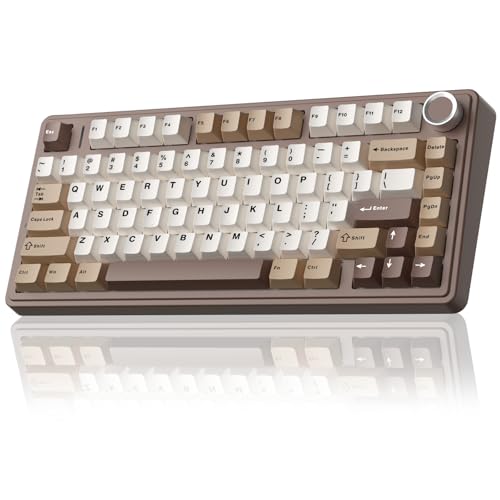
Pros
- Tri-mode wireless and wired connectivity for multiple devices
- Hot-swappable sockets compatible with 3-pin and 5-pin switches
- Five-layer acoustic dampening with pre-lubricated switches
- Dedicated multi-function knob for volume and lighting
- Large 4000mAh internal rechargeable battery
Cons
- Compact 75% layout lacks a dedicated numpad
- Advanced macro programming requires external driver download
- Weighs over 2.2 pounds, limiting travel convenience
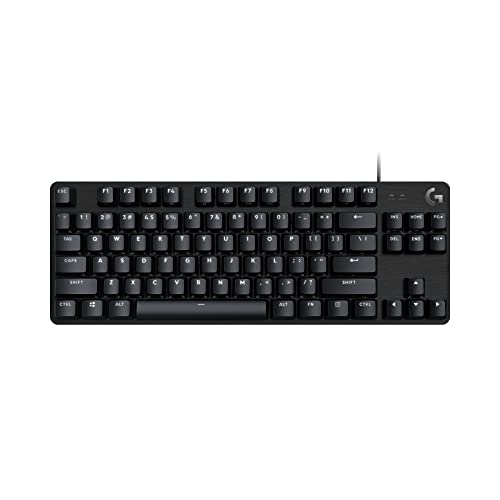
Pros
- Sturdy aluminum-magnesium alloy top plate
- Durable wear-resistant PBT keycaps
- Space-saving tenkeyless layout
- Integrated FN media and lock shortcuts
- Tactile switches provide clear physical feedback
Cons
- Single-color white LED backlighting without RGB
- Rollover limited to 6 keys instead of full NKRO
- Fixed wired connection lacks a detachable cable

Pros
- Tri-mode connectivity across computers, tablets, and consoles
- Hot-swappable 3-pin and 5-pin switch support
- Compact 75% layout retains arrow keys
- Programmable macros and Windows key lock
- Multi-function knob controls lighting, volume, and media
Cons
- Compact layout may not suit full-size keyboard users
- Battery runtime is not specified

Pros
- Hall Effect switches with adjustable actuation
- Fast 8000Hz polling rate
- Compact 68-key layout preserves arrow keys
- Detachable wired USB connection
- South-facing RGB with web-based configuration
Cons
- Web configuration driver does not support macOS
- Wired-only connection with no wireless functionality

Pros
- Hot-swap PCB supports 3-pin and 5-pin switches
- Integrated dual-layer silicone dampening for cleaner sound
- South-facing RGB improves aftermarket keycap clearance
- Compact 65% layout preserves dedicated arrow keys
- Detachable USB-C cable simplifies travel and replacement
Cons
- Wired-only operation with no wireless connectivity support
- Uses ABS keycaps rather than denser PBT plastic
- Compact layout lacks dedicated function and numpad keys

Pros
- Flexible tri-mode wireless and USB-C wired connectivity
- Universal 3-pin and 5-pin hot-swap switch sockets
- Integrated five-layer acoustic dampening construction
- Multi-function knob for quick audio and lighting adjustment
- Pre-lubricated mechanical switches and stabilizers
Cons
- Compact layout lacks a dedicated numeric keypad
- Full macro and rhythm lighting require external driver software

Pros
- Tri-mode wireless with 1000Hz polling rate
- Gasket-mount build with multi-layer acoustic dampening
- Hot-swappable PCB for 3-pin and 5-pin switches
- Integrated customizable TFT display and control knob
- South-facing per-key RGB backlighting
Cons
- Compact 75% layout lacks a dedicated number pad
- Comes pre-installed with plate-mount instead of screw-in stabilizers
- Key remapping and macro features require external software
How to Choose a Prebuilt Mechanical Keyboard
Start with layout: full-size and 96% keyboards retain a number pad, while 75%, tenkeyless, 65%, and 60% models save desk space. A compact board can leave more room for mouse movement, but may require function-layer shortcuts or omit dedicated keys.
Switch feel matters too. Linear switches move without a tactile bump, while tactile switches provide feedback and clicky switches add an audible click. Sound and feel are subjective, and the supplied specifications do not establish how loud any keyboard will be in your room.
Hot-swap sockets let users replace compatible switches without soldering, but check the stated pin support before buying replacements. Wireless models add Bluetooth and 2.4 GHz options, while wired keyboards avoid battery management and keep the connection straightforward.
Recommended Prebuilt Mechanical Keyboards
RK ROYAL KLUDGE R98 Pro Wired Mechanical Keyboard: Best for a Numpad and Switch Customization
This 98-key wired board keeps a number pad, arrow keys, and most full-size functions in a more compact layout. Its hot-swap sockets support 3-pin and 5-pin switches, and the included pre-lubed linear switches suit users who prefer a smooth, non-clicky switch type.
The gasket mount, five sound-absorbing layers, PBT keycaps, and detachable volume knob add practical customization and control features. It supports Windows and macOS, with an online driver for key remapping, macros, and RGB settings.
Pros: Numpad in a space-conscious layout, 3-pin and 5-pin hot swap, PBT keycaps, and a volume knob.
Cons: Wired only, and the linear switch type will not suit users who want tactile bumps or clicky feedback.
Who should skip it: Skip this model if you need wireless connectivity or prefer a compact layout without a number pad.
Compare keyboard and mouse options for a gaming PC if you are choosing both peripherals together.
AULA F75 75% Wireless Mechanical Keyboard: Best for Multi-Device Wireless Use
The F75 combines an 81-key layout with Bluetooth 5.0, 2.4 GHz wireless, and USB wired modes. It can connect to as many as five devices, making it a practical option for switching between a desktop, laptop, or other compatible devices.
It includes hot-swap support for 3-pin and 5-pin switches, a 4000 mAh battery, RGB lighting, and a multifunction knob. The supplied versions differ in switch type and finish, so check the exact listing: options include linear switches described as cream, Greywood, or Reaper.
Pros: Three connection modes, multi-device support, compact layout with arrow keys, hot swap, and a control knob.
Cons: No number pad, and the battery capacity alone does not establish runtime. The exact switch and color depend on the selected version.
Who should skip it: Skip the F75 if you require a dedicated number pad or want a full-size layout.
Logitech G PRO Mechanical TKL Tenkeyless: Best for Clicky Switches and Portability
This wired tenkeyless keyboard uses GX Blue clicky switches, giving users an audible click and tactile feedback. Its compact layout frees desk space, and the detachable Micro USB cable makes it easier to pack than a keyboard with a fixed cable.
LIGHTSYNC lighting patterns can be saved to onboard memory, which is useful where installing software is restricted. F-key programming requires Logitech G HUB, and the keyboard’s macros may not be permitted in tournaments, so check the applicable event rules.
Pros: Clicky GX Blue switches, compact TKL layout, detachable cable, and onboard lighting memory.
Cons: It lacks a number pad, uses Micro USB, and its clicky switches may be distracting in shared or quiet spaces.
Who should skip it: Skip this keyboard if you want quiet linear switches, wireless connectivity, or a built-in number pad.
Logitech G413 TKL SE Mechanical Gaming Keyboard: Best for a Simple Tactile Wired Setup
The G413 TKL SE is a wired tenkeyless board with tactile mechanical switches, white backlighting, and PBT keycaps. Its aluminum-magnesium alloy top case and six-key rollover anti-ghosting are documented features for users seeking a straightforward gaming-focused keyboard.
FN shortcuts handle media controls, lighting, and Windows lock functions. Logitech also lists a 104-key full-size option, but that is a separate layout choice rather than a feature of this TKL model.
Pros: Tactile switches, PBT keycaps, white backlighting, and a compact layout with media shortcuts.
Cons: Wired only, no number pad, and the supplied details do not specify hot-swap support or wireless modes.
Who should skip it: Skip it if you want RGB effects, wireless connections, or the option to replace switches without soldering.
Redragon K521 Upgrade Rainbow LED Gaming Keyboard: Best for a Low-Cost Mechanical-Feel Alternative
This full-size, wired keyboard is described as mechanical-feeling rather than as having mechanical switches. It offers 104 keys, rainbow lighting, 19-key anti-ghosting, and 12 multimedia combinations, with plug-and-play operation listed for Windows, macOS, PS4, PS5, and Xbox.
Its low-complexity feature set may suit users prioritizing a number pad and basic lighting controls over switch customization. The supplied information does not identify mechanical switch type or hot-swap support, so do not assume it provides either.
Pros: Full-size layout, multimedia combinations, adjustable lighting modes, and broad stated platform compatibility.
Cons: Mechanical-feeling keys are not the same specification as mechanical switches, and switch hot swapping is not listed.
Who should skip it: Skip it if genuine mechanical switches, a particular switch feel, or switch replacement is essential.
AULA WIN68 HE Mechanical Gaming Keyboard 60%: Best for Adjustable Magnetic Switches
This 60% wired keyboard uses Hall Effect magnetic switches with adjustable actuation settings, plus advertised 8000 Hz polling and 0.3 ms latency. Those are manufacturer specifications, not independently established measurements, and they should not be treated as a guarantee of better in-game results.
The Windows web driver offers settings for actuation and features such as rapid trigger and key mapping. The stated driver does not support macOS, so Windows users are the clearest fit for its advanced configuration options.
Pros: Adjustable magnetic switch actuation, compact footprint, detachable cable, and Windows-based configuration features.
Cons: The 60% layout omits many dedicated keys, and the advertised configuration software is not compatible with macOS.
Who should skip it: Skip it if you need a number pad, dedicated arrow keys, wireless use, or macOS driver support.
For more keyboard options aimed at a specific game, see our guide to keyboards for StarCraft 2.
Razer Reclusa X Mini 65% Hot-Swappable Mechanical: Best for a Compact Tactile Board
This wired 65% keyboard pairs Razer Orange Tactile Mechanical Switches Gen-3 with hot-swap sockets compatible with 3-pin and 5-pin mechanical switches. It retains a compact footprint while including a detachable USB-C connection, per-key Chroma RGB, N-key rollover, and anti-ghosting.
Its listed gaming features include Snap Tap, Snap Flex, and Dual-Keypress Priority. These are feature claims, not a substitute for checking game compatibility or determining whether a particular feature suits your preferred controls.
Pros: Tactile switches, 3-pin and 5-pin hot swap, compact 65% layout, per-key RGB, and detachable USB-C.
Cons: Wired only, no number pad, and compact layouts rely more heavily on shortcuts for omitted keys.
Who should skip it: Skip it if you prefer a full-size board, wireless connections, or linear or clicky switches out of the box.
EPOMAKER X Aula F75 MAX Wireless Mechanical: Best for a Screen and Wireless Modes
The F75 MAX adds a customizable TFT screen and knob to an 80-key, 75% layout. Its listed connections include Bluetooth, 2.4 GHz wireless, and cable mode, with 1000 Hz polling specified for USB and 2.4 GHz modes.
Other documented features include hot-swap support for 3-pin and 5-pin switches, a gasket mount, RGB lighting, and compatibility with Android, Windows, macOS, and Linux. Its screen and extra controls may appeal to users who want status information without moving to a larger keyboard.
Pros: Three connection modes, customizable display, compact layout, and hot-swap support for common 3-pin and 5-pin switches.
Cons: It does not have a number pad, and the provided specifications do not state battery capacity or runtime.
Who should skip it: Skip it if you want a simpler wired keyboard or need a full-size layout with a numpad.


Write Your Review
No reviews yet. Be the first to share your experience!