

The best mechanical keyboard for a budget build should match your games, desk space, and typing habits without diverting too much of your build budget. For a low-cost wired choice, consider Redragon’s full-size hot-swappable model; for compact competitive gaming, compare the AULA Hall Effect options.
This comparison uses the supplied specifications, not independent measurements. The listed range spans mechanical-feeling membrane-style keys, conventional mechanical switches, wireless boards, and Hall Effect magnetic switches, so these products are not interchangeable.
Keyboard Picks at a Glance

Pros
- Dedicated one-touch lighting toggle button
- 19-key anti-ghosting for essential gaming inputs
- Full 104-key layout with multimedia shortcuts
- Plug-and-play setup across PC and consoles
- Adjustable backlighting brightness and breathing modes
Cons
- Simulates mechanical feel rather than true mechanical switches
- Anti-ghosting is limited to 19 keys


Pros
- Hall Effect switches with adjustable actuation
- Fast 8000Hz polling rate
- Compact 68-key layout preserves arrow keys
- Detachable wired USB connection
- South-facing RGB with web-based configuration
Cons
- Web configuration driver does not support macOS
- Wired-only connection with no wireless functionality

Pros
- Durable wear-resistant PBT keycaps
- Sturdy aluminum-magnesium alloy top plate
- Tactile mechanical switches for responsive feedback
- Convenient FN-layer media and lighting controls
Cons
- Lighting limited to single-color white LEDs
- Key rollover capped at six simultaneous inputs

Pros
- Hot-swappable linear red switches
- Full-key anti-ghosting support
- Software macro editing and remapping
- Includes four spare replacement switches
- Twelve quick-access multimedia shortcuts
Cons
- Backlight LED colors cannot be changed
- Wired-only design without wireless functionality
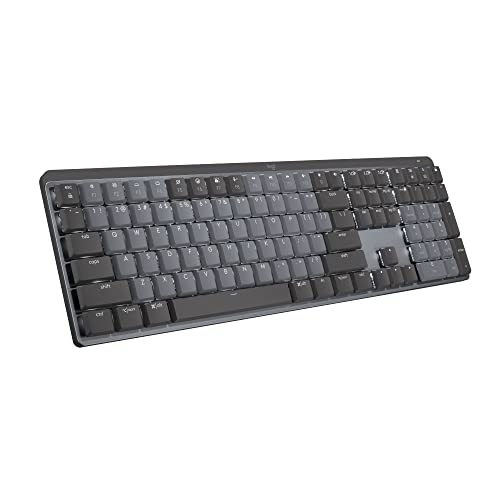
Pros
- Low-profile quiet tactile mechanical switches
- Multi-device pairing across up to three devices
- Smart backlighting with automatic proximity detection
- Includes Logi Bolt receiver and Bluetooth support
- Up to 10 months battery life without backlighting
Cons
- Battery life drops significantly with backlighting enabled
- Full-size footprint takes up substantial desk space

Pros
- Versatile tri-mode wireless and wired connectivity
- Hot-swappable PCB supports 3-pin and 5-pin switches
- Large 8000mAh rechargeable internal battery
- Gasket mount with five-layer acoustic dampening
- Durable double-shot PBT keycaps
Cons
- Heavy build at over 3.3 pounds
- Driver software required for advanced macros and rhythm lighting

Pros
- Compact 60% layout maximizes mouse room
- Smooth 45g linear red switches
- Detachable USB-C cable enhances portability
- Durable double-shot keycaps resist fading
- Full 61-key anti-ghosting rollover
Cons
- Lacks dedicated arrow and navigation keys
- Limited to wired USB-C operation
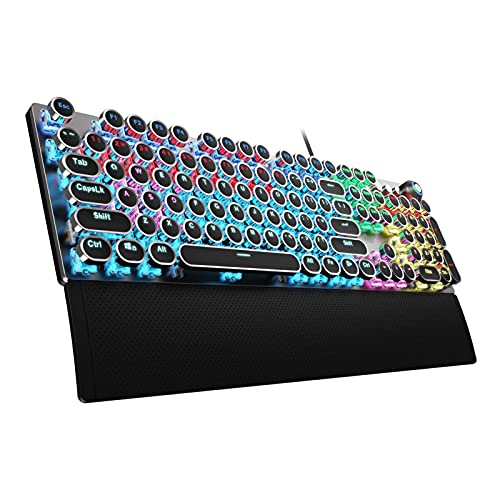
Pros
- Tactile clicky blue mechanical switches
- Dedicated knob for media and lighting controls
- Full 104-key anti-ghosting support
- Sturdy aluminum alloy top plate
- Included magnetic wrist rest
Cons
- Clicky switches produce loud audible noise
- Round keycap profile requires an adjustment period
- Wired-only connection with no wireless functionality

Pros
- Up to 8000 Hz polling rate
- Rapid trigger with 0.02mm step distance
- Hall Effect magnetic switches avoid mechanical wear
- Browser-based configuration requires no local software installation
- Compact 60 percent layout saves desk space
Cons
- Compact 60 percent layout lacks dedicated arrow and navigation keys
- Restricted to a wired connection
Best Mechanical Keyboards for a Budget Build
Redragon K521 Upgrade Rainbow LED Gaming Keyboard: Basic Full-Size Pick
The K521 provides 104 keys, multimedia combinations, one-touch lighting controls, and anti-ghosting for 19 keys. Its mechanical-feeling design and plug-and-play compatibility across Windows, macOS, PS4, PS5, and Xbox suit a basic shared gaming and typing setup.
Pros: Full-size layout, dedicated multimedia combinations, adjustable lighting, and broad stated platform compatibility. Cons: The listing describes mechanical-feeling keys, not conventional mechanical switches, and anti-ghosting is specified for 19 keys. Who should skip it: Skip it if genuine mechanical switches or full-key rollover are priorities.
Compare it with keyboard-and-mouse options for gaming PCs if you are planning the rest of your control setup.
Kisnt KN85 Wireless Mechanical Keyboard: Compact Tri-Mode Choice
This 85-key, 75% board keeps function and arrow keys while omitting the number pad. It offers Bluetooth 5.0, 2.4GHz wireless, and USB-C connections, plus hot-swappable linear switches and a stated 4,000mAh battery.
Pros: Multiple connection modes, three Bluetooth channels, hot-swap support for three- and five-pin switches, and a compact layout. Cons: Wireless performance depends on mode, and the Windows-only driver works in wired or 2.4GHz mode. The maker advises charging with a 5V 1A source and says fast chargers may damage it. Who should skip it: Skip it if you need a number pad or prefer a simple wired board.
AULA WIN68 HE Mechanical Gaming Keyboard 60%: Adjustable Magnetic Switches
The wired 68-key WIN68 HE uses Hall Effect magnetic switches with adjustable actuation from 0.02mm to 3.44mm. Its advertised 8,000Hz polling rate and compact design may appeal to players who want configurable input and more room for mouse movement.
Pros: Adjustable actuation, rapid-trigger features, detachable cable, and a Windows web driver for key mapping and lighting. Cons: Its 60% layout relies on Fn combinations for many commands, and the driver does not support Mac. Advertised response figures are manufacturer specifications, not independent measurements. Who should skip it: Skip it if you need dedicated navigation keys or a number pad.
Logitech G413 SE Full-Size Mechanical: Mainstream Wired Alternative
The G413 SE combines a full-size layout, tactile mechanical switches, PBT keycaps, white backlighting, and six-key rollover anti-ghosting. Its aluminum-magnesium top case and FN media controls make it a straightforward option for a desktop build.
Pros: Full-size keys, wear-resistant PBT caps, tactile switches, and a sturdy stated top-case material. Cons: It is wired, offers white rather than configurable RGB lighting, and provides six-key rather than full-key rollover. Who should skip it: Skip it if low cost, wireless use, hot-swapping, or extensive lighting customization matters most.
Redragon Mechanical Gaming Keyboard Wired: Hot-Swappable Full-Size Option
This Redragon model has linear red switches, hot-swap support, full-key anti-ghosting, programmable macros, and 11 backlight modes. It is a practical fit for someone seeking a conventional wired mechanical keyboard with room to change switches later.
Pros: Hot-swappable switches, macro editing, multimedia shortcuts, and stated compatibility with PC and Mac. Cons: The backlight color cannot be changed, despite its adjustable effects, and the supplied data does not specify its layout size. Who should skip it: Skip it if you require wireless connectivity, a confirmed compact layout, or multi-color RGB control.
AULA F99 Wireless Mechanical Keyboard: Compact Layout with Number Pad
The F99 uses a 99-key, 96% layout that retains a number area while reducing the footprint compared with a conventional full-size arrangement. It supports Bluetooth, 2.4GHz, and USB wired connections, hot-swappable switches, and up to five connected devices.
Pros: Tri-mode connectivity, multiple-device switching, hot-swap support, PBT keycaps, and an 8,000mAh battery. Cons: It is larger than compact 60% or 75% boards, and the supplied information does not state battery runtime. Who should skip it: Skip it if your priority is the smallest possible keyboard or a basic low-cost wired model.
AULA F2088 Typewriter Style Mechanical: Full-Size with Clicky Blue Switches
The wired F2088 offers 104 keys, blue switches, a media and lighting knob, and a magnetic wrist rest. Its clicky switch description and round retro keycaps make it a distinctive full-size choice for users who enjoy audible, tactile feedback.
Pros: Full-key anti-ghosting, multiple lighting effects, dedicated media controls, and stated Windows, Linux, and Mac support. Cons: Clicky switches may be unsuitable in shared or quiet rooms, and its broad design takes more desk space than compact layouts. Who should skip it: Skip it if you want quiet keys, wireless use, or a minimalist compact board.
TMKB 60% Mechanical Gaming Keyboard: Compact Wired Board
This 61-key keyboard uses linear red switches, detachable USB-C, double-shot keycaps, and 15 LED lighting modes. Its compact layout can free desk space for mouse movement, while the stated compatibility includes Windows, Linux, and macOS.
Pros: Detachable cable, compact form, adjustable lighting, and stated 61-key rollover. Cons: A 60% layout omits dedicated arrow and function-key rows, so users must rely on key combinations. Who should skip it: Skip it if you regularly use navigation keys, function keys, or a number pad.
Aula WIN60 HE: Compact Hall Effect Gaming Keyboard
The WIN60 HE is a wired 60% keyboard with magnetic switches, adjustable actuation, rapid-trigger functions, and an advertised polling rate up to 8,000Hz. Its web-based driver supports remapping, macros, and RGB customization, according to the product information.
Pros: Compact footprint, magnetic switches, configurable input, and web-based customization. Cons: It lacks dedicated keys found on larger layouts, and the listing does not provide a stated actuation range for this model. Performance claims are manufacturer specifications. Who should skip it: Skip it if you want a full-size keyboard or need clearly documented actuation measurements before choosing.
Logitech MX Mechanical Wireless Illuminated: Premium Features, Not a Budget Priority
The full-size MX Mechanical pairs low-profile tactile quiet switches with Bluetooth or the included Logi Bolt receiver and supports up to three devices. Smart illumination and USB-C charging target users who value multi-device productivity alongside gaming.
Pros: Wireless multi-device support, low-profile tactile switches, adaptive backlighting, and customizable functions. Cons: Its feature set is less focused on a budget gaming build, and the supplied information does not specify hot-swapping or gaming polling rate. Who should skip it: Skip it if your build budget is tight or you want a wired gaming-first keyboard.
How to Choose a Keyboard for a Budget Build
Decide Which Keys and Layout You Need
Full-size boards retain a number pad, while 75% models keep arrow and function keys in a smaller footprint. A 60% keyboard saves more desk space but moves many commands to Fn combinations. Consider your regular games, work, and number entry before choosing.
Check Switch Type and Upgrade Options
Linear switches generally avoid a tactile bump, while the listed tactile and clicky models provide different feedback. Hot-swap support lets you replace compatible switches without soldering, but confirm pin compatibility. The K521 is described as mechanical-feeling, so do not treat it as a confirmed mechanical-switch model.
Match Connectivity to Your Setup
Wired USB models avoid wireless pairing and charging considerations. Tri-mode boards add Bluetooth and 2.4GHz options, but check the specific device and software requirements. For example, the Kisnt driver is Windows-only and limited to wired or 2.4GHz operation.
Keep Gaming Specifications in Perspective
Polling rate and adjustable actuation can matter to players seeking configurable input, but advertised figures do not establish real-world results. For general gaming, layout, switch feel, rollover, and reliable compatibility may be more useful priorities than a headline polling number.
Frequently Asked Questions
Does a budget keyboard need hot-swappable switches?
No. Hot-swapping is useful if you want to change compatible switches without soldering, but it is not essential for a working gaming setup. A fixed-switch board may be a simpler fit if you already know the feel you prefer.
Is a 60% keyboard suitable for everyday typing?
It can be, if you are comfortable accessing arrows, function keys, and other commands through Fn combinations. Choose a 75%, 96%, or full-size layout if those keys need to remain directly accessible.


Write Your Review
No reviews yet. Be the first to share your experience!