

Choosing the best gaming laptops for video editing requires balancing high-throughput graphics cards, fast multi-core processors, and sufficient system memory. Modern editing suites like Adobe Premiere Pro, DaVinci Resolve, and DaVinci Studio rely heavily on dedicated GPU encoders alongside raw CPU compute. Gaming laptops often serve as cost-effective workstations because their thermal designs handle continuous processing loads under sustained rendering.
The models in this guide span dedicated mobile discrete graphics options and high-memory integrated systems. If your primary focus is grading 4K footage or applying GPU-accelerated motion effects, prioritizing a dedicated NVIDIA GeForce GPU ensures full NVENC encoder support. For general timeline drafting and lighter multi-stream 1080p edits, high-core processors paired with large system memory pools can also provide stable scrubbing performance.

Pros
- NVIDIA GeForce RTX 5070 Laptop GPU
- Intel Core i7-13620H processor
- Slim 19.45mm chassis design
- Flexible 180-degree lay-flat hinge

Pros
- High-end NVIDIA GeForce RTX 5080 Laptop GPU
- Fast 16-inch 240Hz QHD+ display
- Powerful Intel Core Ultra 9-275HX processor
- Generous 2TB NVMe SSD and 32GB DDR5 RAM
- Next-generation Thunderbolt 5 and Wi-Fi 7 support
Cons
- Relatively heavy at nearly six pounds
- Thick chassis at over 1.1 inches

Pros
- Smooth 240Hz WQXGA display with 500 nits brightness
- Intel Core Ultra HX architecture with integrated NPU
- Advanced Cryo-tech cooling maintains thermal stability
- Quick-toggle Stealth Mode minimizes fan noise and lighting
- Includes one year of onsite hardware support
Cons
- Heavier chassis at 5.86 pounds limits portability
- Quiet Mode lowers operating noise by limiting component performance
Pros
- Powerful NVIDIA GeForce RTX 4070 dedicated graphics
- Fast 13th Gen Intel Core i7 processor
- High-refresh 144Hz Full HD gaming panel
- Spacious 1TB NVMe solid-state storage
- High-speed DDR5 memory configuration
Cons
- Heavy total weight reduces overall portability
- Display capped at 1080p Full HD resolution

Pros
- NVIDIA GeForce RTX 5060 with 8GB GDDR7
- 144Hz IPS panel with NVIDIA G-SYNC
- Octa-core AMD Ryzen 7 processor with AI acceleration
- Expandable DDR5 system memory up to 32GB
- Modern HDMI 2.1 and USB-C Gen 2 ports
Cons
- Modest 512GB base storage capacity
- Carries noticeable heft at 5.28 pounds

Pros
- Fast 8-core AMD Ryzen 9 8945HS processor
- Expansive 17.3-inch Full HD display
- User-upgradeable DDR5 memory and storage
- High-speed USB4 connectivity with 100W fast charging
- Hardware webcam privacy shutter and fingerprint reader
Cons
- Integrated Radeon 780M graphics limits demanding AAA gaming
- Conflicting RAM capacity listed across product specifications

Pros
- Powerful 12-core AMD Ryzen AI 9 HX 370 processor
- Generous 64GB DDR5 memory and 2TB NVMe SSD
- Smooth 144Hz refresh rate on a large display
- High-speed 40Gbps USB4 port supports external graphics
- Touchpad fingerprint scanner for quick biometric authentication
Cons
- Lacks a discrete GPU, relying on integrated graphics
- Full HD resolution yields modest pixel density at 17.3 inches
- Large 17.3-inch footprint reduces overall travel portability

Pros
- AMD Ryzen 7 7735HS 8-core processor
- Capable Radeon 680M integrated graphics
- Fast 100W charging support
- Includes backlit keyboard and fingerprint reader
Cons
- Limited 8GB system memory capacity
- Small 256GB storage space
- Modest 6-hour advertised standby battery life

Pros
- AMD Ryzen 7 6800H 8-core processor
- Generous 24GB LPDDR5 memory
- Dual M.2 slots for storage expansion
- Lightweight 3.5-pound portable design
- Dual USB-C ports with DisplayPort output
Cons
- Lacks a dedicated graphics card
- Integrated graphics limit performance in demanding titles
Key Hardware Demands for Video Editing Workflows
Video rendering stresses internal laptop hardware differently than purely recreational gaming. While gaming prioritizes single-thread burst speeds and rasterization, timeline scrubbing and exporting rely on multi-threaded CPU rendering, high memory bandwidth, and dedicated media engines. Ensuring your prospective machine matches your specific project formats prevents frustrating timeline stutter.
Dedicated graphics hardware remains the single largest efficiency multiplier for creative software. Graphics cards from the NVIDIA GeForce RTX series include hardware-accelerated NVENC blocks that dramatically accelerate H.264, HEVC, and AV1 video encoding. If you often pair your machine with external color-calibrated gaming monitors, check for DisplayPort over USB-C or modern HDMI 2.1 outputs.
System memory dictates how many video layers, high-resolution source clips, and background applications you can juggle simultaneously. A baseline of 16GB handles basic 1080p timelines, but 32GB or 64GB becomes essential once you step up to multi-cam 4K workflows. Selecting a laptop with accessible SO-DIMM slots protects your investment as project resolutions increase over time.
Individual Hardware Breakdown
msi Vector 16 HX AI 16” 240Hz QHD+ Gaming Laptop
The msi Vector 16 HX AI 16” 240Hz QHD+ Gaming Laptop represents an uncompromising desktop replacement built for heavy timeline rendering. Featuring an Intel Core Ultra 9-275HX processor alongside an NVIDIA GeForce RTX 5080 Laptop GPU, it offers immense parallel compute for 4K and 8K workflows. The 32GB of DDR5 memory and 2TB NVMe solid state drive provide immediate headroom for large media caches without immediate component upgrades.
Its 16-inch QHD+ 240Hz display provides crisp UI scaling inside complex editing software interfaces. The inclusion of Thunderbolt 5 and Wi-Fi 7 enables ultra-fast external drive transfers, which is vital when moving raw footage from portable field drives. However, this workstation chassis prioritizes heavy thermal dissipation, meaning the machine is bulkier and will draw significant power under sustained creative exports.
Alienware 16X Gaming Laptop, RTX5070
For creators seeking high processing ceilings and premium panel specifications, the Alienware 16X Gaming Laptop, RTX5070 features an Intel Core Ultra 9 290HX processor. The integrated NPU and multi-core layout manage demanding background rendering, project compression, and generative creative plugins efficiently. The 16-inch WQXGA panel delivers 500 nits of peak brightness at 240Hz, making it an excellent choice for editors working in variable ambient lighting.
Equipped with an advanced thermal architecture and dedicated GeForce graphics, this machine manages long timeline exports without severe thermal throttling. Dell includes on-site hardware service for additional reliability if you use the system professionally. Note that high-performance HX class silicon consumes considerable energy, requiring the bundled power adapter to achieve maximum rendering clock speeds.
GIGABYTE Gaming A16 – Intel i7-13620H GeForce RTX
The GIGABYTE Gaming A16 – Intel i7-13620H GeForce RTX delivers modern mobile rendering power inside a relatively slim 19.45mm chassis. It pairs the 10-core Intel Core i7-13620H processor with an NVIDIA GeForce RTX 5070 Laptop GPU, providing robust NVENC hardware acceleration for DaVinci Resolve and Premiere Pro. A 180-degree lay-flat hinge also offers practical physical flexibility during client review sessions.
The RTX 5070 brings modern Blackwell architecture features, including dedicated tensor cores and high-speed video encoding pathways. This makes it an agile machine for hybrid creators who switch between gaming and mobile video production. Its primary compromise is the slimmer thermal envelope, which means cooling fans will run audibly during lengthy timeline exports.
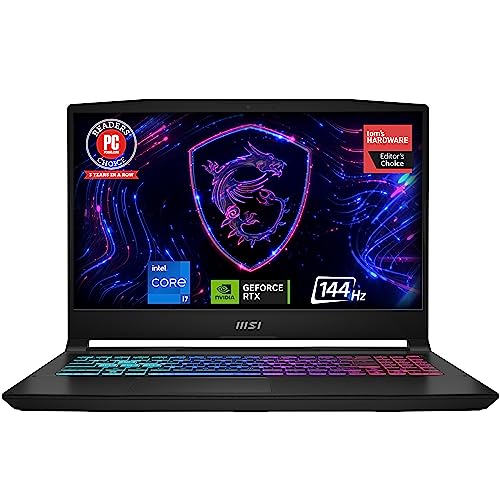
msi Katana 15 15.6″ 144Hz FHD Gaming Laptop
Balancing price and dedicated GPU power, the msi Katana 15 15.6″ 144Hz FHD Gaming Laptop utilizes an Intel 13th Gen Core i7 CPU and an NVIDIA GeForce RTX 4070 Laptop GPU. The 16GB of DDR5 memory and 1TB NVMe drive handle standard YouTube and commercial 1080p or 4K timelines smoothly. The Ada Lovelace architecture provides proven CUDA acceleration across the Adobe Creative Cloud suite.
MSI equips this configuration with their Cooler Boost 5 dual-fan setup to stabilize temperatures during long render queues. Connectivity includes Thunderbolt 4 for fast external scratch disk setups. The primary trade-off is the 1080p display resolution, which offers less screen real estate for wide audio tracks and timeline bins compared to QHD panels.
Lenovo LOQ 15.6″ IPS FHD 144Hz AMD Ryzen 7 250
The Lenovo LOQ 15.6″ IPS FHD 144Hz AMD Ryzen 7 250 represents a balanced entry point for creators needing discrete modern graphics on a sensible budget. Powered by an AMD Ryzen 7 250 8-core processor and an NVIDIA GeForce RTX 5060 with 8GB of GDDR7 VRAM, it handles hardware-accelerated video exports reliably. The 15.6-inch 300-nit IPS screen provides stable color reproduction for general content creation.
With 16GB of DDR5 memory preinstalled, the motherboard retains support for memory expansion up to 32GB as your editing projects expand. HDMI 2.1 and USB-C Gen 2 ports make linking external storage and displays straightforward. However, the pre-installed 512GB solid state drive is modest, meaning you will likely need an external SSD for large project media libraries.
NIMO 17.3″ AI Laptop, 12 Cores AMD Ryzen AI 9 HX
Editors working primarily with CPU-intensive workloads will find massive memory capacity in the NIMO 17.3″ AI Laptop, 12 Cores AMD Ryzen AI 9 HX. Driven by a 12-core AMD Ryzen AI 9 HX 370 processor, this machine includes an expansive 64GB of DDR5 RAM and a 2TB PCIe 4.0 SSD. The spacious 17.3-inch 144Hz display gives editors ample space to spread out multi-track timelines without clutter.
The 64GB RAM configuration prevents timeline freezing during complex multi-app tasks, such as running video editors alongside vector illustration software. It also supports 100W USB-C Power Delivery charging for convenient transport. However, it relies on integrated AMD Radeon 890M graphics, which will render GPU-heavy 3D effects and noise reduction passes slower than dedicated RTX hardware.
NIMO 17.3″ Gaming Laptop
The NIMO 17.3″ Gaming Laptop features an 8-core, 16-thread AMD Ryzen 9 8945HS processor paired with 32GB of DDR5 RAM and a 1TB SSD. Its large 17.3-inch screen provides an expansive viewing canvas that eliminates the cramped feeling of compact notebook displays. It also features user-replaceable memory and storage slots, ensuring simple future component maintenance.
With USB4 connectivity and 100W PD charging, moving large files across modern high-speed docks is fast and dependable. The integrated Radeon 780M graphics handle baseline video edits and 1080p cut-downs adequately. Those planning to export heavy 4K timelines with multiple color grading nodes will still notice the absence of dedicated discrete VRAM.
2026 15.6″ FHD Gaming Laptop
The 2026 15.6″ FHD Gaming Laptop from MITUNTUN is powered by an AMD Ryzen 7 6800H processor with 8 cores and 16 threads. It incorporates a generous 24GB of LPDDR5 memory and a 1TB NVMe solid state drive, supported by an additional open M.2 slot for future capacity growth. Pre-installed Windows 11 Pro makes it compatible with enterprise storage setups and remote desktop environments.
A lightweight 3.5-pound chassis combined with broad port selection, including dual USB-C connections and an SD card reader, facilitates smooth field ingest. While the 24GB memory configuration aids general multi-tasking, graphic processing is driven by integrated Radeon silicon. Highly intensive GPU timeline color grades will naturally take longer to export than on dedicated RTX notebooks.
Light Gaming-AI-Laptop, AMD Ryzen 7 7735HS 8GB DDR5
Serving as an accessible entry point, the Light Gaming-AI-Laptop,AMD Ryzen 7 7735HS 8GB DDR5 provides an 8-core AMD Ryzen 7 7735HS processor. It supports basic 1080p timeline edits, social media clip generation, and lightweight streaming tasks via integrated Radeon 680M graphics. Fast 100W charging and a 54Wh battery keep the notebook portable for mobile editing sessions.
While the processor itself is capable of solid multi-thread crunching, the 8GB of DDR5 RAM and 256GB SSD are restrictive for modern creative software. You will need to manage application caches strictly and rely on external storage drives when processing high-bitrate media files. It functions best for students and casual creators assembling short-form 1080p video content.
Hardware Comparison for Content Creation
| Model | Processor | Graphics Hardware | RAM / Storage | Display Spec |
|---|---|---|---|---|
| MSI Vector 16 HX AI | Intel Core Ultra 9-275HX | NVIDIA RTX 5080 Laptop | 32GB DDR5 / 2TB SSD | 16″ QHD+ 240Hz |
| Alienware 16X | Intel Core Ultra 9 290HX | NVIDIA RTX 5070 Laptop | Not specified / Not specified | 16″ WQXGA 240Hz 500 nits |
| GIGABYTE Gaming A16 | Intel Core i7-13620H | NVIDIA RTX 5070 Laptop | Not specified / Not specified | 16″ 180-degree hinge |
| MSI Katana 15 | Intel Core i7-13th Gen | NVIDIA RTX 4070 Laptop | 16GB DDR5 / 1TB SSD | 15.6″ FHD 144Hz |
| Lenovo LOQ 15.6″ | AMD Ryzen 7 250 | NVIDIA RTX 5060 Laptop (8GB) | 16GB DDR5 / 512GB SSD | 15.6″ FHD 144Hz IPS |
| NIMO 17.3″ AI Laptop | AMD Ryzen AI 9 HX 370 | AMD Radeon 890M (iGPU) | 64GB DDR5 / 2TB SSD | 17.3″ FHD 144Hz |
| NIMO 17.3″ Gaming | AMD Ryzen 9 8945HS | AMD Radeon 780M (iGPU) | 32GB DDR5 / 1TB SSD | 17.3″ FHD |
| MITUNTUN 15.6″ | AMD Ryzen 7 6800H | AMD Radeon (iGPU) | 24GB LPDDR5 / 1TB SSD | 15.6″ FHD IPS |
| NIMO Light Gaming | AMD Ryzen 7 7735HS | AMD Radeon 680M (iGPU) | 8GB DDR5 / 256GB SSD | FHD Standard |
Selecting the Right Configuration for Your Editing Needs
If your workload involves commercial client work, 4K multi-cam timelines, and heavy color correction in DaVinci Resolve, choose a model with discrete NVIDIA RTX graphics. The msi Vector 16 HX AI 16” 240Hz QHD+ Gaming Laptop and GIGABYTE Gaming A16 – Intel i7-13620H GeForce RTX offer the necessary GPU compute and hardware NVENC encoding blocks to keep render times minimal.
For editors who focus mainly on long-form 1080p cuts, podcast production, and broad multitasking with numerous open browser tabs and assets, the NIMO 17.3″ AI Laptop, 12 Cores AMD Ryzen AI 9 HX provides massive 64GB RAM capacity and a broad visual workspace. Review your editing software specifications carefully to ensure your chosen hardware aligns with your production standards. You can explore additional portable choices across our Gaming Laptops section or read our analysis of realistic portable options for tighter setups.
Frequently Asked Questions
Do I need a discrete GPU for video editing?
A dedicated GPU is not strictly mandatory for standard 1080p cuts, but it becomes critical when handling high-bitrate 4K footage, complex visual effects, or timeline grading. NVIDIA RTX GPUs feature dedicated hardware encoding pipelines that reduce video export times significantly compared to running software-only CPU renders.
How much RAM is required for video editing in 2026?
A baseline of 16GB is recommended for editing 1080p and simple 4K projects. If you work regularly with multiple video streams, high-resolution RAW codecs, or background compositing tools, upgrading to 32GB or 64GB ensures stable system performance without caching bottlenecks.




Write Your Review
No reviews yet. Be the first to share your experience!