

Finding the best gaming mouse under $30 used or budget-new comes down to prioritizing core internal hardware over marketing gimmicks. A stable optical sensor, dependable microswitches, and a comfortable grip shape determine your tracking precision in fast titles.
When shopping in the sub-$30 range, secondhand units from established brands like Razer or Logitech often compete directly with feature-packed budget wireless mice. Evaluating connectivity modes, onboard memory, and physical wear ensures you select hardware that holds up during intense play sessions.
Quick Recommendation Summary
For competitive shooter players who value click speed and zero latency, the Razer Cobra Wired Gaming Mouse leads with Gen-3 optical switches rated for 90 million clicks and a lightweight 58-gram shell. Players looking for ultra-portable wireless capability with swappable batteries will find the Razer Orochi V2 Wireless Gaming Mouse, PC & Mac well suited for hybrid work and travel setups.
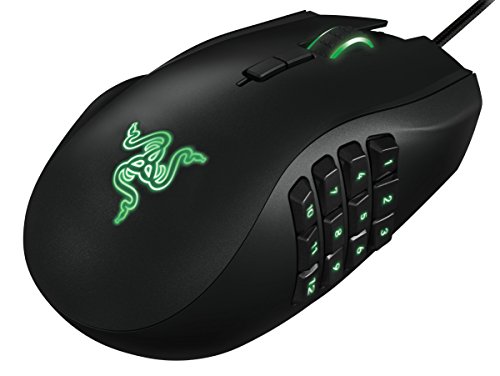
If you prefer dedicated macro controls for MMOs, the Redragon Gaming Mouse, MMO Mouse Gaming UP 12400 supplies a 12-button side cluster and adjustable tuning weights. For consistent daily performance on a traditional wired setup, the Logitech G203 Wired Gaming Mouse – Black delivers clean 8,000 DPI tracking backed by proven software support. If your goal is high-tier competitive play, you can also explore our guide to the best gaming mouse for esports to review tournament-grade pointers.

Pros
- Broad XXL surface fits keyboard and mouse
- Micro-woven cloth optimized for various mouse sensors
- Non-slip rubber base stays firmly in place
- Low-profile design minimizes edge elevation
Cons
- Large footprint requires substantial desk space
- Thin 0.08-inch profile provides minimal wrist cushioning

Pros
- Tri-mode 2.4GHz, Bluetooth 5.3, and wired USB-C connectivity
- Lightweight 67-gram build reduces wrist fatigue
- Sensor supports up to 12,000 DPI and 1000Hz polling
- Dedicated rapid-fire button for quick in-game actions
- Can store and switch between four paired devices
Cons
- Configuration software is unavailable when using Bluetooth
- Driver programming features only support Windows systems

Pros
- Ultralight 58-gram frame for quick control
- Fast optical switches rated for 90 million clicks
- Low-drag Speedflex cable reduces resistance
- Pure PTFE feet deliver a smooth glide
- Vibrant customizable Chroma gradient underglow
Cons
- Tethered wired connection limits movement range
- Advanced adjustments require proprietary desktop software

Pros
- Versatile tri-mode wireless and wired connectivity options
- Ventilated lightweight honeycomb shell design
- Rechargeable battery with USB-C play-and-charge support
- Seven programmable buttons for custom macro setups
- Up to 1000Hz polling rate for responsive tracking
Cons
- Open honeycomb design is vulnerable to dust accumulation
- Full macro and button customization requires software installation

Pros
- Lightweight 58g construction
- Flexible tri-mode connectivity options
- Sensor supports up to 32,000 DPI
- Responsive 1000Hz polling rate
- Rechargeable battery via USB-C
Cons
- Battery runtime hours are not specified
- Driver software platform compatibility is not detailed

Pros
- Dual-mode Bluetooth and low-latency HyperSpeed Wireless connectivity
- Advertised battery life reaches up to 1,100 hours
- Hybrid slot accepts either AA or AAA batteries
- Lightweight and compact design suitable for travel setups
- Durable mechanical switches rated for 60 million clicks
Cons
- Advertised sub-60g weight excludes the required battery
- Lacks an integrated rechargeable internal battery

Pros
- Tri-mode connectivity with multi-device pairing
- Driverless web-based configuration for PC and Mac
- Up to 180 hours of ECO battery runtime
- Smooth PTFE skates for low-friction movement
Cons
- Relatively heavy 90g weight for a honeycomb mouse
- Battery life drops to 48 hours with RGB active

Pros
- Tri-mode 2.4GHz, Bluetooth, and USB-C connectivity
- Adjustable polling rates up to 1000Hz
- Supports gaming while charging over USB-C
- Programmable buttons with macro support
- Ergonomic contoured chassis design
Cons
- Battery life drops significantly with RGB lighting enabled
- Advanced customization requires Windows software download
- Aggressive one-minute idle sleep timer

Pros
- 8,000 DPI sensor with zero smoothing
- Crisp spring-tensioned mechanical primary buttons
- Six fully programmable buttons
- Customizable LIGHTSYNC RGB illumination
- Long 6.89-foot USB cable
Cons
- Tethered cable restricts placement compared to wireless mice
- Full button and lighting customization requires Logitech G HUB

Pros
- 19 programmable buttons for complex macros
- Modular weight tuning with eight removable weights
- Five onboard memory profiles for custom layouts
- Wide DPI adjustment range up to 12400
Cons
- Software download required for macro and lighting customization
Comparing Top Budget and Pre-Owned Gaming Mice
Entry-level and pre-owned mice differ significantly across switch mechanics, connection protocols, and physical weight. The table below outlines documented specifications across these selections to help guide your choice.
| Model | Max DPI | Weight | Connectivity | Switch Type |
|---|---|---|---|---|
| Razer Cobra | 8,500 | 58g | Wired (Speedflex) | Gen-3 Optical |
| Razer Orochi V2 | 18,000 | <60g (excl. battery) | 2.4GHz / Bluetooth | Mechanical Gen-2 |
| Logitech G203 | 8,000 | 85g | Wired (USB-A) | Spring-Tensioned Mechanical |
| Aula SC620 | 12,000 | 67g | 2.4GHz / BT 5.3 / Wired | Not specified |
| TMKB Falcon M1 | 24,000 | 90g | 2.4GHz / BT 5.2 / Wired | 50M Mechanical |
| Redragon M901K | 12,400 | Adjustable (Weights) | Wired (USB-A) | Not specified |
| Redragon M602 Griffin | 8,000 | Not specified | 2.4GHz / Bluetooth / Wired | Not specified |
| Tri-Mode 58g | 32,000 | 58g | 2.4GHz / BT 5.0 / Wired | Not specified |
| SOLAKAKA SM600 | 13,200 | Not specified | 2.4GHz / BT 5.1 / Wired | Not specified |
Individual Mouse Breakdown
Razer Cobra Wired Gaming Mouse
The Razer Cobra Wired Gaming Mouse is designed around a lean 58-gram symmetrical chassis. Its primary selling point is the implementation of Razer Gen-3 optical switches, which use light beams rather than physical metal contacts to actuate commands.
This design prevents mechanical debounce delay and removes the risk of double-clicking issues commonly observed in older pre-owned mice. With 100 percent PTFE feet and a flexible Speedflex cable, it glides freely across cloth pads without snagging, making it a reliable pick for high-movement FPS gaming.
Razer Orochi V2 Wireless Gaming Mouse
The Razer Orochi V2 Wireless Gaming Mouse, PC & Mac caters to fingertip and claw grip users looking for cord-free mobility. It incorporates an 18,000 DPI Focus X optical sensor and dual-mode wireless connectivity via 2.4GHz HyperSpeed and low-energy Bluetooth.
Power is supplied through a hybrid battery compartment that takes a single AA or AAA cell rather than an integrated pouch. While this eliminates internal degradation over time, battery changes add ongoing maintenance, and the compact body may feel cramped for users with large hands using a full palm grip.
Logitech G203 Wired Gaming Mouse
The Logitech G203 Wired Gaming Mouse – Black utilizes an egg-like ambidextrous shell that has remained an esports standard for years. It features an 8,000 DPI gaming-grade sensor that tracks with zero artificial smoothing across standard sensitivity ranges.
Metal spring tensioning beneath the left and right buttons gives each click a clean, tactile reset. The primary compromise is its stiffer rubberized cable compared to newer paracord-style designs, but its durable construction makes it a dependable secondhand purchase.
Aula SC620 Wireless Gaming Mouse
The Aula SC620 Wireless Gaming Mouse weighs 67 grams and provides tri-mode connectivity across 2.4GHz wireless, Bluetooth 5.3, and USB-C wired connections. It features seven programmable inputs, including a dedicated rapid-fire key intended to simplify burst commands in action titles.
Its optical sensor reaches up to 12,000 DPI with a standard 1,000Hz polling rate. Note that driver configuration tools are primarily designed for Windows, meaning advanced macro mapping remains limited when operating over Bluetooth or on alternative operating systems.
Redragon M901K MMO Gaming Mouse
The Redragon Gaming Mouse, MMO Mouse Gaming UP 12400 targets players requiring dense command inputs without leaving the mouse. It features 19 total programmable buttons, which include a 12-button side grid optimized for rotation-heavy MMOs and complex desktop macros.
A built-in weight cartridge holds eight 2.4-gram metal discs, enabling physical mass tuning to suit personal resistance preferences. The ergonomic right-hand contour supports wide palm grips, though the heavy structure is less optimal for rapid crosshair repositioning in competitive shooters.
TMKB Falcon M1 Wireless Gaming Mouse
The TMKB Falcon M1 Wireless Gaming Mouse, 24000 DPI integrates a 1,000mAh internal battery that provides extended runtime between USB-C charges. It tracks up to 24,000 DPI with an advertised 300 IPS tracking speed and 35G acceleration tolerance.
Its perforated honeycomb chassis reduces sweat accumulation during prolonged play sessions while keeping the overall mass around 90 grams. A notable advantage is the zero-install web driver, allowing users on locked work machines or secondary systems to rebind keys without background system software.
SOLAKAKA SM600 Wireless Gaming Mouse
The SOLAKAKA SM600 Wireless Gaming Mouse,Tri-Modes offers broad platform compatibility, storing up to four devices across dual Bluetooth 5.1 profiles, 2.4GHz wireless, and wired Type-C modes. It includes an internal 600mAh rechargeable lithium battery that supports charging while playing.
The honeycomb cutout design improves airflow, while an integrated top toggle handles lighting pattern adjustments on the fly. However, extensive customization of the 13,200 DPI ceiling and macro profiles depends on proprietary Windows software.
Redragon M602 Griffin RGB Gaming Mouse
The Redragon M602 Griffin RGB Gaming Mouse brings an ergonomic right-handed chassis to the sub-$30 category. It supports tri-mode operation and allows users to step through four polling rate tiers up to 1,000Hz alongside DPI increments reaching 8,000.
Its wider body and flared thumb ledge relieve grip tension for palm grip players. The wireless battery life drops considerably when full RGB spectrum effects remain enabled, requiring regular USB-C cable top-offs during daily gaming.
Tri-Mode 58g Wireless Gaming Mouse
The Tri-Mode 58g Wireless Gaming Mouse 32000 DPI stands out by achieving an ultra-lightweight 58-gram form factor without external shell perforations. It features an optical sensor rated up to 32,000 DPI and supports instantaneous device toggling between desktop, laptop, and tablet devices.
Its lightweight profile limits wrist strain during high-velocity gameplay, backed by a 500mAh internal battery. Buyers looking at third-party budget wireless mice should verify long-term driver support, as companion tools can vary in stability across operating system updates.
Surface Accessory: SteelSeries QcK XXL Gaming Mouse Pad
Sensor accuracy relies directly on the tracking surface underneath your mouse feet. The SteelSeries QcK XXL Gaming Mouse Pad – Black provides desktop coverage measuring 35 by 16 inches, giving ample room for full keyboard and mouse placement.
Its micro-woven cloth surface delivers consistent dynamic friction for both optical and laser sensors. If you pick up a secondhand pointer with worn glide skates, pairing it with a high-thread-count desk mat helps smooth out inconsistent tracking.
Key Buying Considerations for Budget and Used Mice
When selecting a gaming mouse under $30 used, pay close attention to physical wear on critical contact points. Mechanical microswitches degrade over time, leading to unintentional double clicks on worn hardware. Mice featuring optical switches, such as the Razer Cobra, eliminate this electrical failure point entirely.
Examine the underside condition as well. Worn PTFE glide feet increase drag and cause inconsistent resistance across your desk pad. If buying used, factor in whether replacement skates are easily available online for that specific chassis.
Wireless models require extra scrutiny regarding power storage. Pre-owned mice with non-removable lithium batteries may show reduced capacity after hundreds of discharge cycles. Removable battery solutions like the Orochi V2 bypass internal cell wear, while wired mice avoid battery degradation completely.
Frequently Asked Questions
Is a used gaming mouse safe to purchase?
A used gaming mouse is generally a safe purchase if the previous owner kept the sensor lens clean and the primary switches remain crisp. Optical switch designs and modular battery compartments provide the safest secondhand reliability.
Does a higher DPI mean better gaming precision?
Higher DPI numbers do not automatically improve in-game accuracy. Most competitive players operate between 400 and 1,600 DPI; the more important specifications are tracking consistency, sensor stability at 1,000Hz polling, and low lift-off distance.
Final Verdict: Which Mouse Should You Buy?
If you play fast first-person shooters and prioritize durability, choose the Razer Cobra Wired Gaming Mouse for its optical switches, featherlight 58-gram chassis, and drag-free cable. Its click mechanics make it the safest choice against long-term hardware wear.
For desk clutter freedom and versatile laptop use, pick the Razer Orochi V2 Wireless Gaming Mouse, PC & Mac, which eliminates battery wear concerns via standard AA or AAA cells. Meanwhile, players needing deep macro configurations for complex MMO hotbars should opt for the Redragon Gaming Mouse, MMO Mouse Gaming UP 12400.





Write Your Review
No reviews yet. Be the first to share your experience!