

Selecting the best budget 15 inch gaming laptop comes down to one clear technical choice: whether your workload requires dedicated graphics or if an integrated solution meets your needs. Machines equipped with discrete GPUs such as the GeForce RTX 3050 provide the baseline graphical throughput needed for modern games, while integrated options demand lower entry costs at the expense of rendering speed.
Quick Comparison of Budget 15-Inch Laptops
Below is the lineup of 10 laptops reviewed in this guide. We feature models running from baseline integrated units to systems equipped with standalone graphics cards.

Pros
- Capable AMD Ryzen 5 7535HS processor
- Spacious 15.3-inch Full HD+ display
- Updated Wi-Fi 6 and Bluetooth 5.3 connectivity
- Includes fast-charging Type-C and HDMI ports
Cons
- No dedicated graphics card specified for demanding games
- Conflicting RAM and SSD capacity across listing specifications
- Base 256GB storage severely restricts game installations

Pros
- 6-core AMD Ryzen 5 7535HS processor
- 16GB high-bandwidth DDR5 memory
- Generous 1TB PCIe NVMe storage
- Taller 16:10 WUXGA IPS panel
- Fast Wi-Fi 6 and Bluetooth 5.3
Cons
- Standard 60Hz display refresh rate
- Limited 45% NTSC color gamut
- No dedicated graphics card specified

Pros
- Smooth 144Hz Full HD IPS panel
- Dedicated RTX 3050 graphics with 6GB VRAM
- Fast Wi-Fi 6 and Gigabit Ethernet connectivity
- Versatile 10Gbps USB ports with power-off charging
- Full-size backlit keyboard with integrated numeric keypad
Cons
- Only 8 GB of installed system memory
- Limited 250-nit brightness and 45% NTSC color coverage

Pros
- Generous 16GB LPDDR5 RAM for smooth multitasking
- Full HD touchscreen display for intuitive navigation
- USB-C port supports both display output and charging
- Modern Wi-Fi 6 connectivity included
Cons
- Limited to PCIe Gen3 SSD speeds
- Entry-level Ryzen 5 7520U restricts demanding tasks
Pros
- Six-core AMD Ryzen 5 7535HS processor
- Anti-glare IPS display with 1920x1200 resolution
- USB-C supports Power Delivery and DisplayPort
- Physical privacy shutter on HD webcam
- Wi-Fi 6 connectivity for reliable wireless networking
Cons
- Integrated Radeon 660M graphics limits modern gaming performance
- 8GB RAM restricts heavy multitasking workloads

Pros
- High-resolution 165Hz WQXGA PureSight OLED display
- Powerful Intel Core i7-14700HX processor
- Dedicated NVIDIA GeForce RTX 5070 graphics
- Fast USB Type-C charging up to 70 percent
- Portable 4.4-pound chassis design
Cons
- Base configuration limited to 16 GB of memory
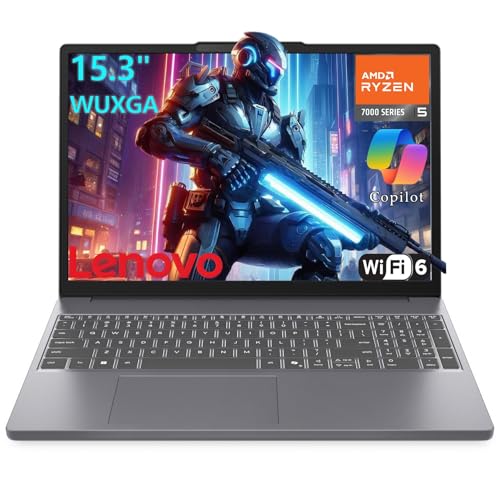
Pros
- AMD Ryzen 5 7535HS 6-core processor
- 16:10 WUXGA anti-glare IPS display
- USB-C with Power Delivery and DisplayPort support
- Physical webcam privacy shutter
- Modern Wi-Fi 6 and Bluetooth 5.3 connectivity
Cons
- Modest 256GB internal storage capacity
- Limited to 8GB of system memory
- Display restricted to 60Hz and 45% NTSC

Pros
- Dedicated NVIDIA Quadro M2000M graphics card
- Ample 16GB DDR4 system memory
- Responsive 512GB solid-state storage
- Pre-installed Windows 10 Pro operating system
Cons
- Heavy 7-pound chassis limits portability
- Older 6th-generation Intel quad-core architecture

Pros
- Crisp 15.6-inch Full HD display
- Fast Wi-Fi 6 wireless networking
- Slim and lightweight portable chassis
- Includes HDMI and USB Type-C connectivity
- Responsive PCIe solid-state storage
Cons
- Limited 4GB RAM restricts multitasking capability
- Modest 128GB SSD capacity fills up quickly
- Entry-level processor unsuited for heavy workloads

Pros
- Generous 24GB DDR5 memory capacity
- Fast 1TB PCIe NVMe storage
- 16:10 aspect ratio provides increased vertical workspace
- Wi-Fi 6 and Bluetooth 5.3 wireless support
- Integrated webcam includes physical privacy shutter
Cons
- No dedicated graphics processor specified in documentation
- Display refresh rate is not documented
Individual Hardware Breakdown and Analysis
HP Victus Gaming 15 Laptop
The HP Victus Gaming 15 Laptop is the standout choice for traditional PC gaming in this price bracket. Equipped with an Intel Core i5-13420H processor and an NVIDIA GeForce RTX 3050 with 6GB of GDDR6 VRAM, it handles 1080p gaming significantly better than any machine using integrated graphics.
The 15.6-inch 1080p IPS panel features a 144Hz refresh rate, allowing smooth visual tracking in fast-paced competitive titles. However, the system includes only 8GB of DDR4 memory and a 250-nit display with 45% NTSC color gamut coverage, meaning users may want to upgrade RAM later for demanding modern releases.
Lenovo 15 Gaming Laptop, AMD Ryzen 5 7535HS (24GB RAM, 1TB SSD)
For buyers needing extensive memory and storage on a budget, this variant of the Lenovo 15 Gaming Laptop, AMD Ryzen 5 7535HS carries 24GB of DDR5 RAM and a 1TB PCIe NVMe solid-state drive. The 6-core, 12-thread Ryzen 5 7535HS processor operates smoothly alongside this generous memory pool for heavy multitasking and casual esports.
Its 15.3-inch WUXGA screen runs at 1920×1200 with a 16:10 aspect ratio, providing extra vertical space for productivity alongside casual play. The main limitation is that it relies on integrated AMD Radeon 660M graphics, which cannot compete with dedicated gaming GPUs in heavier titles.
Lenovo 15″ Gaming Laptop Computer (16GB RAM, 1TB SSD)
The Lenovo 15″ Gaming Laptop Computer offers a balanced middle ground between system memory and storage capacity. It combines the AMD Ryzen 5 7535HS processor with 16GB of DDR5 memory and a 1TB PCIe NVMe SSD, avoiding the immediate storage crunches common on entry-level models.
Its 15.3-inch IPS anti-glare screen is rated for 300 nits of brightness with a 60Hz refresh rate. While the 16GB RAM configuration allows smooth multitasking, high-frame-rate competitive gaming remains constrained by the 60Hz display panel and integrated graphics core.
Lenovo Gaming Laptop, AMD 6-core Ryzen 5 7535HS (512GB SSD)
The Lenovo Gaming Laptop, AMD 6-core Ryzen 5 7535HS features 8GB of DDR5 memory and a 512GB NVMe SSD. It relies on the integrated Radeon 660M graphics engine to drive light esports titles such as Valorant or League of Legends at native 1200p resolution.
The chassis includes modern connectivity with Wi-Fi 6, Bluetooth 5.3, HDMI, and a USB-C port supporting Power Delivery and DisplayPort. The trade-off is the 8GB base memory allocation, which is shared between the Windows operating system and the integrated GPU.
Lenovo 15 Gaming Laptop, AMD Ryzen 5 7535HS (8GB RAM, 256GB SSD)
The Lenovo 15 Gaming Laptop, AMD Ryzen 5 7535HS offers a lower-cost entry point into the Ryzen 5 platform with 8GB of DDR5 RAM and a 256GB PCIe SSD. Its 15.3-inch Full HD+ display runs at 1920×1200, which suits browsing, media streaming, and casual indie games.
Buyers should note that a 256GB drive fills rapidly once Windows 11 and a couple of modern games are installed. External storage or a future internal SSD upgrade will likely be required as your gaming library expands.
Lenovo 15″ FHD+ Gaming Laptop Computer (Renewed)
This renewed Lenovo 15″ FHD+ Gaming Laptop Computer provides the same Ryzen 5 7535HS processor and 15.3-inch 1200p IPS display as its new counterparts at a reduced initial expense. It carries 8GB of DDR5 memory and a 256GB PCIe NVMe SSD inside a slim Luna Grey chassis.
Because it is a renewed unit, cosmetic wear may vary, though the fundamental processing components remain identical to standard retail units. It serves well for classroom use and lightweight casual gaming without demanding an oversized power brick.
Acer Aspire Go 15in Laptop AMD Ryzen 5 16GB RAM
The Acer Aspire Go 15in Laptop AMD Ryzen 5 16GB RAM is built primarily for mobile productivity with casual gaming potential. It runs an AMD Ryzen 5 7520U processor paired with 16GB of LPDDR5 RAM and a 512GB PCIe Gen3 SSD.
The 15.6-inch 1080p LED-backlit touchscreen provides versatile input options for web applications and creative tools. However, the energy-efficient U-series CPU and low-power integrated graphics are meant for basic titles rather than sustained, high-intensity 3D gameplay.
Dell Precision 7510 15-Inch Business Laptop (Renewed)
The renewed Dell Precision 7510 15-Inch Business Laptop is a legacy commercial workstation featuring an Intel Core i7-6820HQ quad-core processor and a 4GB NVIDIA Quadro M2000M dedicated GPU. It also includes 16GB of DDR4 memory and a 512GB SSD under Windows 10 Pro.
While the Quadro M2000M provides dedicated video memory, its older Maxwell architecture lacks driver support for modern games. This configuration is better suited to retro emulation and legacy workstation software than current commercial gaming releases.
Acer Aspire Lite 15in Laptop Intel N150
The Acer Aspire Lite 15in Laptop Intel N150 represents the ultra-low-budget tier with an Intel Processor N150, 4GB of RAM, and a 128GB PCIe SSD. Its 15.6-inch Full HD display and Wi-Fi 6 provide reliable performance for homework and video streaming.
With only 4GB of system memory, this laptop is strictly limited to 2D indie titles, browser-based games, or cloud streaming services. It does not possess the processing capacity to run modern 3D titles locally.
Lenovo Legion 5i Gaming Laptop
The Lenovo Legion 5i – Gaming Laptop stands apart from true budget hardware, featuring an Intel Core i7-14700HX, an NVIDIA GeForce RTX 5070 GPU, and a 15-inch 2.5K WQXGA PureSight OLED display at 165Hz. It represents a high-end benchmark against which entry-level compromise can be evaluated.
With 16GB of memory, 1TB of storage, and advanced Coldfront Hyper cooling, it plays modern games at maximum settings with full ray tracing. However, its premium price tag places it outside standard budget shopper criteria.
Key Hardware Specifications Compared
| Model | Processor | Graphics | RAM | Storage | Display Specs |
|---|---|---|---|---|---|
| HP Victus Gaming 15 | Intel Core i5-13420H | NVIDIA RTX 3050 6GB | 8GB DDR4 | 512GB SSD | 15.6″ FHD 144Hz IPS |
| Lenovo 15 Gaming (24GB) | AMD Ryzen 5 7535HS | AMD Radeon 660M | 24GB DDR5 | 1TB SSD | 15.3″ WUXGA 60Hz IPS |
| Lenovo 15″ Gaming (16GB) | AMD Ryzen 5 7535HS | AMD Radeon 660M | 16GB DDR5 | 1TB SSD | 15.3″ WUXGA 60Hz IPS |
| Lenovo Gaming (512GB) | AMD Ryzen 5 7535HS | AMD Radeon 660M | 8GB DDR5 | 512GB SSD | 15.3″ WUXGA 60Hz IPS |
| Lenovo 15 Gaming (256GB) | AMD Ryzen 5 7535HS | AMD Radeon 660M | 8GB DDR5 | 256GB SSD | 15.3″ WUXGA 60Hz IPS |
| Lenovo 15″ FHD+ (Renewed) | AMD Ryzen 5 7535HS | AMD Radeon 660M | 8GB DDR5 | 256GB SSD | 15.3″ WUXGA 60Hz IPS |
| Acer Aspire Go 15 | AMD Ryzen 5 7520U | Integrated Radeon | 16GB LPDDR5 | 512GB SSD | 15.6″ FHD Touch |
| Dell Precision 7510 | Intel Core i7-6820HQ | NVIDIA Quadro M2000M 4GB | 16GB DDR4 | 512GB SSD | 15.6″ FHD |
| Acer Aspire Lite 15 | Intel N150 | Intel UHD Graphics | 4GB | 128GB SSD | 15.6″ FHD |
| Lenovo Legion 5i | Intel Core i7-14700HX | NVIDIA RTX 5070 | 16GB | 1TB SSD | 15″ 2.5K 165Hz OLED |
How to Choose the Best Budget 15 Inch Gaming Laptop
When shopping for a budget gaming laptop in the 15-inch form factor, evaluating real hardware bottlenecks is crucial. Understanding the following components ensures you spend your funds where they have the greatest impact on frame rates.
Dedicated Graphics vs. Integrated Graphics
A dedicated GPU features its own video RAM (VRAM), which prevents games from competing with Windows for system memory. The HP Victus 15 includes an RTX 3050 with 6GB of GDDR6 VRAM, making it capable of rendering complex 3D titles that cause integrated chips like the Radeon 660M to struggle.
If you prefer non-demanding titles like 2D platformers, older RTS classics, or lightweight competitive shooters, integrated graphics like the AMD Radeon 660M are adequate. They generate less heat and allow for thinner, lighter laptop designs.
Memory and Storage Requirements
Eight gigabytes of RAM is the minimum workable capacity for Windows 11 gaming, but 16GB or more provides a much smoother experience. When a laptop uses integrated graphics, part of that system RAM is dynamically allocated to video tasks, making 16GB configurations notably more resilient.
Storage capacity also deserves attention. Modern game installs frequently exceed 50GB to 100GB each. A 256GB drive will hold only one or two large titles alongside system files, making a 512GB or 1TB drive significantly more practical over time.
Display Refresh Rates and Resolution
Standard displays update at 60Hz, capping visible motion at 60 frames per second. High-refresh panels, such as the 144Hz screen on the HP Victus 15, provide clearer motion clarity during competitive matches. Pairing your laptop with suitable accessories from our guide to the best gaming mice can further improve responsive gameplay.
If you plan to set up a permanent desk station for gaming and studying, you can also connect to external displays. Check our breakdown of the best 1440p gaming monitors to explore multi-display setup options.
Frequently Asked Questions
Can a budget laptop with integrated graphics run modern AAA games?
Integrated graphics like the AMD Radeon 660M can launch many modern titles, but playable performance often requires lowering resolutions to 720p and using minimal detail settings. For reliable 1080p performance in demanding releases, a dedicated GPU like an RTX 3050 is necessary.
Is 8GB of RAM enough for a budget gaming laptop?
Eight gigabytes can handle entry-level esports and everyday tasks, but it leaves little headroom for background applications. Upgrading to 16GB is one of the most cost-effective performance improvements you can make on a budget gaming machine.





Write Your Review
No reviews yet. Be the first to share your experience!