

The right keyboard for a Samsung Galaxy tablet depends first on the exact Tab model and screen size. A case designed for a Tab A11+ or A9+ is not interchangeable with one made for a Tab S10+ or S11 Ultra.
For a Samsung-branded accessory, choose the Book Cover Keyboard listing that names your tablet. For a lower-cost case-style option, consider a compatible third-party model, while checking its exact fit and connection details before ordering.
The product information supplied here identifies compatibility, some case features, and listed prices, but provides no detailed performance measurements. This is a specification-based comparison, not a report of independent product testing.
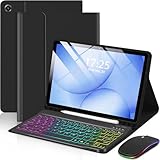
- For Tab A11+ or A9+ with an integrated case: EAMPANG Case with Keyboard Mouse for Samsung, described as a detachable keyboard case with a mouse and pen slot.
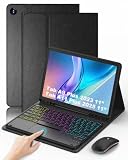
- For the same Tab A-series models with a trackpad: SAMTUNK Tablet Case Keyboard for Samsung Galaxy Tab A11, which lists a multitouch trackpad.
- For a 12.4-inch Tab S-series tablet: SAMTUNK Case Keyboard for Samsung Galaxy Tab S10, with listed compatibility spanning several named Plus and FE models.
- For a Samsung-branded Tab S10+ accessory: Samsung Galaxy Tab S10+ Book Cover Keyboard AI, with a detachable platform and adjustable viewing angles listed.
- For other named Tab S-series models: Match the model-specific Samsung Book Cover Keyboard or Slim listing to the tablet before buying.




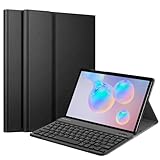

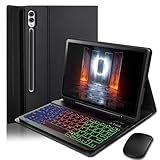


Compare the Keyboard Options
| Keyboard | Listed compatibility | Notable listed features | Main consideration |
|---|---|---|---|
| EAMPANG Case with Keyboard Mouse for Samsung | Galaxy Tab A11+ and A9+, 11 inches | Detachable keyboard, mouse, seven-color backlight, pen slot | Connection details and trackpad support are not specified |
| Tablet Case Keyboard for Samsung Galaxy Tab A11 | Galaxy Tab A11+ and A9+, 11 inches | Multitouch trackpad, detachable magnetic keyboard, pen holder | Connection details are not specified |
| Case Keyboard for Samsung Galaxy Tab S10 | Listed 12.4-inch Tab S10+, S9 FE+, S9+, S8+, S7 FE, and S7+ | Seven-color backlight, magnetic keyboard, mouse, S Pen holder | Confirm the precise tablet variant and attachment requirements |
| Samsung Galaxy Tab S10+ Book Cover Keyboard AI | Galaxy Tab S10+ | Detachable platform, adjustable viewing angles, wireless keyboard sharing | Designed for the named model; verify fit before purchase |
| Samsung Galaxy Tab S10 FE+ Book Cover Keyboard | Galaxy Tab S10 FE+ | Detachable platform, AI key, wireless keyboard sharing | Not listed as compatible with other tablet models |
| Samsung Galaxy Tab S11 Book Cover Keyboard Slim | Galaxy Tab S11 | Slim design, AI-key ready, PC-like experience | Compatibility is listed for the Tab S11 |
| Samsung Galaxy Tab S9 | S9 FE | S10 FE | Galaxy Tab S9, S9 FE, and S10 FE | Slim Book Cover Keyboard, detachable platform, wireless keyboard sharing | Does not list the Plus versions |
| Samsung Official Pro Keyboard with Ai Key (2026) | Galaxy Tab S12 Ultra and Tab S11 Ultra | Samsung Pro Keyboard with AI key | Check exact model and regional version |
| Samsung Official Pro Keyboard for Galaxy Tab S11 | Galaxy Tab S11 Ultra and Tab S12 Ultra | Samsung Pro Keyboard; international model | International model; check layout and regional details |
| Dexnor for Samsung Galaxy Tab A11+/A9+ Plus Case | Galaxy Tab A11+ and A9+, 11 inches | Magnetic folio, multitouch trackpad, backlight, stylus holder | Connection details are not specified |
Recommended Keyboards by Tablet Model
EAMPANG Case with Keyboard Mouse for Samsung
This listing names the 11-inch Galaxy Tab A11+ and A9+ and describes a case with a detachable keyboard, mouse, seven-color backlight, and pen slot. The combined case and accessories may suit a reader who wants a tablet setup with keyboard input and a separate mouse.
Pros: Listed compatibility covers two named A-series tablets, and the case includes a detachable keyboard, mouse, and pen slot. Cons: The supplied details do not specify a trackpad, connection method, keyboard layout, or how the mouse connects. Who should skip it: Skip it if your tablet is not a listed model or you require a documented trackpad.
View the EAMPANG Case with Keyboard Mouse for Samsung.
Tablet Case Keyboard for Samsung Galaxy Tab A11
SAMTUNK lists this 11-inch case for the Galaxy Tab A11+ and A9+, with a detachable magnetic keyboard, multitouch trackpad, and S Pen holder. The trackpad is a useful distinction for people who prefer pointer control without carrying a separate mouse.
Pros: The listing explicitly names both tablet models and includes a multitouch trackpad and pen holder. Cons: The supplied information does not explain the keyboard connection, trackpad gestures, or charging requirements. Who should skip it: Skip it if you own a different Galaxy Tab model or need confirmed connection specifications before choosing.
View the Tablet Case Keyboard for Samsung Galaxy Tab A11.
Case Keyboard for Samsung Galaxy Tab S10
This SAMTUNK case is listed for several 12.4-inch tablets: Tab S10+, S9 FE+, S9+, S8+, S7 FE, and S7+. Its listed features include a magnetic keyboard, seven-color backlight, mouse, and S Pen holder, which may suit compatible tablets used for writing or general productivity.
Pros: The listing names several 12.4-inch models and includes a mouse and pen holder alongside the keyboard. Cons: It does not specify connection details or explain whether every listed feature works identically across all compatible tablets. Who should skip it: Skip it if your tablet is not among the listed models or you want a Samsung-branded accessory.
View the Case Keyboard for Samsung Galaxy Tab S10.
Samsung Galaxy Tab S10+ Book Cover Keyboard AI
Samsung lists this Book Cover Keyboard for the Galaxy Tab S10+. The product details specify an AI key, detachable platform, adjustable viewing angles, and wireless keyboard sharing, making it a model-specific option for users who value those documented features.
Pros: Samsung identifies the compatible tablet and lists adjustable viewing angles, a detachable platform, and wireless keyboard sharing. Cons: The available description does not specify a trackpad, keyboard layout details, or compatibility with other Tab models. Who should skip it: Skip it if you own a different tablet or do not need this model-specific cover design.
View the Samsung Galaxy Tab S10+ Book Cover Keyboard AI.
Samsung Galaxy Tab S10 FE+ Book Cover Keyboard
This Samsung Slim Book Cover Keyboard is listed for the Galaxy Tab S10 FE+. Its stated features include an AI key, detachable platform, PC-like experience, and wireless keyboard sharing, offering a Samsung-branded option for that specific tablet.
Pros: The listing gives a precise tablet match and identifies wireless keyboard sharing and a detachable platform. Cons: Compatibility with other models and the presence of a trackpad are not specified in the supplied details. Who should skip it: Skip it if your tablet is not the Tab S10 FE+ or you need confirmed pointer-control features.
View the Samsung Galaxy Tab S10 FE+ Book Cover Keyboard.
Samsung Galaxy Tab S11 Book Cover Keyboard Slim
Samsung lists this Slim Book Cover Keyboard for the Galaxy Tab S11. The product title identifies AI-key readiness and a PC-like experience, but the supplied details do not provide further layout or pointing-device specifications.
Pros: The accessory is clearly associated with the Tab S11 and is described as a slim Book Cover Keyboard. Cons: The listed information does not confirm a trackpad, wireless keyboard sharing, or compatibility with other models. Who should skip it: Skip it if you own a different Tab generation or require a documented trackpad.
View the Samsung Galaxy Tab S11 Book Cover Keyboard Slim.
Samsung Galaxy Tab S9, S9 FE, and S10 FE Book Cover Keyboard Slim
This Samsung Slim Book Cover Keyboard lists compatibility with the Galaxy Tab S9, S9 FE, and S10 FE. Its stated features include a detachable platform and wireless keyboard sharing, so check the exact model name rather than assuming Plus variants also fit.
Pros: The listing names three tablet models and identifies wireless keyboard sharing and a detachable platform. Cons: It does not list the S9+ or other Plus models, and a trackpad is not specified. Who should skip it: Skip it if you have a Plus model or another tablet outside the listed compatibility.
View the Samsung Galaxy Tab S9, S9 FE, and S10 FE Keyboard.
Samsung Official Pro Keyboard with Ai Key (2026)
This Samsung Pro Keyboard listing names the Galaxy Tab S12 Ultra and Tab S11 Ultra. Its title describes a laptop-like experience and an AI key, but the supplied product information does not detail other features or regional layout specifications.
Pros: It is a Samsung-branded Pro Keyboard listing for two named Ultra tablets and identifies an AI key. Cons: The available details do not establish broader compatibility or specify a trackpad and layout. Who should skip it: Skip it if you have a non-Ultra tablet or need confirmed regional keyboard details.
View the Samsung Official Pro Keyboard with Ai Key (2026).
Samsung Official Pro Keyboard for Galaxy Tab S11
This listing identifies an international-model Samsung Pro Keyboard for the Galaxy Tab S11 Ultra and Tab S12 Ultra. Its compatibility wording is important: it names the Ultra versions, not the standard Tab S11.
Pros: The listed compatibility covers two named Ultra tablets, and the product is identified as a Samsung Pro Keyboard. Cons: It is an international model, while the supplied details do not specify its layout or other regional particulars. Who should skip it: Skip it if you have the standard Tab S11 or need a confirmed US layout.
View the Samsung Official Pro Keyboard for Galaxy Tab S11.
Dexnor for Samsung Galaxy Tab A11+/A9+ Plus Case
Dexnor lists this 11-inch magnetic folio case for the Galaxy Tab A11+ and A9+ Plus. The stated features include a multitouch trackpad, backlighting, and stylus holder, making it a case-style option for users who want pointer control without a separate mouse.
Pros: The listing names both compatible A-series tablets and specifies a multitouch trackpad and stylus holder. Cons: The supplied details do not specify the keyboard connection or backlight settings. Who should skip it: Skip it if your tablet is outside the named A11+ and A9+ models or you need those connection details confirmed.
View the Dexnor for Samsung Galaxy Tab A11+/A9+ Plus Case.
How to Choose a Keyboard for a Samsung Galaxy Tablet
Confirm the Complete Tablet Model
Check the model name on your tablet and compare it with the keyboard listing, including Plus and FE suffixes. Similar names do not establish that cases or keyboard covers share the same fit.
Choose a Case, Trackpad, or Mouse Setup
Several listings combine a keyboard with a protective case, while some specifically identify a multitouch trackpad or separate mouse. If pointer control matters, prefer a listing that explicitly names the feature rather than assuming it is included.
Check the Attachment and Connection Details
Some products are described as magnetic or detachable, but the supplied information does not consistently explain how the keyboard connects or whether it needs charging. Confirm those details in the full product listing before relying on a particular setup.
Match the Accessory to Your Workload
For writing and navigation, a keyboard paired with a documented trackpad may reduce the need for extra accessories. A separate mouse may suit readers who prefer mouse control, while an official cover may appeal to buyers prioritizing a Samsung-branded, model-specific design.
Frequently Asked Questions
Will one Samsung Galaxy tablet keyboard fit every Tab model?
No. The products here list compatibility with specific models and, in some cases, screen sizes. Match the complete tablet name, including Plus, FE, or Ultra, to the accessory listing.
Which options explicitly list a trackpad?
The SAMTUNK case for the Tab A11+ and A9+ and the Dexnor case for those models specify a multitouch trackpad. The supplied descriptions for other options do not establish trackpad support.
Are these keyboards suitable for gaming?
The available specifications describe tablet keyboards, cases, and pointer features, not gaming performance or specialized gaming controls. For a separate PC gaming setup, see our guides to keyboards for gaming and typing and gaming keyboard and mouse combinations.


Write Your Review
No reviews yet. Be the first to share your experience!