

The best fit depends on how much keyboard you need, where your hands rest, and whether you prefer membrane or mechanical keys. For flexible desk use, consider the AULA F75 Pro; for adjustable magnetic actuation, consider the AULA WIN68 HE. One-handed options suit players who want a compact control area, while Redragon S101-3 PRO adds a full-size keyboard and mouse.
This is a specification-based comparison, not a ranking based on personal use. Product details describe advertised features, so treat performance claims as manufacturer specifications. Hand comfort varies with hand size, posture, key spacing, and desk setup; no layout suits everyone.
Top Gaming Keyboards for Different Hand Positions

Pros
- Five dedicated macro keys for rapid command input
- Quiet membrane switches suitable for shared workspaces
- Adjustable mouse sensitivity from 800 to 7200 DPI
- Integrated wrist rest helps reduce typing fatigue
- Onboard memory retains lighting and DPI profiles
Cons
- Uses membrane keys rather than mechanical switches
- Wired design restricts flexible cable-free placement
- Full software customization limited to Windows systems
Pros
- Compact footprint saves desk space
- Full 35-key anti-ghosting capability
- Built-in wrist rest for ergonomic support
- Hardware macro recording without additional software
- Driver-free plug-and-play connectivity
Cons
- Limited key count unsuitable for general typing
- Only two macro recording shortcut options
- Backlighting restricted to preset colors and modes

Pros
- Hall Effect switches with adjustable actuation
- Fast 8000Hz polling rate
- Compact 68-key layout preserves arrow keys
- Detachable wired USB connection
- South-facing RGB with web-based configuration
Cons
- Web configuration driver does not support macOS
- Wired-only connection with no wireless functionality

Pros
- Versatile 2.4GHz, Bluetooth, and wired USB-C connectivity
- Hot-swappable sockets support 3-pin and 5-pin switches
- Multi-function knob for volume and lighting control
- High-capacity 4000mAh rechargeable internal battery
- Compact 75% layout retains dedicated arrow keys
Cons
- Lacks a dedicated numeric keypad
- Full macro programming requires optional driver software
- Side-printed legends may reduce visibility from certain angles

Pros
- Compact half-hand keyboard layout
- Rainbow backlighting
- USB plug-and-play connection
- Includes phone gaming converter
- Converter supports charging during play
Cons
- Converter does not support iOS 13.4 or later
- Converter is not compatible with tablets
- Mobile converter use is intended for supported phones
How These Keyboards Differ
The AULA F75 Pro keeps arrow keys in its 75% layout and offers wired, Bluetooth 5.0, and 2.4GHz connections. The AULA WIN68 HE is a 60% wired board with Hall Effect switches and adjustable actuation. RedThunder and Laelr use 35-key one-handed designs, while the Redragon set provides a conventional full-size keyboard with an included mouse.
Product Reviews
Redragon S101-3 PRO Gaming Keyboard and Mouse
This wired, full-size membrane keyboard includes a mouse, five dedicated macro keys, a wrist rest, and anti-ghosting. Six keyboard lighting modes and software customization add flexibility, while the bundled mouse offers adjustable sensitivity from 800 to 7200 DPI. Windows 10 and 11 compatibility is specified, making this set a practical starting point for PC gaming and general work.
Pros: Full-size layout, included mouse and wrist rest, macro keys, and quiet membrane switches. Cons: Wired connection and membrane typing feel may not suit users seeking mechanical switches or wireless use. Who should skip it: Players who want a compact board, mechanical switches, or a keyboard-only purchase.
Compare more affordable gaming keyboard options if you want to weigh this bundled setup against other layouts.
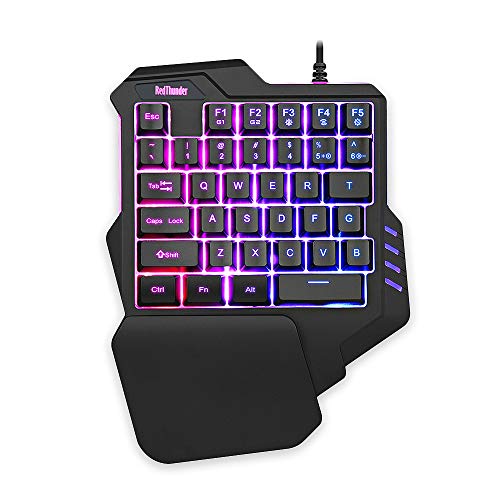
RedThunder One Handed Gaming Keyboard RGB Backlit
This 35-key keypad concentrates controls in a small area and includes a large wrist rest, which may suit players who want to keep one hand on dedicated game keys. All keys support anti-ghosting, and two macro recording combinations are provided. It is driver-free and lists compatibility with Windows, Mac, Linux, and other systems, though software features are not specified.
Pros: Compact footprint, wrist rest, anti-ghosting across all 35 keys, and two macro recordings. Cons: It is not a full keyboard, and its listed response speed is an advertised specification rather than an independent measurement. Who should skip it: Users who need a complete layout for writing, office work, or games requiring many simultaneous keys.
For more one-handed layouts, see our compact gaming keypad comparison.
AULA F75 Pro Wireless Mechanical Keyboard, 75% Hot
The 81-key, 75% layout retains arrow keys while saving space compared with a full-size board. Its tri-mode connection supports USB wired, Bluetooth 5.0, and 2.4GHz wireless, with up to five connected devices. Hot-swap support for 3-pin and 5-pin switches lets owners replace compatible switches without soldering. A knob controls lighting or media functions depending on selected mode.
Pros: Three connection modes, retained arrow keys, hot-swappable switches, and PBT keycaps. Cons: The compact layout relies on shortcuts for keys absent from a full-size layout; battery runtime is not specified. Who should skip it: Users who need a numpad, prefer a full-size layout, or want a wired-only board with no wireless features.
Browse our mechanical keyboard category for more switch and layout options.
AULA WIN68 HE Mechanical Gaming Keyboard 60%
This wired, 68-key board uses Hall Effect magnetic switches with adjustable actuation from 0.02 to 3.44 mm, adjustable in 0.1 mm increments. Its advertised 8,000 Hz polling rate and 0.3 ms latency are specifications, not independently verified results. A Windows web driver supports configuration, while the product data says that driver does not support Mac.
Pros: Adjustable actuation, compact footprint, detachable USB cable, and configurable gaming functions. Cons: Wired connection only, and driver support is limited to Windows; the compact layout assigns additional commands to key combinations. Who should skip it: Mac users who need the configuration software, wireless users, or anyone who prefers a full-size keyboard.
See our 60% gaming keyboard comparison for more compact options.
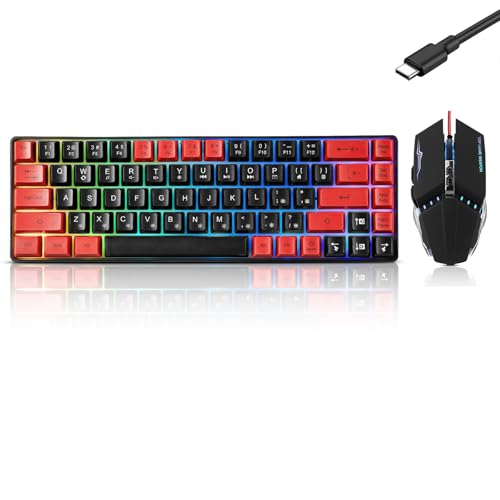
Half Hand Gaming Keyboard and Mouse Combo Laelr 35
This 35-key wired keypad and mouse bundle targets mobile gaming through a Bluetooth 4.2 converter adapter, with dual USB ports and pass-through charging support described for the adapter. The product listing warns that its converter does not support iOS 13.4 or later and is not for tablets. It also lists USB plug-and-play use with PCs, laptops, and computers.
Pros: Small one-handed layout, included mouse, and adapter intended for compatible phones. Cons: Phone compatibility has important limits, including the stated iOS restriction; the listing’s mechanical-switch wording is not supported by further switch specifications. Who should skip it: iPhone users on iOS 13.4 or later, tablet users, and PC players who need a conventional full keyboard.
How to Choose a Gaming Keyboard That Fits Your Hands
Choose Layout Before Features
A full-size board offers a familiar spread of keys, while 75% and 60% layouts reduce desktop space and move some functions to shortcuts. A one-handed keypad leaves more room for mouse movement but cannot replace a full keyboard for general typing. Check whether your games need arrow keys, function keys, or a numpad before choosing a smaller layout.
Match Key Feel to Your Preference
The Redragon uses membrane keys, while the AULA models use mechanical switches, including Hall Effect magnetic switches in the WIN68 HE. The two 35-key products describe their key construction differently, so do not assume identical switch technology. If typing feel matters, compare switch type and replacement support rather than relying on labels such as responsive or ergonomic.
Consider Wrist Support and Desk Position
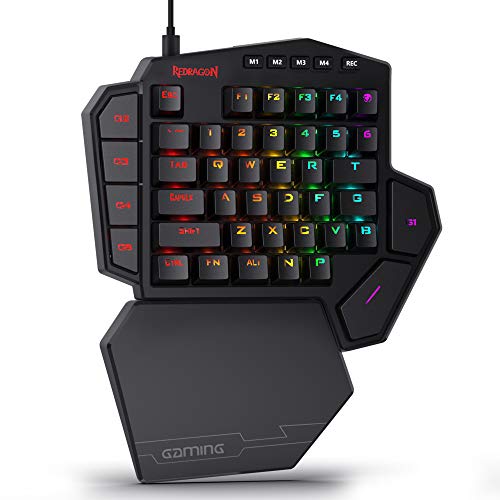
The Redragon and RedThunder include wrist rests, and Laelr describes a palm-rest area. The AULA product details do not specify a wrist rest. These features may affect how your hands sit at the desk, but they cannot guarantee comfort; consider your usual posture and whether the board’s height and layout suit your setup.
Check Connection and Software Compatibility
Choose the F75 Pro if you need Bluetooth, 2.4GHz, and wired modes. The WIN68 HE is wired and its configuration driver is Windows-only. The Redragon lists Windows 10 and 11, while RedThunder lists several desktop operating systems. Laelr’s phone adapter has stated iOS and tablet restrictions, so verify device compatibility before buying.
For broader choices, browse gaming keyboards or compare compact keyboard layouts.





Write Your Review
No reviews yet. Be the first to share your experience!