

For a quiet full-size membrane board, consider HyperX Alloy Core RGB. Choose Redragon K552 for wired mechanical switches, or SteelSeries Apex 3 TKL for a compact, spill-resistant layout.
This specification-based comparison focuses on listed layouts, switch types, connectivity, controls, and compatibility. Confirm current Windows support and software requirements before purchase, especially for programmable features.

Pros
- Hot-swappable linear red switches
- Full-key anti-ghosting support
- Software macro editing and remapping
- Includes four spare replacement switches
- Twelve quick-access multimedia shortcuts
Cons
- Backlight LED colors cannot be changed
- Wired-only design without wireless functionality

Pros
- Smooth linear red mechanical switches
- Space-saving 87-key tenkeyless footprint
- Durable metal top plate design
- Full anti-ghosting and N-key rollover
- Dedicated software for macros and remapping
Cons
- Fixed rainbow colors without full RGB customization
- Backlight effects cannot be adjusted through software

Pros
- Space-saving tenkeyless design
- IP32 spill and dust resistance
- Quiet keystrokes for shared spaces
- Dedicated media buttons and volume roller
- Wide PC and console compatibility
Cons
- Non-mechanical switches lack distinct mechanical tactile response
- RGB illumination is limited to 8 zones instead of per-key

Pros
- Five dedicated macro keys for rapid command input
- Quiet membrane switches suitable for shared workspaces
- Adjustable mouse sensitivity from 800 to 7200 DPI
- Integrated wrist rest helps reduce typing fatigue
- Onboard memory retains lighting and DPI profiles
Cons
- Uses membrane keys rather than mechanical switches
- Wired design restricts flexible cable-free placement
- Full software customization limited to Windows systems

Pros
- Quiet membrane key switches with anti-ghosting
- Spill-resistant construction protects against accidents
- Dedicated media and lighting quick-access buttons
- Solid frame provides good desk stability
- Full-size layout with customizable RGB lighting
Cons
- Uses membrane switches instead of mechanical switches
- Large full-size footprint requires substantial desk space
- Official compatibility is limited to Windows systems

Pros
- Tri-mode connectivity via Bluetooth, 2.4GHz, and USB-C
- Single 2-in-1 USB receiver operates both peripherals
- Ten dedicated multimedia keys for direct playback control
- Mouse supports up to 1000Hz polling rate
- Keyboard battery rated up to 300 hours without RGB
Cons
- Configuration software is limited to Windows systems
- Mouse sensor tops out at 4800 DPI

Pros
- Space-saving 68-key layout with dedicated arrows
- Detachable Type-C cable for easy travel
- Quiet membrane operation suitable for shared rooms
- 26-key anti-ghosting for accurate key registration
Cons
- Uses membrane switches instead of authentic mechanical switches
- No integrated number pad for data entry

Pros
- Versatile tri-mode wireless and wired connectivity
- Hot-swappable PCB supports 3-pin and 5-pin switches
- Large 8000mAh rechargeable internal battery
- Gasket mount with five-layer acoustic dampening
- Durable double-shot PBT keycaps
Cons
- Heavy build at over 3.3 pounds
- Driver software required for advanced macros and rhythm lighting
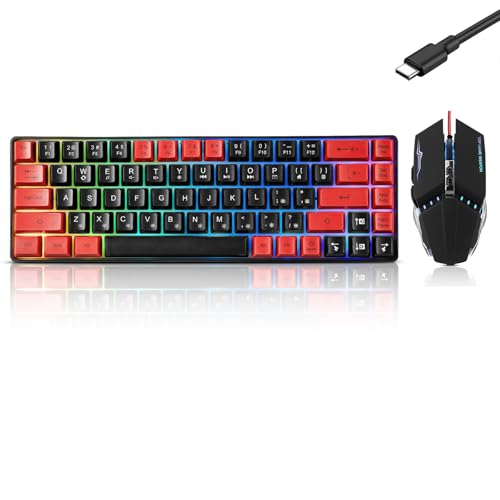
Pros
- Compact 61-key keyboard layout
- No drivers or software required
- Adjustable keyboard typing angle
- Ambidextrous wired optical mouse
- Keyboard and mouse included
Cons
- Compact layout has fewer keys than full-size keyboards
- Wired connection requires available USB ports
- Specifications omit switch type and key rollover details
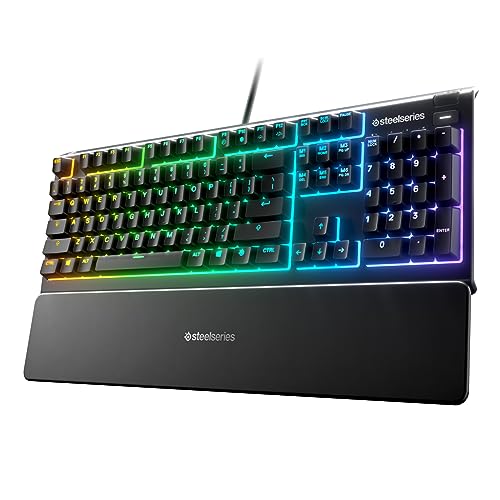
Pros
- IP32 water resistance guards against liquid spills
- Whisper-quiet switches rated for 20 million presses
- Included magnetic wrist rest for palm support
- Dedicated on-the-fly multimedia controls
- Broad compatibility with PC and major consoles
Best compact mechanical option: Redragon Mechanical Gaming Keyboard Wired
This wired K671 model pairs hot-swappable linear red switches with full-key anti-ghosting and 11 backlight modes. Macro editing and key remapping use software, while the lighting effects can change but the lighting color cannot.
Its compact mechanical feature set suits players who want switch replacement without soldering and programmable controls. Listed compatibility includes PC and Mac, but confirm software support for your Windows 10 setup before relying on macros.
Pros: Hot-swappable red switches, full-key anti-ghosting, adjustable lighting effects, macro editing, and included spare switches.
Cons: Lighting color is fixed, and software is needed for macro editing. Who should skip it: Users who want tactile or clicky switches, or fully customizable RGB colors.
Best straightforward wired mechanical pick: Redragon K552 Mechanical Keyboard
The K552 has an 87-key tenkeyless layout, linear red switches, a metal top plate, and N-key rollover across all keys. Its USB cable supports plug-and-play use, and listed compatibility includes Windows.
This layout leaves more desk room for mouse movement than a full-size board while retaining a dedicated function row and navigation keys. The supplied description also mentions software for remapping and macros, although basic use needs no software.
Pros: Mechanical linear switches, 87-key layout, full anti-ghosting, and simple wired setup.
Cons: Rainbow lighting has fixed color patterns and no software color customization. Who should skip it: Users who need a number pad, wireless connection, or per-key RGB control.
Best compact quiet board: SteelSeries Apex 3 TKL RGB Gaming Keyboard
This tenkeyless membrane-style keyboard uses whisper-quiet switches, eight-zone RGB illumination, and IP32 water and dust resistance. Dedicated media controls include a clickable volume roller, and the listed compatibility includes Windows.
Its reduced layout and quieter keystrokes suit shared rooms or desks where mouse space matters. IP32 resistance is not waterproofing, so keep liquids away and do not treat the rating as protection against spills of every kind.
Pros: Compact layout, quiet switches, media controls, and stated IP32 protection.
Cons: It is not a mechanical-switch keyboard and omits the number pad. Who should skip it: Users who require full-size keys or mechanical switch customization.
Best quiet full-size membrane option: HyperX Alloy Core RGB
The Alloy Core RGB offers quiet, responsive membrane keys, anti-ghosting, spill resistance, dedicated media controls, and six preset lighting effects. Its listed operating-system compatibility explicitly includes Windows 10.
Choose it for a quiet gaming and general-use setup with quick media access. The supplied specifications do not identify a mechanical switch option or customizable per-key lighting, so buyers seeking either feature should compare alternatives.
Pros: Explicit Windows 10 compatibility, quiet membrane keys, spill resistance, and dedicated media controls.
Cons: Membrane key design and six preset effects limit switch and lighting customization. Who should skip it: Mechanical-keyboard enthusiasts or users who need programmable per-key lighting.
Best wireless keyboard and mouse bundle: Redragon S101M-KS Gaming Keyboard and Mouse
This combo supports wired, Bluetooth, and 2.4 GHz connections, with one 2.4 GHz receiver controlling both devices. The keyboard includes 10 independent multimedia keys, 12 shortcut combinations, a Windows lock, and a detachable USB-C cable.
It suits Windows PC users who want a matching keyboard and mouse with flexible connection choices. The advertised keyboard runtime is up to 300 hours with RGB off; lighting use changes that condition, and the supplied data gives no runtime with RGB on.
Pros: Three connection modes, bundled mouse, multimedia controls, adjustable mouse DPI, and stated Windows compatibility.
Cons: Wireless play depends on battery charge, and the shared 2.4 GHz receiver serves both devices. Who should skip it: Buyers who already own a mouse or prefer a wired-only setup.
Best full-size bundle with macro keys: Redragon S101-3 PRO Gaming Keyboard and Mouse
This wired combo pairs a full-size membrane keyboard with a mouse, five dedicated macro keys, anti-ghosting, and a wrist rest. The description lists plug-and-play compatibility with Windows 10 and Windows 11, plus software for lighting and macro customization.
It suits a new PC setup needing both basic peripherals and dedicated macro controls. Mouse sensitivity is adjustable from 800 to 7200 DPI, according to the product information; this bundle is not a mechanical keyboard.
Pros: Full-size layout, bundled mouse, five macro keys, wrist rest, and Windows 10 compatibility.
Cons: The keyboard uses membrane keys, and customization requires software. Who should skip it: Users seeking mechanical switches or a compact standalone keyboard.
Best ultra-compact membrane option: GEODMAER 65% Gaming Keyboard
This wired 68-key keyboard has separate arrow keys, no number pad, a detachable Type-C cable, and 26 listed no-conflict keys. It uses membrane switches with a mechanical feel, plus adjustable backlighting and 11 media buttons.
The small layout suits tight desks and portable setups. Only 26 keys are specified as no-conflict, so it does not offer the full-key simultaneous input stated for some alternatives. Confirm your preferred Windows 10 functions before buying.
Pros: Compact layout with arrow keys, detachable cable, backlighting, and media shortcuts.
Cons: Membrane switches and limited specified no-conflict keys. Who should skip it: Players who need a number pad, mechanical switches, or full-key rollover.
Best wireless mechanical customization: AULA F99 Wireless Mechanical Keyboard,Tri-Mode
The F99 is a 99-key, 96% mechanical keyboard with Bluetooth 5.0, 2.4 GHz, and USB wired modes. It supports up to five connected devices, hot-swappable three-pin or five-pin switches, N-key rollover, macro customization, and an 8,000 mAh battery.
Its compact layout retains arrow keys and a number area, making it a fit for mixed gaming and work use. Windows is not named in the supplied compatibility details, so verify Windows 10 support and driver availability before relying on software features.
Pros: Three connection modes, multi-device support, hot-swappable switches, PBT keycaps, and N-key rollover.
Cons: Wireless battery life is not specified, and Windows 10 compatibility is not explicitly listed. Who should skip it: Buyers needing clearly documented Windows 10 support or a simple, nonprogrammable keyboard.
Best low-cost keyboard and mouse set: Guiheng Wired 60% Gaming Keyboard and Mouse Combo
This wired combo includes a 61-key keyboard and optical mouse. The supplied compatibility list includes Windows 10, and the keyboard connects over USB without requiring drivers, according to its product details.
It suits basic gaming setups where a small keyboard and included mouse matter more than advanced controls. The compact 60% layout omits dedicated arrow and function rows, so check whether its key combinations suit your games and everyday work.
Pros: Compact wired keyboard, included mouse, no-driver setup, and explicit Windows 10 compatibility.
Cons: The 61-key layout has fewer dedicated keys, and detailed rollover or switch specifications are not provided. Who should skip it: Users who need dedicated arrow keys, mechanical switches, or documented anti-ghosting.
Best full-size quiet SteelSeries option: SteelSeries Apex 3 Gaming Keyboard – Black
The full-size Apex 3 has whisper-quiet switches, 10-zone RGB, dedicated media controls, and a magnetic wrist rest. Its listed compatibility includes Windows, while its IP32 rating indicates limited water resistance rather than waterproofing.
Choose it if you want a number pad, quieter membrane-style gaming switches, and wrist support. The tenkeyless Apex 3 TKL is a better fit when desk space matters more than full-size keys.
Pros: Full-size layout, quiet switches, media controls, magnetic wrist rest, and stated IP32 protection.
Cons: It is not mechanical, and the full-size layout uses more desk space than a TKL board. Who should skip it: Users seeking hot-swappable switches or a compact layout.
How to Choose a Windows 10 Gaming Keyboard
Match layout to desk space and daily tasks
Full-size keyboards retain a number pad, while tenkeyless models remove it. Smaller 65% and 60% boards reclaim more desk area but omit dedicated keys; check arrow-key access and shortcuts before choosing.
Choose switch feel and noise level
Mechanical red switches are linear, while membrane models generally prioritize quieter typing in these listings. Switch preference is personal, so use the specifications to narrow choices rather than treating one switch type as universally faster.
Check rollover, connectivity, and software needs
Anti-ghosting and N-key rollover describe simultaneous input support, but listed implementations differ by model. Wired USB boards avoid charging, while wireless models add connection flexibility and battery upkeep. Confirm Windows 10 support for required drivers and customization software.
Read water-resistance claims narrowly
IP32 and spill-resistant labels do not make keyboards waterproof. Keep drinks away from electronics, and follow manufacturer care instructions after any spill instead of assuming the rating prevents damage.
More Keyboard Comparisons
For smaller layouts, see our 60% gaming keyboard comparison. For more value-focused options, browse our affordable gaming keyboard guide.




Write Your Review
No reviews yet. Be the first to share your experience!