

The best wireless gaming mouse charging dock for PC depends first on compatibility. Some products include a mouse and matching dock, while the Razer option is an accessory for selected Razer mice.
For most buyers, the ATTACK SHARK X11 is the straightforward choice because it combines a 2.4GHz receiver, Bluetooth, wired USB-C operation, and an RGB charging dock. The EPOMAKER NEX Lite adds OLED screens for users who want visible status information, while the Razer Mouse Dock Pro suits owners of compatible Razer models.

Pros
- Lightweight 62-gram ergonomic design
- Three connection modes for flexible setups
- Included RGB charging dock
- Grip tape improves handling stability
- Adjustable DPI and polling settings
Cons
- Battery runtime is not specified
- Five-button layout may limit command-heavy setups

Pros
- Convenient desktop RGB charging base included
- Versatile tri-mode wireless and wired connectivity
- Lightweight 62-gram ergonomic construction
- Pre-cut anti-slip grip tape included in box
Cons
- Switches rated for a modest 20 million clicks
- Tracking speed capped at 300 IPS

Pros
- Included RGB charging dock with status display
- Built-in OLED screens show vital stats without software
- Lightweight 65-gram build reduces wrist fatigue
- Flexible tri-mode wireless and wired connectivity
- Onboard memory stores custom profiles and macros
Cons
- Right-handed shape is unsuitable for left-handed gamers
- Web configuration utility recommends a Chrome browser

Pros
- Included RGB charging dock
- Dual OLED screens for quick status checks
- Versatile tri-mode wireless and wired connections
- Lightweight 65g ergonomic shell
- Onboard memory retains profile settings
Cons
- Right-handed ergonomic design excludes left-handed users
- Online software is recommended primarily for Chrome browsers
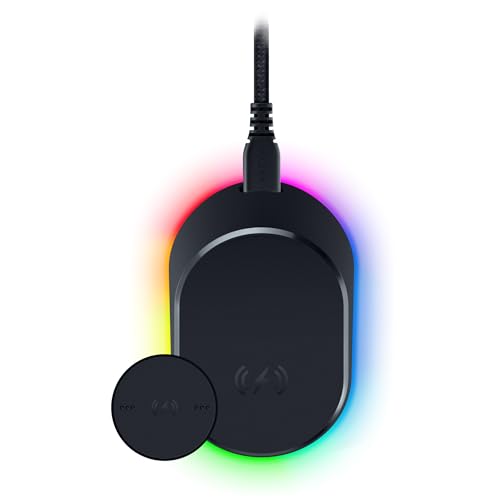
Pros
- Magnetic wireless charging
- Integrated HyperPolling 8K Hz transceiver
- Eight customizable Chroma RGB zones
- Battery status lighting
- Anti-slip base
Cons
- Compatible with only three listed Razer mouse models
- Wireless charging requires the included puck
How These Wireless Mouse Charging Docks Differ
| Product | Mouse included | Wireless modes | Sensor and polling details | Dock features |
|---|---|---|---|---|
| ATTACK SHARK X11, White | Yes | 2.4GHz, Bluetooth 5.2, USB-C wired | PAW3311, up to 22,000 DPI, 1,000Hz | RGB charging dock and receiver storage |
| ATTACK SHARK X11, Black | Yes | 2.4GHz, Bluetooth 5.2, USB-C wired | PAW3311, up to 22,000 DPI, 1,000Hz | RGB charging dock and receiver storage |
| EPOMAKER NEX Lite, variant one | Yes | 2.4GHz, Bluetooth 5.0, USB-C wired | PAW3311, up to 12,000 DPI, 1,000Hz | RGB lighting, OLED dock screen, OLED mouse screen |
| EPOMAKER NEX Lite, Black | Yes | 2.4GHz, Bluetooth 5.0, USB-C wired | PAW3311, up to 12,000 DPI, 1,000Hz | RGB lighting, OLED dock screen, OLED mouse screen |
| Razer Mouse Dock Pro | No | Requires a compatible Razer mouse | Integrated 8KHz transceiver with compatible mice | Magnetic charging puck, Chroma RGB, anti-slip base |
The table shows why these products should not be treated as interchangeable. The ATTACK SHARK and EPOMAKER models are complete mouse-and-dock packages, whereas the Razer dock depends on an existing compatible mouse.
ATTACK SHARK X11 Wireless Gaming Mouse
The ATTACK SHARK X11 is the most flexible complete setup in this group. Its PAW3311 sensor supports up to 22,000 DPI, 300 IPS tracking speed, 35G acceleration, and a stated 1,000Hz polling rate.
Its tri-mode connection supports 2.4GHz wireless, Bluetooth 5.2, and USB-C wired use. That combination suits a PC user who also moves between a laptop, Mac, tablet, or office workstation.
The 62-gram design, ergonomic shape, five programmable buttons, grip tape, and RGB charging dock support users who want a lightweight general-purpose mouse. The dock also provides a storage location for the USB receiver, which can help keep a desk setup organized.
Pros: High stated DPI ceiling, three connection modes, lightweight body, programmable controls, included grip tape, and an integrated charging dock.
Cons: The supplied information does not specify battery life, dock dimensions, or charging speed. The highest DPI setting is not automatically useful for every game or sensitivity preference.
Who should skip it: Skip this model if you need a left-handed design, a larger button layout for MMO commands, or independently measured battery performance.
EPOMAKER NEX Lite Wireless Gaming Mouse w/Screens
The EPOMAKER NEX Lite focuses on visible status information rather than the highest listed sensitivity. Its PAW3311 sensor reaches 12,000 DPI, with 300 IPS, 35G acceleration, six selectable DPI levels, and a stated 1,000Hz polling rate.
Both the mouse and dock include OLED screens that show information such as DPI, battery percentage, connection mode, and polling rate. This is useful for users who prefer checking settings directly instead of opening configuration software.
The mouse supports 2.4GHz wireless, Bluetooth 5.0, and USB-C wired modes. Its right-handed 65-gram body is described for medium-to-large hands, so smaller-hand users should consider the shape carefully before choosing it.
Configuration uses online software, with Chrome recommended for compatibility. Five programmable buttons and onboard memory support users who switch between gaming and office devices.
Pros: Dual OLED displays, three connection modes, lightweight construction, onboard memory, programmable buttons, and an RGB dock with selectable lighting effects.
Cons: The sensor specification is lower than the ATTACK SHARK X11’s listed DPI ceiling. The right-handed shape is intended for medium-to-large hands, and online software may be less convenient than a dedicated desktop application.
Who should skip it: Skip the NEX Lite if you want a symmetrical or left-handed mouse, do not want browser-based configuration, or have no use for OLED status screens.
Razer Mouse Dock Pro with Wireless Charging Puck
The Razer Mouse Dock Pro is a charging and connectivity accessory, not a complete wireless mouse package. It works with the Razer Basilisk V3 Pro, Cobra Pro, and Naga V2 Pro listed in the supplied compatibility information.
Its magnetic wireless charging puck is designed to install on a compatible Razer mouse before the mouse is placed on the dock. The dock also includes an integrated HyperPolling 8KHz transceiver for compatible Razer mice, which targets users who specifically need that supported polling capability.
Eight Chroma RGB lighting zones, charge-status lighting, and an anti-slip base add desktop convenience. These features matter most when the buyer already owns a supported Razer mouse and wants a matching charging station.
Pros: Magnetic charging, supported 8KHz transceiver functionality, Chroma RGB lighting, charge-status indicators, and an anti-slip base.
Cons: It does not include a mouse and is limited to the listed compatible Razer models. It is therefore not a universal dock for the ATTACK SHARK, EPOMAKER, or other wireless mice.
Who should skip it: Skip this dock if you need a complete mouse bundle, use a non-Razer mouse, or do not own one of the listed compatible models.
How to Choose the Best Wireless Gaming Mouse Charging Dock for PC
Check whether the dock includes a mouse
The ATTACK SHARK X11 and EPOMAKER NEX Lite include their matching mice and docks. The Razer Mouse Dock Pro requires a separately compatible Razer mouse, so its purchase decision begins with model compatibility.
Match connectivity to your devices
For low-latency PC gaming, the listed 2.4GHz wireless modes are the relevant connection option. Bluetooth and USB-C wired modes are useful for device flexibility, but the supplied information does not establish identical behavior across every operating system or application.
Consider shape and hand size
The ATTACK SHARK X11 is described for palm, claw, and fingertip grips, while the EPOMAKER NEX Lite uses a right-handed shape intended for medium-to-large hands. Neither product is documented here as a left-handed option.
Do not choose by DPI alone
DPI describes sensitivity range, not complete tracking quality or personal suitability. The X11 offers a higher listed ceiling, while the NEX Lite still provides six selectable settings and the same stated tracking speed and acceleration figures.
Decide whether status displays matter
The EPOMAKER NEX Lite is the only listed option with OLED screens on both the mouse and dock. Choose it when visible battery, DPI, connection, and polling information is more useful than a higher listed DPI limit.
Other Gaming Mouse Guides
Readers comparing wireless options with productivity hardware can also review gaming mouse vs MX master. For grip-specific advice, see the guide to a gaming mouse for claw grip and small hands.
More hardware comparisons are available in the Gaming Mice category, including advice for users considering wireless gaming mice for FPS games.
Final Verdict
The ATTACK SHARK X11 is the most suitable starting point for PC users who want a complete lightweight mouse and charging dock with broad connectivity. Choose the EPOMAKER NEX Lite when dual OLED displays, onboard memory, and a medium-to-large right-handed shape are priorities.
The Razer Mouse Dock Pro is the conditional choice for owners of the listed compatible Razer mice who want magnetic charging and an integrated 8KHz transceiver. It should not be selected as a general-purpose dock for other wireless mouse brands.






Write Your Review
No reviews yet. Be the first to share your experience!