

The best gaming mouse switch replacement kit depends first on compatibility, not advertised click life or switch color. A model-specific board is usually the safer choice, while universal microswitches require careful fitment and often soldering.
This specification-based guide compares replacement switches, button boards, and one optical switch set. It also identifies products that do not belong in a mouse repair kit, including a gaming mouse, a PS5 controller kit, and keyboard switches.




Pros
- Six dedicated thumb buttons for custom macros
- Four-level DPI adjustments reaching up to 8000 DPI
- Dedicated triple-click fire button
- Customizable balance via eight removable internal weights
- Durable braided cable with gold-plated USB connector
Cons
- Right-handed ergonomic design excludes left-handed users
- Tethered USB connection limits placement flexibility
What to Check Before Buying a Mouse Switch Kit
Confirm the mouse model and switch technology
Start with the exact mouse model, revision, and original switch type. Optical switches and mechanical microswitches are not interchangeable by default, and model-specific boards can use different connectors or layouts.
The HUYUN optical replacement names Razer Naga Pro, DeathAdder V2 Pro, Basilisk Ultimate, Viper Ultimate, Viper, and Viper Mini. The BestParts and ECSiNG products similarly identify specific Logitech models, making them easier to match than generic switches.
Decide between loose switches and a replacement board
Loose microswitches are useful when the existing board and wiring remain serviceable. They generally suit buyers comfortable opening the mouse and replacing individual components, but the listing data does not confirm fitment for every gaming mouse.
A complete button board can simplify part matching because the board layout is designed for a named mouse. It still requires careful disassembly, connector handling, and confirmation that the mouse revision matches the listing.
Treat click-life figures as advertised specifications
Click ratings describe an advertised durability target under specified conditions, not a guaranteed service life in every mouse. They should support a comparison, but they cannot replace compatibility checks or proper installation.
Detailed Product Comparison
RUNJRX YIMAGUJRX Black Kailh GM 8.0 Mouse Switch
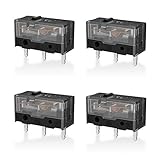
This product is a four-piece pack of Black Kailh GM 8.0 mouse switches. Its main advantage is quantity, giving a repair project multiple replacement components when the mouse uses a compatible mechanical switch format.
Pros: Four switches can support more than one repair, and the Kailh GM 8.0 designation gives buyers a specific switch family to compare.
Cons: The supplied data does not identify compatible mouse models, electrical specifications, installation tools, or a click-life rating. Who should skip it: Owners who need a guaranteed model-specific fit or do not want to verify switch dimensions themselves.
Optical Mouse Switch Micro Switch Switches
This HUYUN replacement set is listed for the Razer Naga Pro, DeathAdder V2 Pro, Basilisk Ultimate, Viper Ultimate, Viper, and Viper Mini. That named compatibility is its strongest selection point for owners of those Razer mice.
Pros: The listing directly identifies several Razer optical-switch mice, which narrows compatibility research. It is a more targeted choice than a generic mechanical microswitch for those models.
Cons: The supplied information does not specify the pack quantity, installation method, or compatibility with other Razer revisions. Who should skip it: Owners of mechanical-switch mice or Razer models not named in the listing.
BestParts Mouse Switch Button Board Replacement
This BestParts assembly is identified for the Logitech G502 Lightspeed and includes a mouse switch button board, microswitch, and cable replacement. It is aimed at a specific wireless gaming mouse rather than general-purpose switch replacement.
Pros: The combined board, switch, and cable can address several related internal components in one model-specific assembly. It may reduce the need to source separate board and cable parts.
Cons: Compatibility is stated for the G502 Lightspeed, not every G502 variant. Who should skip it: Owners of wired G502 models, different Logitech mice, or buyers seeking only a loose microswitch.
RUNJRX Red Kailh GM 4.0 Mouse Micro Switch
This four-piece pack uses Red Kailh GM 4.0 mouse microswitches. Like the Black GM 8.0 pack, it is best considered a component-level option for a mouse that accepts a compatible mechanical switch.
Pros: The four-switch pack provides spare parts, and the GM 4.0 designation helps distinguish it from other Kailh switch families.
Cons: The supplied data does not list compatible mouse models, click force, electrical ratings, or a durability figure. Who should skip it: Buyers who need documented compatibility or a repair part that avoids component-level soldering.
ECSiNG 2 Pairs Micro Switch Button Board
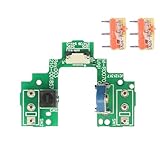
This ECSiNG replacement is listed as compatible with Logitech G900 and G903 gaming mice and uses D2FC-F-7N 20M replacement components. Two pairs provide parts for multiple button positions or a future repair.
Pros: The named G900 and G903 compatibility is useful for owners of those models. The board-based format may be more convenient than buying loose microswitches and matching them to the original layout.
Cons: The listing does not establish compatibility with other Logitech mice or revisions. Who should skip it: Anyone with a different Logitech model or a mouse that uses a different board connector.
Kailh Sword GM X Gaming Mouse Micro Switch 100
This KAILH product is a three-switch pack with an advertised 100-million-click rating. It may appeal to repairers prioritizing the highest stated durability figure among the listed loose mouse switches.
Pros: The 100-million-click specification is clearly stated, and the three-piece pack provides replacement components for a compatible mechanical mouse.
Cons: The supplied data does not list compatible mouse models, switch dimensions, click force, or installation requirements. Who should skip it: Buyers who value confirmed fitment more than a headline click-life rating.
HUYUN Mouse Switch Button Micro Switch Board
This HUYUN board is identified for the Logitech G604 Wireless Gaming Mouse and uses the D2FC-F-K 50M specification. The package also lists mouse feet stickers, which may be useful after opening the mouse housing.
Pros: The G604-specific design and included feet stickers make it a focused replacement option for that wireless mouse. The stated 50M switch designation gives a clearer component reference than an unspecified board.
Cons: Compatibility is not established for other Logitech models, and the supplied data does not describe the installation process. Who should skip it: Owners of a different mouse or buyers who only need individual loose switches.
Products That Do Not Fit This Repair Category
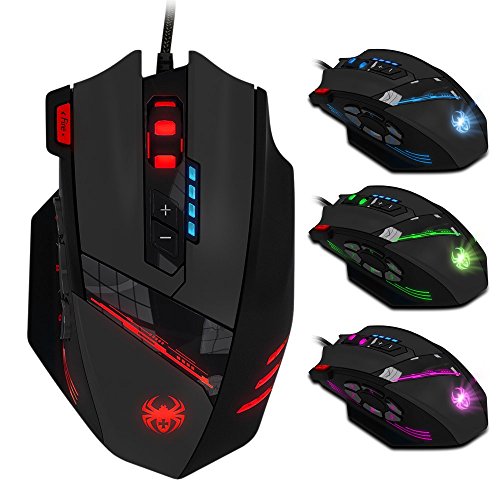
The 12 Programmable Buttons C12 Gaming Mouse is a complete mouse, not a switch replacement kit. Its 12 programmable buttons, four listed DPI levels, adjustable weights, and braided cable may matter when buying a mouse, but they do not help repair an existing one.
The eXtremeRate Strong Version Whole Clicky Kit V2 is designed for PS5 controller models BDM-040, BDM-050, and BDM-060. The 50PCS Blue Keyboard Switches are three-pin keyboard components, so neither product should be selected for a gaming mouse repair without separate compatibility evidence.
Installation and Compatibility Notes
Before ordering, compare the replacement with the original part inside the mouse. Check the switch technology, board shape, connector position, mounting points, and model revision, because a similar product name does not guarantee physical or electrical compatibility.
Opening a mouse can expose small cables, clips, screws, and adhesive feet. If the selected product is a loose microswitch, the repair may also require desoldering and soldering equipment, while a board assembly may still require careful internal connector work.
Disconnect the mouse before opening it and follow the seller’s installation documentation when available. Do not force a connector or switch into place, and confirm the repair is appropriate for the exact hardware revision before removing the original component.
Frequently Asked Questions
Are all gaming mouse switches interchangeable?
No. Mouse switches can differ by technology, dimensions, mounting arrangement, electrical design, and board layout. Match the replacement to the original mouse and switch type rather than choosing only by brand or click rating.
Should I buy loose switches or a button board?
Choose loose switches when the existing board is suitable and you can perform component-level repair. Choose a model-specific board when the listing clearly matches your mouse and you want to replace more of the button assembly.
Which option is best for a Razer optical mouse?
The Optical Mouse Switch Micro Switch Switches are the most directly targeted option in this list because the listing names several Razer optical-switch models. Verify the exact model and revision before purchase, since the supplied information does not cover every Razer mouse.
Final Recommendation
The best gaming mouse switch replacement kit is the one that matches the original hardware most precisely. Choose the HUYUN optical set for the named Razer models, BestParts for the G502 Lightspeed, ECSiNG for the G900 or G903, and HUYUN’s board for the G604.
For compatible mechanical mice, the RUNJRX Kailh packs offer multi-switch replacements, while the Kailh Sword GM X emphasizes its advertised 100-million-click rating. If your mouse model is not clearly supported, pause before buying and verify the internal switch and board specifications.
For broader mouse buying advice, see our comparisons of gaming mice versus the MX Master and gaming mice with side buttons for MMO play.






Write Your Review
No reviews yet. Be the first to share your experience!