

The best gaming mouse with side buttons for MMO games is the Razer Naga V3 Pro Wireless MMO Gaming Mouse for buyers who want adaptable layouts, wireless connectivity, and broad genre support. Its swappable 12-button, 6-button, and 2-button side plates make it more flexible than fixed-layout MMO mice, although the Redragon models provide more affordable ways to access many programmable controls.
This comparison uses documented specifications rather than hands-on claims. The key decision is whether you need a dense 12-button grid, wireless operation, adjustable button placement, or a simpler mouse with only a few extra controls.
- Best adaptable option: Razer Naga V3 Pro Wireless MMO Gaming Mouse, with three magnetic side plates and HyperSpeed, Bluetooth, and USB-C wired modes.
- Best value wireless choice: Redragon Wireless Gaming Mouse, with 16 programmable buttons, 12 side buttons, and a rechargeable battery.
- Best wired value: Redragon M908 Wired MMO RGB Gaming Mouse 12400 DPI, with 18 programmable buttons, adjustable weights, and five memory profiles.
- Best adjustable wired layout: Corsair Scimitar RGB Elite Wired MMO MOBA PC, whose 12-button side panel can be repositioned to suit different grips.
- Best for lighter MMO and general PC control: Razer Basilisk V3 Customizable RGB Wired Ergonomic, with 11 programmable buttons and a thumb rest, but fewer side buttons than dedicated MMO designs.
Top Products

Pros
- 18 programmable buttons including 12-key side grid
- Pixart PAW3327 sensor with up to 12400 DPI
- Includes eight-piece modular weight tuning set
- Five onboard memory profiles for rapid switching
Cons
- Macro remapping software is incompatible with macOS
- Lacks wireless connectivity options


Pros
- 19 programmable buttons for complex macros
- Modular weight tuning with eight removable weights
- Five onboard memory profiles for custom layouts
- Wide DPI adjustment range up to 12400
Cons
- Software download required for macro and lighting customization

Pros
- Interchangeable side plates for multiple game layouts
- Flexible HyperSpeed, Bluetooth, and wired connectivity
- High-resolution 50,000 DPI optical sensor
- Up to 280 hours of battery life over Bluetooth
- Versatile multi-mode tilt scroll wheel
Cons
- Full software customization is not supported on macOS
- Wireless charging docks and accessories sold separately

Pros
- 18 programmable buttons for extensive macro layouts
- Customizable weight tuning system with removable weights
- PAW3327 optical sensor with 1000 Hz polling
- Five onboard memory profiles for preset switching
Cons
- Tethered wired cable limits placement flexibility
- Full button remapping requires proprietary software

Pros
- 12 dedicated programmable side buttons
- Dual 2.4GHz wireless and USB-C wired modes
- Pixart 3335 sensor with adjustable 16000 DPI
- Up to 80 hours of battery in Eco mode
- Full wireless configuration through dedicated software
Cons
- Battery life drops to 45 hours with RGB enabled
- Key remapping requires proprietary driver software
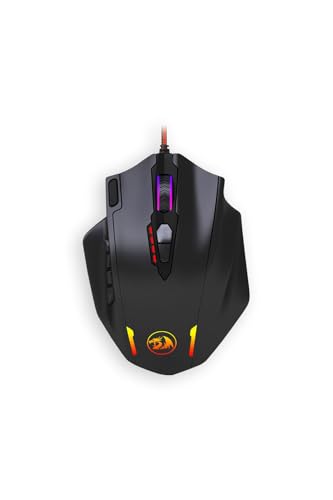
Pros
- Eighteen programmable buttons for extensive macro assignments
- Adjustable polling rate up to 1000 Hz
- Included weight tuning cartridge
- Optical sensor adjustable up to 12400 DPI
- Five physical onboard DPI preset levels
Cons
- Fine DPI tuning requires software configuration
- One physical button cannot be programmed

Pros
- 17 fully programmable macro buttons
- Repositionable 12-button side slider system
- Accurate 18,000 DPI PixArt optical sensor
- Durable 50-million-click Omron switches
- Contoured ergonomic shape with a finger rest
Cons
- Tethered wired-only connection
- Right-hand ergonomic design limits ambidextrous use

Pros
- Ergonomic right-handed shape for comfortable handling
- On-the-fly DPI sensitivity adjustment buttons
- Five fully programmable buttons via Razer Synapse
- Ridged rubber scroll wheel provides tactile grip
- Reliable high-precision 6,400 DPI optical tracking
Cons
- Tethered wired cable limits placement flexibility
- Mechanical switch lifespan limited to 10 million clicks
- Button remapping depends on Razer Synapse software

Pros
- 11 programmable buttons for comprehensive macro control
- Dual-mode HyperScroll tilt wheel enhances versatility
- High-resolution 26K DPI optical sensor
- Responsive optical switches rated for 70 million clicks
- 11 independently customizable RGB lighting zones
Cons
- Tethered wired cable restricts cable-free mobility
- Ergonomic thumb rest form factor excludes left-handed users
How These MMO Mice Differ
| Mouse | Side buttons | Connection | Notable controls | Best suited to |
|---|---|---|---|---|
| Redragon M908 Wired MMO RGB Gaming Mouse 12400 DPI | 12 | Wired USB | 18 programmable buttons, adjustable weights, five profiles | Budget-conscious MMO players who prefer wired operation |
| Redragon Wireless Gaming Mouse | 12 | Wireless or wired charging mode | 16 programmable buttons, five profiles, adjustable polling rate | Players who want wireless freedom and many controls |
| Redragon Gaming Mouse, MMO Mouse Gaming UP 12400 | 12 | Not specified | 19 programmable buttons, adjustable weights, five profiles | Users who want the highest button count among the listed Redragon models |
| Razer Naga V3 Pro Wireless MMO Gaming Mouse | 2, 6, or 12 depending on plate | HyperSpeed wireless, Bluetooth, or USB-C wired | Swappable side plates, edge buttons, ring-finger button | Players who move between MMO, MOBA, FPS, and general use |
| Redragon M913 Wireless RGB MMO Gaming Mouse 16000 | 12 | 2.4 GHz wireless or USB-C wired | 16 programmable buttons, five DPI levels | Wireless MMO setups that need a straightforward 12-button grid |
| Redragon M921 Wired RGB MMO Gaming Mouse 12400 DPI | 12 | Wired USB | 18 programmable buttons, dedicated fire button, adjustable weights | Users who want a wired MMO layout with extra aiming controls |
| Corsair Scimitar RGB Elite Wired MMO MOBA PC | 12 | Wired USB | 17 programmable buttons, repositionable side panel | Players who need to fine-tune side-button reach |
| Razer DeathAdder Essential Ergonomic Wired | Not specified | Wired USB | Five programmable buttons, 6,400 DPI sensor | Users who need only a few shortcuts rather than MMO button density |
| Razer Basilisk V3 Customizable RGB Wired Ergonomic | Not specified | Wired USB | 11 programmable buttons, thumb rest, tilt wheel | Mixed gaming and productivity use with moderate button needs |
Product-by-Product Analysis
Redragon M908 Wired MMO RGB Gaming Mouse 12400 DPI
The Redragon M908 provides 18 programmable buttons, including 12 side buttons, a Pixart PAW3327 optical sensor, up to 1,000 Hz polling, and five memory profiles. Its adjustable DPI range, RGB lighting, and included 2.4-gram weight pieces give MMO players several ways to configure controls and handling.
Pros: Dense button coverage, onboard profile support, adjustable weights, and a braided wired connection. Cons: It requires a cable, and the large number of controls may feel crowded for users who prefer a simple layout. Who should skip it: Choose another model if wireless use or a removable side panel matters more than low-cost button density.
The supplied compatibility information lists programmable use for older Windows versions through Windows 10, while Mac support is described as normal use only. Buyers on newer Windows releases or macOS should confirm current software support before relying on advanced remapping.
Redragon Wireless Gaming Mouse
This wireless Redragon model combines 16 programmable buttons with 12 side buttons, adjustable DPI from 100 to 16,000, polling rates from 125 to 1,000 Hz, and five saved profiles. Its built-in 1,000 mAh battery is specified for more than 70 hours with RGB disabled, and it can remain connected while charging.
Pros: Wireless freedom, wired charging use, many remappable controls, two working modes, and profile storage. Cons: The documented battery figure applies with RGB disabled, and software is required for full customization. Who should skip it: Skip this model if you want the lowest possible cable complexity or do not need a 12-button MMO grid.
Redragon Gaming Mouse, MMO Mouse Gaming UP 12400
With 19 programmable buttons, 12 side buttons, five profiles, adjustable polling from 125 to 1,000 Hz, and eight removable 2.4-gram weights, this is the most configurable Redragon option by button count. It is aimed at players who want MMO commands, macros, and physical balance adjustments in one wired-style design.
Pros: Highest stated button count in this group, adjustable weight distribution, and profile-based customization. Cons: The supplied data does not specify its connection type or operating-system software support. Who should skip it: Avoid making it your first choice if wireless connectivity or clearly documented compatibility is essential.
Razer Naga V3 Pro Wireless MMO Gaming Mouse
The Razer Naga V3 Pro is the most flexible choice for players who switch between genres. Its magnetic side plates provide 12, 6, or 2 side-button layouts, while two edge buttons and a lockable ring-finger button add further control options.
It supports Razer HyperSpeed wireless, Bluetooth, and USB-C wired mode. Razer lists up to 155 hours on HyperSpeed wireless and up to 280 hours on Bluetooth, while the Focus Pro 50K sensor, optical switches, and HyperScroll Tilt Wheel Gen-2 broaden its use beyond MMOs.
Pros: Swappable layouts, three connection modes, long stated battery figures, and strong support for MMO, MOBA, FPS, and productivity tasks. Cons: Its feature set may be unnecessary for players who only want a fixed 12-button grid, and full customization is available on Windows while macOS is limited to core functions and onboard settings. Who should skip it: Skip it if your priority is a simple wired MMO mouse with the fewest setup requirements.
Redragon M913 Wireless RGB MMO Gaming Mouse 16000
The M913 offers 2.4 GHz wireless and USB-C wired modes, 12 side buttons, 16 programmable controls, and a Pixart 3335 sensor. Its stated battery range is 45 hours with backlighting enabled and up to 80 hours in eco mode, giving it a practical choice for cable-free MMO setups.
Pros: Dual connection modes, a familiar 12-button side grid, wireless customization, and a battery mode designed for longer use. Cons: It has fewer total programmable buttons than the 18-button and 19-button alternatives, and its DPI presets are less extensive than some models. Who should skip it: Choose another mouse if you need adjustable weights, a removable side layout, or the maximum number of commands.
Redragon M921 Wired RGB MMO Gaming Mouse 12400 DPI
The M921 combines 12 side buttons with a dedicated fire button, 18 programmable buttons, five profiles, and eight removable weights. Its PAW3327 sensor is specified for up to 1,000 Hz polling, 200 IPS tracking, and 30G acceleration, making it suitable for users who want MMO controls alongside quick-access aiming functions.
Pros: Extra fire control, adjustable balance, profile storage, and a clearly documented wired performance specification. Cons: The cable limits desk freedom, and its aggressive multi-button layout may be more than casual MMO players need. Who should skip it: Skip it if you prefer wireless play or a lighter, less specialized control scheme.
Corsair Scimitar RGB Elite Wired MMO MOBA PC
The Corsair Scimitar RGB Elite has 17 programmable buttons, including a 12-button side panel that can slide into a more suitable position for the user’s grip. Its PMW3391 optical sensor supports up to 18,000 DPI with one-DPI adjustment, and the contoured shape includes a right-side finger rest.
Pros: Repositionable side controls, a palm-oriented shape, detailed DPI adjustment, and a durable cable and switch specification. Cons: It is wired and does not provide the layout flexibility of removable side plates. Who should skip it: Skip it if you need wireless operation or want to change between two-button and 12-button configurations.
Razer DeathAdder Essential Ergonomic Wired
The DeathAdder Essential is not a dedicated MMO mouse, but its five programmable buttons can handle basic shortcuts, push-to-talk assignments, and a small number of mapped commands. It also has a 6,400 DPI optical sensor, reprogrammable DPI buttons, and a rubberized scroll wheel.
Pros: Straightforward ergonomic design, programmable controls, and a simpler layout for general PC gaming. Cons: The supplied information does not identify a 12-button side panel, so it cannot match dedicated MMO mice for ability-heavy games. Who should skip it: Skip it if your MMO setup requires many simultaneous hotkeys on the mouse.
Razer Basilisk V3 Customizable RGB Wired Ergonomic
The Basilisk V3 provides 11 programmable buttons, a thumb rest, a tilt wheel, and a 26K DPI optical sensor. It is better suited to players who want a general-purpose gaming mouse with several shortcuts rather than a dense MMO command panel.
Pros: Ergonomic thumb support, programmable controls, a versatile scroll wheel, and suitability for gaming and productivity. Cons: It does not offer the dedicated 12-button side grid found on the MMO-focused models. Who should skip it: Skip it if your priority is mapping a large ability bar directly to side buttons.
How to Choose the Best Gaming Mouse With Side Buttons for MMO
Choose the Button Layout Before the Sensor
For most MMO players, side-button placement matters more than extremely high DPI figures. A 12-button grid can place many abilities under the thumb, while a two-button or five-button design is easier to manage for general gaming but limits direct MMO bindings.
Fixed grids are usually the simplest approach, while the Corsair Scimitar RGB Elite adds physical repositioning. The Razer Naga V3 Pro goes further with removable plates, allowing the same mouse to change roles between MMO and FPS play.
Consider Wired Versus Wireless Use
Wired mice such as the Redragon M908, Redragon M921, and Corsair Scimitar RGB Elite avoid battery management but keep a cable on the desk. Wireless models such as the Redragon Wireless Gaming Mouse, Redragon M913, and Razer Naga V3 Pro offer more movement freedom, with wired modes available for charging or connected play where documented.
Check Software and Operating-System Support
Advanced remapping, macros, DPI settings, lighting, and profile storage depend on the manufacturer’s software. The supplied data specifically describes full Razer Synapse customization on Windows, while macOS supports fewer functions on the Naga V3 Pro. Redragon also identifies software requirements for programmable features on several models, so verify current downloads and OS support before purchase.
Do Not Overvalue Maximum DPI
Every listed mouse provides more sensitivity than most MMO players need for ordinary desktop and game control. DPI range is useful when you want multiple sensitivity profiles, but button placement, grip comfort, software support, and connection type have a more direct effect on suitability.
Account for Weight and Shape
The Redragon M908, Redragon Gaming Mouse, MMO Mouse Gaming UP 12400, and Redragon M921 include removable weights for balance adjustments. This can help users who prefer a heavier or differently balanced mouse, but it also adds configuration choices and does not guarantee that the shape will suit every hand or grip.
Frequently Asked Questions
How many side buttons does an MMO mouse need?
There is no universal number. Twelve side buttons suit players who want many abilities within thumb reach, while six or fewer can be easier for mixed gaming and productivity use. The Razer Naga V3 Pro is the most adaptable because its side-plate system supports several layouts.
Are wireless MMO mice suitable for PC gaming?
Yes, when the connection mode and software meet your requirements. The Redragon Wireless Gaming Mouse and Redragon M913 support wireless use with wired charging modes, while the Razer Naga V3 Pro adds HyperSpeed, Bluetooth, and USB-C wired connectivity.
Is a high-DPI sensor important for MMO games?
Usually, it is less important than comfortable button access and reliable remapping. High DPI can provide sensitivity flexibility, but the supplied specifications do not establish a particular setting as best for every MMO, grip, display, or player.
Final Recommendation
The best gaming mouse with side buttons for MMO players depends on the controls you actually need. Choose the Razer Naga V3 Pro Wireless MMO Gaming Mouse if you want one adaptable mouse for multiple genres and connection modes. Choose the Redragon Wireless Gaming Mouse or Redragon M913 Wireless RGB MMO Gaming Mouse 16000 for wireless 12-button control with a lower-complexity layout.
For a wired setup with extensive remapping, the Redragon M908, Redragon M921, or Corsair Scimitar RGB Elite are more targeted choices. The Corsair model is particularly relevant when side-panel position matters, while the Redragon options emphasize button count and adjustable weights. The Razer DeathAdder Essential and Basilisk V3 are better choices when you need a few useful shortcuts rather than a dedicated MMO keypad.






Write Your Review
No reviews yet. Be the first to share your experience!