

The best mechanical keyboard for Mac gaming is not necessarily the most expensive model. Mac users should first check layout support, connection type, key mapping options, and whether the keyboard also suits their games and everyday work.
Among these options, the Keychron K4 is the clearest fit for users who want a dedicated Mac layout, wireless connectivity, and a number pad. The Logitech MX Mechanical is better suited to quiet multi-device productivity, while the AULA F75 Pro, RK ROYAL KLUDGE S98, and SOLAKAKA A99 Pro offer more gaming-focused customization.

Pros
- Compact layout retains dedicated arrow keys
- Smooth linear red mechanical switches
- Full anti-ghosting across all keys
- Detachable cable simplifies transport
- Dual adjustable kickstands for ergonomics
Cons
- Single-color blue lighting without RGB customization
- Lacks wireless connectivity options

Pros
- Versatile 2.4GHz, Bluetooth, and wired USB-C connectivity
- Hot-swappable sockets support 3-pin and 5-pin switches
- Multi-function knob for volume and lighting control
- High-capacity 4000mAh rechargeable internal battery
- Compact 75% layout retains dedicated arrow keys
Cons
- Lacks a dedicated numeric keypad
- Full macro programming requires optional driver software
- Side-printed legends may reduce visibility from certain angles

Pros
- Versatile Bluetooth, 2.4GHz, and USB-C connectivity
- Convenient built-in smart display and multi-function knob
- Hot-swappable PCB compatible with 3-pin and 5-pin switches
- Extensive multi-layer sound dampening reduces typing noise
- Durable wear-resistant double-shot PBT keycaps
Cons
- Three-pound total weight limits travel portability
- Full-sized footprint requires substantial desktop space

Pros
- Low-profile quiet tactile mechanical switches
- Multi-device pairing across up to three devices
- Smart backlighting with automatic proximity detection
- Includes Logi Bolt receiver and Bluetooth support
- Up to 10 months battery life without backlighting
Cons
- Battery life drops significantly with backlighting enabled
- Full-size footprint takes up substantial desk space

Pros
- Gasket mount with EVA foam sound dampening
- Hot-swappable PCB accepts 3-pin and 5-pin switches
- Angled color screen displays GIFs and system status
- Pre-lubed linear switches with south-facing LEDs
- Compact 75% layout retains essential navigation keys
Cons
- Only documented for wired USB-C connectivity
- GIF uploads and macros require proprietary software

Pros
- Space-saving 100-key layout includes number pad
- Multi-device Bluetooth 5.1 wireless connectivity
- Long battery life with backlight disabled
- Includes keycaps for both Mac and Windows
- Full N-key rollover supported in wired mode
Cons
- Limited to 6-key rollover in wireless mode
- Backlighting restricted to white illumination only

Pros
- Dedicated one-touch lighting toggle button
- 19-key anti-ghosting for essential gaming inputs
- Full 104-key layout with multimedia shortcuts
- Plug-and-play setup across PC and consoles
- Adjustable backlighting brightness and breathing modes
Cons
- Simulates mechanical feel rather than true mechanical switches
- Anti-ghosting is limited to 19 keys
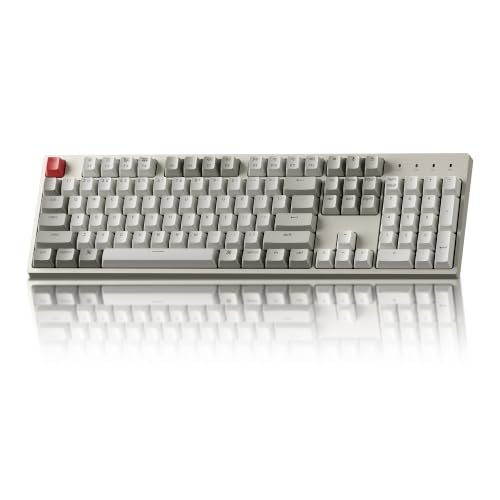
Pros
- Full 104-key layout with dedicated number pad
- Tactile switches rated for 50 million keystrokes
- Includes dedicated Mac and Windows replacement keycaps
- Detachable braided USB Type-C cable
- Two-level adjustable feet for ergonomic angles
Cons
- Non-backlit keys reduce visibility in the dark
- Wired-only design lacks wireless connectivity
- Num Lock function is limited to Windows systems

Pros
- Hot-swappable linear red switches
- Full-key anti-ghosting support
- Software macro editing and remapping
- Includes four spare replacement switches
- Twelve quick-access multimedia shortcuts
Cons
- Backlight LED colors cannot be changed
- Wired-only design without wireless functionality

Pros
- Versatile tri-mode wireless and wired connection options
- Integrated LCD screen and multi-function rotary knob
- Hot-swappable PCB compatible with 3-pin and 5-pin switches
- High-capacity 8000mAh internal rechargeable battery
- Space-saving 96% layout preserves the numeric keypad
Cons
- Web driver software requires a wired connection to configure
- Significantly reduced advertised battery life when using RGB backlighting
How These Mac Gaming Keyboards Differ
| Keyboard | Layout | Connection | Mac-relevant feature | Main limitation |
|---|---|---|---|---|
| Logitech MX Mechanical Wireless Illuminated | Full size | Bluetooth, Logi Bolt receiver | Multi-device and multi-OS support | Quiet tactile design prioritizes productivity over gaming customization |
| AULA F75 Pro Wireless Mechanical Keyboard,75% Hot | 75%, 81 keys | Bluetooth, 2.4GHz, USB-C | Tri-mode connectivity and programmable keys | Mac-specific layout details are not specified |
| RK ROYAL KLUDGE S98 Wireless Mechanical Keyboard | Compact layout with number pad | Bluetooth, 2.4GHz, USB-C | Display identifies WIN/MAC layout and connection mode | Mac software and key remapping support are not fully specified |
| Keychron K4 96% Layout 100 Keys Wireless Bluetooth | 96%, 100 keys | Bluetooth, USB-C | Mac layout, Mac keycaps, and Windows compatibility | Wireless mode supports 6KRO rather than wired NKRO |
| Keychron C2 Full Size Wired Mechanical Keyboard | Full size, 104 keys | USB-C wired | Mac-optimized layout and included Mac keycaps | No wireless mode and no backlight on the listed version |
| MageGee Portable 60% Mechanical Gaming Keyboard | Compact 68-key layout | USB wired | Plug-and-play Mac compatibility | Limited onboard layout compared with full-size keyboards |
Product-by-Product Analysis
Logitech MX Mechanical Wireless Illuminated
The Logitech MX Mechanical Wireless Illuminated uses low-profile tactile quiet mechanical switches in a full-size layout. Bluetooth Low Energy and the included Logi Bolt receiver allow pairing with up to three devices, while Logi Options+ supports key customization and multi-computer Flow functions.
- Pros: Mac-compatible multi-OS design, low-profile keys, adaptive backlighting, quiet tactile switches, and long stated battery life when backlighting is disabled.
- Cons: The full-size chassis takes more desk space, and the productivity-focused design offers fewer gaming customization details than the enthusiast-oriented models.
- Who should skip it: Skip it if you want hot-swappable switches, extensive RGB control, or a compact gaming layout.
AULA F75 Pro Wireless Mechanical Keyboard,75% Hot
The AULA F75 Pro Wireless Mechanical Keyboard,75% Hot combines an 81-key 75% layout with Bluetooth, 2.4GHz wireless, and USB-C wired modes. Its hot-swappable PCB accepts 3-pin and 5-pin switches, while programmable keys, N-key rollover, RGB lighting, and a control knob support gaming and customization.
- Pros: Compact layout retains arrow keys, tri-mode connectivity supports several device types, and the switch socket design allows changes without soldering.
- Cons: The supplied information does not specify a dedicated Mac layout or Mac-specific keycaps, so macOS remapping may require adjustment.
- Who should skip it: Skip it if native Mac legends and clearly documented Mac key functions matter more than switch customization.
RK ROYAL KLUDGE S98 Wireless Mechanical Keyboard
The RK ROYAL KLUDGE S98 Wireless Mechanical Keyboard adds a smart display and multifunction knob to a wireless mechanical keyboard with a compact number-pad-oriented layout. The display can show the selected WIN/MAC layout, connection mode, and battery status, while Bluetooth 5.0, 2.4GHz, and USB-C provide flexible connections.
- Pros: Tri-mode connectivity, hot-swappable 3-pin and 5-pin support, double-shot PBT keycaps, sound-dampening materials, and visible system status information.
- Cons: The product data does not fully document macOS software behavior, key remapping, or the exact physical layout of Mac modifier keys.
- Who should skip it: Skip it if you need a straightforward Mac-first keyboard with clearly documented Apple modifier legends.
Womier SK80 75% Keyboard with Color Multimedia
The Womier SK80 75% Keyboard with Color Multimedia is a compact 75% wired keyboard with a color display, gasket-mounted construction, hot-swappable 3-pin and 5-pin support, and programmable RGB settings. Its software can configure macros, lighting, and display images, and the listed compatibility includes Mac and Windows systems.
- Pros: Space-saving layout, Mac and Windows compatibility, hot-swappable switches, display controls, programmable lighting, and detachable USB-C connectivity.
- Cons: The supplied information does not specify wireless connectivity or a dedicated Mac modifier layout, and software compatibility details for macOS are limited.
- Who should skip it: Skip it if you need wireless use, a number pad, or fully documented Mac-specific software support.
Keychron K4 96% Layout 100 Keys Wireless Bluetooth
The Keychron K4 96% Layout 100 Keys Wireless Bluetooth is one of the most directly suitable choices for a Mac gaming setup. It has a Mac layout, includes Mac and Windows keycaps, connects to up to three Bluetooth devices, and also supports wired USB-C use with a 96% layout that retains the number pad.
- Pros: Clearly documented Mac layout, included Mac keycaps, wireless and wired modes, number pad, white backlight, and a large stated battery capacity.
- Cons: Wireless operation is specified as 6KRO, while NKRO is available in wired mode, and the 96% layout remains larger than a 75% or 60% keyboard.
- Who should skip it: Skip it if you want per-key RGB lighting, a smaller gaming footprint, or wireless NKRO specifically.
Keychron C2 Full Size Wired Mechanical Keyboard
The Keychron C2 Full Size Wired Mechanical Keyboard focuses on a traditional 104-key layout, a wired USB-C connection, and Mac-friendly controls. It includes extra keycaps for Mac and Windows, a tactile Keychron switch, adjustable feet, and a dedicated Siri or Cortana key.
- Pros: Native Mac-oriented layout, full-size number pad, constant wired connection, tactile switches, and included replacement keycaps for both operating systems.
- Cons: The listed version has no backlight and does not offer wireless connectivity, making it less flexible for multi-device setups.
- Who should skip it: Skip it if you want wireless gaming, RGB lighting, or a compact keyboard for limited desk space.
MageGee Portable 60% Mechanical Gaming Keyboard
The MageGee Portable 60% Mechanical Gaming Keyboard uses a compact wired design with 68 keys, separate arrow keys, and access to F1 through F12 through the function layer. Its red switches are linear, and the keyboard is specified as plug-and-play compatible with Mac without drivers or software.
- Pros: Small footprint, dedicated arrow keys, linear red switches, anti-ghosting across the listed keys, adjustable feet, and simple Mac installation.
- Cons: It is wired only, uses blue LED backlighting rather than configurable RGB, and its compact layout requires function-layer shortcuts for some controls.
- Who should skip it: Skip it if you need wireless connectivity, Mac-specific modifier legends, or a number pad.
Redragon K521 Upgrade Rainbow LED Gaming Keyboard
The Redragon K521 Upgrade Rainbow LED Gaming Keyboard is a basic wired gaming keyboard with mechanical-feeling keys, rainbow backlighting, 19-key anti-ghosting, and 12 multimedia key combinations. It is listed as plug-and-play compatible with macOS, Windows, PlayStation, and Xbox.
- Pros: Broad stated compatibility, one-touch lighting control, multimedia shortcuts, and anti-ghosting support for common key combinations.
- Cons: The product is described as mechanical feeling rather than using documented mechanical switches, and the data does not specify hot-swap support or Mac-specific keycaps.
- Who should skip it: Skip it if genuine mechanical switches, switch replacement, or detailed Mac layout support are priorities.
Redragon Mechanical Gaming Keyboard Wired
The Redragon Mechanical Gaming Keyboard Wired offers hot-swappable linear red switches, double-shot PBT keycaps, 11 backlight modes, macro editing, and full-key anti-ghosting. Its wired connection and stated PC and Mac compatibility make it a practical option when wireless features are unnecessary.
- Pros: Hot-swappable red switches, PBT keycaps, macro editing, full-key anti-ghosting, multimedia shortcuts, and a stated two-year warranty.
- Cons: The lighting color cannot be changed, the connection is wired, and the supplied information does not describe a Mac-specific layout.
- Who should skip it: Skip it if you want wireless use, per-key RGB color control, or Apple modifier legends.
SOLAKAKA A99 Pro Mechanical Keyboard with LCD
The SOLAKAKA A99 Pro Mechanical Keyboard with LCD combines a 96% layout with a display, metal knob, tri-mode connectivity, hot-swappable switches, and a stated 8,000mAh battery. It supports Mac, Windows, iOS, and Android systems, while its web driver can configure macros, key mapping, lighting, display GIFs, and other settings through a wired connection.
- Pros: Mac compatibility, tri-mode connections, number pad, hot-swappable 3-pin and 5-pin support, programmable web driver, PBT keycaps, and a large stated battery.
- Cons: The web driver must be accessed through a wired connection, and the product data does not specify whether every customization function works identically on macOS.
- Who should skip it: Skip it if you prefer a simpler keyboard without a display, web configuration, or a relatively feature-heavy control system.
How to Choose the Best Mechanical Keyboard for Mac Gaming
Start With Mac Layout Support
A Mac-compatible connection does not always mean a Mac-optimized physical layout. The Keychron K4 and C2 specifically include Mac-oriented controls and extra Mac keycaps, while several gaming keyboards only state general Mac compatibility.
For occasional gaming, a standard Windows-style layout can still work if macOS recognizes the keyboard correctly. For frequent switching between work and games, a documented Mac layout reduces the need to remap modifier keys or remember unfamiliar legends.
Choose the Connection That Fits Your Mac
Bluetooth is useful for clean desks and multiple devices, while a 2.4GHz receiver can provide another wireless option on models that include it. Wired USB-C keyboards avoid wireless pairing concerns and are often the simplest choice for a fixed gaming station.
Check the ports on your Mac before choosing a wired or receiver-based keyboard. A supplied receiver may require an appropriate adapter or hub if your computer does not provide a compatible USB port.
Match the Layout to Your Games and Desk
A 60% or 75% keyboard leaves more room for mouse movement, but it may place function-row and navigation commands behind a function layer. A 96% or full-size keyboard preserves the number pad and more dedicated keys, which can help with productivity and some game controls.
The MageGee is the most compact option listed, while the Keychron K4, SOLAKAKA A99 Pro, Logitech MX Mechanical, and Keychron C2 are better suited to users who want more dedicated keys.
Consider Switch Type and Customization
Linear red switches, such as those listed for the MageGee and Redragon models, provide a smooth keypress without a tactile bump. Tactile switches, including those in the Logitech MX Mechanical and Keychron C2, provide a noticeable feedback point that some users prefer for typing.
Hot-swappable models such as the AULA F75 Pro, RK ROYAL KLUDGE S98, Womier SK80, Redragon wired model, and SOLAKAKA A99 Pro allow compatible switches to be replaced without soldering. This is useful for customization, but it also adds more configuration choices than a fixed-switch keyboard.
Check Software Requirements Before Buying
RGB profiles, macros, display images, and key remapping may depend on manufacturer software or a web driver. The SOLAKAKA A99 Pro specifies that its web driver should be accessed through a wired connection, while the Womier SK80 and AULA F75 Pro describe driver-based customization without fully documenting macOS support.
If you want a plug-and-play Mac setup, the MageGee, Keychron C2, and other wired options with clearly stated Mac compatibility involve fewer software decisions. For advanced customization, verify that the required driver supports your version of macOS before purchase.
Which Keyboard Is Best for Different Mac Gaming Setups?
- Best Mac-first wireless choice: Keychron K4, because it has a documented Mac layout, Mac keycaps, Bluetooth, wired USB-C, and a number pad.
- Best productivity and multi-device option: Logitech MX Mechanical, because it combines low-profile tactile switches, quiet operation, backlighting, and support for up to three devices.
- Best compact customizable option: AULA F75 Pro, because its 75% layout, tri-mode connectivity, hot-swap support, knob, and programmable keys suit mixed gaming and work setups.
- Best display-equipped option: SOLAKAKA A99 Pro, because its LCD, knob, tri-mode connectivity, hot-swap support, and web driver provide extensive configuration options.
- Best simple wired Mac option: Keychron C2, because it has a full-size Mac-oriented layout, Mac keycaps, tactile switches, and a USB-C wired connection.
- Best compact plug-and-play option: MageGee, because its 68-key wired layout is listed as compatible with Mac without requiring drivers or software.
Frequently Asked Questions
Are mechanical keyboards compatible with Mac computers?
Many mechanical keyboards work with Mac computers through Bluetooth or USB, but compatibility does not guarantee a dedicated Mac layout. Check for Mac keycaps, macOS support, and documented modifier-key behavior when those details matter.
Is a wired keyboard better for Mac gaming?
A wired keyboard provides a direct connection and avoids Bluetooth pairing or wireless receiver requirements. Wireless models are more flexible for multi-device use, so the better choice depends on whether your Mac remains in one gaming position.
Do Mac gaming keyboards need special software?
Basic typing and gaming may work without extra software on models listed as plug-and-play. Macros, key remapping, RGB profiles, and display customization can require a driver or web tool, and the available macOS support should be confirmed before relying on those functions.
Final Recommendation
The Keychron K4 is the strongest general recommendation for the best mechanical keyboard for Mac gaming when Mac layout support, wireless connectivity, and a number pad are all important. Choose the Keychron C2 if you prefer a simpler full-size wired setup, or the MageGee if saving desk space matters most.
For users who prioritize hot-swappable switches, RGB controls, and gaming-oriented customization, the AULA F75 Pro, Womier SK80, RK ROYAL KLUDGE S98, and SOLAKAKA A99 Pro are more suitable. The Logitech MX Mechanical is the better fit when quiet typing and multi-device productivity take priority over enthusiast gaming features.
For broader setup decisions, compare the keyboard with your pointing device and display needs in our guides to gaming mice versus the MX Master and mechanical keyboards versus Hall effect keyboards.



Write Your Review
No reviews yet. Be the first to share your experience!