

The best quiet mechanical keyboard for gaming combines a low-noise switch design with stable construction, useful compatibility, and controls that match your setup. Among these options, the Razer BlackWidow V4 X is the clearest choice for quiet wired gaming, while the Redragon K556 PRO adds wireless flexibility and hot-swappable switches.
This comparison is based on documented specifications rather than independent acoustic measurements. The listed keyboards differ significantly, including one hybrid model, one membrane keyboard, wired and wireless designs, and layouts ranging from compact 75% boards to full-size keyboards.
- Best overall quiet mechanical option: Razer BlackWidow V4 X Mechanical Gaming Keyboard, with yellow linear switches, built-in sound dampeners, acoustic foam, and lubricated stabilizers.
- Best wireless choice: Redragon K556 PRO Wireless RGB Mechanical, with USB-C, Bluetooth, and 2.4GHz connectivity plus hot-swappable switch support.
- Best compact customization option: SOLAKAKA KI99 Pro Wireless Mechanical Keyboard, with a 96% layout, gasket structure, silent switches, and five noise-reducing layers.
- Best smaller desktop option: AULA F75 Pro Wireless Mechanical Keyboard,75% Hot, with a 75% layout, pre-lubricated stabilizers, and five layers of sound-dampening material.
- Best non-mechanical quiet alternative: SteelSeries Apex 3 Gaming Keyboard – Black, which uses whisper-quiet gaming switches but is not a mechanical keyboard.

Pros
- Tri-mode wireless and USB-C connectivity
- Hot-swappable sockets compatible with 3-pin and 5-pin switches
- Durable brushed aluminum frame construction
- Pre-installed quiet linear switches minimize typing noise
- Companion software supports macro programming and RGB customization

Pros
- Tactile hybrid switches rated for 20 million clicks
- Built-in customizable OLED smart display
- Durable aircraft-grade aluminum alloy frame
- Dynamic per-key RGB backlighting with reactive effects
- Detachable magnetic wrist rest included

Pros
- Hot-swappable linear red switches
- Full-key anti-ghosting support
- Software macro editing and remapping
- Includes four spare replacement switches
- Twelve quick-access multimedia shortcuts
Cons
- Backlight LED colors cannot be changed
- Wired-only design without wireless functionality

Pros
- IP32 water resistance guards against liquid spills
- Whisper-quiet switches rated for 20 million presses
- Included magnetic wrist rest for palm support
- Dedicated on-the-fly multimedia controls
- Broad compatibility with PC and major consoles

Pros
- Fast 1.2mm linear Yellow switches with sound dampeners
- Six dedicated programmable macro keys
- Multi-function roller and dedicated media controls
- Per-key customizable Razer Chroma RGB lighting
- Built-in acoustic foam and lubricated stabilizers

Pros
- Large 10,000mAh rechargeable battery capacity
- Flexible Bluetooth, 2.4GHz wireless, and USB-C connectivity
- Hot-swappable PCB compatible with 3-pin and 5-pin switches
- Multi-layered gasket design dampens key clatter effectively
- Dedicated hardware knob for quick volume and lighting control
Cons
- Macro and lighting customization require dedicated driver software
- Condensed 96% layout features tighter key spacing than full-size boards

Pros
- Versatile 2.4GHz, Bluetooth, and wired USB-C connectivity
- Hot-swappable sockets support 3-pin and 5-pin switches
- Multi-function knob for volume and lighting control
- High-capacity 4000mAh rechargeable internal battery
- Compact 75% layout retains dedicated arrow keys
Cons
- Lacks a dedicated numeric keypad
- Full macro programming requires optional driver software
- Side-printed legends may reduce visibility from certain angles
How These Quiet Gaming Keyboards Compare
| Keyboard | Switch or key design | Connection | Layout | Notable quiet-focused features |
|---|---|---|---|---|
| Razer BlackWidow V4 X Mechanical Gaming Keyboard | Yellow linear mechanical switches | Wired | Not specified | Built-in sound dampeners, foam, lubricated stabilizers |
| Redragon K556 PRO Wireless RGB Mechanical | Quiet linear switches, hot-swappable | USB-C, Bluetooth, 2.4GHz | 104-key | Aluminum frame and switch replacement support |
| SOLAKAKA KI99 Pro Wireless Mechanical Keyboard | Silent switches, hot-swappable | USB-C, Bluetooth 5.0, 2.4GHz | 96% | Gasket structure and five noise-reducing layers |
| AULA F75 Pro Wireless Mechanical Keyboard,75% Hot | Pre-lubricated Reaper switches, hot-swappable | USB-C, Bluetooth 5.0, 2.4GHz | 75% | Five layers of filling material and pre-lubricated stabilizers |
| Redragon Mechanical Gaming Keyboard Wired | Linear red switches, hot-swappable | Wired | Not specified | Linear switch design, but no specific acoustic dampening is listed |
| SteelSeries Apex 5 Hybrid Mechanical | Hybrid blue mechanical switches | USB | Not specified | Hybrid construction, not described as quiet |
| SteelSeries Apex 3 Gaming Keyboard – Black | Whisper-quiet gaming switches | Wired | Not specified | Quiet key design, but it is not mechanical |
Recommended Quiet Mechanical Keyboards
Razer BlackWidow V4 X Mechanical Gaming Keyboard
Razer BlackWidow V4 X Mechanical Gaming Keyboard is the strongest specification-based pick when quiet wired gaming takes priority. Its yellow linear switches use a 1.2mm actuation and reset distance with 45g of required force, while built-in sound dampeners, foam under the circuit board, and lubricated stabilizers target common sources of keyboard noise.
The six dedicated macro keys, media controls, multifunction roller, per-key RGB, and doubleshot ABS keycaps suit players who want extensive gaming controls without relying entirely on software shortcuts. It connects as a wired keyboard, so it is better suited to a fixed PC desk than a setup that regularly switches between computers or mobile devices.
- Pros: Quiet-focused linear switch design, documented acoustic materials, six macro keys, media controls, per-key RGB, and durable doubleshot keycaps.
- Cons: Wired only, with no stated wireless connectivity or hot-swappable switch support.
- Who should skip it: Skip this model if you need Bluetooth, 2.4GHz wireless operation, or frequent switch experimentation.
Redragon K556 PRO Wireless RGB Mechanical
Redragon K556 PRO Wireless RGB Mechanical is a practical fit for gamers who want a full-size keyboard with quiet linear switches and flexible connections. Its USB-C, Bluetooth, and 2.4GHz modes support different desk layouts, while the aluminum construction is intended to keep the 104-key board stable during use.
The upgraded hot-swap socket accepts many three-pin and five-pin switches, allowing users to change the typing feel without soldering. That flexibility is useful for future customization, although the product data does not specify a battery capacity, acoustic measurement, or included replacement switch selection.
- Pros: Three connection modes, full-size 104-key layout, quiet linear switches, aluminum construction, hot-swappable sockets, RGB presets, and macro software.
- Cons: Wireless battery details are not specified, and the full-size layout occupies more desk space than compact alternatives.
- Who should skip it: Skip this model if you want a smaller keyboard, a dedicated acoustic measurement, or a simple wired-only design.
SOLAKAKA KI99 Pro Wireless Mechanical Keyboard
SOLAKAKA KI99 Pro Wireless Mechanical Keyboard targets users who want quiet mechanical features in a space-saving 96% layout. Silent switches, a gasket structure, five noise-reducing layers, and a 1.2mm flex-cut PCB are specified to reduce harsh bottom-out and case sounds while preserving a mechanical typing feel.
Its USB-C, Bluetooth 5.0, and 2.4GHz connections support PCs, laptops, smartphones, and other compatible devices. The 10,000mAh battery, PBT keycaps, control knob, RGB lighting, and three-pin or five-pin hot-swap support make it versatile, but the compact layout may require adjustment for users who regularly use a dedicated number pad.
- Pros: Silent switches, gasket structure, five sound-reducing layers, triple-mode connectivity, large stated battery capacity, PBT keycaps, and hot-swappable sockets.
- Cons: The product has a 96% layout rather than a full-size number-pad layout, and independent noise results are not provided.
- Who should skip it: Skip this model if you need a full-size keyboard or prefer a keyboard with a simpler, less customizable design.
AULA F75 Pro Wireless Mechanical Keyboard,75% Hot
AULA F75 Pro Wireless Mechanical Keyboard,75% Hot is a suitable choice for compact gaming desks that still need dedicated arrow keys. Its 75% layout retains those navigation controls while reducing overall footprint, and the knob can manage lighting in gaming mode or volume and playback in office mode.
The pre-lubricated stabilizers, five layers of filling material, single-key PCB slotting, and integrated silicone pad are documented measures intended to improve feel and reduce cavity noise. It supports USB-C, Bluetooth 5.0, and 2.4GHz connections, plus three-pin and five-pin switch replacement, although its Reaper switches are described as producing a creamy mechanical sound rather than being explicitly silent.
- Pros: Compact 75% layout, tri-mode connectivity, hot-swappable sockets, pre-lubricated stabilizers, five-layer dampening, control knob, and PBT keycaps.
- Cons: The included switches are not specifically identified as silent, and the compact layout omits a dedicated number pad.
- Who should skip it: Skip this model if minimum noise is more important than compact size or if you require a full-size layout.
Redragon Mechanical Gaming Keyboard Wired
Redragon Mechanical Gaming Keyboard Wired is the simplest mechanical option for buyers who want linear red switches, hot-swapping, anti-ghosting, and programmable functions. The red switches are described as lighter and smoother than tactile or clicky designs, but the available specifications do not identify dedicated sound dampening or a measured noise level.
Its wired connection suits a conventional PC setup, while 11 backlight modes, macro editing, multimedia shortcuts, double-shot keycaps, and included spare switches add useful functionality. Because the lighting is described as adjustable but not color-changeable, it is less flexible visually than the RGB models in this comparison.
- Pros: Linear red switches, hot-swappable design, anti-ghosting, macro editing, multimedia shortcuts, spare switches, and double-shot keycaps.
- Cons: No documented acoustic dampening, wireless connection, or full RGB color customization.
- Who should skip it: Skip this model if you need specifically silent switches, wireless connectivity, or advanced per-key lighting.
Quiet Alternatives That Are Not Fully Mechanical
SteelSeries Apex 3 Gaming Keyboard – Black
SteelSeries Apex 3 Gaming Keyboard – Black is worth considering if quiet operation matters more than mechanical switch characteristics. Its whisper-quiet gaming switches are rated for 20 million low-friction keypresses, and it adds a magnetic wrist rest, dedicated multimedia controls, and 10-zone RGB lighting.
The keyboard is listed as compatible with Windows, Mac OS X, Xbox Series consoles, PS4, and PS5. However, it is not a mechanical keyboard, so readers specifically seeking mechanical switch feedback, hot-swapping, or the customization associated with mechanical boards should choose another model.
- Pros: Quiet switch design, spill resistance rated IP32, wrist rest, multimedia controls, RGB lighting, and broad listed platform compatibility.
- Cons: It is a membrane-style gaming keyboard rather than a mechanical keyboard, with no hot-swap support listed.
- Who should skip it: Skip this model if mechanical switches are a firm requirement or if you want to customize the switch type.
SteelSeries Apex 5 Hybrid Mechanical
SteelSeries Apex 5 Hybrid Mechanical combines blue mechanical switch components with a membrane layer, an OLED smart display, per-key RGB, aluminum construction, and a magnetic wrist rest. The hybrid blue switch design is intended to provide tactile click feedback, which makes it a poor match for readers who need the quietest possible keyboard.
The OLED display can show game information, GIFs, and Discord messages, while the USB connection suits a fixed PC or console desk. This model is better considered a feature-rich hybrid keyboard than a quiet mechanical recommendation.
- Pros: OLED display, per-key RGB, aluminum frame, magnetic wrist rest, hybrid key design, and documented support for 20 million keypresses.
- Cons: Blue-style tactile clicking conflicts with quiet-use priorities, and the hybrid design is not equivalent to a conventional fully mechanical keyboard.
- Who should skip it: Skip this model if you share a room, record microphone audio nearby, or want linear silent switches.
How to Choose a Quiet Mechanical Keyboard for Gaming
Start With the Switch Type
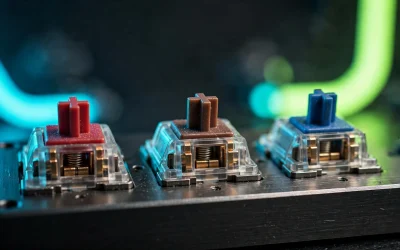
Linear switches generally avoid the deliberate click mechanism found on clicky switches, making them a more sensible starting point for quiet gaming. Among these products, the Razer uses yellow linear switches, the Redragon K556 PRO uses quiet linear switches, and the SOLAKAKA specifies silent switches.
Switch type alone does not establish a measured sound level. Case materials, stabilizers, keycaps, desk surfaces, and bottom-out force also influence the sound produced during typing and gameplay.
Look for Documented Acoustic Construction
For the clearest quiet-focused specifications, prioritize products that identify dampeners, foam, gasket structures, silicone layers, or lubricated stabilizers. The Razer, SOLAKAKA, and AULA models provide more specific acoustic construction details than the standard Redragon wired model.
These features support a quieter design, but the supplied information does not include independent decibel measurements. Treat advertised quiet or silent terminology as a product specification rather than a guaranteed result in every room or setup.
Choose the Right Layout
A full-size 104-key board such as the Redragon K556 PRO preserves a dedicated number pad and familiar spacing. The SOLAKAKA uses a 96% layout, while the AULA uses a smaller 75% format that keeps arrow keys but saves more desk space.
Compact layouts can leave more room for a mouse, but they may require function-layer shortcuts or adaptation for number-pad tasks. Consider your games, productivity software, and desk dimensions before prioritizing compactness.
Check Connectivity and Platform Needs
Wireless flexibility is strongest on the Redragon K556 PRO, SOLAKAKA KI99 Pro, and AULA F75 Pro, each supporting wired USB-C alongside wireless modes. The Razer and standard Redragon models are wired, while the SteelSeries options use USB connections.
Before buying, confirm the required connection mode, operating system support, available ports, and software needs for macros or lighting. USB-C identifies the connector shape, but it does not by itself establish any additional video or data features.
Consider Hot-Swap Support
Hot-swappable sockets allow compatible switches to be replaced without soldering, which is useful when you want to tune sound or key feel later. The Redragon K556 PRO, SOLAKAKA KI99 Pro, AULA F75 Pro, and standard Redragon wired model list support for three-pin or five-pin switches.
Hot-swap compatibility does not mean every switch is guaranteed to fit or behave identically. Check switch dimensions, pin configuration, plate clearance, and the keyboard manufacturer’s compatibility information before making changes.
Related Mechanical Keyboard Guides
Readers comparing sound and feel can review our guide to mechanical keyboards versus low-profile keyboards and the explanation of mechanical versus scissor-switch designs. Our mechanical keyboard switches guide also explains the practical differences between linear, tactile, and clicky switches.
FAQ
What is the best quiet mechanical keyboard for gaming here?
The Razer BlackWidow V4 X has the strongest documented quiet-focused design, with yellow linear switches, sound dampeners, foam, and lubricated stabilizers. Choose the Redragon K556 PRO instead if wireless connectivity and a full-size layout matter more.
Are clicky mechanical keyboards suitable for quiet gaming?
Clicky designs are generally a poor match for noise-sensitive gaming because their switch mechanism intentionally produces audible feedback. The SteelSeries Apex 5 uses hybrid blue switches with tactile clicking, so linear or silent models are more appropriate for shared spaces.
Is the SteelSeries Apex 3 a mechanical keyboard?
No. The Apex 3 is a non-mechanical gaming keyboard with whisper-quiet switches, making it a useful alternative when low noise matters more than mechanical switch characteristics.
Final Recommendation
Choose the Razer BlackWidow V4 X if you want the most clearly documented quiet-focused wired design for a PC gaming desk. Choose the Redragon K556 PRO for full-size wireless flexibility, the SOLAKAKA KI99 Pro for silent compact customization, or the AULA F75 Pro for a smaller 75% layout with extensive dampening features.
If you only need a quiet gaming keyboard and do not require mechanical switches, the SteelSeries Apex 3 is the more appropriate alternative. Avoid the SteelSeries Apex 5 when minimizing noise is the priority, because its hybrid blue switch design emphasizes tactile clicking.



Write Your Review
No reviews yet. Be the first to share your experience!