

The best laptop keyboards for gaming are not all built for the same setup. Compact models save desk space, full-size boards preserve familiar controls, and wireless mechanical options add flexibility for multiple devices.
Based on documented specifications, the AULA F75 Pro is the most versatile choice for users who want wireless connectivity and mechanical customization. The Logitech G213 is a practical full-size option, while the GEODMAER and MageGee models suit compact laptop gaming setups.

GEODMAER 65% RGB Keyboard and Mouse Combo
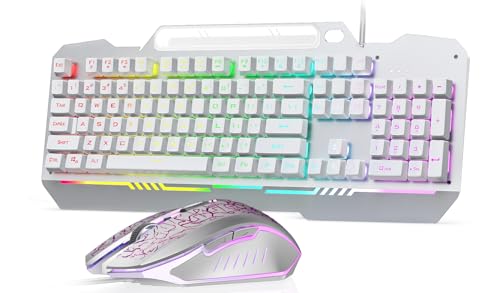
AULA T102 104-Key Keyboard and Mouse Combo

Logitech G213 Prodigy Wired RGB Gaming Keyboard

Ordilend All-in-1 Laptop & Keyboard Cleaning Kit

BlueFinger 4-in-1 RGB Gaming Peripheral Combo

BlueFinger RGB Gaming Keyboard and Mouse Combo

MageGee MK-Box 68-Key Mechanical Keyboard

AULA F2088 Mechanical Keyboard Blue Switches

Redragon K556 PRO Wireless Mechanical Keyboard

AULA F75 Pro Wireless Mechanical Keyboard
As an Amazon Associate we earn from qualifying purchases. Product prices and availability are accurate as of the date/time indicated.
Comparison of the Best Laptop Keyboards for Gaming
| Keyboard | Layout | Key type | Connection | Best suited to |
|---|---|---|---|---|
| GEODMAER 65% Gaming Keyboard and Mouse Combo | 65%, 68 keys | Membrane with mechanical-style feel | Wired USB | Compact starter setup |
| Logitech G213 Prodigy Wired RGB Gaming Keyboard | Full size | Not specified | Wired | Gaming and productivity |
| AULA T102 | Full size, 104 keys | Membrane | Wired USB | Simple plug-and-play bundle |
| BlueFinger RGB Gaming Keyboard and Backlit Mouse | Full size, 104 keys | Not specified | Wired USB | Complete accessory bundle |
| MageGee MK-Box | 60%, 68 keys | Mechanical red switch | Wired USB | Portable compact gaming |
| AULA F2088 | Full size, 104 keys | Mechanical blue switch | Wired USB | Clicky typing and gaming |
| Redragon K556 PRO | Full size, 104 keys | Hot-swappable mechanical | USB-C, Bluetooth, 2.4GHz | Wireless full-size customization |
| AULA F75 Pro | 75%, 81 keys | Hot-swappable mechanical | USB-C, Bluetooth 5.0, 2.4GHz | Flexible compact mechanical setup |
How to Choose Among These Laptop Keyboards
Choose the Layout Before the Lighting
Compact 60%, 65%, and 75% keyboards leave more room for a mouse and can travel easily with a laptop. Full-size boards retain the number pad and dedicated function keys, which helps productivity and number-heavy workloads.
Decide Whether Mechanical Switches Matter
Mechanical options in this roundup include linear red switches, clicky blue switches, and hot-swappable designs. Membrane models can be simpler and quieter, but the supplied specifications do not establish that any keyboard will feel or sound identical to another.
Check the Connection and Software Requirements
Wired USB keyboards are generally the simplest choice when the laptop has a compatible USB port. Wireless models require Bluetooth or a 2.4GHz receiver, while software features such as macros, lighting customization, and mouse DPI changes may require manufacturer utilities.
Consider Bundled Accessories Carefully
Keyboard and mouse bundles can reduce the number of separate purchases for a new setup. However, bundled mice, headsets, and mouse pads may offer fewer adjustments than dedicated peripherals, so prioritize the keyboard if it will be used daily.
For more keyboard-focused buying context, see our guide to gaming keyboards for typing. Readers building a complete computer can also review our guide to important gaming PC specifications.
Frequently Asked Questions
Are compact keyboards suitable for laptop gaming?
Yes, compact keyboards can be suitable when desk space and portability matter. Check whether the chosen layout retains arrow keys, function-key access, and any controls required for your games or work.
Do these keyboards work with every laptop?
Wired models require a compatible USB connection, while wireless models require Bluetooth support or room for a 2.4GHz receiver. The supplied specifications list compatibility for several operating systems, but they do not guarantee support for every laptop configuration.
Which keyboard is best for gaming and office work?
The Logitech G213 and Redragon K556 PRO are the most suitable full-size choices for mixed gaming and productivity. The AULA F75 Pro is better for users who want a smaller layout with wireless connectivity and mechanical customization.
Final Verdict
The best laptop keyboards for gaming depend mainly on layout and connection preferences. Choose the AULA F75 Pro for a flexible compact mechanical setup, the Redragon K556 PRO for full-size wireless use, or the Logitech G213 for straightforward wired gaming and productivity.
For a portable wired mechanical option, the MageGee is the most focused choice, while the GEODMAER is useful when a compact keyboard and mouse are needed together. The AULA, BlueFinger, and AULA F2088 models make more sense when full-size controls, bundled accessories, or a specific typing style matter most.


Write Your Review
No reviews yet. Be the first to share your experience!