

The best gaming headset wireless budget pick depends first on whether you need wireless play or simply an affordable headset for PC gaming. For wireless flexibility at a modest tier, compare the HyperX Cloud Jet, Acer tri-mode headset, and NUBWO model; for a lower-cost wired option, consider the Razer BlackShark V2 X.
This roundup is based on the supplied specifications, not independent performance measurements. Check the connection method for your device before choosing, especially if you use Xbox, where several wireless options require a wired connection or are not compatible.

Pros
- Large 50mm audio drivers
- Convenient flip-to-mute 6mm boom microphone
- DTS Headphone:X 2.0 surround sound support
- Versatile 3.5mm and USB DAC connectivity
- Comfortable lightweight frame with rotating ear cups
Cons
- DTS Headphone:X 2.0 requires Logitech G HUB software
- Advanced surround sound unavailable on standard console connections
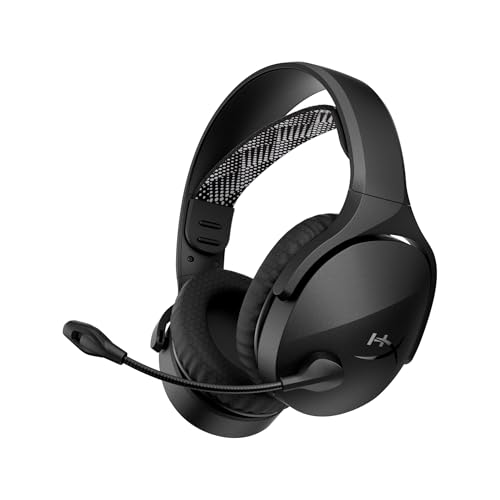
Pros
- Dual 2.4GHz and Bluetooth 5.3 wireless connectivity
- Swivel-to-mute boom mic with always-on sidetone
- Up to 25 hours of wireless battery life
- Breathable mesh earpads and elastic suspension headband
- Integrated on-ear controls for audio and wireless pairing
Cons
- Incompatible with Xbox consoles
- Requires a USB-A port for 2.4GHz wireless

Pros
- Flexible tri-mode connectivity
- Broad multi-platform support
- Suspension headband and breathable cushions
- Detachable ENC microphone
- Play while charging
Cons
- Xbox support is wired only
- Battery life drops with logo lighting enabled

Pros
- Lightweight 240g frame for extended comfort
- Broad compatibility via standard 3.5mm audio jack
- TriForce 50mm drivers for distinct frequency tuning
- Cardioid microphone with targeted voice pickup
Cons
- Surround sound requires Windows 10 64-bit
- Xbox One may require a separate stereo adapter

Pros
- Dual 2.4GHz and Bluetooth 5.2 wireless connectivity
- Up to 40 hours of rated battery life
- Companion app support with 10-band EQ customization
- Flip-to-mute microphone with variable mic monitoring
- Lightweight floating headband with memory foam cushions

Pros
- Lightweight 240-gram frame with memory foam padding
- Versatile 3.5 mm cross-platform compatibility
- On-earcup volume wheel for quick adjustments
- Passive noise isolation via closed earcups
- Tuned 50 mm drivers for clear sound separation
Cons
- Wired 3.5 mm cable restricts player movement
- Lacks wireless audio capability

Pros
- Up to 100 hours of low-latency wireless battery life
- Dual 2.4GHz and Bluetooth wireless options
- Includes both detachable boom and built-in internal mics
- Broad connectivity with USB-C and USB-A adapters included
- Durable steel sliders and memory foam ear pads
Cons
- RGB lighting reduces battery life to 23 hours
- Onboard memory holds only one custom profile
- Instant Pair feature limited to select OMEN laptops

Pros
- Up to 60 hours of battery life per charge
- Multi-function charging base station included
- Lag-free 2.4GHz wireless connectivity
- On-ear game and chat audio balance controls
- Included Dolby Atmos 3D audio support
Cons
- Compatibility limited to Xbox and PC systems
- Dolby Atmos requires the Dolby Access app and account
- Microphone noise cancellation requires specific physical orientation

Pros
- Advertised 80-hour battery life with quick charging
- Versatile 2.4GHz wireless and Bluetooth 5.2 connectivity
- Glasses-friendly memory foam ear cushions
- Flip-to-mute microphone with AI noise reduction
- Comprehensive 10-band EQ customization via Swarm II
Cons
- Lacks Xbox console compatibility
- QuickSwitch toggles connections instead of simultaneous audio mixing

Pros
- Versatile 2.4GHz, Bluetooth, and 3.5mm connections
- Up to 100-hour rated battery life
- Simultaneous Bluetooth pairing for incoming mobile calls
- Large 50mm composite diaphragm drivers
Cons
- Xbox consoles require a wired 3.5mm connection
- Wireless functionality on consoles requires USB dongle
How to Choose a Budget Wireless Gaming Headset
For PC gaming, a 2.4GHz USB receiver is useful when you want a dedicated wireless connection for gameplay. Bluetooth adds convenience for phones and tablets, but the supplied specifications do not establish that Bluetooth is suitable for low-latency gaming.
Next, confirm platform support and connection requirements. Some headsets work wirelessly with PlayStation and PC but do not support Xbox wirelessly; others offer Xbox compatibility only through a 3.5mm cable.
Battery claims are manufacturer specifications, not a guarantee of runtime in every setup. Lighting, volume, connection mode, and usage can affect battery life where the manufacturer says so; consider whether wired play is available if charging flexibility matters.
Microphone design also affects everyday use. A swivel-to-mute or flip-up mic is convenient for quick muting, while a detachable mic can be removed when you do not need voice chat.
Wireless Picks for PC Gaming
HyperX Cloud Jet: straightforward dual-wireless connectivity
The HyperX Cloud Jet – Dual Wireless Gaming Headset combines a 2.4GHz USB-A dongle with Bluetooth 5.3 and lists support for PC, Mac, PS5, PS4, and mobile devices. Its 40mm drivers, swivel-to-mute boom mic, sidetone, and stated battery life of up to 20 hours on 2.4GHz suit PC players who want wireless chat and simple device switching.
Pros: Two wireless connection options, headset controls, sidetone, and a lightweight design with breathable mesh earpads. Cons: It is not compatible with Xbox, and the listed 2.4GHz battery life is shorter than its Bluetooth figure. Who should skip it: Xbox users and players who require a wired fallback.
Acer tri-mode headset: more connection choices
The Acer Wireless Gaming Headset for PS5, PC, PS4 offers 2.4GHz wireless, Bluetooth 5.4, and a 3.5mm wired mode. The manufacturer lists PC, Mac, PS5, PS4, Switch, laptops, and mobile devices among supported platforms; Xbox Series X|S and Xbox controllers are supported by wired connection only.
Its detachable ENC microphone, physical controls, suspension headband, and stated battery life of up to 45 hours with the logo light off offer flexibility for mixed gaming and calls. Pros: Three connection modes, a detachable mic, and play-while-charging support. Cons: Xbox support is wired only, and runtime varies with settings and use. Who should skip it: Anyone seeking wireless Xbox audio.
NUBWO G06: long advertised battery life at the entry level
The NUBWO Wireless Gaming Headset with Mic for Ps5 Ps4 lists 2.4GHz wireless, Bluetooth 5.3, and 3.5mm wired modes, with PC, PS5, and PS4 named for dongle use. Its advertised battery life reaches 100 hours, while Xbox Series compatibility is wired only.
Pros: Multiple connection modes, a stated long battery life, and simultaneous 2.4GHz and Bluetooth connections for gaming and phone use. Cons: The advertised zero-latency language is not an independent measurement, and the Xbox limitation matters for console owners. Who should skip it: Buyers who need confirmed wireless Xbox support or prefer a wired connection option from a more established listed brand.
HyperX Cloud Flight 2: battery capacity and removable boom mic
The HyperX Cloud Flight 2 – Wireless Gaming Headset supports 2.4GHz and Bluetooth, with a USB-C dongle and USB-C-to-USB-A adapter included. Its advertised battery life is up to 100 hours on 2.4GHz or 150 hours on Bluetooth with lighting off, and it lists compatibility with PC, PS5, PS4, Switch, and mobile devices.
Pros: Long stated battery life, a detachable boom mic plus an internal mic, and included adapter options for USB-A ports. Cons: RGB lighting reduces the stated maximum runtime, and the specifications do not list Xbox support. Who should skip it: Xbox players or buyers who do not value its lighting and dual-microphone options.
Turtle Beach Stealth 500: app-based EQ and wireless switching
The Turtle Beach Stealth 500 Wireless Amplified combines low-latency 2.4GHz wireless with Bluetooth 5.2 and lists an app with a 10-band EQ. Its variable mic monitoring, QuickSwitch control, and memory foam cushions may suit PC players who want to adjust audio settings and switch between wireless sources.
Pros: Two wireless modes, EQ options, mic monitoring, and a lightweight headband design. Cons: The supplied information does not specify battery life or list detailed platform compatibility, so verify your setup before buying. Who should skip it: Shoppers who need confirmed PC connection details or a documented battery-life target.
Wired Alternatives for a Tighter Budget
Razer BlackShark V2 X: lightweight wired PC and console option
The Razer BlackShark V2 X Gaming Headset is wired through a 3.5mm audio jack, so it avoids battery management but does not provide wireless play. Its 240g listed weight, 50mm drivers, cardioid mic, and closed earcups make it a reasonable option for PC players prioritizing a simple wired setup.
Pros: Broad stated compatibility with PC, Mac, PlayStation, Xbox One, and Switch, plus a lightweight design. Cons: The 7.1 surround feature requires software and is limited to Windows 10 64-bit; Xbox One may require a separate stereo adapter. Who should skip it: Anyone specifically seeking a wireless headset or built-in wireless convenience.
Razer BlackShark V2 X Wired PlayStation: lower-cost wired alternative
The Razer BlackShark V2 X Wired PlayStation uses a 3.5mm jack and lists PlayStation as its primary platform, with broader compatibility described for popular platforms. Its 240g weight, memory foam cushions, volume wheel, and bendable cardioid mic suit console or PC setups that accept a wired analog connection.
Pros: A straightforward wired connection, on-headset volume control, and memory foam ear cushions. Cons: It is not wireless, and the supplied details do not specify software surround support for this exact model. Who should skip it: Buyers who need wireless audio or a USB connection.
Other Options and Their Trade-Offs
The Logitech G432 Wired Gaming Headset – Black connects to PC or Mac through a USB DAC or 3.5mm cable, and supports other listed platforms through specified wired or console modes. Its 50mm drivers and flip-up mute mic may suit buyers seeking one wired headset for multiple devices. Pros: Flexible connection options and a boom mic that mutes when raised. Cons: It is not wireless, and DTS Headphone:X 2.0 requires Logitech G HUB software. Who should skip it: Anyone requiring cable-free PC gaming.
The RIG 800 PRO HX Wireless Gaming Headset is an Xbox-focused 2.4GHz model that also lists PC support, a charging base, and up to 60 hours of wireless audio. Pros: A charging base, long stated battery life, and on-ear game/chat controls. Cons: Its stated platform focus is Xbox and PC, so it is not the most broadly documented choice here. Who should skip it: Buyers prioritizing a lower-cost, lightweight PC headset or support for PlayStation and Switch.
The Turtle Beach Stealth 600 Wireless Multiplatform lists PS5, PS4, PC, and mobile support, with 2.4GHz wireless, Bluetooth 5.2, and a stated battery life of up to 80 hours. Pros: Wireless switching, a flip-to-mute mic, and a mappable control wheel. Cons: Xbox is not among its listed compatible devices. Who should skip it: Xbox users and shoppers seeking a particularly low-cost option.
The Turtle Beach Stealth 500 Wireless Amplified is another wireless choice, but its listed specifications leave battery life and detailed platform support unclear. Pros: 2.4GHz and Bluetooth connections, audio EQ options, and variable mic monitoring. Cons: Confirm platform support and runtime for your needs before choosing. Who should skip it: Buyers who need those details documented before purchase.
Frequently Asked Questions
Is a wireless headset better than a wired headset for PC gaming?
Neither connection is automatically better for every player. A wireless model removes the headset cable and may offer Bluetooth for other devices, while a wired 3.5mm headset avoids battery charging and requires a compatible audio jack.
Can these wireless headsets connect to Xbox?
Compatibility varies by model. The HyperX Cloud Jet is listed as incompatible with Xbox, while the Acer and NUBWO models specify Xbox support through a 3.5mm wired connection only. Check the exact connection mode required for your console.
What should PC buyers check before ordering?
Confirm that your PC has the required USB-A or USB-C port, or a compatible 3.5mm audio connection. Also check whether the features you want, such as software surround or EQ customization, require a particular operating system or companion software.


Write Your Review
No reviews yet. Be the first to share your experience!