

For a genuinely detachable boom mic, compare the HyperX CloudX, Acer Wireless Gaming Headset, FIFINE H9, EKSA E900 Pro, HyperX Cloud Flight 2, and AOC headset. The Valorise mic retracts rather than detaches, while the Razer and Ozeino descriptions do not specify removable microphones.
For PC gaming, first decide whether you need wireless freedom, wired simplicity, or a microphone that can be removed completely. This specification-based comparison also checks connection types, platform limits, and the trade-offs documented for each model.


Pros
- Flexible tri-mode connectivity
- Broad multi-platform support
- Suspension headband and breathable cushions
- Detachable ENC microphone
- Play while charging
Cons
- Xbox support is wired only
- Battery life drops with logo lighting enabled
Pros
- Official Xbox console licensing
- Durable aluminum frame construction
- Comfortable memory foam ear cushions
- Detachable noise-cancelling microphone
- Integrated in-line audio controls
Cons
- Requires controllers with a 3.5mm jack
- Tethered wired connection only

Pros
- Lightweight 240g frame for extended comfort
- Broad compatibility via standard 3.5mm audio jack
- TriForce 50mm drivers for distinct frequency tuning
- Cardioid microphone with targeted voice pickup
Cons
- Surround sound requires Windows 10 64-bit
- Xbox One may require a separate stereo adapter
Pros
- Wide compatibility across consoles, PC, and mobile
- Adjustable 360-degree noise-cancelling microphone
- Comfortable padded protein ear cushions
- Includes 3.5mm PC splitter cable
Cons
- USB connection required solely for LED lighting
- Older Xbox One controllers require an unincluded adapter


Pros
- Dual detachable USB and 3.5mm audio connections
- Detachable unidirectional noise-cancelling microphone
- Convenient on-ear volume and mute controls
- Comfortable memory protein ear padding
- Broad multi-platform gaming compatibility
Cons
- Virtual 7.1 surround sound only functions on PC
- Surround sound features require a USB connection

Pros
- Up to 100 hours of low-latency wireless battery life
- Dual 2.4GHz and Bluetooth wireless options
- Includes both detachable boom and built-in internal mics
- Broad connectivity with USB-C and USB-A adapters included
- Durable steel sliders and memory foam ear pads
Cons
- RGB lighting reduces battery life to 23 hours
- Onboard memory holds only one custom profile
- Instant Pair feature limited to select OMEN laptops

Pros
- Versatile 2.4GHz, Bluetooth, and 3.5mm connections
- Up to 100-hour rated battery life
- Simultaneous Bluetooth pairing for incoming mobile calls
- Large 50mm composite diaphragm drivers
Cons
- Xbox consoles require a wired 3.5mm connection
- Wireless functionality on consoles requires USB dongle

Pros
- Low-latency 2.4GHz wireless audio
- Up to 45 hours of battery life
- Versatile 2.4GHz, Bluetooth, and 3.5mm connectivity
- Detachable noise-canceling microphone
- Comfortable memory-protein ear cushions
Cons
- Xbox consoles require 3.5mm wired connection
- PlayStation does not support Bluetooth audio mode
- RGB lighting reduces battery life to 20 hours
Best Gaming Headsets With a Detachable Mic
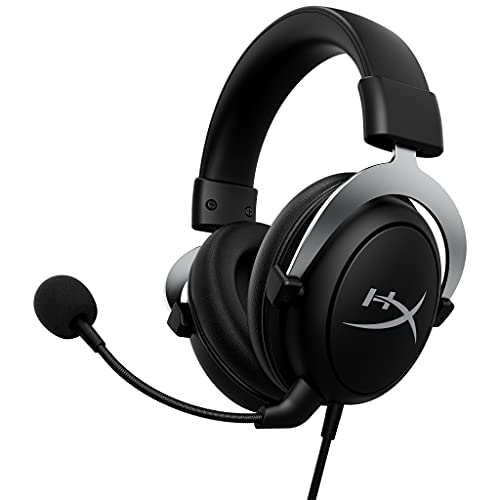
HyperX CloudX, Official Xbox Licensed: Best for Xbox Controller Connections
The CloudX combines an officially licensed Xbox design with a detachable noise-canceling microphone, a braided cable, and in-line volume and mute controls. Its 3.5 mm connection is intended for Xbox controllers with a headset jack, making it a straightforward wired option for Xbox-focused players.
The product information highlights memory foam ear cushions and an aluminum frame, but does not specify PC connection details beyond the 3.5 mm design. Check that your computer has a compatible headset jack or suitable splitter; PC surround processing and a USB connection are not listed.
Pros: Detachable mic, in-line controls, braided cable, and stated Xbox controller compatibility. Cons: Wired only, with limited PC-specific connection information. Who should skip it: Players seeking wireless audio or a clearly documented USB PC setup.
Acer Wireless Gaming Headset for PS5, PC, PS4: Best Tri-Mode Choice
Acer’s headset has a detachable ENC microphone and supports 2.4 GHz wireless, Bluetooth 5.4, and 3.5 mm wired connections. The listed compatibility includes PC, Mac, PlayStation, Switch, and mobile devices, while Xbox is supported through wired 3.5 mm only.
The suspension headband, mesh cushions, physical controls, and stated battery life of up to 45 hours with the logo light off are useful for extended sessions. Battery life is lower with the light on, and actual runtime varies with use; the supplied information does not specify a USB dongle connector.
Pros: Three connection modes, detachable mic, and broad stated platform support. Cons: Xbox wireless support is not listed, and battery life depends on lighting and use. Who should skip it: Xbox players who require a wireless connection.
FIFINE H9 Wired Gaming Headset with Microphone: Best for Wired PC Controls
The FIFINE H9 includes a detachable microphone, USB and 3.5 mm connections, and a USB control box for headset volume, microphone volume, and mute. Its 10-foot braided cable can help when connecting to a desktop positioned away from the player.
Advertised 7.1 surround sound is associated with the USB connection, while the 3.5 mm jack supports Xbox controllers and other compatible devices. The listing describes USB use with PS4, PS5, and docked Switch, so check the connection requirements for your particular computer or console.
Pros: Removable mic, two connection types, physical control box, and a long cable. Cons: No wireless mode, and the listed surround feature is tied to USB. Who should skip it: Anyone wanting a wireless headset or a boom-free internal microphone.
EKSA E900 Pro USB Gaming Headset for PC: Best for USB Surround Features
The E900 Pro has a detachable noise-canceling microphone and removable USB and 3.5 mm cables. Its listed virtual 7.1 surround sound works on PC over USB, and the headset also supports 3.5 mm connections for compatible consoles and mobile devices.
A one-key mute control, volume adjustment, memory protein ear cushions, and stated two-year warranty are relevant practical details. The surround feature is not listed for 3.5 mm use, so players switching between PC and console should expect connection-dependent functionality.
Pros: Detachable mic, interchangeable cable interfaces, PC USB surround feature, and stated warranty. Cons: No wireless option; 7.1 sound is limited to PC USB use. Who should skip it: Wireless users or anyone expecting virtual surround through every connection.
HyperX Cloud Flight 2: Best for Wireless Use With a Removable Boom
The Cloud Flight 2 pairs a detachable boom microphone with a built-in internal mic, so users can remove the boom and retain microphone functionality. It offers 2.4 GHz wireless and Bluetooth, with listed support for PC, PlayStation, Switch, and mobile devices.
HyperX specifies up to 100 hours on 2.4 GHz or 150 hours on Bluetooth with lighting off, and up to 23 hours with full RGB lighting. These are advertised maximums, not guaranteed session lengths; the included USB-C dongle and USB-C-to-USB-A adapter support the stated platform connections.
Pros: Removable boom plus internal mic, two wireless modes, and included adapter. Cons: RGB lighting substantially reduces the stated maximum battery life, and Xbox is not listed. Who should skip it: Xbox users or buyers who do not need wireless features and onboard lighting.
AOC 2.4GHz Wireless Gaming Headset for PS5, PS4: Best for Multiple Connection Modes
AOC’s headset has a detachable microphone and offers 2.4 GHz USB wireless, Bluetooth 6.0, and 3.5 mm wired connections. The listed USB wireless compatibility includes PC, Mac, PS5, PS4, and Switch; Xbox Series support is wired only.
The advertised battery life reaches up to 45 hours with RGB lighting off, or 20 hours with lighting on. The product information says PS5 and PS4 do not support Bluetooth audio for this headset, so use the USB dongle for wireless console gaming rather than assuming Bluetooth will work.
Pros: Detachable mic, three connection types, and clearly stated console connection distinctions. Cons: Bluetooth audio is not supported on PS5 or PS4, and RGB reduces battery life. Who should skip it: Players who expect Bluetooth audio from PlayStation consoles.
Alternatives With Retractable or Non-Removable Microphones
Valorise Wireless Gaming Headset: Retractable Mic Alternative
The Valorise headset’s microphone retracts into the headset; its listing does not describe it as detachable. It provides 2.4 GHz wireless, Bluetooth 5.4, and 3.5 mm wired modes, with stated PC support and an explicit warning that wireless does not work with Xbox Series.
Advertised battery life ranges from 45 to 100 hours depending on connection mode, microphone use, and lighting. The product listing also marks microphone functionality as invalid for Switch in its multi-platform details, so Switch buyers should verify their intended setup before choosing it.
Pros: Retractable mic, multiple connection modes, and a stated long battery range. Cons: The mic is not described as detachable, Xbox Series wireless is unsupported, and Switch mic support is flagged as invalid. Who should skip it: Anyone who specifically needs a removable boom or reliable Switch voice chat.
Razer BlackShark V2 X: Wired Option With a Fixed Mic
The BlackShark V2 X connects through 3.5 mm and lists compatibility with PC, Mac, PlayStation, Xbox One, and Switch. Its cardioid microphone is not identified as detachable, so it is an alternative for buyers prioritizing a wired headset rather than a removable boom.
Razer specifies 50 mm drivers, a 240 g weight, and software-enabled 7.1 surround sound limited to Windows 10 64-bit. The Xbox One stereo adapter may be required and is sold separately; check the connection and software requirements for your setup.
Pros: Lightweight specified design, 3.5 mm cross-platform connection, and Windows surround option. Cons: Mic removability is not specified, and surround sound has a stated Windows limitation. Who should skip it: Buyers who require a detachable microphone or wireless audio.
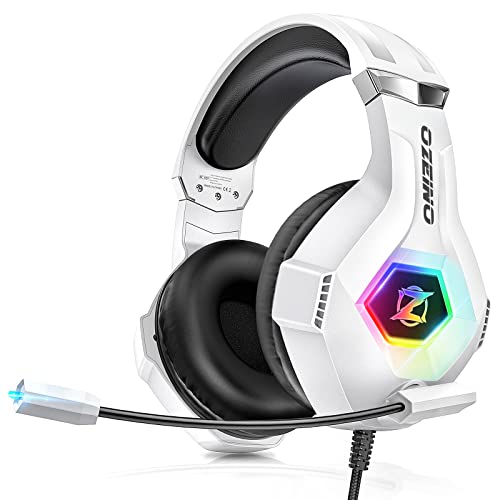
Ozeino Gaming Headset: Low-Cost Wired Alternative
The Ozeino headset uses a 3.5 mm connection and lists PC, PlayStation, Xbox, Switch, laptop, and mobile compatibility. Its microphone rotates, but the product information does not say it detaches, so do not choose it expecting a removable boom.
PC use requires the supplied 1-to-2 audio splitter according to the listing, while its USB connector powers the lighting only. That distinction matters for desktop setups: USB should not be treated as the audio connection, and older Xbox One controllers may require an additional adapter.
Pros: Broad listed 3.5 mm compatibility, rotating mic, and a PC splitter requirement is disclosed. Cons: Detachable mic is not specified, and USB is for lighting only. Who should skip it: Users needing a removable microphone or USB audio.
NUBWO Wireless Gaming Headset: Wireless and Wired Alternative
The NUBWO listing describes 2.4 GHz, Bluetooth 5.3, and 3.5 mm modes, but does not specify a detachable microphone. Its stated platform details include wireless connections for PC and PlayStation, with Xbox Series compatibility through 3.5 mm wired mode only.
The advertised battery life is up to 100 hours, and the listing describes simultaneous 2.4 GHz and Bluetooth connections. Treat those statements as manufacturer specifications; choose this model for its connection options only if a removable boom is not essential.
Pros: Three connection modes and stated dual-wireless functionality. Cons: Mic removability is not specified, and Xbox Series is wired only. Who should skip it: Buyers whose primary requirement is a detachable microphone.
How to Choose a Detachable-Mic Gaming Headset for PC
Confirm the Microphone Actually Detaches
A detachable boom can be removed physically; a retractable microphone simply stows inside the headset. If you want a clean headphone profile for music or travel, prioritize listings that explicitly say the microphone detaches, rather than assuming a rotating or retractable design is removable.
Match the Connection to Your PC and Other Devices
USB, 3.5 mm, and wireless dongles are not interchangeable features. Check whether your PC has a compatible headset jack, whether a splitter is required, and whether the included dongle uses a port your computer supports.
For cross-platform use, confirm the exact mode supported on each device. Several models in this comparison restrict Xbox to wired 3.5 mm, while Bluetooth support does not automatically mean Bluetooth audio works on PlayStation consoles.
Consider Mic Controls, Comfort, and Battery Claims
In-line or earcup mute controls can be more convenient than changing PC settings, while a detachable mic is useful when voice chat is not needed. Cushion materials and headband designs vary, so prioritize the fit details that matter to your sessions.
Wireless battery figures are advertised maximums and may depend on lighting, connection mode, microphone use, and volume. If you want to keep playing while charging, confirm that feature is specified for the exact model rather than inferring it from a charging port.
Which Headset Should You Choose?
Choose the HyperX CloudX for a wired Xbox controller setup, or the FIFINE H9 and EKSA E900 Pro for wired PC use with documented detachable microphones. The Acer, HyperX Cloud Flight 2, and AOC offer removable booms alongside wireless options, but their platform and battery details differ.
If complete microphone removal is not essential, the Valorise retractable design may suit a multi-mode setup, while the Razer, Ozeino, and NUBWO are alternatives with mic removability unspecified. Confirm the exact connection and microphone behavior you need before choosing.





Write Your Review
No reviews yet. Be the first to share your experience!