

For a budget wired PC gaming headset, start by checking your computer’s ports. A 3.5 mm headset may need a splitter for separate headphone and microphone jacks, while a USB model needs a compatible USB audio port.
Among these options, the Logitech G432 offers 50 mm drivers and optional DTS Headphone:X 2.0 through Logitech G HUB. The Razer BlackShark V2 X Wired PlayStation is a lighter 3.5 mm option, while the EKSA E1000 connects by USB and is not compatible with game controllers.
This best gaming headset budget wired roundup is based on supplied specifications and compatibility information, not claims of independent audio measurement. Prices and availability can change, so compare current listings and confirm the connection suits your PC before buying.
Wired Gaming Headsets for PC to Consider

Pros
- Large 50mm audio drivers
- Convenient flip-to-mute 6mm boom microphone
- DTS Headphone:X 2.0 surround sound support
- Versatile 3.5mm and USB DAC connectivity
- Comfortable lightweight frame with rotating ear cups
Cons
- DTS Headphone:X 2.0 requires Logitech G HUB software
- Advanced surround sound unavailable on standard console connections
Pros
- Dual 2.4GHz and Bluetooth 5.3 wireless connectivity
- Swivel-to-mute boom mic with always-on sidetone
- Up to 25 hours of wireless battery life
- Breathable mesh earpads and elastic suspension headband
- Integrated on-ear controls for audio and wireless pairing
Cons
- Incompatible with Xbox consoles
- Requires a USB-A port for 2.4GHz wireless

Pros
- Large 50mm audio drivers
- Lightweight build under eight ounces
- Comfortable memory protein ear cushions
- Flexible microphone with integrated mute control
- Standard 3.5mm cross-platform compatibility
Cons
- USB plug only powers lighting without audio transmission
- Incompatible with Xbox 360
- Requires an adapter for PlayStation 3 use

Pros
- Lightweight 240-gram frame with memory foam padding
- Versatile 3.5 mm cross-platform compatibility
- On-earcup volume wheel for quick adjustments
- Passive noise isolation via closed earcups
- Tuned 50 mm drivers for clear sound separation
Cons
- Wired 3.5 mm cable restricts player movement
- Lacks wireless audio capability

Pros
- Advertised 80-hour battery life with quick charging
- Versatile 2.4GHz wireless and Bluetooth 5.2 connectivity
- Glasses-friendly memory foam ear cushions
- Flip-to-mute microphone with AI noise reduction
- Comprehensive 10-band EQ customization via Swarm II
Cons
- Lacks Xbox console compatibility
- QuickSwitch toggles connections instead of simultaneous audio mixing

Pros
- Versatile 2.4GHz, Bluetooth, and 3.5mm connections
- Up to 100-hour rated battery life
- Simultaneous Bluetooth pairing for incoming mobile calls
- Large 50mm composite diaphragm drivers
Cons
- Xbox consoles require a wired 3.5mm connection
- Wireless functionality on consoles requires USB dongle
Pros
- Lightweight 250g design with memory foam padding
- Unidirectional microphone with 120-degree pickup angle
- Foldable and rotating earcups for easy storage
- Broad 3.5mm plug-and-play console compatibility
- Tangle-resistant braided 1.5-meter audio cable
Cons
- Dual 3.5mm PC splitter cable not included
- Requires manual PC audio setup with Xbox controllers

Pros
- Versatile 2.4GHz, Bluetooth, and wired connectivity options
- Up to 48 hours of rated battery life
- Convenient on-ear controls for volume and mic mute
- Wide compatibility across PC, consoles, and mobile devices
- 50mm drivers tuned for spatial sound positioning
Cons
- Bluetooth is incompatible with PS5 and PS4 consoles
- Requires a 3.5mm wired connection for Xbox consoles

Pros
- Driver-free plug-and-play 7.1 surround sound
- Large 50mm neodymium audio drivers
- Adjustable microphone with noise reduction
- Comfortable memory-protein ear cushions
- Generous 2.2-meter durable cable
Cons
- Not compatible with game controller audio jacks
- Limited exclusively to devices with USB ports

Pros
- Plush memory foam headband and ear cushions
- Flexible USB-C, USB-A, and 3.5mm connectivity
- Durable metal frame construction
- Mic features integrated LED mute indicator
- Convenient on-earcup audio and mute controls
Cons
- Tethered wired design limits free movement
- Lacks wireless connectivity options
How These Budget Wired Headsets Differ
These picks cover two common PC connection types: 3.5 mm analog and USB. A USB connection can be convenient when a headset includes its own audio hardware, while analog models can connect to compatible headset jacks and may need a splitter on desktop computers with separate audio and microphone ports.
“Surround sound” and driver size are manufacturer specifications, not proof of measured positional accuracy or overall sound quality. Treat software features such as DTS Headphone:X as a potential extra, and check whether the required software and connection fit your setup.
Product Assessments
Logitech G432 Wired Gaming Headset: Best for Software-Based Surround Audio
The Logitech G432 has 50 mm drivers, a 6 mm flip-to-mute boom microphone, and support for DTS Headphone:X 2.0 with Logitech G HUB. It can connect to a PC or Mac by USB DAC or 3.5 mm cable, giving buyers a choice of connection methods.
Pros: Two connection options, a microphone that mutes when raised, and optional software-based spatial audio. The ear cups rotate up to 90 degrees, and the supplied details describe lightweight construction and leatherette padding.
Cons: DTS Headphone:X 2.0 requires Logitech G HUB, so the feature depends on software. The supplied compatibility notes for some consoles describe wireless stereo behavior, which does not establish wired console compatibility.
Who should skip it: Skip this model if you want a headset that works without companion software or need clearly documented wired console support.
Razer BlackShark V2 X Wired PlayStation: Best for a Lightweight 3.5 mm Headset
This model uses a 3.5 mm jack and weighs 240 g according to its specifications. Its 50 mm TriForce Titanium drivers, bendable cardioid microphone, on-headset volume wheel, and memory foam ear cushions suit PC players who want analog connectivity and accessible controls.
Pros: The listed weight is relatively low, and the closed earcups and memory foam cushions are intended to provide a closer fit. The microphone’s cardioid pickup pattern is designed to favor voice from the front rather than the sides and rear.
Cons: It connects through 3.5 mm, and the supplied information does not specify a USB adapter. A desktop PC with separate microphone and headphone ports may require a compatible splitter, which is not listed in the product details.
Who should skip it: Skip it if your PC lacks a compatible 3.5 mm headset connection and you do not want to use an adapter.
Tatybo Gaming Headset for PS5 PC: A Low-Cost 3.5 mm Option
The Tatybo headset lists 50 mm drivers, a flexible microphone, an inline mute control, and a braided cable. Its 3.5 mm connection is intended for compatible PCs and consoles, making it a straightforward option for a setup with a suitable headset jack.
Pros: The feature list includes a flexible mic, memory-style ear padding, and a braided cord. Its analog connection can serve several device types with a compatible 3.5 mm jack.
Cons: The product details do not specify a cable length or a PC splitter. The listed RGB lighting may require a suitable power connection, but the supplied information does not explain its connection requirements.
Who should skip it: Skip it if you need confirmed USB connectivity, detailed cable specifications, or a clearly documented splitter included for a desktop PC.
NUBWO HG04L Gaming Headset: Best for a Braided Cable and Directional Mic
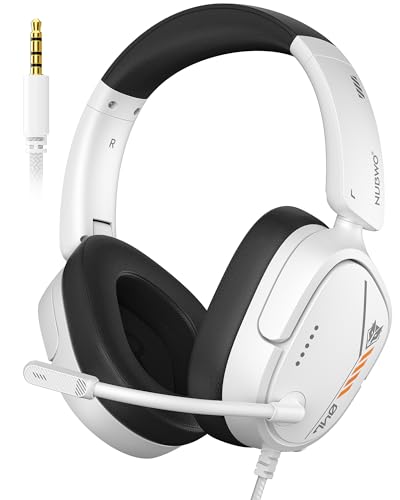
The NUBWO HG04L is a 3.5 mm headset with a 1.5 m braided cable, a cardioid microphone, and on-headset mute and volume controls. Its specifications also list a 250 g weight, memory foam padding, and foldable, rotatable ear cups.
Pros: The directional microphone is designed to favor sound from the front, and the controls are located on the headset. The foldable design may help with storage, while the stated cable length gives buyers a useful fit reference.
Cons: A splitter cable for PCs with separate audio and microphone jacks is not included. The product notes also say PC microphone settings may need enabling when using the headset with an Xbox controller through a computer.
Who should skip it: Skip it if you need an included PC splitter or a longer cable than the specified 1.5 m.
EKSA E1000 USB PC Gaming Headset: Best for USB-Audio Setup
The EKSA E1000 connects through USB and includes a built-in audio chip. Its listed features include driver-free 7.1 surround sound, 50 mm drivers, an adjustable microphone, and a 2.2 m cable. The supplied compatibility information names Windows 7, 8, and 10, along with PS4 and PS5 USB audio ports.
Pros: USB audio avoids the need for a 3.5 mm headset jack, and the longer specified cable may suit a PC desk. The product listing describes plug-and-play surround audio and includes a stated two-year warranty.
Cons: It is not compatible with game controllers, according to the supplied details. Buyers should confirm compatibility with their operating system, since the named Windows versions do not establish support for every newer or alternative system.
Who should skip it: Skip it if you need controller connectivity, a 3.5 mm connection, or confirmed support for an operating system not listed.
HyperX Cloud III Wired Gaming Headset: Best for Multiple Connector Options
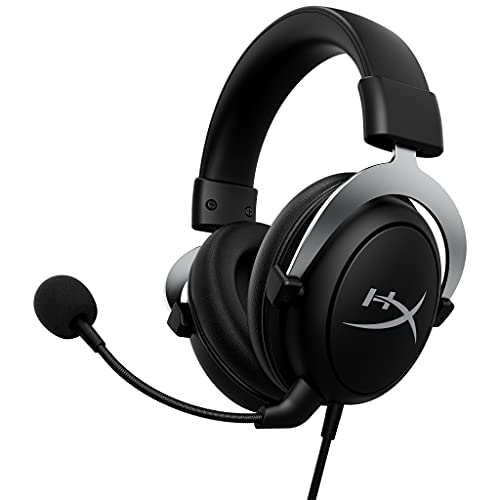
The HyperX Cloud III includes USB-A, USB-C, and 3.5 mm connectors, with stated compatibility for PC, Mac, consoles, and mobile devices. Its listed features include angled 53 mm drivers, a noise-canceling microphone with a mute indicator, a metal frame, and memory foam ear cushions.
Pros: Multiple included connector types make it adaptable to different devices, subject to their ports and software support. The earcup controls handle volume and microphone mute, and the mic has an LED mute indicator.
Cons: This model is a higher-feature option rather than a bare-minimum budget pick. Its supplied details do not state a weight or cable length, so compare those factors if they matter for your desk or fit.
Who should skip it: Skip it if your priority is the simplest low-cost analog headset and you do not need its extra connector options or listed features.
How to Choose a Budget Wired Gaming Headset for PC
Check Your PC’s Audio Ports First
Many desktop PCs have separate headphone and microphone jacks, while headsets with one 3.5 mm plug are intended for a combined headset jack. The NUBWO HG04L listing explicitly notes that a splitter may be needed for a PC with separate jacks, and that the splitter is not included. Confirm your computer’s port layout before choosing any analog model.
For USB, check that the PC has a compatible USB audio port and that the headset supports its operating system. The EKSA listing names specific Windows versions, while the HyperX Cloud III lists several connector types and PC and Mac compatibility.
Match the Microphone to Your Chat Setup
Cardioid and unidirectional microphones are designed to prioritize sound from a particular direction, but the terms alone do not establish measured voice clarity or background-noise reduction. Look for practical controls as well: these picks list features such as flip-to-mute, an inline mute control, or an earcup mute button.
Consider Fit, Cable, and Software Needs
Weight, padding, cable length, and adjustability affect whether a headset fits your desk and preferences. Only use figures supplied for the exact model: the Razer listing states 240 g, and the NUBWO HG04L listing gives a 1.5 m cable. Other models may not publish comparable measurements here.
Software features can add setup steps. Logitech’s DTS Headphone:X 2.0 requires G HUB, whereas the EKSA listing describes its USB surround feature as driver-free. Neither description establishes independently measured audio quality, so treat them as feature claims rather than performance guarantees.
Frequently Asked Questions
Is USB or 3.5 mm better for a PC gaming headset?
Neither connection is automatically better for every PC. USB suits a computer with an available compatible port, while 3.5 mm works with a compatible headset jack and may need a splitter on desktops with separate audio and microphone ports.
Can these wired headsets connect to an Xbox controller?
The Razer, Tatybo, and NUBWO HG04L listings describe 3.5 mm connectivity across compatible devices, but confirm the exact controller and model support before purchase. The EKSA E1000 is explicitly not compatible with game controllers. The supplied HyperX Cloud III details list Xbox compatibility and a 3.5 mm connector.
Does a headset’s surround-sound label guarantee accurate positional audio?
No. Surround and spatial-audio labels describe advertised features, not independently verified positional accuracy. Check connection and software requirements, then weigh those features alongside microphone controls, fit, and compatibility.
Which Best Gaming Headset Budget Wired Option Fits Your PC?
Choose the Logitech G432 if you want both USB DAC and 3.5 mm connection options and are comfortable installing G HUB for DTS audio. Consider the Razer BlackShark V2 X for a lightweight 3.5 mm setup, or the NUBWO HG04L if its specified cable length and directional mic suit your desk and chat needs.
The EKSA E1000 is the clearest fit for a USB headset connection, provided your PC and operating system are compatible and you do not need controller support. The HyperX Cloud III suits buyers who value included connector variety, while the Tatybo offers a simpler analog feature set. For more wired and wireless alternatives, see our headsets for casual gaming guide.



Write Your Review
No reviews yet. Be the first to share your experience!