

The best full keyboards for gaming depend on whether you prioritize mechanical switches, quieter typing, extra controls, or desk space. For a traditional full-size layout with a number pad, consider the Cherry MX 3.0S or Logitech G413 SE; for a more compact footprint that retains a numpad, the Logitech G316 X 98 is a 98% option.
This specification-based roundup compares switch types, key rollover, customization, and practical extras from the supplied product information. It does not rely on hands-on testing, and the available specifications do not establish measured response times or real-world durability.
- Quiet linear mechanical typing: Cherry MX 3.0S, with MX2A Silent Red switches and full N-key rollover.
- Mechanical features at a practical level: Logitech G413 SE, with tactile switches, PBT keycaps, and six-key rollover.
- Extra customization: Redragon K668, with hot-swappable switches and four additional shortcut keys.
- Macro and media controls: Razer BlackWidow V4 X, with six dedicated macro keys and a multifunction roller.
- Quieter, lower-cost membrane design: Corsair K55 RGB PRO or SteelSeries Apex 3, depending on whether macro keys or console compatibility matter more.
- Full-size functionality in less space: Logitech G316 X 98, a 98% layout with a numpad and hot-swappable switches.

Pros
- Six dedicated macro keys for custom shortcuts
- IP42 dust and spill resistance
- Detachable soft rubber wrist rest included
- Dedicated onboard media and volume buttons
- Five-zone customizable RGB backlighting
Cons
- Uses membrane switches instead of mechanical switches
- Tethered wired connection with no wireless support

Pros
- Quiet linear CHERRY MX2A Silent Red switches
- Rigid extruded aluminum chassis without visible screws
- Full N-key rollover and anti-ghosting hardware support
- Detachable cable simplifies packing and transport
- Dedicated Windows key lock mode for gaming
Cons
- Keyboard uses an older micro-USB connection
- Software required for custom RGB lighting configurations

Pros
- Tactile hybrid switches rated for 20 million clicks
- Built-in customizable OLED smart display
- Durable aircraft-grade aluminum alloy frame
- Dynamic per-key RGB backlighting with reactive effects
- Detachable magnetic wrist rest included

Pros
- IP32 water resistance guards against liquid spills
- Whisper-quiet switches rated for 20 million presses
- Included magnetic wrist rest for palm support
- Dedicated on-the-fly multimedia controls
- Broad compatibility with PC and major consoles

Pros
- Durable wear-resistant PBT keycaps
- Sturdy aluminum-magnesium alloy top plate
- Tactile mechanical switches for responsive feedback
- Convenient FN-layer media and lighting controls
Cons
- Lighting limited to single-color white LEDs
- Key rollover capped at six simultaneous inputs

Pros
- Durable spill-resistant build for simple cleanup
- Dedicated media and volume control buttons
- Tuned tactile keys with gaming anti-ghosting
- Integrated palm rest enhances typing comfort
- Customizable five-zone RGB via Logitech G HUB
Cons
- RGB illumination is limited to five zones
- Integrated palm rest cannot be removed

Pros
- Universal 3-pin and 5-pin hot-swappable switch sockets
- Quiet pre-installed linear red switches
- Dedicated productivity shortcut keys
- Includes two distinct keycap sets
- Customizable RGB lighting with audio synchronization
Cons
- Tethered wired operation with no wireless connectivity
- Large full-size footprint requires substantial desk space
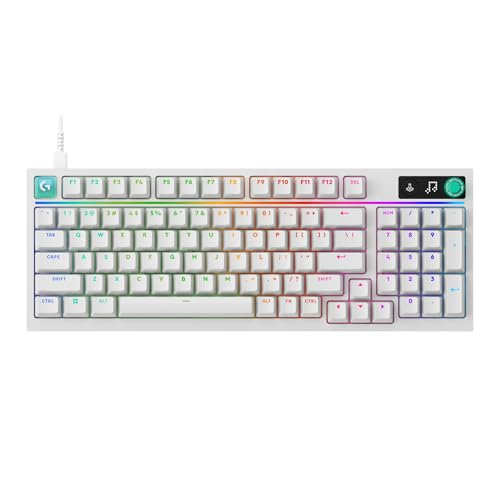
Pros
- Rapid 8 kHz report rate
- Hot-swappable PCB with durable PBT keycaps
- Gasket-mounted structure with internal sound dampening
- On-board LED dot-matrix display and multi-function dial
- Efficient 98 percent layout retains full number pad

Pros
- Fast 1.2mm linear Yellow switches with sound dampeners
- Six dedicated programmable macro keys
- Multi-function roller and dedicated media controls
- Per-key customizable Razer Chroma RGB lighting
- Built-in acoustic foam and lubricated stabilizers

Pros
- Fast 8 kHz report rate for low latency
- Compact 98 percent layout includes number pad
- Hot-swappable switches with durable PBT keycaps
- Sound-dampened gasket-mounted construction
- Convenient on-board dot-matrix screen and control dial
Cons
- Enabling 8 kHz polling rate requires G HUB software
- Full macro and lighting customization requires software configuration
Recommended Gaming Keyboards
Cherry MX 3.0S: Quiet Linear Mechanical Switches
The Cherry MX 3.0S Wired Mechanical Gaming Keyboard pairs linear MX2A Silent Red switches with full N-key rollover, anti-ghosting, and a Windows-key lock. Those features suit players who prefer smooth, non-clicky key action and need simultaneous inputs to register reliably.
Its aluminum housing and detachable USB-A to micro-USB cable are useful practical details, while RGB effects can be customized with CHERRY UTILITY. The supplied data does not specify console compatibility or a dedicated number of macro keys, so check those requirements before choosing it for a particular setup.
Corsair K55 RGB PRO: Membrane Keys and Dedicated Macros
The Corsair K55 RGB PRO Membrane Wired Gaming Keyboard is a membrane option with six dedicated macro keys, media controls, and five-zone RGB customization through iCUE. It fits players who want one-press shortcuts and convenient volume or playback control without opting for a mechanical switch design.
Its IP42-rated dust and spill resistance and detachable palm rest add practical features for a gaming desk. The supplied specifications do not identify key rollover or switch actuation characteristics, so players who need those details should verify them before buying.
SteelSeries Apex 5: Hybrid Clicky Switches and OLED Display
The SteelSeries USB Apex 5 Hybrid Mechanical uses hybrid blue switches designed to provide a tactile click, along with per-key RGB, an OLED display, and a magnetic wrist rest. The display supports customizable content such as game information and Discord messages, making this a fit for users who value on-keyboard information and lighting control.
Its click-oriented switch feel may be a poor match for shared rooms or anyone seeking a quiet keyboard. The listed 900 x 300 x 4 millimeter dimensions are unusual for a keyboard specification; verify the product listing for accurate desk-fit measurements before purchase.
SteelSeries Apex 3: Quiet Membrane Gaming with Console Support
The SteelSeries Apex 3 Gaming Keyboard – Black uses whisper-quiet gaming switches, ten-zone RGB lighting, and dedicated multimedia controls. Its stated compatibility includes Windows, Mac OS X, Xbox Series S and X, PS4, and PS5, making it a useful candidate for a multi-platform setup.
The IP32 water-resistance rating offers limited protection against accidental liquid exposure, not waterproofing. This is a membrane keyboard rather than a conventional mechanical-switch model, so choose it for quieter operation and platform coverage rather than a mechanical typing feel.
Logitech G413 SE: Tactile Mechanical Switches and PBT Keycaps
The Logitech G413 SE Full-Size Mechanical combines tactile mechanical switches, PBT keycaps, white backlighting, and six-key rollover with anti-ghosting. It suits players who want a conventional full-size mechanical board and durable keycap material without making per-key RGB lighting a priority.
Media functions are assigned to FN keys, rather than dedicated media controls, and the supplied rollover specification is six-key rather than full N-key. A tenkeyless G413 TKL SE is also identified as an alternative, but it does not retain the full-size numpad layout.
Logitech G213 Prodigy: Full-Size Membrane Design with Palm Rest
The Logitech G213 Prodigy Wired RGB Gaming Keyboard is a full-size membrane keyboard with five customizable lighting zones, an anti-ghosting gaming matrix, and dedicated media controls. Its integrated palm rest and adjustable feet may suit players who want a more supported, feature-rich desk setup without mechanical switches.
Logitech G HUB handles lighting, game mode, and macro programming. The available product details do not specify a water-resistance rating or a particular console compatibility list, so do not assume those features based on its gaming positioning.
Redragon K668: Hot-Swappable Switches and Four Extra Keys
The Redragon K668 108-Key Hot-Swap Wired RGB has a 108-key layout, four shortcut keys, and sockets listed as compatible with most three-pin or five-pin switches. Hot swapping allows supported switches to be changed without soldering, making this a strong choice for users interested in experimenting with switch feel or replacing individual switches.
Its stock linear switches are described as discreet, and the keyboard includes adjustable feet and programmable shortcut keys. Confirm that any replacement switch matches the stated socket compatibility; the supplied details do not identify console support or a specific rollover standard beyond the product’s anti-ghosting claim.
Logitech G316 X 98: Compact Layout with a Numpad
The Logitech G316 X 98 Mechanical Gaming Keyboard preserves numpad functionality in a 98% layout, which can free some desk space compared with a traditional full-size board. Its listed features include linear switches, hot swapping, PBT keycaps, an onboard dial and display, and an advertised 8 kHz report rate.
The 8 kHz figure is a manufacturer-stated report rate, not an independently measured improvement in game performance. G HUB is required for the stated report-rate controls and extensive lighting, key assignment, and macro customization; choose this model only if its compact layout and software features suit your setup.
Razer BlackWidow V4 X: Linear Switches and Macro Controls
The Razer BlackWidow V4 X Mechanical Gaming Keyboard has yellow linear switches with a stated 1.2 mm actuation point, six dedicated macro keys, a multifunction roller, and per-key Chroma RGB. It suits players who want quick-access macros and media controls alongside a linear mechanical feel.
Razer lists sound dampeners, foam under the circuit board, and lubricated stabilizers as acoustic features, but no measured noise level is provided. The supplied details do not specify console compatibility or key rollover, so check those requirements if either is essential to your use.
How to Choose a Full Gaming Keyboard
Choose the Switch Type for Your Room and Preferences
Mechanical models here include linear switches on the Cherry, Redragon, Logitech G316 X 98, and Razer, while the Logitech G413 SE uses tactile mechanical switches. The Apex 5 is hybrid and click-oriented; the Corsair K55, Apex 3, and G213 use membrane-style designs or gaming switches described as quiet.
Switch labels alone do not establish exact loudness, feel, or typing preference. If noise matters, favor models explicitly described as silent or quiet, and remember that the Apex 5’s tactile click is unlikely to suit every shared space.
Check Layout, Numpad, and Desk Space
A full-size board keeps a dedicated number pad, which can help with data entry and shortcuts but occupies more desk width. The Logitech G316 X 98 is the listed space-saving alternative that retains a numpad; compare the actual layout and dimensions in the product listing if mouse room is limited.
Match Rollover and Controls to Your Games
Full N-key rollover is specified for the Cherry MX 3.0S, while the Logitech G413 SE lists six-key rollover and the Redragon K668 advertises anti-ghosting. The remaining supplied descriptions do not provide comparable rollover details, so avoid assuming that every keyboard supports the same simultaneous-key behavior.
Macro keys can reduce repeated inputs: the Corsair and Razer each list six dedicated macro keys, and the Redragon has four extra programmable hotkeys. For quick volume and playback changes, the Corsair, Apex 3, G213, and Razer specify media controls of different types.
Consider Software, Lighting, and Compatibility
Some customization depends on companion software: CHERRY UTILITY, Corsair iCUE, Logitech G HUB, SteelSeries software, or Razer Chroma features. If you prefer onboard controls or minimal setup, check which lighting, macros, and assignments work without software before choosing.
Compatibility is model-specific. The Apex 3 explicitly lists Windows, Mac OS X, Xbox Series S and X, PS4, and PS5; the supplied descriptions do not provide an equally complete compatibility list for every other keyboard. Confirm operating-system support, connection type, and any console requirements against the exact listing.




Write Your Review
No reviews yet. Be the first to share your experience!