

Choosing the best dell keyboards for gaming starts with one important distinction: Dell’s current options in this selection are mainly Alienware keyboards or Dell computer bundles that include non-Dell peripherals. For a standalone gaming keyboard, the Alienware AW510K is the closest match, while Corsair, Logitech, SteelSeries, and Redragon provide more alternatives for different budgets and layouts.
This guide uses documented specifications rather than hands-on testing. The most important factors are switch type, rollover or anti-ghosting support, layout, software features, comfort, operating-system compatibility, and whether a keyboard is included with a complete Dell computer.
- Best Dell-branded gaming option: Alienware Low-Profile RGB Gaming Keyboard AW510K, with Cherry MX Low Profile Red switches, per-key RGB, programmable keys, and USB passthrough.
- Best affordable mechanical alternative: Logitech G413 SE Full-Size Mechanical, with tactile switches, PBT keycaps, and a durable aluminum-magnesium top case.
- Best feature-rich membrane option: Corsair K55 RGB PRO Membrane Wired Gaming Keyboard, with six macro keys, five RGB zones, media controls, and a detachable palm rest.
- Best compact modern layout: Logitech G316 X 98 Mechanical Gaming Keyboard, which keeps a numpad while using a space-saving 98% layout and hot-swappable switches.
- Best keyboard and mouse bundle: Redragon S101-3 PRO Gaming Keyboard and Mouse, intended for buyers who need both wired peripherals in one package.

Pros
- Six dedicated macro keys for custom shortcuts
- IP42 dust and spill resistance
- Detachable soft rubber wrist rest included
- Dedicated onboard media and volume buttons
- Five-zone customizable RGB backlighting
Cons
- Uses membrane switches instead of mechanical switches
- Tethered wired connection with no wireless support

Pros
- IP32 water resistance guards against liquid spills
- Whisper-quiet switches rated for 20 million presses
- Included magnetic wrist rest for palm support
- Dedicated on-the-fly multimedia controls
- Broad compatibility with PC and major consoles

Pros
- Durable wear-resistant PBT keycaps
- Sturdy aluminum-magnesium alloy top plate
- Tactile mechanical switches for responsive feedback
- Convenient FN-layer media and lighting controls
Cons
- Lighting limited to single-color white LEDs
- Key rollover capped at six simultaneous inputs
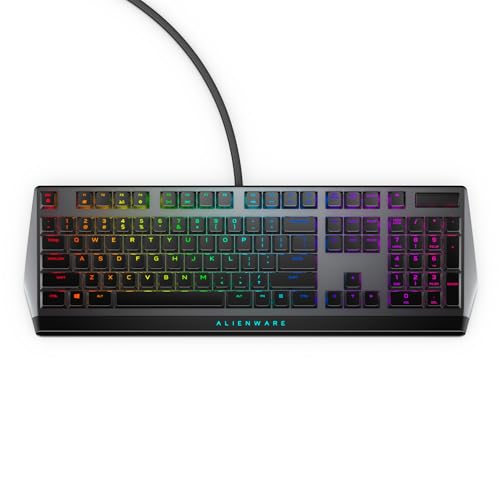
Pros
- Cherry MX Low Profile Red linear switches
- Built-in USB passthrough and media controls
- Rigid metal top plate construction
- Per-key AlienFX RGB illumination
- Onboard memory for macro profile storage
Cons
- Full-size 18.4-inch footprint demands substantial desk space
- RGB and macro setup requires Alienware Command Center
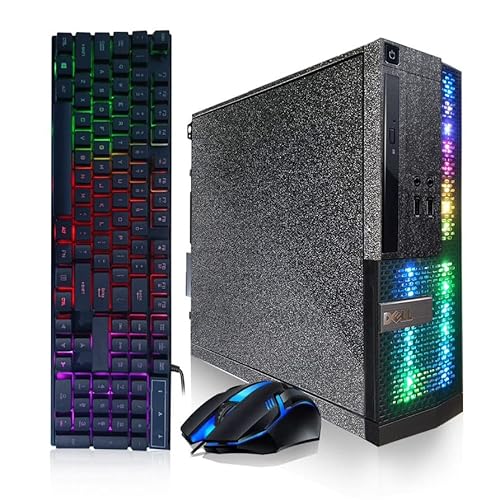
Pros
- 16GB memory for everyday multitasking
- 512GB solid-state storage
- Windows 11 Pro included
- Wi-Fi and Bluetooth connectivity
- RGB keyboard and mouse included
Cons
- Dedicated GPU is not specified
- CPU generation is not specified
- Wireless connectivity standards are not specified

Pros
- 16GB RAM for everyday multitasking
- 512GB SSD for faster boot times
- Windows 11 Pro included
- 24-inch monitor included
- RGB peripherals and front-panel lighting
Cons
- Integrated graphics limit demanding gaming headroom
- Monitor resolution and refresh rate unspecified
- Refurbished units may arrive in generic packaging

Pros
- Durable spill-resistant build for simple cleanup
- Dedicated media and volume control buttons
- Tuned tactile keys with gaming anti-ghosting
- Integrated palm rest enhances typing comfort
- Customizable five-zone RGB via Logitech G HUB
Cons
- RGB illumination is limited to five zones
- Integrated palm rest cannot be removed

Pros
- Fast 8 kHz report rate for low latency
- Compact 98 percent layout includes number pad
- Hot-swappable switches with durable PBT keycaps
- Sound-dampened gasket-mounted construction
- Convenient on-board dot-matrix screen and control dial
Cons
- Enabling 8 kHz polling rate requires G HUB software
- Full macro and lighting customization requires software configuration

Pros
- Dedicated one-touch lighting toggle button
- 19-key anti-ghosting for essential gaming inputs
- Full 104-key layout with multimedia shortcuts
- Plug-and-play setup across PC and consoles
- Adjustable backlighting brightness and breathing modes
Cons
- Simulates mechanical feel rather than true mechanical switches
- Anti-ghosting is limited to 19 keys

Pros
- Five dedicated macro keys for rapid command input
- Quiet membrane switches suitable for shared workspaces
- Adjustable mouse sensitivity from 800 to 7200 DPI
- Integrated wrist rest helps reduce typing fatigue
- Onboard memory retains lighting and DPI profiles
Cons
- Uses membrane keys rather than mechanical switches
- Wired design restricts flexible cable-free placement
- Full software customization limited to Windows systems
How These Best Dell Keyboards For Gaming Options Differ
| Keyboard | Switch or key type | Layout and controls | Notable specification |
|---|---|---|---|
| Alienware AW510K | Cherry MX Low Profile Red | Three-section layout, programmable keys, media controls | Per-key AlienFX RGB, full N-key rollover, USB passthrough |
| Corsair K55 RGB PRO | Membrane | Full-size, six macro keys, dedicated media controls | IP42-rated dust and spill-resistant design |
| SteelSeries Apex 3 | Whisper-quiet membrane switches | Full-size with multimedia controls | 10-zone RGB, IP32 water resistance, magnetic wrist rest |
| Logitech G413 SE | Tactile mechanical | Full-size, FN media controls | PBT keycaps and six-key rollover anti-ghosting |
| Logitech G213 Prodigy | Gaming membrane | Full-size, media controls, integrated palm rest | Five-zone RGB and configurable G HUB controls |
| Logitech G316 X 98 | Linear mechanical | 98% layout with numpad and control dial | Hot-swappable switches and up to 8 kHz report rate |
| Redragon S101-3 PRO | Soft-touch membrane | Full-size keyboard with mouse included | Five macro keys and six keyboard lighting modes |
| Redragon K521 | Mechanical-feeling keys | 104 keys with multimedia combinations | 19-key anti-ghosting and rainbow LED backlighting |
Best Dell-Branded Choice: Alienware Low-Profile RGB Gaming Keyboard AW510K
The Alienware Low-Profile RGB Gaming Keyboard AW510K is the strongest fit for shoppers specifically searching for the best dell keyboards for gaming. Alienware is Dell’s gaming brand, and this model uses Cherry MX Low Profile Red switches with linear operation, low actuation force, and shorter travel.
Its low-profile mechanical design suits competitive players who prefer a smooth keypress and a flatter keyboard shape. Full N-key rollover supports simultaneous key registration, while per-key AlienFX RGB, onboard memory, programmable keys, and media controls provide useful customization.
The main limitation is that linear low-profile switches will not suit everyone, especially users who prefer stronger tactile feedback. It is also more specialized and less budget-oriented than the membrane keyboards in this list. Alienware Command Center is required for the full lighting and programming feature set.
Best Alternatives to Dell and Alienware Keyboards
Corsair K55 RGB PRO Membrane Wired Gaming Keyboard
The Corsair K55 RGB PRO is a practical alternative for gamers who want macro controls without moving to mechanical switches. Its six dedicated macro keys can trigger shortcuts or commands, and CORSAIR iCUE supports custom assignments across five RGB lighting zones.
Dedicated volume and media controls reduce the need to leave a game, while the detachable rubber palm rest supports longer sessions. IP42-rated protection is useful for minor dust and spill exposure, but it should not be treated as waterproofing.
SteelSeries Apex 3 Gaming Keyboard
The SteelSeries Apex 3 is aimed at users who prioritize quieter operation and broad device compatibility. Its whisper-quiet membrane switches, magnetic wrist rest, dedicated multimedia controls, and 10-zone RGB lighting cover common gaming and productivity needs.
SteelSeries lists compatibility with Windows, Mac OS X, Xbox Series consoles, PS4, and PS5. Its IP32 water resistance provides limited spill protection, although the membrane design does not offer the switch feel or customization associated with mechanical models.
Logitech G413 SE Full-Size Mechanical
The Logitech G413 SE is a straightforward mechanical choice for buyers who want tactile feedback, PBT keycaps, and a full-size layout. Its six-key rollover anti-ghosting supports common multi-key gaming inputs, while the brushed aluminum-magnesium top case is designed to limit flex.
White LED backlighting is simpler than full RGB, so it is less suitable for users building a highly synchronized lighting setup. The FN-based media controls also require function-key combinations instead of separate media buttons.
Logitech G213 Prodigy Wired RGB Gaming Keyboard
The Logitech G213 Prodigy combines a full-size membrane design with five customizable RGB zones, an integrated palm rest, adjustable feet, and dedicated media controls. Its anti-ghosting gaming matrix is designed to help register multiple inputs during play.
This model fits mixed gaming and productivity setups that benefit from a familiar full-size layout. It does not provide the switch-level customization or mechanical key feel of the AW510K, G413 SE, or G316 X 98, and Logitech G HUB is needed for advanced lighting, macros, and game-mode settings.
Logitech G316 X 98 Mechanical Gaming Keyboard
The Logitech G316 X 98 is the most feature-focused alternative in this group. Its 98% layout retains a numpad while reducing the footprint compared with many conventional full-size keyboards, leaving more room for mouse movement.
Hot-swappable switches, double-shot PBT keycaps, a control dial, a dot-matrix display, gasket mounting, and sound-dampening layers make it attractive to enthusiasts. Logitech also advertises an 8 kHz report rate through G HUB, but that setting is a manufacturer specification rather than an independently measured gaming advantage.
Redragon S101-3 PRO Gaming Keyboard and Mouse
The Redragon S101-3 PRO is best considered a complete starter peripheral set rather than a direct competitor to the Alienware keyboard. It includes a full-size RGB membrane keyboard, a gaming mouse, five macro keys, an ergonomic wrist rest, and programmable software.
It suits first-time PC gamers, students, and buyers replacing basic peripherals together. The trade-off is that the package offers less keyboard specialization than standalone mechanical models, and its Windows 10 and Windows 11 plug-and-play claims should be checked against the specific system being used.
Redragon K521 Upgrade Rainbow LED Gaming Keyboard
The Redragon K521 is a low-cost wired option with a 104-key layout, mechanical-feeling keys, one-touch lighting controls, multimedia combinations, and 19-key anti-ghosting. Its stated compatibility includes Windows, macOS, PS4, PS5, Xbox, and plug-and-play use without a driver.
Its rainbow LED system is less customizable than per-key RGB, and mechanical-feeling does not mean the keyboard uses mechanical switches. Choose it for basic gaming input and broad platform support, not for enthusiast switch customization.
Dell Computer Bundles With Included Keyboards
Two listed Dell products are complete refurbished or renewed computer packages, not standalone Dell keyboards. They may still be relevant if the goal is to buy a Dell-based gaming setup with a keyboard included, but the supplied descriptions do not identify the included keyboard models in detail.
Dell PC Treasure Box RGB Desktop Computer Intel
The Dell PC Treasure Box RGB Desktop Computer Intel includes a wired RGB gaming keyboard and mouse alongside an Intel Core i5 quad-core processor, 16GB of memory, a 512GB SSD, Windows 11 Pro, Wi-Fi, Bluetooth, and multiple USB ports.
This package is appropriate for someone who needs a complete desktop and basic gaming peripherals in one purchase. The keyboard’s switch type, rollover support, layout details, and software controls are not specified, so it should not be selected over the AW510K when keyboard performance is the main priority.
Dell Optiplex PC, Core i5, 24-inch Monitor, 16GB RAM, 512GB SSD
This Dell OptiPlex package includes a 24-inch monitor, a refurbished desktop, and non-Dell gaming keyboard, mouse, and headset accessories. The keyboard is described as having red, green, and blue backlighting, but the supplied information does not specify its switch mechanism or anti-ghosting features.
It makes more sense as a home, office, or entry-level gaming bundle than as a focused keyboard upgrade. Buyers should verify the exact included accessories and system configuration before purchase because the keyboard is not identified as a standalone Dell or Alienware model.
How to Choose Among the Best Dell Keyboards For Gaming
Choose the switch style first
Mechanical keyboards provide a more defined switch-based feel, but the best choice depends on the mechanism. The AW510K and G316 X 98 use linear mechanical designs, while the G413 SE uses tactile mechanical switches. Membrane models such as the K55, Apex 3, G213, and S101-3 PRO are generally better suited to users who prefer softer or quieter keypresses.
Match the layout to your desk and games
Full-size keyboards retain a numpad and are useful for productivity, simulation games, and number-heavy workflows. The G316 X 98 keeps numpad functionality in a smaller layout, while the AW510K uses a three-section layout and the supplied products do not include a dedicated tenkeyless keyboard.
Check rollover, macros, and software needs
Rollover and anti-ghosting matter when games require several simultaneous keys. The AW510K lists full N-key rollover, the G413 SE lists six-key rollover, and the K521 lists 19-key anti-ghosting. Macro and lighting controls often require software such as Alienware Command Center, CORSAIR iCUE, Logitech G HUB, or Redragon’s downloadable utility.
Consider comfort and spill protection realistically
Wrist rests and adjustable feet can improve positioning during longer sessions, with included or integrated support on several models. IP32 and IP42 ratings indicate limited protection against certain spills or debris, not full waterproofing, so normal care is still required.
Are Dell Keyboards Good for PC Gaming?
Alienware keyboards can be a good fit for PC gaming when you want Dell ecosystem styling, low-profile Cherry MX switches, per-key lighting, and programmable controls. The AW510K is the clearest standalone choice in this selection, but competing brands offer more variety in switch types, layouts, bundles, and price tiers.
For a wider setup, keyboard comfort also depends on desk space and monitor positioning. Our guide to computer desks for gaming can help when choosing a surface for a full-size keyboard, mouse, and monitor.
Final Verdict on the Best Dell Keyboards For Gaming
The Alienware Low-Profile RGB Gaming Keyboard AW510K is the best match for readers who specifically want a Dell-associated standalone gaming keyboard and prefer linear low-profile mechanical switches. Choose the Logitech G413 SE for tactile mechanical feedback, the G316 X 98 for hot-swappable features and a compact numpad layout, or the Corsair K55 RGB PRO for macros and membrane comfort.
The SteelSeries Apex 3 and Logitech G213 are sensible quieter full-size alternatives, while the Redragon models suit basic setups or buyers who need a keyboard and mouse together. The Dell PC bundles are complete computer packages with included accessories, so they should only be considered when the entire system is needed rather than a dedicated keyboard upgrade.




Write Your Review
No reviews yet. Be the first to share your experience!