

The best keyboards for pro gaming depend mainly on the games you play, your preferred layout, and whether adjustable actuation matters. Rapid-trigger and analog boards target fast FPS movement, while compact wireless, full-size, and programmable designs suit different desk and workload requirements.
This specification-based roundup compares ten PC gaming keyboards using their documented switches, layouts, connection options, customization tools, and compatibility details. It does not represent independent latency, durability, noise, or battery testing.

Pros
- Tactile switches deliver quiet keystroke feedback
- Eight dedicated macro keys and programmable dial
- Padded magnetic wrist rest with integrated underglow
- Doubleshot keycaps prevent lettering from wearing off
Cons
- Wired configuration restricts cord-free desk arrangements
- Full three-sided underglow requires attaching the wrist rest

Pros
- 32 fully programmable keys for complex inputs
- Integrated 8-way directional thumbpad for navigation
- Razer Hypershift unlocks secondary key layers
- Individually customizable Razer Chroma RGB backlighting
Cons
- Hybrid mecha-membrane switches rather than full mechanical switches
- Designed exclusively for left-hand operation
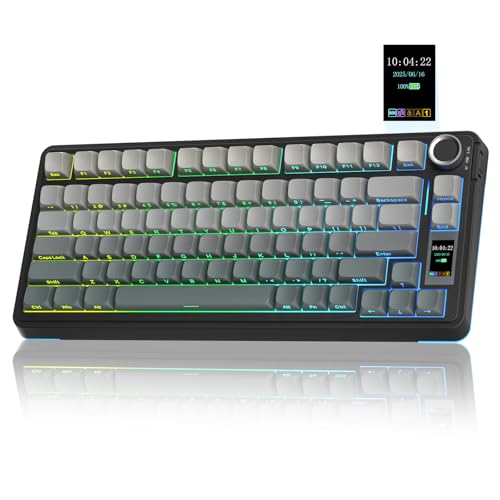
Pros
- Versatile tri-mode wireless and wired connectivity
- Hot-swappable PCB supports 3-pin and 5-pin switches
- Built-in LCD screen and multi-function rotary knob
- Five layers of sound-dampening internal materials
- Durable side-engraved PBT keycaps
Cons
- Configuration software requires a wired connection
- Driver and screen customization limited to Windows systems

Pros
- Flexible tri-mode wireless and multi-device pairing
- Hot-swappable 3-pin and 5-pin switch compatibility
- Integrated LCD screen with physical rotary knob
- Generous 5000mAh internal battery capacity
- Multi-layer internal acoustic dampening design
Cons
- Configuration software requires a wired connection
- Screen customization is limited to Windows systems

Pros
- Compact 60% footprint frees up mouse space
- Responsive GX tactile optical switches
- Low-latency LIGHTSPEED wireless and Bluetooth support
- Multi-layer key customization via KEYCONTROL
- Includes protective carrying case for travel
Cons
- Lacks dedicated arrow keys and navigation cluster
- Requires learning secondary function layers for commands

Pros
- OmniPoint 3.0 magnetic switches with customizable actuation
- Rapid Trigger and Rapid Tap optimize competitive responsiveness
- Versatile dual-wireless connectivity via 2.4GHz and Bluetooth
- Durable PBT keycaps and built-in OLED screen
- Protection Mode minimizes unintended key inputs

Pros
- Flexible tri-mode wireless and wired connectivity
- Gasket-mounted build with multi-layer sound dampening
- Universal 3-pin and 5-pin hot-swap switch sockets
- Convenient multi-function media and lighting knob
- Software support for macro and lighting customization
Cons
- Compact 81-key layout lacks a dedicated numpad
- Model variant does not include an LCD screen

Pros
- Gasket mount with five sound-dampening layers
- Hot-swappable PCB compatible with 3-pin and 5-pin switches
- Durable double-shot PBT keycaps in MDA profile
- Dedicated CNC aluminum volume control knob
- Pre-lubed linear cream switches
Cons
- Wired-only design lacks wireless connectivity
- Compact 96% layout clusters keys closer together
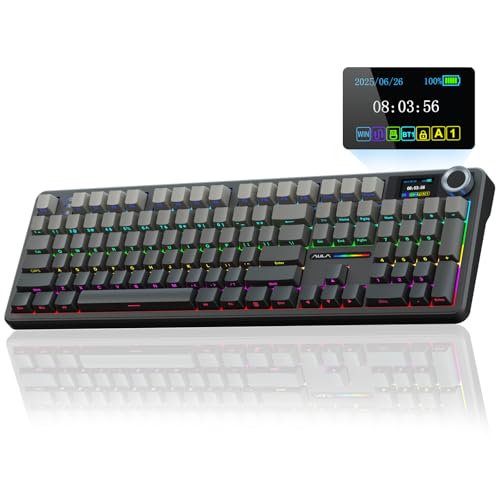
Pros
- Full-size layout with dedicated number pad
- Hot-swappable 3-pin and 5-pin switch support
- Three connection modes across multiple platforms
- Large 8000mAh battery capacity
- Built-in display and multifunction control knob
Cons
- Screen customization requires Windows software and wired mode
- Macro and RGB software supports Windows in wired mode
- Linux may have abnormal F-zone functionality with incompatible drivers
How These Keyboards Differ
| Keyboard | Most relevant feature | Layout or connection | Best suited to |
|---|---|---|---|
| Razer Huntsman V3 Pro Esports Gaming Keyboard | Rapid Trigger and adjustable 0.1 to 4.0 mm actuation | Wired keyboard; layout not specified | Competitive FPS movement |
| SteelSeries Apex Pro TKL Gen 3 Gaming Keyboard | OmniPoint 3.0 Hall Effect switches and Rapid Tap | TKL; 2.4 GHz and Bluetooth | Players wanting adjustable actuation with wireless flexibility |
| Logitech G PRO X 60% Wireless Gaming Keyboard | GX optical switches and five Keycontrol layers | 60% compact; LIGHTSPEED, Bluetooth, and USB | Portable esports setups and mouse space |
| Razer BlackWidow V4 Pro Wired Mechanical | Eight macro keys and tactile Orange switches | Wired full-feature keyboard | Players who need macros and dedicated controls |
| Razer Tartarus V2 Left-Handed Gaming Keypad | 32 programmable keys and an eight-way thumbpad | Left-handed keypad; wired | Supplemental controls and creative workflows |
| AULA S75 PRO Wireless Mechanical Gaming Keyboard | Hot-swap switches and tri-mode connectivity | 75% layout; wired, 2.4 GHz, and Bluetooth | Compact customizable desks |
| AULA S98 Pro Wireless Mechanical Gaming Keyboard | 96-key layout with number pad and 5000mAh battery | Tri-mode wireless and USB-C wired | Gaming and productivity in one board |
| RK ROYAL KLUDGE R98 Pro Wired Mechanical Keyboard | Hot-swap sockets, gasket mount, and number pad | 98-key wired layout | Budget-conscious gaming and office use |
| Redragon K673 PRO Wireless 81-Key RGB Gasket | Tri-mode connectivity and hot-swap support | 81-key compact layout | Affordable flexible setups |
| AULA F108 PRO – Wireless Mechanical Keyboard | Full-size layout and 8000mAh battery | Wired, 2.4 GHz, and Bluetooth | Full desktop control and long sessions |
Our Specification-Based Picks
Best for Adjustable FPS Input: Razer Huntsman V3 Pro Esports Gaming Keyboard
Razer Huntsman V3 Pro Esports Gaming Keyboard is the most focused option for players who prioritize rapid directional changes in competitive FPS games. Its Gen-2 analog optical switches provide adjustable actuation from 0.1 to 4.0 mm, while Rapid Trigger resets keys as they are lifted rather than relying only on a conventional fixed activation point.
Razer Snap Tap can prioritize the latest input between two selected keys after the required firmware update. Onboard controls let users adjust actuation and Rapid Trigger sensitivity without software, and the board stores settings locally. The main limitation is its wired, competition-focused design, which may be less attractive for users wanting wireless connections or a conventional typing experience.
Razer Huntsman V3 Pro Esports Gaming Keyboard
Best Wireless Adjustable-Actuation Option: SteelSeries Apex Pro TKL Gen 3 Gaming Keyboard
SteelSeries Apex Pro TKL Gen 3 Gaming Keyboard combines a tenkeyless layout with OmniPoint 3.0 Hall Effect switches. Its 40 actuation levels span 0.1 to 4.0 mm, and Rapid Trigger, Rapid Tap, and Protection Mode are designed for fast movement, latest-input behavior, and fewer accidental nearby presses.
Dual wireless connectivity includes 2.4 GHz for gaming and Bluetooth for other devices. This makes it more flexible than a strictly wired competition board, but the TKL layout omits a number pad, and the feature set may be unnecessary for players who do not need adjustable magnetic switches.
SteelSeries Apex Pro TKL Gen 3 Gaming Keyboard
Best Compact Wireless Choice: Logitech G PRO X 60% Wireless Gaming Keyboard
Logitech G PRO X 60% Wireless Gaming Keyboard is designed for players who want a small board and more room for mouse movement. Its GX optical switches are offered in tactile or linear versions, while the LIGHTSPEED adapter provides a stated 1 ms response rate and the keyboard also supports Bluetooth and USB connectivity.
Keycontrol supports five customizable layers, which helps compensate for the compact layout. The trade-off is that a 60% board does not provide dedicated function-row, navigation, or arrow-key controls in the usual full-layout arrangement, so users must rely on layers or shortcuts. A carrying case is included for transport between events.
Logitech G PRO X 60% Wireless Gaming Keyboard
Best for Macros and Tactile Feedback: Razer BlackWidow V4 Pro Wired Mechanical
Razer BlackWidow V4 Pro Wired Mechanical uses Orange mechanical switches, which provide tactile feedback without the click associated with clicky switches. Eight dedicated macro keys and a programmable command dial give it more direct controls than compact esports boards.
This is a practical choice for players who also stream, edit, or use complex keybinds. It is less focused on adjustable actuation and rapid-trigger behavior, and its wired full-feature format occupies more desk space than a TKL or 60% board.
Razer BlackWidow V4 Pro Wired Mechanical
Best Supplemental Keypad: Razer Tartarus V2 Left-Handed Gaming Keypad
Razer Tartarus V2 Left-Handed Gaming Keypad is not a conventional replacement keyboard. It provides 32 programmable keys, an eight-way thumbpad, and Hypershift remapping, making it useful as a dedicated control surface beside another keyboard.
The thumbpad can suit players who prefer console-style movement or want many actions within the left hand. Its mecha-membrane switches are not the same as the adjustable optical or Hall Effect switches found in the FPS-focused picks, and a separate main keyboard may still be required for general typing.
Razer Tartarus V2 Left-Handed Gaming Keypad
Best Customizable 75% Option: AULA S75 PRO Wireless Mechanical Gaming Keyboard
AULA S75 PRO Wireless Mechanical Gaming Keyboard uses an 80-key 75% layout that retains arrow keys while reducing the footprint compared with a full-size board. Its tri-mode connectivity supports Bluetooth 5.0, 2.4 GHz wireless, and USB-C wired use, with compatibility listed for Windows, Mac, iOS, Android, PlayStation, and Xbox.
Hot-swap support for 3-pin and 5-pin switches allows customization without soldering. The software is Windows-only and requires wired mode for screen-image, GIF, and driver-based settings, so users on other operating systems should not expect the complete configuration feature set.
AULA S75 PRO Wireless Mechanical Gaming Keyboard
Best Compact Board with a Number Pad: AULA S98 Pro Wireless Mechanical Gaming Keyboard
AULA S98 Pro Wireless Mechanical Gaming Keyboard uses a 96-key layout that keeps a number pad while remaining more compact than a traditional full-size design. It supports Bluetooth 5.0, 2.4 GHz, and USB-C wired connectivity, can save up to five devices, and lists compatibility with Windows, Mac, iOS, Android, PlayStation, and Xbox.
The hot-swappable 3-pin and 5-pin base is useful for future switch changes, while the 5000mAh battery supports the wireless design. Its software is officially described as Windows-only and wired-mode dependent for advanced programming, and the 96-key format may still be larger than competitive FPS players prefer.
AULA S98 Pro Wireless Mechanical Gaming Keyboard
Best Value Full-Feature Wired Board: RK ROYAL KLUDGE R98 Pro Wired Mechanical Keyboard
RK ROYAL KLUDGE R98 Pro Wired Mechanical Keyboard provides a 98-key layout with a number pad, arrow keys, a detachable volume knob, and hot-swap support for 3-pin and 5-pin switches. Its gasket mount, pre-lubed linear switches, PBT keycaps, and five-layer sound-absorbing construction target a softer, quieter-feeling typing setup.
The online driver supports key remapping, macros, and RGB settings on Windows and Mac. It is a sensible general-purpose option for gaming and work, but its wired-only connection and linear switch configuration offer fewer out-of-the-box choices for users seeking wireless play or tactile feedback.
RK ROYAL KLUDGE R98 Pro Wired Mechanical Keyboard
Best Affordable Tri-Mode Layout: Redragon K673 PRO Wireless 81-Key RGB Gasket
Redragon K673 PRO Wireless 81-Key RGB Gasket combines an 81-key layout with USB-C, Bluetooth, and 2.4 GHz connections. Its hot-swap socket accepts most 3-pin and 5-pin switches, while gasket mounting and five-layer dampening target a cushioned typing feel.
A single knob handles backlight brightness and media playback, and software supports RGB customization, macros, and keybindings. The specification does not identify adjustable actuation or rapid-trigger functions, so it is better suited to flexible everyday gaming than to players specifically seeking analog movement controls.
Redragon K673 PRO Wireless 81-Key RGB Gasket
Best Full-Size Wireless Option: AULA F108 PRO – Wireless Mechanical Keyboard
AULA F108 PRO – Wireless Mechanical Keyboard is built around a 104-key full-size layout with dedicated function keys and a number pad. It supports Bluetooth 5.0, 2.4 GHz wireless, and USB-C wired connectivity, and its listed features include a 1000 Hz polling rate in wired and 2.4 GHz modes.
The 8000mAh battery, hot-swap base, PBT keycaps, and programmable RGB controls make it suitable for users who want one board for gaming and productivity. Its large footprint is a disadvantage for low-sensitivity FPS players who need maximum mouse space, and the driver supports Windows only in wired mode.
AULA F108 PRO – Wireless Mechanical Keyboard
How to Choose the Best Keyboards for Pro Gaming
Start with the Input System
Adjustable optical or Hall Effect switches are the most relevant specification for players focused on actuation control and rapid-trigger movement. The Razer Huntsman V3 Pro and SteelSeries Apex Pro TKL Gen 3 explicitly support these features, while the Logitech board uses optical switches but does not list adjustable actuation.
Traditional mechanical, mecha-membrane, and hot-swappable boards can still be appropriate when typing feel, macro access, layout, or customization matters more than analog-style input. Switch type alone does not establish measured latency, durability, or competitive advantage.
Match the Layout to Your Desk and Games
A 60% or TKL board leaves more room for mouse movement, but compact layouts remove dedicated controls. The Logitech G PRO X 60% is the smallest mainstream option here, while the SteelSeries Apex Pro TKL Gen 3 retains a more familiar arrangement without a number pad.
Choose a 75%, 81%, 96%, 98%, or full-size board if you need arrow keys, navigation controls, function keys, or a number pad. A keypad such as the Tartarus V2 takes a different approach by adding programmable left-hand controls beside a separate keyboard.
Check Connection and Software Requirements
For tournament-style PC play, wired or dedicated 2.4 GHz connections avoid the practical concern of Bluetooth switching and pairing. Wireless models in this guide may also support USB-C or Bluetooth, but their advanced configuration software can have operating-system or wired-mode restrictions.
Before buying, verify the exact game platform, operating system, available USB ports, and whether macro or lighting configuration is important. The AULA models list broad device compatibility, but their driver features are specifically limited to Windows wired mode.
Consider Customization and Secondary Workloads
Hot-swap support is valuable for users who expect to change switches without soldering. Macro keys, programmable layers, a control knob, and onboard settings are more useful for streaming, productivity, editing, or games with extensive keybinds than for players who only need standard movement controls.
For more switch replacement options, see our guide to hot-swappable mechanical keyboards. Readers building a larger desk setup may also benefit from comparing gaming desks with storage before choosing a full-size board.
Frequently Asked Questions
Are rapid-trigger keyboards necessary for pro gaming?
No. Rapid Trigger can be relevant to competitive FPS players who value quick key resets, but it is not required for every game or player. A conventional mechanical keyboard may be the better fit when layout, switch feel, wireless use, macros, or general productivity has higher priority.
Is a wireless keyboard suitable for competitive PC gaming?
The listed wireless models support either 2.4 GHz connections, Bluetooth, or both. For the most controlled setup, use the documented 2.4 GHz mode or wired connection where available, and check whether the keyboard’s advanced software requires a wired connection.
Which layout is most practical for FPS games?
Compact and TKL layouts can provide more mouse space, but the right choice depends on sensitivity, keybinds, and other tasks. A 60% board maximizes compactness, while a TKL or 75% board keeps more dedicated controls without the footprint of a full-size keyboard.






Write Your Review
No reviews yet. Be the first to share your experience!