

The best company for gaming keyboards depends on your preferred layout, switch feel, connection type, and intended PC workload. SteelSeries and Logitech G offer strong gaming-focused designs, while Alienware targets premium low-profile mechanical users and Redragon emphasizes flexible bundles.
This guide compares the listed keyboards using documented specifications rather than hands-on testing. The right choice may be a compact tenkeyless model, a full-size mechanical keyboard, a wireless keyboard and mouse bundle, or an inexpensive 60% board.
- Best compact all-rounder: SteelSeries Apex 3 TKL RGB Gaming Keyboard, with a tenkeyless layout, quiet switches, anti-ghosting, and console compatibility.
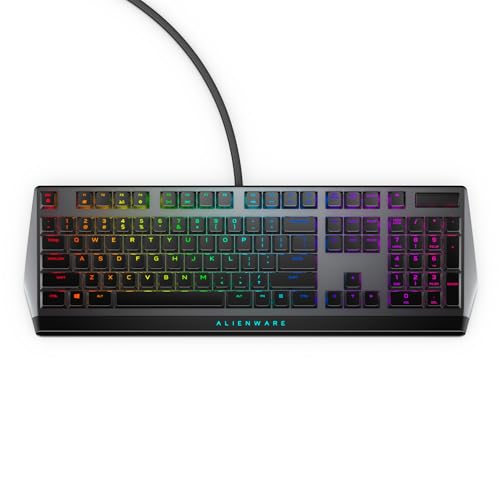
- Best premium low-profile option: Alienware Low-Profile RGB Gaming Keyboard AW510K, with Cherry MX Low Profile Red switches, per-key RGB, programmable keys, and USB passthrough.
- Best wireless bundle: Redragon S101M-KS Gaming Keyboard and Mouse, offering wired, Bluetooth, and 2.4 GHz modes with a matching mouse.
- Best full-size value pick: Logitech G213 Prodigy Wired RGB Gaming Keyboard, combining a numpad, media controls, palm rest, and Logitech G HUB support.
- Best budget mechanical option: MageGee Portable 60% Mechanical Gaming Keyboard, with red switches, a compact 68-key layout, and broad computer compatibility.

Pros
- Space-saving tenkeyless design
- IP32 spill and dust resistance
- Quiet keystrokes for shared spaces
- Dedicated media buttons and volume roller
- Wide PC and console compatibility
Cons
- Non-mechanical switches lack distinct mechanical tactile response
- RGB illumination is limited to 8 zones instead of per-key
Pros
- Cherry MX Low Profile Red linear switches
- Built-in USB passthrough and media controls
- Rigid metal top plate construction
- Per-key AlienFX RGB illumination
- Onboard memory for macro profile storage
Cons
- Full-size 18.4-inch footprint demands substantial desk space
- RGB and macro setup requires Alienware Command Center

Pros
- Durable spill-resistant build for simple cleanup
- Dedicated media and volume control buttons
- Tuned tactile keys with gaming anti-ghosting
- Integrated palm rest enhances typing comfort
- Customizable five-zone RGB via Logitech G HUB
Cons
- RGB illumination is limited to five zones
- Integrated palm rest cannot be removed

Pros
- Complete 3-in-1 desktop gaming accessory bundle
- Reinforced steel plate ensures keyboard rigidity
- Ergonomic memory foam faux-leather wrist rest included
- Adjustable optical mouse sensitivity up to 7200 DPI
Cons
- Uses mechanical-feel membrane switches instead of authentic mechanical
- Anti-ghosting is restricted to 26 specific keys

Pros
- Tri-mode connectivity via Bluetooth, 2.4GHz, and USB-C
- Single 2-in-1 USB receiver operates both peripherals
- Ten dedicated multimedia keys for direct playback control
- Mouse supports up to 1000Hz polling rate
- Keyboard battery rated up to 300 hours without RGB
Cons
- Configuration software is limited to Windows systems
- Mouse sensor tops out at 4800 DPI

Pros
- Durable wear-resistant PBT keycaps
- Sturdy aluminum-magnesium alloy top plate
- Tactile mechanical switches for responsive feedback
- Convenient FN-layer media and lighting controls
Cons
- Lighting limited to single-color white LEDs
- Key rollover capped at six simultaneous inputs

Pros
- Compact 61-key layout maximizes desk space
- Tactile and clicky mechanical switch feedback
- Detachable USB-C cable simplifies transport
- Full-key anti-ghosting prevents input conflicts
- Double-shot keycaps provide clear legend backlighting
Cons
- Lacks dedicated arrow and navigation keys
- Fixed rainbow lighting lacks full RGB customization

Pros
- Compact layout retains dedicated arrow keys
- Smooth linear red mechanical switches
- Full anti-ghosting across all keys
- Detachable cable simplifies transport
- Dual adjustable kickstands for ergonomics
Cons
- Single-color blue lighting without RGB customization
- Lacks wireless connectivity options

Pros
- Durable metal panel with integrated ergonomic wrist rest
- Whisper-quiet switches suitable for shared environments
- IP32 spill resistance with built-in drainage holes
- 25-key anti-ghosting support for gaming inputs
- Customizable backlighting with automatic sleep mode
Cons
- Multimedia shortcut keys do not work on Mac systems
- Uses membrane volcano switches instead of mechanical switches

Pros
- Tactile hybrid switches rated for 20 million clicks
- Built-in customizable OLED smart display
- Durable aircraft-grade aluminum alloy frame
- Dynamic per-key RGB backlighting with reactive effects
- Detachable magnetic wrist rest included
How the Best Company for Gaming Keyboards Options Compare
| Keyboard | Layout | Switch or input type | Connection and compatibility | Best suited to |
|---|---|---|---|---|
| SteelSeries Apex 3 TKL RGB Gaming Keyboard | Tenkeyless | Whisper-quiet gaming switches | Windows, Mac OS X, Xbox Series S and X, PS4, PS5 | Compact gaming and quieter shared spaces |
| Alienware Low-Profile RGB Gaming Keyboard AW510K | Three-section layout | Cherry MX Low Profile Red | PC software features through Alienware Command Center | Low-profile mechanical gaming and macro use |
| Redragon S101M-KS Gaming Keyboard and Mouse | Full keyboard with media controls | Keyboard and mouse bundle | Wired, Bluetooth, and 2.4 GHz; Windows and PC-focused compatibility | Cable-free setups needing a matching mouse |
| Logitech G213 Prodigy Wired RGB Gaming Keyboard | Full-size | Gaming membrane-style keys | Wired PC keyboard with Logitech G HUB support | Gaming, productivity, and media control |
| Logitech G413 SE Full-Size Mechanical | Full-size | Tactile mechanical switches | Wired PC keyboard | Users wanting PBT keycaps and a rigid chassis |
| MageGee Portable 60% Mechanical Gaming Keyboard | 68-key compact | Mechanical red switches | USB 2.0; Windows, Linux, and Mac | Small desks, travel, and FPS-focused layouts |
Recommended Keyboards by User and Workload
SteelSeries Apex 3 TKL RGB Gaming Keyboard for Compact Gaming
SteelSeries Apex 3 TKL RGB Gaming Keyboard removes the numeric keypad while retaining dedicated media controls and a clickable volume roller. Its quiet gaming switches, anti-ghosting support, and stated durability rating of more than 20 million keypresses suit players who want a less intrusive keyboard for gaming and everyday typing.
The tenkeyless shape leaves more room for mouse movement and is easier to position than a full-size board. IP32 water and dust resistance adds protection against minor spills and particles, but it should not be treated as waterproof. Compatibility is unusually broad, including Windows, Mac OS X, Xbox Series consoles, PS4, and PS5.
Alienware Low-Profile RGB Gaming Keyboard AW510K for Mechanical Control
Alienware Low-Profile RGB Gaming Keyboard AW510K uses Cherry MX Low Profile Red switches with linear operation, shorter travel, and low actuation force. That design is aimed at users who prefer smooth key presses and a lower keyboard profile rather than the clicky feedback of blue switches.
Per-key AlienFX RGB, programmable keys, full N-key rollover, onboard memory, and USB passthrough make it suitable for customized PC gaming setups. Its limitations are the premium positioning and the need to use Alienware Command Center for its lighting and programming features.
Redragon S101M-KS Gaming Keyboard and Mouse for Wireless Flexibility
Redragon S101M-KS Gaming Keyboard and Mouse is the most complete option for buyers who need both input devices. It supports wired, Bluetooth, and 2.4 GHz wireless modes, and one receiver can control the keyboard and mouse together.
The keyboard includes independent multimedia keys, a Windows lock function, RGB lighting, and a detachable USB-C cable. The included mouse offers five listed DPI levels up to 4800 DPI, programmable buttons, and adjustable polling rates through Redragon software. This is a practical bundle, but buyers seeking a specific mechanical switch or premium keyboard construction should consider a keyboard-only model instead.
Logitech G213 Prodigy Wired RGB Gaming Keyboard for Gaming and Productivity
Logitech G213 Prodigy Wired RGB Gaming Keyboard uses a full-size layout with a numeric keypad, dedicated media controls, an integrated palm rest, and adjustable feet. Its gaming matrix is designed for anti-ghosting, while the five-zone lighting and macro options are configured through Logitech G HUB.
This keyboard fits users who switch between games, office applications, and media playback. The main trade-off is that it is not a mechanical keyboard, so buyers specifically seeking mechanical switch feedback should choose the Logitech G413 SE or another mechanical model.
RedThunder K10 Wired Gaming Keyboard and Mouse for a Complete Desktop Bundle
RedThunder K10 Wired Gaming Keyboard and Mouse combines a full-size 104-key keyboard, a gaming mouse, and a soft wrist rest. The keyboard lists 26 anti-ghosting keys, a steel plate, adjustable feet, and RGB lighting, while the mouse includes a stated sensitivity of up to 7200 DPI.
This bundle suits buyers building a basic PC gaming station with one purchase. Its documented features emphasize bundled value and ergonomics, but the keyboard is described as mechanical-feel rather than as a conventional mechanical keyboard, so switch enthusiasts should set expectations accordingly.
Logitech G413 SE Full-Size Mechanical for Tactile Typing
Logitech G413 SE Full-Size Mechanical combines tactile mechanical switches with PBT keycaps and a brushed aluminum-magnesium alloy top case. Its full-size layout preserves the numeric keypad, while six-key rollover anti-ghosting and FN media controls support gaming and general desktop use.
The white LED backlighting is more restrained than the multicolor RGB systems on several alternatives. This makes it a sensible choice for users prioritizing tactile switches, keycap durability, and a rigid body over extensive lighting customization.
TECKNET Wired Gaming Keyboard for Quiet Full-Size Use
TECKNET Wired Gaming Keyboard offers a full-size layout, integrated wrist rest, metal base, 15-zone rainbow backlighting, and 25-key anti-ghosting. Its listed whisper-quiet switch design and IP32 spill resistance make it relevant for shared rooms, study areas, and mixed gaming and typing workloads.
The product supports Windows-oriented multimedia controls, with the supplied specifications noting that those controls are not compatible with Mac. Buyers using macOS should verify whether the remaining keyboard functions meet their needs before choosing it.
MageGee Portable 60% Mechanical Gaming Keyboard for Small Desks
MageGee Portable 60% Mechanical Gaming Keyboard uses a compact 68-key design with separate arrow keys and access to function-row commands through the Fn key. Its red switches are linear, while full-key anti-ghosting, a detachable USB cable, and adjustable feet support portable gaming and everyday typing.
The keyboard works with Windows, Linux, and Mac through USB 2.0 without requiring drivers or software. The compact layout saves desk space, but users who regularly need a numeric keypad, dedicated navigation cluster, or full media controls may find it restrictive.
SteelSeries USB Apex 5 Hybrid Mechanical for Extra Features
SteelSeries USB Apex 5 Hybrid Mechanical combines hybrid blue mechanical switches with a membrane layer, per-key RGB lighting, an OLED smart display, and a magnetic wrist rest. The aircraft-grade aluminum alloy frame is designed for a sturdy desktop setup, while the display can show game information, GIFs, and Discord messages.
This is a good fit for users who value tactile click feedback and built-in information features. The hybrid switch design is less straightforward than a standard mechanical keyboard, and the listed full-width construction requires more desk space than a tenkeyless or 60% model.
CACKBIRD 60% Wired Mechanical Gaming Keyboard for Minimal Setups
60% Wired Mechanical Gaming Keyboard with Blue uses clicky blue switches, a 61-key layout, full-key anti-ghosting, detachable Type-C cabling, and rainbow LED backlighting. It is designed for users who want maximum desk space for mouse movement and do not need a traditional navigation cluster.
The keyboard is plug and play for listed Windows and Mac systems, with no driver or software requirement. Blue switches provide tactile and audible feedback, which may not suit quiet rooms or shared workspaces.
What to Look For When Choosing the Best Company for Gaming Keyboards
Choose the Layout Before the Lighting
Full-size keyboards keep the numeric keypad and are convenient for productivity, spreadsheets, and shortcut-heavy applications. Tenkeyless models remove the numpad to create more mouse space, while 60% and 68-key boards are better for compact desks and portable setups.
Match Switch Behavior to Your Environment
Linear switches such as the listed Cherry MX Low Profile Red and MageGee red switches have smooth travel without a tactile bump. Blue switches provide click and tactile feedback, while quiet membrane-style or whisper-quiet designs are more appropriate when noise matters.
Check Software and Operating-System Support
Lighting, macros, key remapping, and device profiles may depend on manufacturer software. Logitech G213 features Logitech G HUB support, Alienware AW510K uses Alienware Command Center, and Redragon customization requires software from the company website. Basic plug-and-play models such as the MageGee keyboard avoid that software requirement.
Consider Spill Protection Carefully
IP32 or spill-resistant construction can help with minor accidents, but it does not make a keyboard safe to submerge. SteelSeries Apex 3 TKL and TECKNET list IP32 protection, while Logitech G213 describes resistance to liquids, crumbs, and dirt.
Frequently Asked Questions
Which company is the best for gaming keyboards?
There is no single best company for gaming keyboards for every PC user. SteelSeries is a strong fit for compact layouts and console compatibility, Logitech G offers both membrane and mechanical options, Alienware focuses on premium low-profile features, and Redragon provides flexible bundles and compact budget designs.
Are tenkeyless keyboards better for gaming?
A tenkeyless keyboard can leave more space for mouse movement and may be easier to position. It is not automatically better, because users who need a numpad for productivity or specialized shortcuts may prefer a full-size layout.
Are mechanical keyboards necessary for PC gaming?
No. Mechanical keyboards offer different tactile, linear, or clicky switch characteristics, but membrane-style gaming keyboards can still provide anti-ghosting, media controls, RGB lighting, and gaming-focused layouts.
Final Recommendation
The best company for gaming keyboards depends on the features that matter most in your setup. Choose SteelSeries Apex 3 TKL for a compact and quiet multi-platform keyboard, Alienware AW510K for low-profile mechanical control, Logitech G213 for full-size gaming and productivity, or Logitech G413 SE for tactile mechanical switches and PBT keycaps.
Redragon is the more suitable direction when you need a wireless keyboard and mouse bundle, while MageGee or CACKBIRD fits compact desk users who want a lower-cost mechanical layout. For additional workspace planning, compare these keyboard choices with the recommendations in our guide to gaming keyboards for laptops and compact setups.


Write Your Review
No reviews yet. Be the first to share your experience!