

Finding the best speakers under $50 for computer workstations requires balancing acoustic clarity against power constraints. Budget options rarely offer massive bass or studio accuracy, yet modern entry-level units easily outclass tinny laptop drivers and integrated monitor speakers.
The primary decision when choosing sub-$50 desktop audio comes down to configuration: standalone stereo pairs, space-saving soundbars, or compact 2.1 systems with a dedicated subwoofer. Your available desk depth and preferred connection method will quickly narrow down the right choice.

Pros
- Dedicated control pod for volume and power
- Separate bass level control on the subwoofer
- Compact flat-panel satellites save desktop space
- Includes dedicated four-inch side-firing subwoofer
Cons
- Modest 9W RMS total power output
- Bass adjustment dial placed directly on subwoofer
- Requires 110V AC wall outlet power
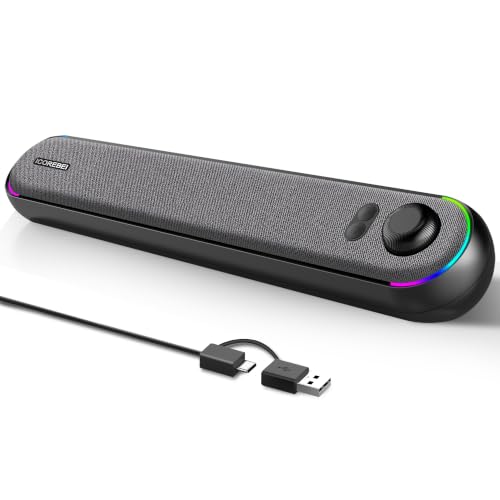
Pros
- Single-cable USB audio and power connection
- Bluetooth 5.3 plus wired USB connectivity
- Low-profile angled design fits under monitors
- Driver-free plug-and-play operation
- Customizable RGB lighting with power toggle
Cons
- Requires constant USB power with no internal battery
- No built-in microphone for calls

Pros
- Single-cable USB-C audio and power delivery
- Angled 45-degree drivers direct sound to ear level
- Clear Dialog processing improves vocal clarity
- Supports Bluetooth 5.0 wireless streaming
- Includes USB-C to USB-A converter
Cons
- Requires 10W USB port for peak acoustic output
- Analog 3.5 mm audio cable is not included

Pros
- Multiple wired inputs plus low-latency Bluetooth 5.3
- MDF wooden enclosure helps dampen unwanted resonance
- Simple front-panel volume and power control dial
- Compact footprint fits crowded desktops easily
- Includes RCA, USB-C, and 3.5mm AUX cables

Pros
- Simple plug-and-play USB or Type-C connection
- Convenient front-facing analog volume knob
- Integrated 3.5mm headphone passthrough jack
- Compact footprint fits small workspaces easily
- Touch-sensitive RGB lighting can be toggled off
Cons
- Limited to 10W peak power output
- Lacks Bluetooth wireless audio connectivity
Quick Comparison of Budget Desktop Speakers
| Model | Speaker Type | Audio Inputs | Power Source |
|---|---|---|---|
| Creative Pebble V3 | 2.0 Stereo | USB-C Audio, Bluetooth 5.0, 3.5mm AUX | USB-C / USB-A Bus Power |
| Cyber Acoustics CA-3090 | 2.1 Subwoofer Set | 3.5mm Analog Audio | Dedicated AC Wall Adapter |
| NSY Audio Powered Speakers | 2.0 Bookshelf Pair | Bluetooth 5.3, USB-C, 3.5mm, RCA | USB Power |
| ICOREBEI SoundBar | Under-Monitor Soundbar | USB-C Audio, Bluetooth 5.3 | USB Bus Power |
| Bluedee Computer Speakers | 2.0 Stereo Compact | USB / USB-C Direct Audio | USB Bus Power |
Top Speakers Under $50 for Desktop Computers
1. Creative Pebble V3, 2.0 USB-C Desktop Speakers
The Creative Pebble V3, 2.0 USB-C Desktop Speakers remain a benchmark for compact desktop sound. They feature 2.25-inch full-range drivers tilted at a 45-degree angle, aiming sound directly toward the listener rather than across the surface of the desk.
Creative equips the Pebble V3 with built-in Clear Dialog audio processing to sharpen vocal frequencies in videos and calls. It accepts digital audio and power over a single USB-C cable, while also supporting Bluetooth 5.0 wireless streaming and standard 3.5mm AUX input.
Because they rely on bus power, these speakers will not produce earth-shaking low frequencies. However, their compact footprint makes them ideal for anyone setting up gaming desks for small spaces where physical real estate is limited.
2. Cyber Acoustics CA-3090 2.1 Speaker System, 18W
For users who want dedicated low-end punch, the Cyber Acoustics CA-3090 2.1 Speaker System, 18W includes a separate 4-inch side-firing polycarbon subwoofer. Two satellite units handle stereo mids and highs, powered by an external 110V wall adapter delivering 9W continuous RMS power.
A desktop control pod places master volume and system power within arm reach. The subwoofer cabinet also features an independent bass dial, allowing you to fine-tune low-end presence depending on whether you are watching films or taking voice calls.
A downside to this setup is the extra wiring required between the satellite speakers, the floor unit, and the power outlet. Planning ahead with dedicated cable management desks helps keep this multi-piece speaker bundle tidy.
3. NSY Audio Powered Computer Speakers for Desktop PC
The NSY Audio Powered Computer Speakers for Desktop PC utilize dense MDF wood cabinets instead of standard lightweight plastics. Wood construction reduces internal cabinet resonance, helping the dual 3-inch drivers produce cleaner stereo separation across acoustic tracks and multimedia playback.
Connectivity options are generous on this model, offering Bluetooth 5.3 alongside wired RCA, USB-C, and 3.5mm analog inputs. A front-panel combination dial controls both master power and volume adjustments smoothly without requiring software intervention.
While the manufacturer markets a high 60W peak output, realistic sustained volume matches standard entry-level expectations. Their taller bookshelf profile requires adequate clearance beside your monitor setup.
4. ICOREBEI Computer Speakers USB Powered SoundBar
The ICOREBEI Computer Speakers USB Powered SoundBar is designed specifically to slide directly under a computer monitor. This single horizontal chassis contains dual full-range drivers assisted by a passive bass radiator to provide wide near-field dispersion.
A single USB-C cable transmits both digital audio and necessary power, eliminating messy multi-cable bundles on busy work surfaces. The unit also includes Bluetooth 5.3 pairing and three switchable RGB ambient lighting modes that can be turned off when working.
Because the drivers sit closely together in one small soundbar enclosure, stereo separation is noticeably narrower than dedicated satellite pairs. It excels most in compact home offices where side-speaker placement is impossible.
5. Bluedee Computer Speakers for Desktop PC
The Bluedee Computer Speakers for Desktop PC provide reliable plug-and-play stereo audio with an integrated front volume knob. Their dual drivers are housed in compact upright casings equipped with bottom non-slip pads that minimize desktop vibrations.
Unlike many entry-level sets that require separate audio and power runs, the Bluedee transmits digital audio directly through its USB/Type-C cable. A built-in 3.5mm headphone jack on the front lets you quickly switch to private listening without crawling behind your computer chassis.
The unit features touch-controlled RGB lighting that reacts with media or can be powered down. While treble and mid-range clarity are solid for spoken media, low sub-bass response is limited by the compact enclosure volume.
Key Factors When Choosing Budget Computer Speakers
Low-cost PC speakers rely on different engineering trade-offs to keep prices reasonable. Understanding these hardware differences ensures you select the correct model for your room and daily use cases.
Power Source: USB Bus Power vs. AC Wall Adapters
USB-powered speakers like the Creative Pebble V3 or Bluedee draw electrical current directly from your PC motherboard or a powered hub. This eliminates heavy power bricks under your desk but limits the overall electrical wattage available to drive heavy speaker cones.
Systems featuring an AC power plug, such as the Cyber Acoustics CA-3090, pull steady power from your electrical wall socket. This allows larger subwoofers to produce sustained low frequencies without draining your PC USB controller.
Audio Transmission: Analog 3.5mm vs. Single-Cable USB
Traditional 3.5mm analog connections rely entirely on your motherboard integrated audio codec. In some budget PC builds, noisy motherboard grounding can introduce faint buzzing or electrical hum into analog speaker cables.
Modern USB speakers bypass your motherboard analog circuitry by sending pure digital audio signals directly to an internal digital-to-analog converter inside the speaker. This generally guarantees clean, static-free output without requiring driver installations.
Desk Ergonomics and Audio Directivity
Speaker placement heavily impacts clarity in desktop environments. Because high audio frequencies are directional, speakers with angled baffles direct vocals directly toward your ears rather than bouncing sound off your desk mat.
If you already have a compact desk crowded with peripherals or dedicated mic arms, an under-monitor soundbar or miniature satellite pair offers the easiest path to clean audio without blocking screens.
Frequently Asked Questions
Can budget computer speakers replace a gaming headset?
Budget speakers under $50 provide casual gaming audio, clear dialogue, and fatigue-free listening during long sessions. However, competitive gaming requires precise directional footsteps and microphone clarity that are better served by dedicated wireless gaming headsets.
Do I need to install software for USB computer speakers?
No, standard USB computer speakers utilize universal USB Audio Class drivers recognized automatically by Windows, macOS, and ChromeOS. You simply connect the cable and set the speaker as your default playback device in your system sound settings.
Final Recommendation
If you want the cleanest stereo audio with the simplest single-cable setup, the Creative Pebble V3 is the easiest pick for most desk environments. For users who prioritize punchy bass in games and films, the Cyber Acoustics CA-3090 delivers lower frequencies that no compact USB speaker can replicate.






Write Your Review
No reviews yet. Be the first to share your experience!