

A cluttered gaming desk full of loose power bricks, dangling display cables, and tangled peripherals disrupts both aesthetics and airflow. Finding the best gaming desks with cable management requires looking closely at integrated routing trays, desktop pass-through grommets, and expandable under-desk enclosures.
While some specialized workstations feature built-in steel troughs, many players achieve better flexibility by pairing sturdy desks with high-capacity management channels. If you already use wide surfaces like those in our guide to the best gaming desks for dual monitors, retrofitting a large under-desk organizer often delivers superior wire concealment compared to narrow stock cutouts.
Top Under-Desk Cable Management Solutions
Whether your workstation came without built-in routing or you need more capacity for heavy power bricks, an adaptable under-desk tray is the most reliable upgrade for clean wiring.

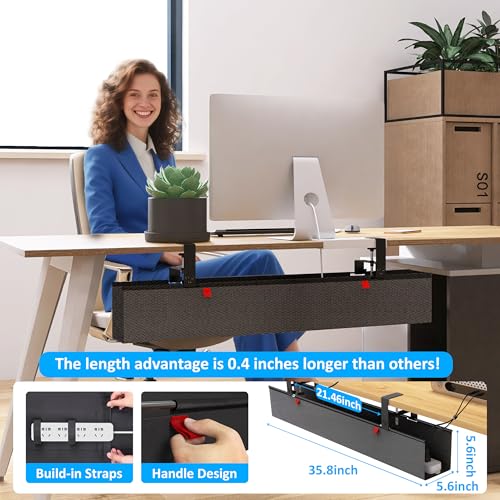
Cotohim Under Desk Cable Management Tray 35.8"


As an Amazon Associate we earn from qualifying purchases. Product prices and availability are accurate as of the date/time indicated.
The Cotohim Under Desk Cable Management Tray is designed to resolve wire clutter beneath standard computer desks and standing desks alike. Measuring 35.8 inches long by 5.6 inches wide, this organizer offers extensive horizontal span to cradle bulky surge protectors, power bricks, and excess display cables without forcing cords into tight bends.
Unlike rigid steel mesh baskets that leave colorful wiring visible from across the room, Cotohim constructs this unit with thickened flame-retardant Oxford cloth. This textile design encloses the wiring completely, preventing dust accumulation while keeping loose adapters out of sight. The kit includes two support brackets, two fiber structural tubes, and 12 cable ties to organize bundles before they settle into the hammock.
Mounting versatility is a major strength. The brackets support non-destructive clamp installation for desktop thicknesses between 0.4 inches and 2.4 inches, making it suitable for renters or desks made of delicate materials. Alternatively, users can mount the brackets using traditional screws for permanent placement. The primary trade-off is vertical clearance: at 5.6 inches wide, it requires sufficient open space behind knee level to prevent accidental contact while seated in comfortable gaming chairs.
Key Cable Management Features for Gaming Desks
When selecting a gaming desk or modular routing kit, structural dimensions and accessibility matter far more than aesthetic carbon-fiber textures. Evaluating practical engineering details ensures your setup remains manageable when swapping hardware.
Under-Desk Enclosure Volume
Gaming setups require substantial power delivery. A standard station often powers a gaming tower, two monitors, powered speakers like those found in our best PC speakers under $100 guide, and miscellaneous USB hubs. Narrow channels under two inches wide cannot house modern high-joule surge protectors alongside transformer-style power adapters. Ensure your routing tray provides at least five inches of usable depth.
Mounting Mechanisms: Clamps vs. Screws
Pre-drilling holes into dense hardwood or powder-coated steel is time-consuming, while drilling into hollow-core honeycomb desks can ruin the tabletop entirely. Clamp-on brackets eliminate structural damage and let you slide the raceway laterally to avoid monitor arm reinforcement plates. However, clamp mechanisms require at least one inch of rear overhang to seat securely against the desktop edge.
Weight Capacity and Fire Safety
High-end power bricks from large gaming displays and monitors generate passive heat. When choosing fabric-based cord hiders, flame-retardant materials are vital. Verify that the bracket hardware supports the combined load of your power strip and heavy adapter bricks without sagging toward your feet.
How to Route Cables on Multi-Display Desks
Managing cables becomes significantly more complex on expansive workstations, such as setups detailed in our guide to the best gaming desk for 3 monitors. The most effective approach separates signal lines from electrical power lines to minimize electromagnetic interference and physical tangling.
Start by mounting your primary power strip directly inside an under-desk channel like the Cotohim Under Desk Cable Management Tray. Plug display power cords, speaker cables, and PC power leads directly into this suspended strip. Next, run monitor signal cables along your monitor arms using Velcro ties, dropping them straight into the tray. Only two cords should ultimately reach the wall outlet: the main surge protector plug and an Ethernet cable.
Frequently Asked Questions
Do fabric cable organizers cause power supplies to overheat?
Open fabric trays made from breathable, flame-retardant Oxford cloth allow natural heat dissipation through open side ends. Avoid packing multiple laptop charging bricks tightly against one another to maintain steady air circulation around transformers.
Can I use clamp-on cable trays on standing desks?
Yes. Clamp-on trays are ideal for height-adjustable desks because they move together with the desktop. By placing your power strip inside the tray, all monitor and peripheral cords rise and fall synchronously, requiring only one slack power cable running down to the wall outlet.
Final Recommendation
For PC builders seeking a clean battlestation, investing in high-capacity routing accessories often proves more cost-effective than buying a rigid desk with fixed, narrow grommets. The Cotohim Under Desk Cable Management Tray provides the length and depth required to conceal bulky power strips cleanly. Measure your desk thickness and rear frame clearance before installation to verify clamp compatibility.






Write Your Review
No reviews yet. Be the first to share your experience!