

The best gaming headset microphone for a PC depends first on how you connect and where you play. For a straightforward wired pick, consider the Razer BlackShark V2 X Gaming Headset; for USB audio and PC surround processing, compare the EKSA E900 Pro USB Gaming Headset for PC.
This specification-based roundup compares microphone design, connection requirements, and documented comfort features. A headset’s advertised noise cancellation or surround sound does not establish independently measured voice quality or positional accuracy.

Pros
- Large 50mm audio drivers
- Convenient flip-to-mute 6mm boom microphone
- DTS Headphone:X 2.0 surround sound support
- Versatile 3.5mm and USB DAC connectivity
- Comfortable lightweight frame with rotating ear cups
Cons
- DTS Headphone:X 2.0 requires Logitech G HUB software
- Advanced surround sound unavailable on standard console connections

Pros
- Lightweight 240g frame for extended comfort
- Broad compatibility via standard 3.5mm audio jack
- TriForce 50mm drivers for distinct frequency tuning
- Cardioid microphone with targeted voice pickup
Cons
- Surround sound requires Windows 10 64-bit
- Xbox One may require a separate stereo adapter
Pros
- Broad compatibility across consoles, PC, and mobile
- Cooling gel cushions mitigate heat and pressure
- Retractable cardioid microphone reduces ambient noise
- Durable and lightweight bauxite aluminum frame
- Convenient in-line audio and microphone controls
Cons
- 7.1 surround sound requires 64-bit Windows 10
- Surround sound features unsupported on gaming consoles

Pros
- Large 50mm audio drivers
- Lightweight build under eight ounces
- Comfortable memory protein ear cushions
- Flexible microphone with integrated mute control
- Standard 3.5mm cross-platform compatibility
Cons
- USB plug only powers lighting without audio transmission
- Incompatible with Xbox 360
- Requires an adapter for PlayStation 3 use
Pros
- Wide compatibility across consoles, PC, and mobile
- Adjustable 360-degree noise-cancelling microphone
- Comfortable padded protein ear cushions
- Includes 3.5mm PC splitter cable
Cons
- USB connection required solely for LED lighting
- Older Xbox One controllers require an unincluded adapter

Pros
- Lightweight 240-gram frame with memory foam padding
- Versatile 3.5 mm cross-platform compatibility
- On-earcup volume wheel for quick adjustments
- Passive noise isolation via closed earcups
- Tuned 50 mm drivers for clear sound separation
Cons
- Wired 3.5 mm cable restricts player movement
- Lacks wireless audio capability

Pros
- Dual detachable USB and 3.5mm audio connections
- Detachable unidirectional noise-cancelling microphone
- Convenient on-ear volume and mute controls
- Comfortable memory protein ear padding
- Broad multi-platform gaming compatibility
Cons
- Virtual 7.1 surround sound only functions on PC
- Surround sound features require a USB connection

Pros
- Extremely lightweight 0.66-pound frame
- Foldable design enables compact storage
- Comfortable memory foam ear cushions
- Flexible noise-filtering microphone
- Plug-and-play 3.5mm analog connection
Cons
- Requires audio splitter for PC connectivity
- Older Xbox One controllers require separate adapter

Pros
- Low-latency 2.4GHz wireless audio
- Up to 45 hours of battery life
- Versatile 2.4GHz, Bluetooth, and 3.5mm connectivity
- Detachable noise-canceling microphone
- Comfortable memory-protein ear cushions
Cons
- Xbox consoles require 3.5mm wired connection
- PlayStation does not support Bluetooth audio mode
- RGB lighting reduces battery life to 20 hours
Pros
- Lightweight 250g design with memory foam padding
- Unidirectional microphone with 120-degree pickup angle
- Foldable and rotating earcups for easy storage
- Broad 3.5mm plug-and-play console compatibility
- Tangle-resistant braided 1.5-meter audio cable
Cons
- Dual 3.5mm PC splitter cable not included
- Requires manual PC audio setup with Xbox controllers
How These Gaming Headset Microphones Differ
The main distinction is connectivity. Most options here use a 3.5 mm jack, while the EKSA also includes USB, and the AOC offers 2.4GHz wireless, Bluetooth, and wired audio. PC users should check whether their computer has a combined headset jack or separate microphone and headphone ports before choosing.
Microphone designs also vary: some are retractable, detachable, or flip-to-mute, while others are flexible boom arms. These features affect positioning and storage, but the supplied specifications do not provide comparable microphone measurements or independent voice-quality results.
Recommended Headsets
Razer BlackShark V2 X Gaming Headset: A Wired All-Rounder
The Razer BlackShark V2 X Gaming Headset pairs a bendable HyperClear cardioid microphone with a 3.5 mm connection. Its stated pickup pattern favors sound from the front, while closed earcups and 240 g weight are relevant considerations for players seeking a lightweight, wired design.
Pros: Flexible cardioid mic, lightweight frame, and compatibility with PC, Mac, PS4, Xbox One, and Nintendo Switch through 3.5 mm. Cons: Software-enabled 7.1 surround sound is specified for Windows 10 64-bit only, and no USB connection is listed.
Who should skip it: Skip this model if you need a USB headset or wireless connection.
Logitech G432 Wired Gaming Headset: Flip-to-Mute Boom Mic
The Logitech G432 Wired Gaming Headset – Black has a 6 mm boom microphone that mutes when flipped up. It connects to PC or Mac through a USB DAC or 3.5 mm cable, and its 50 mm drivers and optional DTS Headphone:X 2.0 processing are aimed at immersive game audio.
Pros: Convenient flip-to-mute control, two listed PC connection options, and compatibility with several consoles and mobile devices. Cons: DTS Headphone:X 2.0 requires Logitech G HUB software, and the supplied compatibility notes distinguish console stereo operation from the PC software feature.
Who should skip it: Skip it if you want a detachable microphone or do not want to install software for the advertised DTS processing.
EKSA E900 Pro USB Gaming Headset for PC: USB and 3.5 mm Choices
The EKSA E900 Pro USB Gaming Headset for PC includes removable USB and 3.5 mm audio cables, plus a detachable unidirectional noise-canceling microphone. Its advertised 7.1 virtual surround sound requires a USB connection on PC, so the connection choice matters if that feature is a priority.
Pros: Detachable mic, two connection types, and an onboard mute switch and volume adjustment. The manufacturer lists PC, PS4, PS5, and Xbox One compatibility. Cons: 7.1 sound is limited to PC with USB, and console compatibility does not imply that this processing is available there.
Who should skip it: Skip it if you prefer a simple single-cable setup or need surround processing on a console.
Razer BlackShark V2 X Wired PlayStation: A PlayStation-Focused Variant
The Razer BlackShark V2 X Wired PlayStation is a 3.5 mm headset primarily intended for PlayStation 5. Its bendable HyperClear cardioid mic can be positioned near the mouth, and the headset also lists compatibility with other popular platforms through its analog connection.
Pros: Directional microphone design, on-headset volume wheel, closed earcups, and a stated weight of 240 g. Cons: It is wired, and the supplied details do not specify software-enabled surround sound for this PlayStation variant.
Who should skip it: Skip it if you need USB connectivity or want a wireless headset.
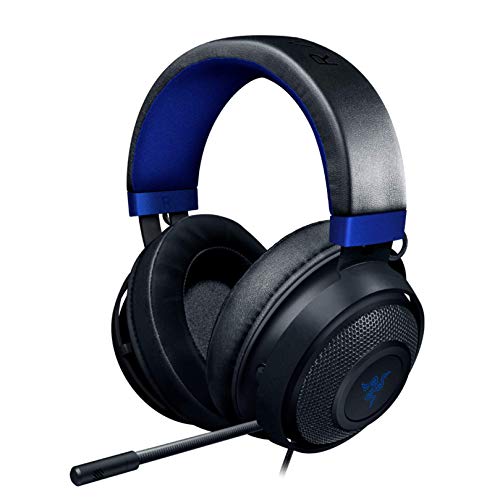
Razer Kraken Gaming Headset: Retractable Microphone
The Razer Kraken Gaming Headset uses a retractable noise-isolating cardioid microphone and a 3.5 mm headphone jack. Cooling gel-infused cushions and a bauxite aluminum frame are its notable comfort and construction features, while software-enabled 7.1 surround sound is listed for Windows 10 64-bit.
Pros: Retractable mic, inline volume and mute controls, and compatibility claims covering PC, PlayStation, Switch, Xbox, and mobile. Cons: It is wired, and the listed 7.1 processing has a Windows-specific requirement.
Who should skip it: Skip it if you want a detachable mic or a wireless connection.
AOC 2.4GHz Wireless Gaming Headset for PS5, PS4: Multi-Mode Connectivity
The AOC 2.4GHz Wireless Gaming Headset for PS5, PS4 combines a USB wireless dongle, Bluetooth, and a 3.5 mm cable. Its detachable omnidirectional noise-canceling microphone and stated battery life of up to 45 hours, or 20 hours with RGB lighting on, may suit players who want wireless use alongside a wired fallback.
Pros: Multiple connection modes, detachable mic, and a stated 45-hour maximum battery life. Cons: PS5 and PS4 do not support Bluetooth audio for this headset; use the USB dongle for wireless console audio. Xbox Series use is listed through wired 3.5 mm mode only.
Who should skip it: Skip it if you want a wired-only headset or need Bluetooth audio on PS5 or PS4.
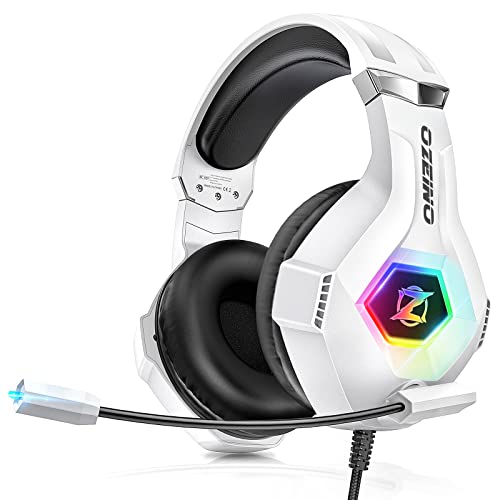
Ozeino Gaming Headset for PC, Ps4, Ps5: Entry-Level Features
The Ozeino Gaming Headset for PC, Ps4, Ps5 has a flexible, rotatable noise-canceling microphone and a 3.5 mm connection. Its USB connector powers the LED lighting only, so PC users should not mistake it for a USB audio connection; a 1-to-2 audio splitter is specified for PCs with separate mic and headphone jacks.
Pros: Broad stated 3.5 mm compatibility, adjustable mic, and included PC splitter requirement is clearly identified. Cons: The USB plug is for lighting, and the product’s surround-sound description does not establish a specific PC USB surround mode. Older Xbox One controllers may need a separate adapter.
Who should skip it: Skip it if you need USB audio, or if you do not want to manage separate PC audio and microphone connections.
Tatybo Gaming Headset for PS5 PC: Lightweight Wired Pick
The Tatybo Gaming Headset for PS5 PC is a 3.5 mm headset with a flexible microphone and mute control. Its listed features include memory-protein ear cushions, a braided cable, and an aluminum headband, making it a basic wired option for compatible consoles and computers.
Pros: Flexible mic, stated mute control, and a braided cable. The manufacturer lists PC, PS5, Xbox, and Switch use with a 3.5 mm jack. Cons: Xbox 360 is not supported, and PS3 use requires a 3.5 mm adapter. The supplied details do not specify a PC splitter.
Who should skip it: Skip it if your device lacks a compatible 3.5 mm connection or you need a documented USB audio option.
SENZER SG500 Gaming Headset with Noise Cancelling: Foldable Design
The SENZER SG500 Gaming Headset with Noise Cancelling features a bendable microphone, memory foam cushions, and a foldable design. Its 3.5 mm plug supports listed devices including PC and Mac, but PC use requires a splitter when the computer has separate audio and microphone jacks.
Pros: Foldable for storage, adjustable mic arm, and plug-and-play operation on compatible 3.5 mm devices. Cons: A PC splitter may be required, and the supplied information does not identify a USB audio connection or a specific surround-processing implementation.
Who should skip it: Skip it if your setup requires USB audio or you want a non-folding headset.
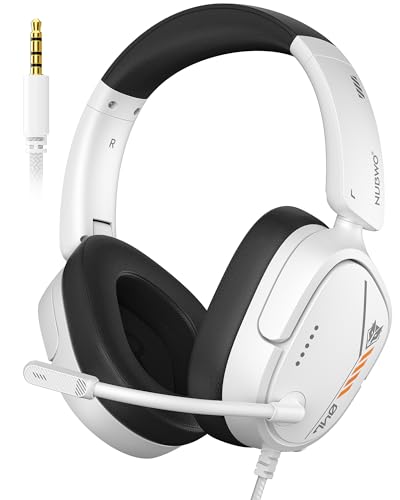
NUBWO HG04L Gaming Headset for PS5/PS4: Directional Mic and Controls
The NUBWO HG04L Gaming Headset for PS5/PS4 has a unidirectional microphone described with a 120-degree pickup angle, plus an onboard mute button and volume wheel. It connects through a 3.5 mm jack and has a 1.5 m braided cable; these details may appeal to desktop players who want direct headset controls.
Pros: Directional mic design, accessible controls, foldable and rotatable earcups, and a stated cable length. Cons: A PC with separate microphone and audio jacks needs a splitter, which is not included. Xbox controller use through a PC also requires microphone settings to be enabled.
Who should skip it: Skip it if you need a splitter included or want a wireless headset.
Choosing a Gaming Headset Microphone for PC
Check the PC Audio Ports First
A single 3.5 mm plug may work with a combined headset port, while a desktop with separate headphone and microphone ports may require a splitter. The EKSA offers USB and 3.5 mm cables; the Ozeino and SENZER listings specifically call out splitter requirements for certain PC setups.
Match Microphone Style to Your Routine
Choose a flip-up mic if quick muting matters, as on the Logitech G432. A retractable or detachable design can make the headset easier to use without the mic, while a bendable boom allows adjustment near the mouth. Cardioid and unidirectional descriptions indicate directional pickup intent, not a guarantee that all background noise will be removed.
Understand Surround Sound and Platform Limits
Some listed surround features require software or a specific connection. Logitech requires G HUB for DTS Headphone:X 2.0, Razer’s BlackShark V2 X specifies Windows 10 64-bit for software-enabled 7.1, and EKSA limits its 7.1 mode to PC over USB. Treat these as advertised feature requirements, not independent measures of directional accuracy.
Consider Wireless Requirements
The AOC model is the only listed wireless option. Its USB dongle provides wireless audio on the specified consoles and PC, while Bluetooth is intended for compatible everyday devices; the product listing explicitly excludes Bluetooth audio on PS5 and PS4. Check the platform and connection mode rather than assuming every wireless feature works everywhere.
Frequently Asked Questions
Do I need a USB gaming headset for PC voice chat?
No. A compatible 3.5 mm headset can handle PC audio and voice chat, though computers with separate input and output ports may require a splitter. USB is useful when you want a listed USB audio mode, as with the EKSA, but check feature requirements for that connection.
Which headset has a microphone that can be removed or moved out of the way?
The Logitech G432 microphone flips up to mute, the Razer Kraken microphone retracts, and the EKSA and AOC microphones are detachable. These mechanisms serve different needs, so choose based on whether muting, storage, or removing the mic entirely matters most.


Write Your Review
No reviews yet. Be the first to share your experience!