

For a lightweight gaming mouse, consider the Razer Cobra; for extensive MMO shortcuts, the Redragon M908 offers more programmable controls. The Logitech G502 Hero balances customizable buttons and weights, while the Anker vertical mouse prioritizes a handshake-style hand position.
This comparison is based on supplied specifications, not independent performance measurements. Sensor resolution, button counts, shape, and software requirements help narrow the choices, but they do not establish measured tracking quality or personal comfort.

Pros
- Four on-the-fly DPI speed settings up to 3600
- Driver-free plug-and-play operation
- Six-button design with side navigation controls
- Ergonomic contoured shape suited for palm grip
- Integrated multi-color lighting
Cons
- Sensitivity restricted to four predetermined DPI steps
- Lowest available DPI setting starts at 1200 DPI

Pros
- Ergonomic right-handed shape for comfortable handling
- On-the-fly DPI sensitivity adjustment buttons
- Five fully programmable buttons via Razer Synapse
- Ridged rubber scroll wheel provides tactile grip
- Reliable high-precision 6,400 DPI optical tracking
Cons
- Tethered wired cable limits placement flexibility
- Mechanical switch lifespan limited to 10 million clicks
- Button remapping depends on Razer Synapse software

Pros
- Up to 7200 adjustable DPI
- Nine programmable buttons with macro editing
- Ergonomic contouring with finger rest design
- Customizable seven-mode RGB backlighting
Cons
- Full macro customization requires separate software download
- Tethered wired connection limits freedom of movement

Pros
- 18 programmable buttons including 12-key side grid
- Pixart PAW3327 sensor with up to 12400 DPI
- Includes eight-piece modular weight tuning set
- Five onboard memory profiles for rapid switching
Cons
- Macro remapping software is incompatible with macOS
- Lacks wireless connectivity options

Pros
- Ultralight 58-gram frame for quick control
- Fast optical switches rated for 90 million clicks
- Low-drag Speedflex cable reduces resistance
- Pure PTFE feet deliver a smooth glide
- Vibrant customizable Chroma gradient underglow
Cons
- Tethered wired connection limits movement range
- Advanced adjustments require proprietary desktop software

Pros
- High-precision 35,000 DPI optical sensor with glass tracking
- Dual-mode tilt wheel with automatic Smart-Reel switching
- 13 customizable inputs including multi-function thumb trigger
- Durable optical switches rated for 90 million clicks
- Flexible Speedflex cable minimizes surface resistance
Cons
- Tethered wired design limits freeform desk movement
- Advanced profile and wheel configuration requires Razer Synapse
Pros
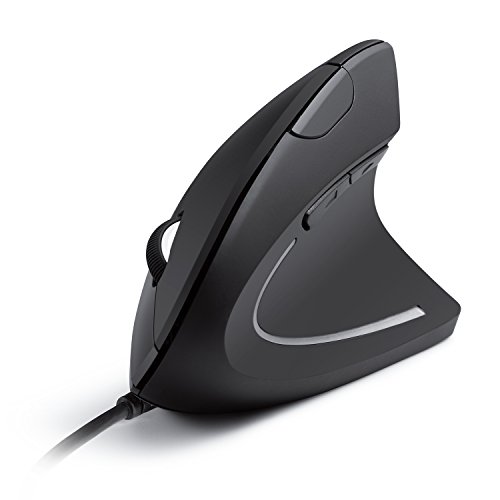
- Ergonomic handshake posture reduces wrist fatigue
- Selectable 1000 and 1600 DPI tracking options
- Dedicated side buttons for quick browser navigation
- Zero battery management due to wired connection
- Backed by an 18-month manufacturer warranty
Cons
- Offers only two fixed DPI sensitivity levels
- Wired USB cable limits portability compared to wireless

Pros
- High-precision HERO sensor up to 25,600 DPI
- Eleven fully programmable buttons
- Adjustable balance with five removable weights
- Dual-mode hyper-fast scroll wheel
- Tensioned mechanical switches for crisp clicks
Cons
- Tethered wired design restricts cable-free movement
- Full RGB customization requires Logitech Gaming Software

Pros
- 8,000 DPI sensor with zero smoothing
- Crisp spring-tensioned mechanical primary buttons
- Six fully programmable buttons
- Customizable LIGHTSYNC RGB illumination
- Long 6.89-foot USB cable
Cons
- Tethered cable restricts placement compared to wireless mice
- Full button and lighting customization requires Logitech G HUB

Pros
- Ultralight 55-gram chassis reduces wrist fatigue
- Durable mechanical switches rated for 80 million clicks
- Symmetrical design supports versatile grip styles
- Six programmable buttons configurable through software
- 12K DPI optical sensor delivers responsive tracking
Cons
- Tethered wired design limits cable-free desk movement
- Advanced lighting and macro customization requires proprietary software
How to Choose a Wired Mouse
Start with shape and control layout: an ergonomic gaming shell, symmetrical body, MMO keypad, and vertical grip serve different preferences. If possible, compare dimensions and grip fit before buying, since the supplied specifications do not include measurements for most models.
DPI indicates adjustable sensitivity, not a guarantee of accuracy or superior gameplay. Button count matters when you will use remappable shortcuts, while a lighter listed weight may appeal to players who frequently make broad mouse movements.
Check software needs and operating-system support for the exact features you want. Some functions require a manufacturer utility, and compatibility for basic pointer use does not necessarily mean every lighting or programming feature works on every system.
Product Reviews
Razer DeathAdder Essential Ergonomic Wired
The Razer DeathAdder Essential Ergonomic Wired has a 6,400 DPI optical sensor, five programmable buttons, and mechanical switches rated for up to 10 million clicks. Dedicated DPI buttons allow sensitivity changes, and its ridged rubberized scroll wheel is designed for controlled scrolling.
Pros: Straightforward programmable controls, on-the-fly sensitivity adjustment, and a tactile scroll wheel suit general gaming and creative tasks. Cons: Its listed DPI and five-button layout are less extensive than several feature-rich alternatives here.
Who should skip it: Skip this model if you want a very light mouse, a large side-button array, or an advanced scroll wheel.
Razer DeathAdder Essential Ergonomic Wired
BENGOO Gaming Mouse Wired with RGB Backlit
The BENGOO Gaming Mouse Wired with RGB Backlit offers six buttons and four selectable DPI settings from 1,200 to 3,600. The product information describes it as plug-and-play, with compatibility listed for older Windows versions and Mac computers.
Pros: Its six-button layout, adjustable sensitivity, and lighting provide useful basic gaming controls without requiring a driver according to the listing. Cons: The listed maximum sensitivity is lower than other gaming picks, and detailed Mac feature support is not specified.
Who should skip it: Skip it if you need high-DPI adjustment, confirmed advanced software features, or a documented lightweight design.
BENGOO Gaming Mouse Wired with RGB Backlit
Redragon M908 Wired MMO RGB Gaming Mouse 12400 DPI
The Redragon M908 Wired MMO RGB Gaming Mouse 12400 DPI has 18 programmable buttons, including 12 side buttons, and five onboard profiles. Its Pixart PAW3327 sensor, 1,000 Hz polling rate, and included weight set make it a configurable option for MMO controls.
Pros: The side-button grid and profile storage support games or workflows that use many shortcuts. Cons: Its numerous controls and weight-tuning system may be unnecessary for simpler games, and programmable use is listed for Windows while Mac is specified for normal use.
Who should skip it: Skip it if you prefer a minimal, symmetrical mouse or do not want to configure many buttons.
Redragon M908 Wired MMO RGB Gaming Mouse 12400 DPI
Redragon M602 Gaming Mouse
The Redragon M602 Gaming Mouse combines an ergonomic shape with nine programmable buttons and adjustable sensitivity up to 7,200 DPI. Its software can change button assignments, lighting, speed, and macros, while the listing identifies PC, Windows, laptop, and Mac support.
Pros: The nine-button layout and software configuration suit players who want extra commands without an MMO-style side grid. Cons: The detailed feature support for Mac is not specified, and software is needed for customization beyond its onboard controls.
Who should skip it: Skip it if you want a very light design or prefer a mouse that needs no software setup.
Razer Basilisk V3 35K Wired Ergonomic
The Razer Basilisk V3 35K Wired Ergonomic combines a 35,000 DPI Gen-2 optical sensor with 13 customizable controls and a tilt wheel. Its wheel supports tactile or free-spin scrolling, and the Speedflex cable is designed to reduce drag during movement.
Pros: Extensive controls, fine DPI adjustment, customizable lighting, and configurable scroll behavior suit users who value options for both games and desktop work. Cons: Razer Synapse is needed for software-based customization, and its feature set may be excessive for basic use.
Who should skip it: Skip it if you want a simple, lightweight mouse or do not need many controls and scroll modes.
Razer Basilisk V3 35K Wired Ergonomic
Razer Cobra Wired Gaming Mouse
The Razer Cobra Wired Gaming Mouse weighs 58 g and has Gen-3 optical switches rated for a 90-million-click lifecycle. Its sensor sensitivity can be adjusted in 50 DPI increments, and its PTFE feet and flexible cable are specified for smooth movement.
Pros: The listed weight, adjustable sensitivity, and flexible cable suit players seeking a light wired design. Cons: It has fewer programmable controls than the Basilisk or G502, and Synapse is used for further accuracy optimization and customization.
Who should skip it: Skip it if you need numerous side buttons, adjustable weights, or a multi-mode scroll wheel.
Razer Cobra Wired Gaming Mouse
Logitech G502 Hero Wired Gaming Mouse
The Logitech G502 Hero Wired Gaming Mouse has 11 programmable buttons, a dual-mode scroll wheel, and a sensor listed up to 25,600 DPI. Five optional 3.6 g weights allow users to adjust the mouse’s weight and balance.
Pros: The combination of programmable controls, free-spin scrolling, and configurable weights suits players who want to personalize handling and shortcuts. Cons: The supplied data does not state its weight without added weights, and LIGHTSYNC customization requires Logitech Gaming Software.
Who should skip it: Skip it if a lightweight mouse or a simple, unadorned control layout is your priority.
Logitech G502 Hero Wired Gaming Mouse – Black
Anker USB Wired Vertical Mouse
The Anker USB Wired Vertical Mouse uses a handshake-style orientation intended to support a more natural wrist and arm position. It has 1,000 or 1,600 DPI settings, next and previous buttons, and a 4.9-foot USB cable.
Pros: Its vertical shape offers an alternative to conventional mouse designs for long computer sessions, while the navigation buttons help with browsing. Cons: Its low DPI range and vertical form are less suited to players seeking conventional gaming controls or high sensitivity.
Who should skip it: Skip it if you prefer a traditional gaming shape, need extensive programmable controls, or want more DPI options.
Anker USB Wired Vertical Mouse
Logitech G203 Wired Gaming Mouse
The Logitech G203 Wired Gaming Mouse has a six-button design, an 8,000 DPI optical sensor, and up to five selectable sensitivity settings. Logitech G HUB supports button assignments and lighting customization, and the mouse connects through USB Type-A.
Pros: Its moderate button count and configurable DPI settings provide practical options for everyday gaming without an MMO keypad. Cons: The supplied information does not include its weight or shape dimensions, and software is needed for advanced customization.
Who should skip it: Skip it if you want a vertical design, numerous side controls, or a mouse with documented low weight.
Logitech G203 Wired Gaming Mouse – Black
GLORIOUS Model O Eternal Ultralight RGB
The GLORIOUS Model O Eternal Ultralight RGB is listed at 55 g and uses a symmetrical design with six remappable buttons. Its 12,000 DPI sensor and dual-zone RGB lighting are paired with switches rated for 80 million clicks.
Pros: The listed low weight and symmetrical shape suit players who favor quick movements and a less sculpted design. Cons: Its honeycomb shell may not suit users who prefer a solid outer surface, and Glorious CORE is required for software customization.
Who should skip it: Skip it if you want a fully enclosed shell, a vertical grip, or many dedicated side buttons.
GLORIOUS Model O Eternal Ultralight RGB
Which Wired Mouse Should You Choose?
Choose the Razer Cobra if low listed weight and a flexible cable matter most, or the Redragon M908 if MMO shortcuts and profiles are central to your setup. The Logitech G502 Hero offers more controls and adjustable weights, while the Anker is the distinctly different choice for a vertical grip.
For a simpler gaming layout, compare the DeathAdder Essential, BENGOO, and Logitech G203 by sensitivity range and software needs. Consider the Basilisk V3 when its configurable wheel and 13 controls are useful, and the Model O Eternal when its 55 g weight and symmetrical shell better match your preferences.
Before choosing, confirm that the listed operating-system support covers your intended use and that any required configuration software is suitable for your computer. For a broader setup, see our guide to gaming keyboard and mouse combinations.


Write Your Review
No reviews yet. Be the first to share your experience!