

For quiet clicking with straightforward wireless setup, the Logitech M330 Silent Plus is a practical pick. Choose the M550 for small-to-medium hands and SmartWheel scrolling, the M650 for customizable side buttons, or the Lift if you prefer a vertical grip.
This comparison uses supplied specifications to assess intended use and trade-offs. The listed models emphasize quieter clicks and productivity features, but their data does not establish gaming sensor performance, polling rate, or suitability for competitive play.

Pros
- Dual Bluetooth and Logi Bolt wireless connectivity
- SilentTouch technology dampens click noise
- SmartWheel enables precise and fast scrolling
- Up to 24-month battery life on one AA battery
- Ergonomic contoured profile with rubber side grips
Cons
- Not suited for larger hand sizes
- Relies on disposable AA batteries rather than internal recharging

Pros
- Substantially reduces click sounds for quiet environments
- Contoured body suited for comfortable right-handed use
- Long battery life up to 18 months
- Simple plug-and-play USB-A wireless pairing
- Compatible across multiple major desktop operating systems
Cons
- Asymmetrical shape is incompatible with left-handed use
- Requires a USB-A port with no Bluetooth option

Pros
- 57-degree vertical angle promotes natural wrist posture
- Dual connectivity via Bluetooth Low Energy or Logi Bolt
- SmartWheel provides smooth and precise scrolling
- Whisper-quiet clicks minimize workspace distractions
- Long battery life rated up to two years
Cons
- Designed exclusively for right-handed users
- Not optimized for larger hand sizes
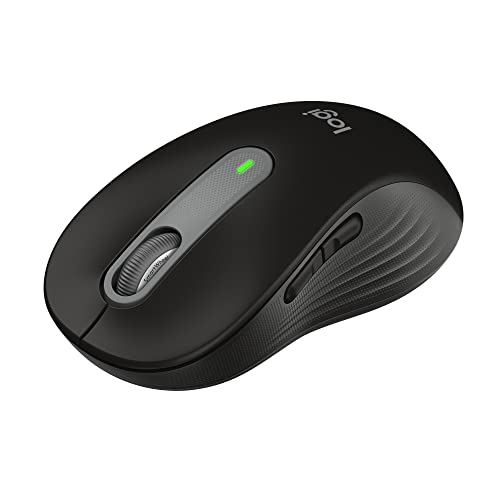
Pros
- Dual connectivity via Bluetooth and Logi Bolt USB
- SilentTouch mechanism drastically reduces clicking noise
- Long 24-month battery life on one AA battery
- Adaptive SmartWheel handles detailed and fast scrolling
- Customizable side shortcuts through Logi Options+
Cons
- Form factor is limited to small and medium hands
- Uses a replaceable AA battery instead of USB-C charging
How These Quiet Mice Differ
Logitech M330 Silent Plus: Simple, quiet clicking
The Logitech M330 Silent Plus Full Size 2.4 GHz advertises more than 90 percent less clicking sound through SilentTouch technology. It connects with the included USB-A receiver, tracks on most surfaces, and has an advertised battery life of up to 18 months from one AA battery.
Its contoured shape is designed for right-handed users, making it a straightforward option for everyday computer work where a receiver connection is convenient. The supplied compatibility information lists Windows, macOS, ChromeOS, and Linux.
Pros: Quiet-click technology, a receiver included, and long stated battery life. Cons: Right-handed design and USB-A receiver connectivity only; Bluetooth is not listed. Who should skip it: Left-handed users or anyone who needs Bluetooth or customizable side buttons.
Logitech Signature M550: Small-to-medium hands and flexible scrolling
The Logitech Signature M550 Wireless Mouse Small combines SilentTouch clicks with a SmartWheel that switches between line-by-line precision and faster scrolling. It supports Bluetooth Low Energy or the Logi Bolt USB receiver, and Logitech states up to 24 months of use from the included AA battery.
The contoured body, thumb area, and rubber side grips are intended for small-to-medium hands. Its listed compatibility spans Windows, macOS, Linux, ChromeOS, iPadOS, and Android, making it a versatile general-purpose option for compatible devices.
Pros: Dual connection choices, SmartWheel scrolling, quiet clicks, and broad listed platform support. Cons: The small size is not intended as a universal fit, and customizable side buttons are not listed. Who should skip it: People with larger hands or readers who specifically want programmable side buttons.
Logitech Signature M650: Quiet clicks with customizable side buttons
The Logitech Signature M650 Wireless Mouse Small adds customizable side buttons to a quiet-click design with SmartWheel scrolling. Bluetooth Low Energy and the Logi Bolt receiver provide connection options, while Logitech specifies up to two years of battery life from one AA battery.
Side-button shortcuts can be configured through Logitech Options+ on Windows and macOS. The product is also listed as compatible with Linux, ChromeOS, iPadOS, and Android, though the supplied customization software support is specifically stated for Windows and macOS.
Pros: Quiet clicks, configurable side buttons, dual wireless connection options, and SmartWheel scrolling. Cons: This is the small version, and the stated shortcut customization is limited to Windows and macOS. Who should skip it: Users seeking a larger mouse or side-button configuration on an operating system not listed for Options+.
Logitech Lift: Vertical shape for small-to-medium right hands
The Logitech Lift Vertical Ergonomic Wireless Mouse has a 57-degree upright shape, a textured grip, and a thumb rest. Its quiet clicks and SmartWheel are paired with Bluetooth Low Energy or the included Logi Bolt USB receiver.
Logitech describes the Lift as a fit for small-to-medium right hands and says its design was assessed against criteria from ergonomists. Listed compatibility includes Windows, macOS, iPadOS, ChromeOS, and Linux. The shape is a distinct ergonomic choice, so users accustomed to a conventional mouse may prefer to consider that change before buying.
Pros: Vertical form, quiet clicks, customizable buttons, and Bluetooth or receiver connectivity. Cons: The listed fit is limited to small-to-medium right hands, and its shape differs substantially from a standard mouse. Who should skip it: Left-handed users, people with larger hands, or anyone who wants a conventional mouse shape.
How to Choose a Quiet Mouse
Match the connection to your computer
The M330 uses a USB-A receiver, while the M550, M650, and Lift offer Bluetooth Low Energy and Logi Bolt receiver connectivity. Check that your computer supports the connection you plan to use, and note that receiver-based setup requires an available compatible USB port.
Prioritize fit and hand preference
The M550 and small M650 target small-to-medium hands, and the Lift is specifically described for small-to-medium right hands. The M330 is contoured for right-handed use. If your hand size or preferred grip falls outside these descriptions, the supplied information does not confirm a suitable fit.
Consider workflow features, not just click noise
Choose SmartWheel scrolling on the M550, M650, or Lift if you move between detailed documents and long pages. The M650 and Lift list customizable buttons, but software-based configuration is documented for Windows and macOS on the M650. The M330 keeps its feature set simpler.
Set realistic gaming expectations
These products are quiet wireless mice with productivity-oriented features. The supplied specifications do not include gaming-focused details such as polling rate, sensor performance, or onboard profiles, so readers choosing a mouse primarily for competitive gaming should compare those requirements separately. For related fit advice, see our guides to mouse form for gaming and gaming mouse grip styles.
Frequently Asked Questions
Which of these mice offers Bluetooth?
The M550, M650, and Lift list Bluetooth Low Energy connectivity. The M330 product information lists a USB-A receiver and does not specify Bluetooth.
Which models have customizable buttons?
The M650 lists customizable side buttons through Logitech Options+ on Windows and macOS. The Lift lists customizable buttons, while the supplied details do not specify the software requirements for configuring them.
Verdict: Which Quiet Mouse Should You Choose?
Choose the M330 for quiet clicks and a simple USB-A receiver setup, the M550 for SmartWheel scrolling and small-to-medium hands, or the M650 if customizable side buttons matter. The Lift suits readers who want a vertical shape and have a small-to-medium right hand. For competitive gaming, compare gaming-specific specifications before choosing any of these productivity-focused models.




Write Your Review
No reviews yet. Be the first to share your experience!