

For a low-cost wired option, consider the Razer DeathAdder Essential or BENGOO Gaming Mouse. For wireless play, compare the lightweight ATK VXE Dragonfly R1 SE+ with the Logitech G305, while the Redragon M725 adds Bluetooth and wired modes.
This roundup compares advertised specifications and stated compatibility, not independent performance results. Check your preferred grip, connection type, button needs, and operating system before choosing.
Budget Gaming Mouse Picks

BENGOO Wired RGB Gaming Mouse

Razer DeathAdder Essential Wired Gaming Mouse

Redragon M725 49g Wireless Gaming Mouse

Logitech G703 Lightspeed Wireless Gaming Mouse

Redragon M602 Wired RGB Gaming Mouse

INPHIC A9 V2 Explorer Wireless Gaming Mouse
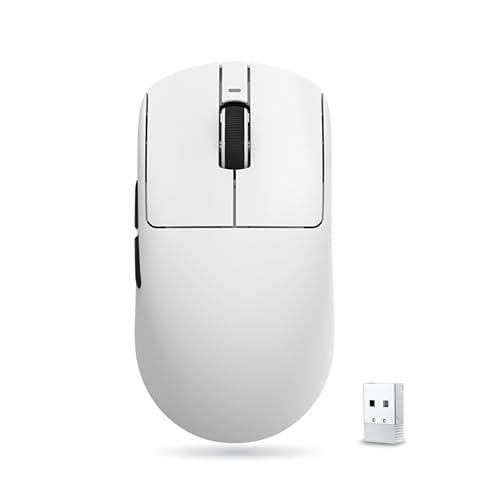
ATK VXE Dragonfly R1 SE+ Wireless Gaming Mouse

Logitech G305 Lightspeed Wireless Gaming Mouse

Logitech G305 Lightspeed Wireless Mouse - Lilac

OKAMUS Pre-Built PC (i5, 8GB RAM, 256GB SSD)
As an Amazon Associate we earn from qualifying purchases. Product prices and availability are accurate as of the date/time indicated.
How to Choose a Budget Gaming Mouse
Connection and shape matter more than a headline DPI figure for many buyers. Wired models avoid battery management, while wireless models vary in connection modes, weight, and battery arrangements.
- Connection: Choose wired for a direct cable connection. For wireless, check whether the mouse uses a USB receiver, Bluetooth, or both, and whether the device has the ports or pairing support needed.
- Weight and shape: The listed weights range from 49 g for the Redragon M725 to 102 g for the INPHIC A9 V2. A symmetrical shape may suit different grip preferences, but shape comfort is personal.
- Buttons and software: More programmable buttons can help with shortcuts and macros, but they are useful only if you want those controls and the required software supports your system.
- DPI and sensor details: DPI describes sensitivity settings, not a guarantee of accuracy or game performance. Consider the available adjustment range alongside connection, shape, and controls.
Recommended Budget Gaming Mouses
Razer DeathAdder Essential: Simple Wired Ergonomic Pick
The Razer DeathAdder Essential Ergonomic Wired has a 6,400 DPI optical sensor, five programmable buttons, and mechanical switches rated for up to 10 million clicks. Its wired design suits a desktop setup that does not need wireless pairing or charging.
Pros: Dedicated, reprogrammable DPI buttons provide sensitivity adjustment, and the ridged scroll wheel is designed for tactile control. Razer Synapse supports button remapping and macro assignment.
Cons: It is wired, and its 6,400 DPI maximum is lower than several wireless alternatives here. Who should skip it: anyone who needs Bluetooth, a wireless receiver, or a lighter listed model.
BENGOO Gaming Mouse: Basic Wired Controls
The BENGOO Gaming Mouse Wired with RGB Backlit offers four DPI settings from 1,200 to 3,600 and six buttons, including forward and back controls. The supplied listing describes plug-and-play use without a driver and names Windows versions through Windows 10, plus Linux and MacBook compatibility.
Pros: It provides several sensitivity steps and extra buttons in a straightforward wired design. Its stated compatibility makes it an option for buyers who want a basic mouse without installing software.
Cons: The listed DPI ceiling is modest beside other picks, and the supplied compatibility details do not specify particular macOS versions. Who should skip it: players who need higher sensitivity settings, wireless use, or detailed software customization.
Redragon M725: Lightweight, Three-Mode Connectivity
The Redragon M725 Honeycomb Shell Gaming Mouse is listed at 49 g and supports USB-C wired, Bluetooth, and 2.4 GHz wireless connections. It has five programmable buttons and five configurable modes, making it a flexible choice for compatible PC, Mac, and laptop setups.
Pros: The three connection options can accommodate different devices, and its low listed weight may appeal to players who prefer a lighter mouse. Dedicated software supports button and DPI customization.
Cons: The advertised 8,000 DPI figure is not the same as its listed default levels, which top out at 4,000 DPI; further details on battery life are not provided. Who should skip it: buyers who prefer a solid-shell design or need documented battery runtime.
Logitech G703: Wireless Mouse with Optional Charging System
The Logitech G703 Lightspeed Wireless Gaming Mouse uses a HERO 25K sensor with a stated range of 100 to 25,600 DPI. Logitech lists a 95 g weight, up to 35 hours of play with default RGB lighting, six programmable buttons, and an optional 10 g weight.
Pros: LIGHTSPEED wireless and the higher-resolution sensor specifications suit buyers seeking a wireless gaming setup with configurable controls. POWERPLAY charging is supported when paired with the separately sold charging system.
Cons: POWERPLAY is an additional system, not included charging hardware, and the mouse weighs more than the lightest options here. Who should skip it: buyers prioritizing minimal weight or a simple wired connection.
Redragon M602: Wired Mouse with More Programmable Buttons
The Redragon M602 Gaming Mouse is a wired ergonomic model with adjustable DPI up to 7,200 and nine programmable buttons. Its software supports button remapping, macros, speed settings, and lighting adjustments, with downloads directed to Redragon’s website.
Pros: The nine-button layout offers more assignable controls than most picks in this roundup. It also supports several RGB lighting modes, including turning the lighting off.
Cons: It is wired, and using its customization features requires installing the manufacturer’s software. Who should skip it: anyone seeking wireless connectivity or a minimal-button layout.
INPHIC A9 V2: Silent Clicks and Multiple Connections
The INPHIC A9 V2 Explorer Wireless Gaming Mouse supports dual Bluetooth pairing, 2.4 GHz wireless, and USB-C wired connection. It weighs 102 g, has six DPI settings up to 12,800, and is described as rechargeable and usable while connected by cable.
Pros: Multiple connection choices and silent-click buttons can suit shared spaces, work, and gaming. The supplied compatibility includes Windows, macOS, Android, and iOS, with optional Windows software for settings.
Cons: At 102 g, it is the heaviest mouse in this selection with a supplied weight, and its wireless gaming performance is not independently established by the listed specifications. Who should skip it: players who prioritize low weight or want a gaming-focused design with documented competitive latency.
ATK VXE Dragonfly R1 SE+: Lightweight Wireless Choice
The ATK VXE Dragonfly R1 SE+ Wireless Gaming Mouse has a 55 g symmetrical body, a PAW3395 SE sensor, and an advertised DPI range up to 18,000. Its wired, 2.4 GHz, and Bluetooth modes provide flexibility, while the listing states up to 70 hours of runtime at 1,000 Hz.
Pros: The low listed weight and tri-mode connection suit buyers seeking a compact wireless option for gaming and general work. The 1,000 Hz polling rate is supported in wired and wireless modes, and the mouse is listed as compatible with Windows and Mac.
Cons: The 120.6 mm length and 64.1 mm width may not suit every hand, and the battery claim is a manufacturer specification rather than a guaranteed runtime. Who should skip it: buyers who prefer a larger mouse or do not want to configure settings through dedicated software.
Logitech G305: Long Advertised Battery Life
The Logitech G305 Lightspeed Wireless Gaming Mouse uses a HERO sensor rated up to 12,000 DPI and a LIGHTSPEED receiver with a stated 1 ms report rate. Its compact design stores the receiver inside the mouse, and Logitech lists up to 250 hours of continuous gaming from one AA battery.
Pros: The AA-powered design avoids a built-in rechargeable battery, and the long advertised runtime may reduce battery changes. The white and lilac listings share the G305 model name but have different supplied product details.
Cons: This is a receiver-based wireless mouse, not a Bluetooth model, and it requires an AA battery. Who should skip it: buyers who need Bluetooth connectivity, a rechargeable battery, or several connection modes.


Write Your Review
No reviews yet. Be the first to share your experience!