

For a Bluetooth mouse that switches between computers, consider the Logitech M720 Triathalon Full Size Multi-Device. For travel, the compact Logitech M196 is a simpler, ambidextrous choice, while the Logitech Lift prioritizes an upright grip.
Bluetooth is convenient when you want to avoid a USB receiver, but it is not the best fit for every gaming setup. The Logitech G305 is included as a wireless gaming alternative, not a Bluetooth mouse: its listed LIGHTSPEED connection uses a receiver.
This comparison uses the supplied specifications to match each model with likely workloads. Check your device’s Bluetooth support, preferred mouse size, and need for a receiver before choosing.
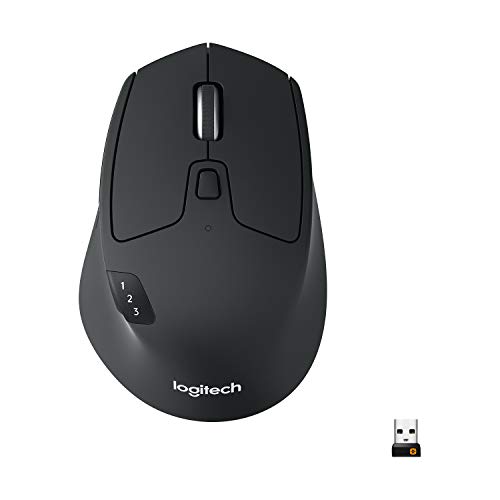
Pros
- Connects and switches across three devices seamlessly
- Versatile dual-mode hyper-fast scroll wheel
- Dual connectivity with Bluetooth and Unifying USB receiver
- Long advertised 24-month battery life
- Six customizable shortcut buttons
Cons
- Right-handed ergonomic design is unsuitable for left-handed users

Pros
- High-resolution 4000 DPI Darkfield sensor
- Versatile Bluetooth and RF wireless options
- Wireless range up to 33 feet
- Compact and lightweight portable design

Pros
- Dongle-free Bluetooth connectivity frees up device ports
- Compact ambidextrous shape fits easily into travel bags
- Long 12-month battery life with included AA battery
- Compatible across multiple major operating systems
Cons
- Requires a Bluetooth-capable host device
- No optional 2.4 GHz wireless receiver included

Pros
- 57-degree vertical angle promotes natural wrist posture
- Dual connectivity via Bluetooth Low Energy or Logi Bolt
- SmartWheel provides smooth and precise scrolling
- Whisper-quiet clicks minimize workspace distractions
- Long battery life rated up to two years
Cons
- Designed exclusively for right-handed users
- Not optimized for larger hand sizes

Pros
- Fast 1 ms wireless report rate
- Long-lasting battery life from single AA cell
- Precise 12,000 DPI HERO optical sensor
- Integrated internal storage for USB nano receiver
Cons
- Requires replaceable AA batteries instead of internal recharging
- Accessing extended Endurance mode requires Logitech G HUB software
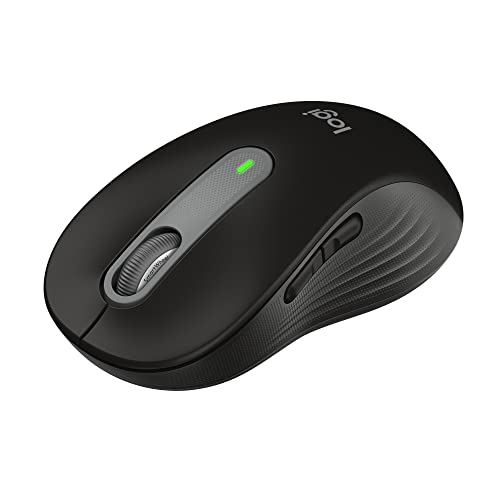
Pros
- Dual connectivity via Bluetooth and Logi Bolt USB
- SilentTouch mechanism drastically reduces clicking noise
- Long 24-month battery life on one AA battery
- Adaptive SmartWheel handles detailed and fast scrolling
- Customizable side shortcuts through Logi Options+
Cons
- Form factor is limited to small and medium hands
- Uses a replaceable AA battery instead of USB-C charging
Pros
- Dual Bluetooth and Logi Bolt wireless connectivity
- Quiet click design reduces ambient noise
- Adaptive SmartWheel for fast or precise scrolling
- Up to two years of battery life on one AA
- Ergonomic shape with textured rubber side grips
Cons
- Software customization is limited to Windows and macOS
- Powered by replaceable AA battery instead of USB rechargeability
How to Choose a Bluetooth Mouse
Start with how you connect. Bluetooth models here pair directly with compatible devices, while some also offer a USB receiver as an alternative. A receiver may be useful if Bluetooth is unavailable or you prefer a dedicated wireless connection.
Next, consider shape and size. The M196 is compact and ambidextrous, the M720 is full-sized and shaped for right-hand use, and the Lift has an upright design for small to medium right hands. The M650 models offer different size options.
For gaming, distinguish a Bluetooth connection from a wireless gaming receiver. The G305 lists a 1 ms report rate and a 12,000 DPI maximum, but its LIGHTSPEED connection is receiver-based. Its specifications do not establish Bluetooth support.
Battery claims are manufacturer specifications, not guarantees of the time every person will get. For models using AA batteries, consider whether replaceable batteries suit your routine. Confirm operating-system and connection requirements for your particular computer or tablet.
Best Bluetooth Mouse Picks by Use
Logitech M720 Triathalon Full Size Multi-Device: Best for Switching Between Computers
The M720 combines Bluetooth with a Logitech Unifying receiver and can switch between as many as three computers using a button. Logitech FLOW can move the cursor, text, and files across multiple computers, making this a strong match for multi-device productivity setups.
Its full-size, sculpted right-hand shape, six customizable buttons, and scrolling wheel with fast or click-to-click modes support long work sessions and document navigation. The stated battery life is up to 24 months, and compatibility includes Windows, macOS, Chrome OS, Linux, and iPadOS.
Pros: Bluetooth and receiver connectivity, three-device switching, customizable buttons, and a long stated battery life.
Cons: The right-hand sculpted shape is not ambidextrous, and Logitech FLOW and button customization depend on Logitech software.
Who should skip it: Left-handed users, people who want a very compact mouse, or buyers who need a gaming-specific Bluetooth connection.
Logitech MX Anywhere 2S Bluetooth Edition: Best for Compact, Higher-Resolution Tracking
This compact mouse lists Bluetooth and radio-frequency wireless connectivity, a 33-foot operating distance, Darkfield movement detection, and a maximum resolution of 4,000 DPI. Those specifications make it worth considering for portable use and work across varied surfaces.
The product information describes control of up to three Apple Mac and Windows laptops, with no USB receiver included. That makes it less suitable if you require receiver-based connectivity, and the supplied specifications do not state battery life or detailed button customization.
Pros: Compact format, Bluetooth connectivity, Darkfield tracking, and a stated 4,000 DPI resolution.
Cons: No USB receiver is included, and the supplied information does not specify battery life or compatibility beyond the listed Mac and Windows laptop use.
Who should skip it: Buyers who need an included receiver, detailed battery-life information, or a mouse specifically described for gaming.
Logitech M196 Compact Ambidextrous Bluetooth: Best for Simple, Portable Use
The M196 connects through Bluetooth without a dongle, and its compact ambidextrous shape suits either hand and fits easily into a travel bag. Logitech lists compatibility with Apple, Windows, and Chromebook devices, along with optical tracking and line-by-line scrolling.
It uses one included AA battery and has a stated battery life of up to 12 months, with an auto-sleep feature. Its straightforward feature set fits everyday browsing, learning, and laptop use better than workloads needing programmable controls or gaming-focused specifications.
Pros: Direct Bluetooth pairing, ambidextrous design, compact size, broad stated device compatibility, and an included AA battery.
Cons: The supplied specifications do not list extra customizable buttons, multi-computer switching, or gaming performance features.
Who should skip it: Users who prefer a full-size grip, want programmable side buttons, or need a dedicated gaming mouse.
Logitech Lift Vertical Ergonomic Wireless Mouse: Best for an Upright Grip
The Lift uses a 57-degree vertical shape, a thumb rest, and a textured grip. It is designed for small to medium right hands, so its defining advantage is its form rather than broad size or handedness options.
It connects through Bluetooth Low Energy or the included Logi Bolt USB-A receiver, and offers quiet clicks, a SmartWheel, and four customizable buttons out of six. Logitech lists support for Windows, macOS, iPadOS, Chrome OS, and Linux, with up to two years of battery life.
Pros: Upright grip, receiver or Bluetooth connectivity, quiet clicks, customizable controls, and compatibility with several operating systems.
Cons: The shape is specified for small to medium right hands, and its form may not suit users seeking a conventional mouse.
Who should skip it: Left-handed users, people with large hands, or anyone who prefers a standard horizontal mouse shape.
Logitech G305 Lightspeed Wireless Gaming Mouse: Best Receiver-Based Gaming Alternative
The G305 is the gaming-focused option in this roundup, but it is not listed as a Bluetooth mouse. Its LIGHTSPEED wireless connection uses a nano receiver and has a stated 1 ms report rate; the HERO sensor lists up to 12,000 DPI and 400 IPS.
Logitech specifies up to 250 hours of continuous gameplay from one AA battery and a weight of 3.4 ounces. These are manufacturer claims, not independent measurements. The receiver-based connection can suit a gaming PC with an available compatible port, but does not meet a strict Bluetooth requirement.
Pros: Gaming-oriented sensor specifications, a stated 1 ms report rate, low listed weight, and built-in receiver storage.
Cons: Bluetooth is not specified, so this model does not qualify when Bluetooth connectivity is essential.
Who should skip it: Anyone who specifically needs Bluetooth pairing or wants to avoid using a USB receiver.
Logitech Signature M650 Wireless Mouse Small: Best for Quiet Everyday Work
The small M650 connects through Bluetooth Low Energy or a Logi Bolt USB receiver. Its SmartWheel switches between precise line-by-line scrolling and faster scrolling, while SilentTouch is specified to reduce click noise by 90 percent.
It includes customizable side buttons through Logitech Options+ on Windows and macOS, and Logitech lists compatibility with Windows, macOS, Linux, ChromeOS, iPadOS, and Android. The stated battery life is up to 24 months from one AA battery.
Pros: Bluetooth or receiver connectivity, quiet-click feature, customizable side buttons, SmartWheel, and broad listed compatibility.
Cons: The small size may not suit users who prefer a larger mouse, and customizing side buttons requires Logitech software on supported computers.
Who should skip it: Users with larger hands who want a full-size mouse, or anyone who does not need quiet clicks and programmable side controls.
Logitech Signature M650 L Full Size Wireless Mouse: Best for a Larger Hand Fit
The M650 L shares the standard M650’s listed Bluetooth Low Energy and Logi Bolt receiver connections, SmartWheel, quiet-click feature, and customizable side buttons. Its full-size format makes it the more relevant version for users who prefer a larger mouse.
Logitech lists compatibility with Windows, macOS, Linux, ChromeOS, iPadOS, and Android, plus up to 24 months of battery life from one AA battery. Side-button customization uses Logitech Options+ on Windows and macOS.
Pros: Full-size format, Bluetooth and receiver options, quiet clicks, configurable side buttons, and a SmartWheel.
Cons: Its larger size is less suited to users seeking a compact travel mouse, and customization software is limited to Windows and macOS.
Who should skip it: People with small hands who prefer a compact mouse, or buyers seeking gaming-specific connection specifications.
Which Bluetooth Mouse Should You Choose?
Choose the M720 if switching among several computers, receiver flexibility, and programmable buttons matter most. Pick the M196 for simple Bluetooth pairing and ambidextrous portability, or the MX Anywhere 2S if compact tracking and its listed 4,000 DPI resolution fit your needs.
Consider the Lift if you want a vertical shape and have a small to medium right hand. Choose the small M650 for quiet, compact everyday work or the M650 L for a larger fit. For receiver-based gaming, the G305 has gaming-focused specifications, but it is not a Bluetooth option.
For more shape and grip guidance, read our articles on mouse shape for gaming and mouse grip styles. Browse the Gaming Mice category for related guides.


Write Your Review
No reviews yet. Be the first to share your experience!