

The best switches for gaming keyboards depend mainly on key feel, actuation behavior, noise, and compatibility. Linear switches suit fast, uninterrupted presses, tactile switches add feedback for typing, clicky switches provide audible confirmation, and Hall effect switches allow adjustable actuation when supported by compatible software and hardware.
Among these options, the AULA WIN68 HE is the most configurable choice because its magnetic switches support adjustable actuation and rapid-trigger features. The Razer BlackWidow V4 X is a strong fit for users who want quiet linear switches with dedicated controls, while the AULA F75 models offer hot-swappable mechanical designs for future switch changes.
| Option | Switch or key technology | Connection | Best suited to | Important limitation |
|---|---|---|---|---|
| AULA WIN68 HE | Hall effect magnetic switches | Wired USB | Competitive gaming and adjustable actuation | Windows-only web driver |
| Razer BlackWidow V4 X | Yellow linear switches | Wired USB | Quiet rapid inputs and macro-heavy gaming | Fixed wired layout with no hot-swap feature listed |
| AULA F75 Pro | Pre-lubricated Reaper switches | 2.4GHz, Bluetooth 5.0, USB-C | Wireless gaming and switch customization | Exact Reaper switch characteristics are not specified |
| AULA F75 | Pre-lubricated Reaper switches | 2.4GHz, Bluetooth 5.0, USB-C | Wireless gaming with a 75% layout | Exact Reaper switch characteristics are not specified |
| MageGee MK-Box | Red linear switches | Wired USB 2.0 | Affordable compact gaming setups | Only a wired connection and blue backlight |
| Redragon K552 | Red linear switches | Wired USB | Tenkeyless gaming and typing | Rainbow lighting is not software-customizable |
| AULA F2088 | Blue clicky switches | Wired USB | Audible feedback and full-size layouts | Click noise may not suit shared spaces |
| BlingKingdom switches | MX-style clicky blue switches | Replacement components | Compatible hot-swap keyboard owners | Only 3-pin compatibility is specified |
| GEODMAER 65% | Membrane mechanism with mechanical feel | Detachable USB-C cable | Quiet, compact, low-cost setups | Not a mechanical switch keyboard |
Our Recommended Best Switches for Gaming Keyboards
The recommendations below are based on documented switch type, actuation features, layout, connection method, programmability, and stated compatibility. They are specification-based comparisons, not claims of independent performance measurements.

Pros
- Compact layout retains dedicated arrow keys
- Smooth linear red mechanical switches
- Full anti-ghosting across all keys
- Detachable cable simplifies transport
- Dual adjustable kickstands for ergonomics
Cons
- Single-color blue lighting without RGB customization
- Lacks wireless connectivity options

Pros
- Versatile 2.4GHz, Bluetooth, and wired USB-C connectivity
- Hot-swappable sockets support 3-pin and 5-pin switches
- Multi-function knob for volume and lighting control
- High-capacity 4000mAh rechargeable internal battery
- Compact 75% layout retains dedicated arrow keys
Cons
- Lacks a dedicated numeric keypad
- Full macro programming requires optional driver software
- Side-printed legends may reduce visibility from certain angles

Pros
- Space-saving 68-key layout with dedicated arrows
- Detachable Type-C cable for easy travel
- Quiet membrane operation suitable for shared rooms
- 26-key anti-ghosting for accurate key registration
Cons
- Uses membrane switches instead of authentic mechanical switches
- No integrated number pad for data entry

Pros
- Tactile clicky blue mechanical switches
- Dedicated knob for media and lighting controls
- Full 104-key anti-ghosting support
- Sturdy aluminum alloy top plate
- Included magnetic wrist rest
Cons
- Clicky switches produce loud audible noise
- Round keycap profile requires an adjustment period
- Wired-only connection with no wireless functionality

Pros
- Flexible tri-mode wireless and USB-C wired connectivity
- Universal 3-pin and 5-pin hot-swap switch sockets
- Integrated five-layer acoustic dampening construction
- Multi-function knob for quick audio and lighting adjustment
- Pre-lubricated mechanical switches and stabilizers
Cons
- Compact layout lacks a dedicated numeric keypad
- Full macro and rhythm lighting require external driver software

Pros
- Fast 1.2mm linear Yellow switches with sound dampeners
- Six dedicated programmable macro keys
- Multi-function roller and dedicated media controls
- Per-key customizable Razer Chroma RGB lighting
- Built-in acoustic foam and lubricated stabilizers

Pros
- Crisp audible click and tactile feedback
- Transparent housing suits LED backlighting
- Ten switches included
- POM shaft core
- Advertised 50-million-keystroke lifespan
Cons
- Three-pin compatibility may exclude some keyboards
- Blue switches produce audible clicks
- Pins may arrive bent and need correction

Pros
- Hall Effect switches with adjustable actuation
- Fast 8000Hz polling rate
- Compact 68-key layout preserves arrow keys
- Detachable wired USB connection
- South-facing RGB with web-based configuration
Cons
- Web configuration driver does not support macOS
- Wired-only connection with no wireless functionality

Pros
- Hot-swappable PCB supports 3-pin and 5-pin switches
- Dual-mode 2.4 GHz wireless and multi-device Bluetooth
- Internal foam and tape dampening reduce typing hollows
- Dedicated programmable roller and media control buttons
- Long advertised battery life up to 980 hours
Cons
- Tenkeyless layout omits a dedicated number pad

Pros
- Smooth linear red mechanical switches
- Space-saving 87-key tenkeyless footprint
- Durable metal top plate design
- Full anti-ghosting and N-key rollover
- Dedicated software for macros and remapping
Cons
- Fixed rainbow colors without full RGB customization
- Backlight effects cannot be adjusted through software
AULA WIN68 HE Mechanical Gaming Keyboard 60%
The AULA WIN68 HE uses Hall effect magnetic switches with an adjustable actuation range from 0.02 mm to 3.44 mm. Its software also supports rapid-trigger, SOCD, DKS, multi-function, toggle, key mapping, macro, and RGB settings, giving advanced users more control than a conventional fixed-actuation switch.
- Pros: Adjustable actuation, individually configurable sensitivity, stated 8,000Hz polling rate, 0.3ms advertised latency, compact 68-key layout, and detachable wired connection.
- Cons: The web driver works only on Windows, and the magnetic switch features require the supplied keyboard hardware and software.
- Who should skip it: Skip it if you need Bluetooth, wireless operation, macOS configuration support, or a conventional mechanical switch feel.
Our mechanical keyboard versus Hall effect comparison explains why adjustable magnetic switches are a different category from standard red, brown, or blue switches.
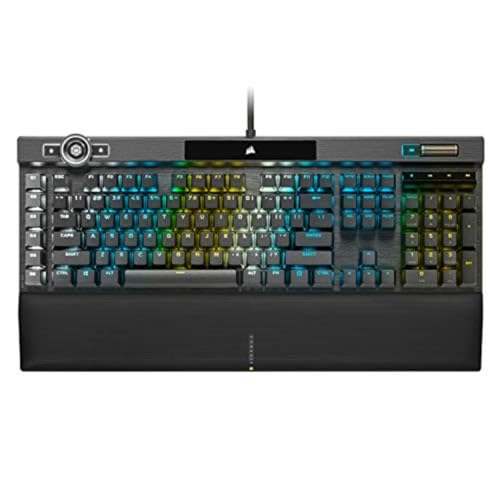
Razer BlackWidow V4 X Mechanical Gaming Keyboard
Razer’s Yellow switches are linear and specified with a 1.2 mm actuation point, a 1.2 mm reset point, and 45 g required force. Built-in dampeners are intended to reduce switch noise, while six dedicated macro keys and a multi-function roller suit games that use frequent commands or media controls.
- Pros: Linear key travel, low specified actuation force, dampened switch design, six macro keys, per-key Chroma RGB, and doubleshot ABS keycaps.
- Cons: It is a wired keyboard, and the supplied data does not list hot-swappable sockets or adjustable actuation.
- Who should skip it: Skip it if you want wireless connectivity, tactile or clicky feedback, or the ability to install replacement switches later.
AULA F75 Pro Wireless Mechanical Keyboard, 75% Hot
The AULA F75 Pro combines pre-lubricated Reaper switches with a hot-swappable PCB that supports both 3-pin and 5-pin switches. That makes it a useful starting point for owners who want a ready-to-use linear-style mechanical keyboard while retaining the option to change switch feel without soldering.
- Pros: 3-pin and 5-pin hot-swap support, 2.4GHz, Bluetooth 5.0, and wired modes, an 81-key 75% layout, programmable macros, and a 4000mAh battery.
- Cons: The supplied information does not specify the Reaper switch’s actuation force, travel, or exact sound profile. Wireless battery runtime is also not documented.
- Who should skip it: Skip it if you want a full-size keyboard, need a documented switch force curve, or prefer a simple wired keyboard without wireless features.
AULA F75 75% Wireless Mechanical Keyboard
The standard AULA F75 uses the same general Reaper switch and hot-swap approach as the Pro model. Its 75% layout preserves arrow keys while reducing the footprint compared with a full-size keyboard, and the tri-mode connection supports PCs, laptops, tablets, phones, PlayStation, and Xbox according to the supplied specifications.
- Pros: Hot-swappable 3-pin and 5-pin sockets, pre-lubricated stabilizers, tri-mode connectivity, a control knob, RGB lighting, macro programming, and N-key rollover.
- Cons: The exact characteristics of the Reaper switches are not specified, and the product is less suitable for users who need a numpad.
- Who should skip it: Skip it if you need a full-size layout, a verified low-actuation switch specification, or a keyboard designed primarily for competitive wired play.
MageGee Portable 60% Mechanical Gaming Keyboard
The MageGee MK-Box uses red linear switches, which the supplied description characterizes as smooth, low-resistance, and free from a tactile bump. Its 68-key layout retains separate arrow keys and F1 through F12 access through the compact design, making it practical for small desks and portable PC setups.
- Pros: Linear red switch feel, compact 68-key layout, full anti-ghosting for all 68 keys, detachable USB cable, adjustable feet, and compatibility with Windows, Linux, and Mac.
- Cons: It uses a wired USB 2.0 connection, the lighting is blue rather than full RGB, and its compact layout omits the dedicated number pad.
- Who should skip it: Skip it if you need wireless operation, per-key RGB, a full-size layout, or hot-swappable switches.
Redragon K552 Mechanical Keyboard
The Redragon K552 uses linear red switches and an 87-key tenkeyless layout. The product data specifies full anti-ghosting and N-key rollover, while the metal top plate and wired USB connection support a straightforward desktop gaming setup without wireless pairing or battery management.
- Pros: Linear red switches, tenkeyless design, full N-key rollover, metal top plate, macro and remapping support through software, and compatibility with Windows, macOS, Linux, and most gaming systems.
- Cons: The Rainbow LED version uses fixed-color patterns without software lighting customization, and the keyboard does not provide a numpad or wireless connection.
- Who should skip it: Skip it if you want full RGB control, wireless connectivity, a compact 60% layout, or tactile and clicky switch feedback.
AULA F2088 Typewriter Style Mechanical
The AULA F2088 uses blue mechanical switches with crisp click sound and tactile feedback. Its full-size 104-key layout, dedicated media controls, aluminum alloy panel, and included wrist rest make it more appropriate for users who divide their time between typing and gaming.
- Pros: Clicky tactile feedback, full-size 104-key layout, anti-ghosting, programmable lighting controls, dedicated media functions, USB wired reliability, and compatibility with Windows, Linux, and Mac.
- Cons: Clicky switches produce more audible feedback than linear designs, and the full-size typewriter-style layout occupies more desk space.
- Who should skip it: Skip it if you share a quiet room, prefer low-noise linear switches, or need a compact keyboard for limited desk space.
BlingKingdom 10 PCS Mechanical Keyboard Switches
These BlingKingdom replacement switches are MX-style blue clicky switches with a specified 4 mm total travel and approximately 50 million keystroke lifespan. They are supplied as 3-pin switches, so they are relevant mainly to compatible hot-swap keyboards or builds designed for 3-pin components.
- Pros: Audible click, tactile feedback, transparent housing for LED backlighting, POM stem material, and a stated long keystroke lifespan.
- Cons: The package contains only ten switches, pins may need correction after shipping, and compatibility is limited by the specified 3-pin design and the host keyboard’s socket layout.
- Who should skip it: Skip it if your keyboard is not hot-swappable, uses 5-pin-only sockets, or you want quiet linear switches.
GEODMAER 65% Gaming Keyboard
The GEODMAER 65% is a membrane keyboard that imitates a mechanical feel rather than using individual mechanical switches. It may suit users who want a compact, quiet keyboard with separate arrow keys, a detachable Type-C cable, and stated 26-key anti-conflict support.
- Pros: Compact 65% layout, separate arrow keys, quiet membrane operation, detachable cable, backlight controls, Windows key lock, and a stated lifespan above 10 million keystrokes.
- Cons: It is not a mechanical switch keyboard, and the supplied data does not document adjustable actuation, N-key rollover, or switch replacement support.
- Who should skip it: Skip it if you specifically want mechanical switch customization, tactile switch variety, or Hall effect features.
How to Choose the Best Switches for Gaming Keyboards
Choose Linear Switches for Uninterrupted Key Presses
Linear switches move without a tactile bump or click. The red switches in the MageGee and Redragon keyboards, along with the Yellow switches in the Razer, are the clearest choices here. They suit users who prefer smooth repeated presses, although a linear design does not provide the physical confirmation found in tactile or clicky switches.
Choose Tactile or Clicky Switches for Feedback
Blue switches in the AULA F2088 and BlingKingdom replacement switches provide tactile feedback and an audible click. This can help users who value a distinct confirmation during typing, but the sound may be unsuitable for shared rooms, streaming microphones, or quiet offices.
Consider Hall Effect When Actuation Control Matters
Hall effect switches detect magnetic movement rather than relying on a conventional mechanical contact. The AULA WIN68 HE supports adjustable actuation and rapid-trigger settings, but those features depend on its compatible hardware and Windows web driver. This is a different purchase decision from selecting a standard replacement switch.
Check Hot-Swap Compatibility Before Buying Replacement Switches
A hot-swappable PCB allows switch changes without soldering, but the socket must match the replacement switch. The AULA F75 models support 3-pin and 5-pin switches, while the BlingKingdom package is specified as 3-pin. Check the keyboard socket, switch orientation, LED position, and keycap stem compatibility before installation.
Match the Layout and Connection to the Setup
Compact 60% and 65% keyboards save desk space but use function layers and omit the number pad. Tenkeyless models retain more navigation keys, while full-size designs such as the AULA F2088 suit spreadsheet work and users who need dedicated number keys. Wired keyboards avoid battery management, while the AULA F75 models add 2.4GHz and Bluetooth options.
Frequently Asked Questions
Are red switches better than blue switches for gaming?
Neither is universally better. Red switches provide a smooth linear press, while blue switches add tactile and audible feedback. Choose red when you prefer uninterrupted movement or lower audible output, and choose blue when physical and sound feedback matter more than quiet operation.
Can any mechanical keyboard use replacement switches?
No. The keyboard must have compatible hot-swap sockets, or the switches must be soldered by someone equipped for that installation. The AULA F75 models explicitly support 3-pin and 5-pin switches, while compatibility for other listed keyboards is not specified.
Do Hall effect switches work like regular mechanical switches?
They can provide a mechanical-style key feel, but their sensing method and software controls differ. The AULA WIN68 HE offers adjustable actuation and rapid-trigger settings, so it should be evaluated as a complete Hall effect keyboard rather than as a normal switch replacement platform.
Final Recommendation
The AULA WIN68 HE is the most suitable choice for players who specifically want adjustable actuation and Hall effect controls. Choose the Razer BlackWidow V4 X for a wired keyboard with documented linear Yellow switches, dampening, and dedicated macro keys. The AULA F75 Pro and AULA F75 are better fits for wireless users who want hot-swap flexibility.
For a simpler compact setup, the MageGee and Redragon provide linear red switches without the complexity of magnetic adjustment. The AULA F2088 and BlingKingdom switches suit users who prefer clicky feedback, while the GEODMAER is the practical option for a quiet membrane keyboard rather than a mechanical switch platform.


Write Your Review
No reviews yet. Be the first to share your experience!