

For a PC headset that balances music and gaming, start with the connection you need: the Logitech G432 offers USB or 3.5 mm wired use, while wireless picks add freedom with specific compatibility limits. For music alongside gaming, consider whether removable microphones, Bluetooth, or a simple wired connection matter more than virtual surround features.
This specification-based comparison focuses on documented features, supported devices, and trade-offs. Advertised surround sound and latency figures are manufacturer claims, not independent measurements. The products span gaming headsets, general computer headsets, and one wired earbud option.
The Logitech G432 is a practical wired choice for PC users who want both USB and 3.5 mm connections. The AOC and WESEARY models offer 2.4 GHz wireless plus Bluetooth, but their platform restrictions differ. For a lower-complexity USB computer headset, consider the Logitech H390, while the Apple EarPods are a compact wired alternative rather than a full gaming headset.

Pros
- Large 50mm audio drivers
- Convenient flip-to-mute 6mm boom microphone
- DTS Headphone:X 2.0 surround sound support
- Versatile 3.5mm and USB DAC connectivity
- Comfortable lightweight frame with rotating ear cups
Cons
- DTS Headphone:X 2.0 requires Logitech G HUB software
- Advanced surround sound unavailable on standard console connections

Pros
- Dual 2.4GHz and Bluetooth wireless connections
- Low advertised latency down to 20ms
- Up to 50-hour battery life without lighting
- Fast 2.5-hour USB-C recharging
- Large 50mm dynamic drivers
Cons
- Not compatible with Xbox consoles
- Bluetooth mode unsupported on PS5 and PS4
- Microphone disabled on Nintendo Switch over Bluetooth
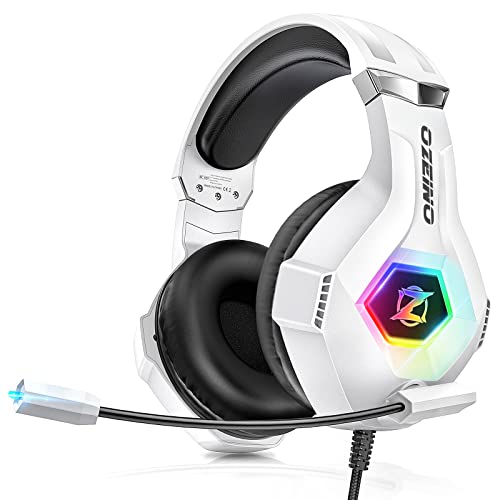
Pros
- Wide compatibility across consoles, PC, and mobile
- Adjustable 360-degree noise-cancelling microphone
- Comfortable padded protein ear cushions
- Includes 3.5mm PC splitter cable
Cons
- USB connection required solely for LED lighting
- Older Xbox One controllers require an unincluded adapter

Pros
- Dual detachable USB and 3.5mm audio connections
- Detachable unidirectional noise-cancelling microphone
- Convenient on-ear volume and mute controls
- Comfortable memory protein ear padding
- Broad multi-platform gaming compatibility
Cons
- Virtual 7.1 surround sound only functions on PC
- Surround sound features require a USB connection

Pros
- Broad compatibility with standard 3.5mm jacks
- Inline remote for volume and playback
- Integrated microphone for voice calls
- Ergonomic design shaped to ear geometry
Cons
- Requires an adapter for devices without headphone jacks
- Wired design limits physical movement

Pros
- Low-latency 2.4GHz wireless audio
- Up to 45 hours of battery life
- Versatile 2.4GHz, Bluetooth, and 3.5mm connectivity
- Detachable noise-canceling microphone
- Comfortable memory-protein ear cushions
Cons
- Xbox consoles require 3.5mm wired connection
- PlayStation does not support Bluetooth audio mode
- RGB lighting reduces battery life to 20 hours

Pros
- Driver-free plug-and-play 7.1 surround sound
- Large 50mm neodymium audio drivers
- Adjustable microphone with noise reduction
- Comfortable memory-protein ear cushions
- Generous 2.2-meter durable cable
Cons
- Not compatible with game controller audio jacks
- Limited exclusively to devices with USB ports

Pros
- Simple plug-and-play USB-A setup
- Built-in inline mute and volume controls
- Adjustable noise-canceling boom microphone
- Works With Chromebook certified
- Long 6.23-foot cable
Cons
- Restricted to standard USB-A wired ports
- Lacks 3.5mm analog connection support
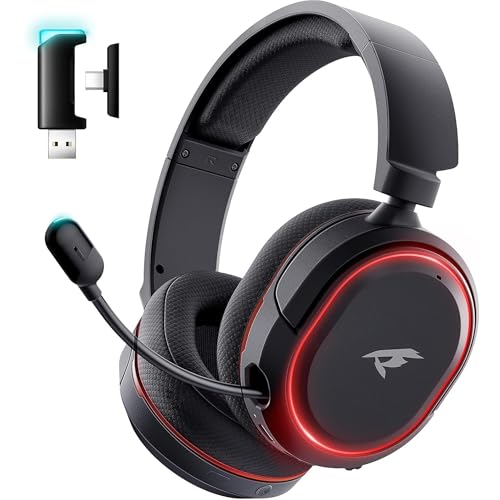
Pros
- Versatile 2.4GHz, Bluetooth 5.4, and 3.5mm connection options
- Long battery runtime reaching up to 100 hours
- Includes both USB-A and USB-C transmitter dongles
- Retractable microphone with one-touch mute control
- Supports playback while charging via USB-C
Cons
- Wireless functionality does not support Xbox consoles
- Microphone input is unsupported on Nintendo Switch
- PS5 wireless connectivity is limited strictly to 2.4GHz

Pros
- Wide multi-platform support via 3.5mm connector
- Large 50mm neodymium audio drivers
- Flexible noise-reducing chat microphone
- 30-degree tilting breathable protein earcups
- Integrated RGB accent lighting
Cons
- Requires separate adapter for older Xbox One controllers
- Relatively heavy at nearly 0.93 pounds
How to Choose Headphones for Music and PC Gaming
Match the connection to your PC and other devices
USB headsets can simplify computer setup, but a USB connection does not guarantee compatibility with every console or controller. A 3.5 mm connection is more versatile when your device has the appropriate jack, though PC microphone and headphone ports may require a splitter. Check the exact connection notes before choosing a model for multiple platforms.
Choose wireless modes for the right job
For gaming, 2.4 GHz dongle connections are the relevant low-latency option on wireless models that support them. Bluetooth can suit phones and casual listening, but some listed headsets do not support Bluetooth audio on PS5 or PS4. Verify each mode’s platform support rather than assuming one wireless connection works everywhere.
Look beyond surround-sound labels
Virtual surround processing may be useful for directional game cues, but it does not by itself establish music fidelity or measured positional accuracy. The Logitech G432 requires Logitech G HUB for DTS Headphone:X 2.0, and the EKSA E900 Pro specifies that 7.1 surround is available on PC over USB. Consider standard stereo playback and your listening preferences as well.
Consider microphone and comfort needs
A boom microphone helps with team chat, while a detachable or retractable mic can make a headset more convenient for music. Padding materials and adjustable headbands are listed by several models, but fit is personal. If you wear glasses or plan long sessions, prioritize a return policy and fit information from the retailer.
Recommended Music Gaming Headphones
Logitech G432: Best wired all-rounder for PC and consoles
The Logitech G432 has 50 mm drivers and connects to PC or Mac using its USB DAC or a 3.5 mm cable. Its DTS Headphone:X 2.0 feature requires Logitech G HUB, and the flip-up boom microphone mutes when raised. This is a flexible choice for listeners who want a conventional over-ear gaming headset with both wired connection options.
Pros: USB DAC and 3.5 mm options, a boom mic with flip-up mute, and compatibility notes covering PC, Mac, mobile, PlayStation, and docked Nintendo Switch use.
Cons: The advertised DTS feature depends on G HUB, and the headset is wired rather than wireless. Console connection behavior varies by platform.
Who should skip it: Skip this model if you need wireless listening or Bluetooth for music on the go.
AOC 2.4GHz Wireless Gaming Headset: Best for multi-mode listening
The AOC headset combines a 2.4 GHz USB dongle, Bluetooth 6.0, and a 3.5 mm audio cable. Its listed battery life reaches up to 45 hours, or up to 20 hours with RGB lighting on, according to the product specifications. The detachable microphone and Bluetooth mode make it a versatile option for gaming and everyday listening across supported devices.
Pros: Three connection types, a detachable microphone, and stated dongle support for PS5, PS4, PC, Mac, and Switch. Bluetooth is listed for phones and tablets.
Cons: PS5 and PS4 do not support Bluetooth audio for this headset. Xbox use is limited to 3.5 mm wired mode, and listed battery life varies with lighting.
Who should skip it: Skip it if you need wireless Xbox audio or Bluetooth audio on PS5 or PS4.
WESEARY Wireless Gaming Headset: Best budget-oriented wireless feature set
WESEARY lists 2.4 GHz wireless and Bluetooth modes, with advertised latency of 20 ms or less over 2.4 GHz and under 48 ms over Bluetooth. The specifications also claim up to 35 hours with lighting or 50 hours without it. These claims may appeal to PC players seeking wireless use, but connection requirements and exclusions deserve attention.
Pros: 50 mm drivers, a one-click mic mute, two wireless modes, and stated 2.4 GHz support for PC, Mac, PS5, PS4, and Switch.
Cons: The 2.4 GHz setup requires USB and Type-C connections together for the listed PC and console use. Neither mode supports Xbox, Bluetooth does not support PS5 or PS4, and the mic is not compatible with Switch over Bluetooth.
Who should skip it: Skip it if you use Xbox or need a simple single-dongle setup.
Ozeino Gaming Headset: Best low-cost wired pick
The Ozeino headset uses a 3.5 mm connection for listed compatibility with PC, PlayStation, Xbox, Switch, laptops, and mobile devices. On PC, its supplied 1-to-2 audio splitter is required to connect separate microphone and audio jacks. The USB connector powers the LED lighting only, so it is not a USB audio headset.
Pros: Broad stated 3.5 mm compatibility, an adjustable noise-canceling microphone, and over-ear padding. The lighting can be used without treating USB as the audio connection.
Cons: PC users may need the splitter, and older Xbox One controllers require a separate Microsoft adapter. The advertised 7.1 wording is not accompanied by detailed platform-specific processing requirements.
Who should skip it: Skip it if you want wireless audio or a USB connection for PC sound.
EKSA E900 Pro: Best for removable cables and PC USB surround
The EKSA E900 Pro includes removable USB and 3.5 mm audio cables, a 50 mm driver, and a detachable noise-canceling microphone. Its 7.1 surround feature is specified for PC use with the USB cable. The two cable options suit someone switching between a computer and devices that accept 3.5 mm audio.
Pros: Removable cable options, a detachable mic with a mute switch, and stated PC, PlayStation, and Xbox One compatibility.
Cons: Virtual 7.1 is limited to PC over USB. The supplied details do not specify wireless listening or Bluetooth.
Who should skip it: Skip it if you want Bluetooth music playback or wireless gaming.
EKSA E1000: Best plug-and-play USB headset for PC
The EKSA E1000 connects over USB and includes a built-in audio chip for its advertised driver-free 7.1 surround feature. It also has a 50 mm driver, an adjustable noise-reduction microphone, and a 2.2 m cable. This setup fits a PC or supported PlayStation user who prefers a direct USB connection rather than a 3.5 mm plug.
Pros: USB plug-and-play audio, an adjustable microphone, and stated compatibility with Windows 7, 8, and 10 PCs and PS4 or PS5.
Cons: It is not compatible with game controllers, and the listed compatibility does not establish support for every operating system or device. No wireless mode is specified.
Who should skip it: Skip it if you need controller connectivity, Bluetooth, or a 3.5 mm connection.
Valorise Wireless Gaming Headset: Best for long stated battery life
The Valorise headset lists 2.4 GHz, Bluetooth 5.4, and 3.5 mm connections, plus a retractable microphone. Its specifications claim up to 100 hours in Bluetooth mode with lighting and microphone off, and up to 45 hours in 2.4 GHz mode with both on. These are mode-specific manufacturer claims, not a single expected runtime for every setup.
Pros: Multiple connection choices, a retractable mic, and stated simultaneous use while charging. The 3.5 mm cable offers a wired fallback.
Cons: Wireless use is not compatible with Xbox Series, and the listed Switch microphone support is invalid. Battery claims vary with connection and feature settings.
Who should skip it: Skip it if you need wireless Xbox support or reliable microphone use with Switch.
Logitech H390: Best for USB calls and everyday computer audio
The Logitech H390 is a USB-A stereo headset designed for computers, with fine-tuned drivers, an inline volume and mute control, and a rotating noise-canceling microphone. Its 1.9 m cable and stated Chromebook compatibility suit desk use for music, calls, and meetings. It is a general computer headset rather than a multi-platform gaming model.
Pros: USB-A plug-and-play operation, inline controls, a rotating mic, and padded ear cushions. The listed uses include music, calls, and meetings.
Cons: The supplied specifications do not list a 3.5 mm connection, wireless audio, or console compatibility.
Who should skip it: Skip it if you need console support, a removable mic, or wireless listening.
Jimonyer Gaming Headset: Best for a simple 3.5 mm gaming setup
The Jimonyer uses a 3.5 mm audio jack and lists compatibility with PC, PlayStation, Xbox, Switch, Mac, laptops, and mobile phones. Its 50 mm drivers and adjustable microphone are intended for game audio and team communication. Older Xbox One controllers need a separate Microsoft adapter, which is not included.
Pros: Broad stated 3.5 mm support, adjustable microphone, and adjustable ear cups. The wired connection avoids battery management.
Cons: It has no listed wireless mode, and the 7.1 surround description does not specify a connection or software requirement. Older Xbox One controllers need an additional adapter.
Who should skip it: Skip it if you want Bluetooth, USB audio, or wireless use.
Apple EarPods with 3.5 mm Plug: Best compact option for music and calls
Apple EarPods are wired earbuds with a 3.5 mm plug, inline controls, and an integrated microphone. They suit music, calls, and compatible devices with a headphone jack, and their small form differs from an over-ear gaming headset. They may work for casual PC audio if the computer has the required jack, but they do not offer a boom mic or stated gaming surround features.
Pros: Compact wired design, music and call controls, and a microphone integrated into the cable.
Cons: The fit is earbud-style rather than over-ear, and no gaming-focused surround processing or boom microphone is specified.
Who should skip it: Skip it if you need an over-ear fit, strong game-chat positioning, or a boom microphone.
Final Recommendation
Choose the Logitech G432 if you want wired PC flexibility with USB and 3.5 mm options. The AOC is a better fit for switching between supported dongle gaming and Bluetooth listening, while WESEARY suits users who specifically want its advertised low-latency wireless mode and accept its setup restrictions. For USB computer audio and calls, consider the Logitech H390; for compact music listening, the EarPods are the simplest form factor.
Before buying, confirm your PC’s available ports, whether you need a splitter, and which wireless modes work with your console or phone. Readers comparing more general-purpose options can also see our guide to headsets for casual gaming.


Write Your Review
No reviews yet. Be the first to share your experience!