

The best headsets for VR depend first on your platform: PC simulation, standalone play, or smartphone viewing. For standalone gaming, compare Meta’s Quest models; for PC simulation, consider Pimax or HTC. Phone viewers are a separate, simpler category, while the Kawaye product is an accessory rather than a headset.
This specification-based guide compares advertised features and stated compatibility, not independent performance measurements. Confirm your computer, phone, software, and accessory requirements before buying. For more options, browse our VR headset category.
Top Products

Pros
- Dual adjustment knobs for balanced weight distribution
- Wide compatibility across Quest 2, 3, and 3S
- Convenient 55-degree flip-up design for glasses wearers
- Generously sized 35-square-inch rear support cushion
- Quick tool-free snap-on installation
Cons
- Battery pack must be purchased separately
- Not suitable for head circumferences under 22.1 inches

Pros
- Fits smartphones from 4.7 to 7.0 inches
- Adjustable interpupillary distance for optical clarity
- Integrated optical support for myopia users
- Anti-blue light lenses to reduce eye strain
- Lightweight design with adjustable T-shaped strap
Cons
- Requires a separate compatible smartphone to function
- Lacks dedicated motion controllers and standalone tracking hardware

Pros
- Lightweight 268g build with breathable foam padding
- Broad compatibility with 4.7 to 7.2-inch phones
- Adjustable focal and pupil distance dials
- Supports naked-eye use for myopia up to 600 degrees
- Anti-blue light lenses to reduce eye fatigue
Cons
- Cannot automatically convert standard 2D video to 3D
- Requires external 3D apps or split-screen content

Pros
- Lightweight 268g chassis with breathable foam padding
- Includes wireless Bluetooth controller for navigation
- Supports phones from 4.7 up to 7.2 inches
- Adjustable focus supports myopia up to 600 degrees
- Lenses feature integrated blue-light protection
Cons
- Does not automatically convert standard 2D content to 3D
- Requires dedicated VR apps or split-screen content
- Warranty benefits require user registration
Pros
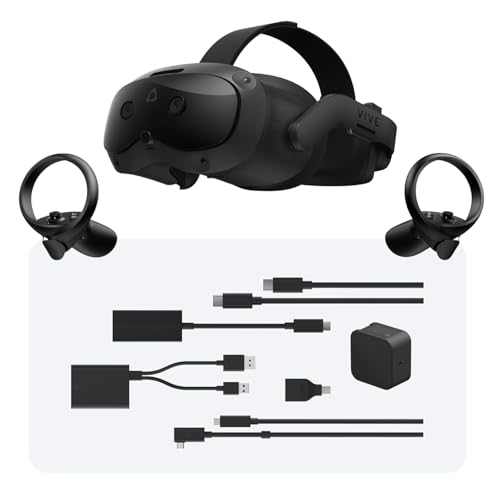
- Lossless DisplayPort PC VR streaming connection
- High 2448 x 2448 per-eye resolution
- Integrated eye tracking and auto-IPD adjustment
- Hot-swappable battery design maintains continuous operation
- Base-station-free inside-out tracking system
Cons
- Display refresh rate is limited to 90 Hz
- Full face and body tracking requires optional accessories

Pros
- Ultra-high 3840x3840 resolution per eye
- Expansive 140-degree field of view
- Mini-LED local dimming for deep contrast
- Inside-out tracking removes need for base stations
- Integrated spatial audio and noise-canceling microphone
Cons
- Requires a tethered DisplayPort PC connection
- Demanding resolution requires high-end GPU hardware

Pros
- Lightweight 268-gram frame with breathable cushioning
- Wide smartphone compatibility from 4.7 to 7.2 inches
- Adjustable focus supports myopia up to 600 degrees
- Bundled Bluetooth controller for mobile navigation
- Blue-light filtering lenses offer up to 110-degree FOV
Cons
- Cannot convert standard 2D media into 3D automatically
- Requires a separate compatible smartphone to function
- Controller functionality depends on individual app support

Pros
- Snapdragon XR2 Gen 2 processing power
- Full-color RGB mixed-reality passthrough
- Untethered wireless operation
- Upgraded 8GB of system memory
Cons
- Battery runtime limited to around two hours
- Base 128GB capacity limits total installed games

Pros
- Snapdragon XR2 Gen 2 processor for smooth visuals
- High-capacity 512GB storage for standalone libraries
- Full-color mixed reality passthrough cameras
- Cordless design allows untethered movement
- Upgraded 8GB RAM ensures responsive performance
Cons
- Advertised battery life limited to around two hours
Best Headsets for VR Compared
Meta Quest 3: Standalone play with more storage
The Meta Quest 3 is a standalone headset with 512GB of storage, Snapdragon XR2 Gen 2 processing, 8GB of memory, and color passthrough cameras. Its 4K+ Infinite Display and untethered operation suit people who want VR without a gaming PC connection.
Pros: Standalone use, 512GB storage, color passthrough, and the listed Snapdragon XR2 Gen 2 platform. Cons: The supplied information does not specify per-eye resolution, refresh rate, or PC connection details. Who should skip it: PC sim enthusiasts who need documented DisplayPort specifications or shoppers seeking a lower-cost standalone option.
Our casual gaming headset guide covers conventional audio headsets, which are different from immersive VR displays.
Meta Quest 3S: Standalone VR with a bundled game offer
The Meta Quest 3S uses the Snapdragon XR2 Gen 2 platform and 8GB of memory for standalone play. The listed bundle includes Gorilla Tag items, while color passthrough and untethered operation support mixed-reality features and movement without a cable.
Pros: Standalone gaming, 128GB storage, color passthrough, and a listed two-hour-or-more battery-life claim. Cons: Its storage is lower than the Quest 3’s, and the supplied details do not state display resolution or refresh rate. Who should skip it: Users who need substantial onboard storage or specifically want a documented PC simulation connection.
Pimax Crystal Super: High-resolution PC simulation
The Pimax Crystal Super connects to a PC through DisplayPort and advertises 3,840 by 3,840 pixels per eye, a 140-degree field of view, and refresh rates up to 90Hz. Eye tracking, inside-out tracking, and integrated spatial audio target demanding flight and racing simulation setups.
Pros: Detailed stated resolution, wide field of view, eye tracking, and a direct PC DisplayPort connection. Cons: The supplied information gives no minimum PC specifications, so check GPU and system requirements with the manufacturer. Who should skip it: People seeking a standalone headset, phone viewer, or compact low-cost entry point.
HTC Vive Focus Vision Wired Bundle: PC streaming and standalone flexibility
The HTC Vive Focus Vision supports standalone use and PC VR, with a wired DisplayPort mode described as lossless. Its listed display is 2,448 by 2,448 pixels per eye, with a 120-degree field of view and 90Hz refresh rate. Eye, hand, and low-light tracking, plus hot-swappable battery support, add flexibility.
Pros: Standalone and PC modes, DisplayPort connection, auto-IPD, spatial audio, and a replaceable main battery arrangement. Cons: Wireless PC streaming requires a compatible Wi-Fi setup, and the supplied details do not identify minimum PC specifications. Who should skip it: Buyers who only want phone-based viewing or do not need its mixed-reality and tracking features.
TECKNET VR Headset for Phone: Smartphone viewing without a controller
This phone viewer accepts stated smartphone screen sizes from 4.7 to 7.2 inches and advertises a 90-to-110-degree field of view. Adjustable pupil distance and focal length, plus a 268-gram stated weight, make it a phone-based option for compatible apps and panoramic video, not PC VR.
Pros: Broad stated phone-size range, adjustable optics, and a soft nose rest. Cons: The phone supplies the display and processing, and the headset does not automatically convert ordinary images into 3D. Who should skip it: PC gamers or anyone wanting a self-contained VR system.
TECKNET VR Headset for Phone with Controller: Phone-based interaction
This version pairs a smartphone viewer with a Bluetooth controller and states support for phones with 4.7-to-7.2-inch screens. Its advertised adjustable optics and 90-to-110-degree field of view are intended for compatible phone apps, videos, and basic interactive use.
Pros: Includes a Bluetooth controller, supports a stated range of phone sizes, and offers adjustable pupil distance and focal length. Cons: Controller support depends on the app, and the phone remains responsible for display and processing. Who should skip it: Buyers who need native PC VR, standalone processing, or a guarantee that every app works with the controller.
TECKNET VR Headset for Phone with Bluetooth: Another controller bundle
This listing also describes a phone headset with a Bluetooth controller, 4.7-to-7.2-inch phone compatibility, and adjustable optics. The advertised 90-to-110-degree field of view supports phone-based 360-degree content, provided the app or video supplies a compatible format.
Pros: A controller is included, the stated phone range is broad, and the listing describes adjustable pupil distance and focal length. Cons: It is not a PC-connected or standalone headset; content and controller behavior depend on compatible phone software. Who should skip it: Anyone seeking a dedicated gaming headset with its own display and processor.
Xiaokeis VR Headset 3D Glasses: Basic smartphone viewing
The Xiaokeis viewer is designed for smartphones with 4.7-to-7-inch screens and includes adjustable interpupillary distance. Its portable phone-based design is aimed at 360-degree videos and compatible games, with support for some myopia users claimed by the product listing.
Pros: Adjustable interpupillary distance, compatibility with a stated range of phone sizes, and a headband intended for adults and children. Cons: It relies on a smartphone and compatible content, rather than providing PC VR or standalone processing. Who should skip it: Users seeking a high-resolution dedicated headset or verified optical suitability for their prescription.
Kawaye Quest Head Strap: Comfort accessory, not a VR headset
The Kawaye is a replacement strap for Meta Quest 3S, Quest 3, and Quest 2. Dual adjustment knobs, two padded support areas, and a 55-degree flip-up design are intended to change fit and facial-pressure distribution. The listed battery compartment requires a separately sold compatible battery pack.
Pros: Stated compatibility with three Quest models, adjustable fit, flip-up access, and included fastener kits for Quest 3S or 3 and Quest 2. Cons: It does not include a headset or battery pack. Who should skip it: Anyone shopping for a complete VR system or using a headset outside the stated Quest models.
How to Choose the Best Headsets for VR
Choose the platform before comparing features
Standalone headsets process VR without a gaming PC connection, while the Pimax and HTC models list PC-focused connection options. Phone viewers hold a compatible smartphone and depend on its apps, screen, and processing. The Kawaye strap only fits specified Quest headsets, so it cannot serve as a complete system.
Match display details to the workload
For simulation, compare resolution per eye, field of view, refresh rate, tracking, and the connection type. Pimax lists 3,840-by-3,840 resolution per eye and up to 90Hz; HTC lists 2,448-by-2,448 per eye and 90Hz. These advertised specifications do not establish achievable performance on a particular PC.
Check compatibility and content requirements
Before choosing a phone viewer, measure the phone screen size and check whether the intended app supports split-screen or panoramic VR content. The TECKNET listings specifically note that ordinary images do not become 3D automatically. For PC headsets, verify computer requirements, software support, and connection setup with the manufacturer.
Consider fit, power, and accessories
Adjustable optics and head supports can help with positioning, but specifications alone cannot guarantee a comfortable fit. The HTC bundle lists hot-swappable battery support, while the Kawaye strap has a battery slot for compatible packs sold separately. Confirm what is included before treating an accessory as part of a headset purchase.
Frequently Asked Questions
Are phone VR viewers suitable for PC gaming?
No PC connection is specified for the phone viewers here. They use a smartphone as the display and depend on compatible mobile apps, so choose a headset that explicitly supports PC VR for computer gaming.
Which listed headset works without a PC?
The Meta Quest 3 and Quest 3S are described as untethered, standalone headsets. The HTC Vive Focus Vision also supports standalone use, while its PC modes provide an additional option.
Is the Kawaye product a VR headset?
No. It is a replacement head strap for the specified Meta Quest models. You need a compatible Quest headset separately, and its optional battery pack is also sold separately.





Write Your Review
No reviews yet. Be the first to share your experience!