

The best gaming mouse for XIM should prioritize predictable connectivity before high DPI numbers or decorative lighting. Wired models are usually the simplest starting point, while wireless options can work when the XIM adapter, receiver, console, and game setup support them correctly.
This specification-based roundup compares ten gaming mice for different XIM-related setups, including lightweight FPS models, ergonomic designs, MMO mice, and budget choices. Product compatibility should still be confirmed against the current documentation for your specific XIM device and console.
- Best wired option for programmable controls: Razer Basilisk V3 Customizable RGB Wired Ergonomic, with 11 programmable buttons and a 26,000 DPI sensor.
- Best lightweight wireless choice: Redragon M730 PRO Wireless Lightweight RGB, weighing 62 grams and offering wired or wireless operation.
- Best simple budget mouse: Redragon M656 Wireless Optical Gaming Mouse 4000, with seven programmable buttons and a 500Hz polling rate.
- Best for larger hands: Redragon Large Wireless Gaming Mouse for Big, with a full-size ergonomic shape and three connection modes.
- Best for many commands: Redragon M913 Wireless RGB MMO Gaming Mouse 16000, with twelve side buttons and sixteen total buttons.
Top Gaming Mouse Picks for XIM

Pros
- Tri-mode 2.4GHz, Bluetooth 5.3, and wired USB-C connectivity
- Lightweight 67-gram build reduces wrist fatigue
- Sensor supports up to 12,000 DPI and 1000Hz polling
- Dedicated rapid-fire button for quick in-game actions
- Can store and switch between four paired devices
Cons
- Configuration software is unavailable when using Bluetooth
- Driver programming features only support Windows systems

Pros
- Wireless 2.4GHz connection
- Seven programmable buttons
- Five adjustable DPI levels
- Polling rates up to 500Hz
Cons
- Battery not included
- Scroll wheel lighting is not always on

Pros
- Lightweight 62-gram construction
- Wired and Bluetooth connectivity
- Up to 10000 DPI through software
- 1000Hz polling rate
- Customizable RGB lighting
Cons
- Expanded DPI settings require software
- Battery life is advertised, not independently verified

Pros
- Dual HyperSpeed wireless and Bluetooth connectivity options
- Up to 535 hours of extended battery life
- Nine programmable buttons for custom macro setups
- Durable mechanical switches rated for 60M clicks
- High-precision 18,000 DPI optical sensor
Cons
- Configuration and optimization require Razer Synapse software
- Battery life varies depending on usage conditions

Pros
- 12 dedicated programmable side buttons
- Dual 2.4GHz wireless and USB-C wired modes
- Pixart 3335 sensor with adjustable 16000 DPI
- Up to 80 hours of battery in Eco mode
- Full wireless configuration through dedicated software
Cons
- Battery life drops to 45 hours with RGB enabled
- Key remapping requires proprietary driver software

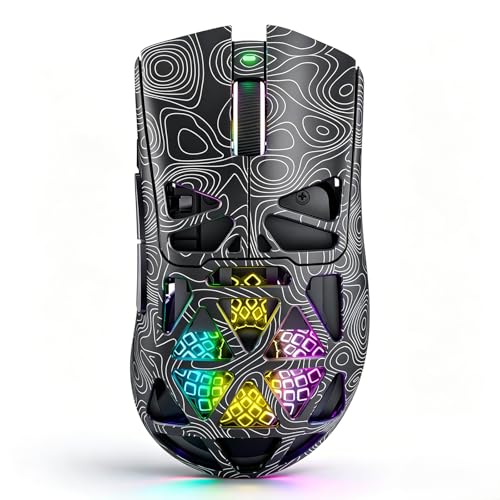
Pros
- Versatile tri-mode wireless and wired connectivity options
- Ventilated lightweight honeycomb shell design
- Rechargeable battery with USB-C play-and-charge support
- Seven programmable buttons for custom macro setups
- Up to 1000Hz polling rate for responsive tracking
Cons
- Open honeycomb design is vulnerable to dust accumulation
- Full macro and button customization requires software installation

Pros
- 19 programmable buttons for complex macros
- Modular weight tuning with eight removable weights
- Five onboard memory profiles for custom layouts
- Wide DPI adjustment range up to 12400
Cons
- Software download required for macro and lighting customization

Pros
- 11 programmable buttons for comprehensive macro control
- Dual-mode HyperScroll tilt wheel enhances versatility
- High-resolution 26K DPI optical sensor
- Responsive optical switches rated for 70 million clicks
- 11 independently customizable RGB lighting zones
Cons
- Tethered wired cable restricts cable-free mobility
- Ergonomic thumb rest form factor excludes left-handed users

Pros
- Native 8,000Hz hyper-polling rate
- High-resolution 26,000 DPI optical sensor
- Durable anodized aluminum frame
- Fast and responsive optical switches
- Six-axis gyro for precise lift-off tracking

Pros
- Versatile Bluetooth, 2.4GHz, and USB-C wired connectivity
- Ergonomic contoured shape with dual finger rests
- Rechargeable 1000mAh battery with charge-and-play capability
- Adjustable polling rate up to 1000Hz
- Stores USB receiver inside the mouse body
Cons
- Software configuration requires Windows and wired or 2.4GHz mode
- Bulky ergonomic dimensions are unsuitable for small hands
How the Best Gaming Mouse for XIM Options Differ
Razer Basilisk V3 Customizable RGB Wired Ergonomic
The wired Razer Basilisk V3 is the most straightforward recommendation when connection consistency matters. Its 11 programmable buttons, thumb rest, optical switches, and 26,000 DPI Focus Plus sensor provide broad control for PC gaming and compatible XIM configurations.
Its main limitation is the fixed cable, which may be less convenient than a wireless mouse in a living-room console setup. Razer Synapse is required for deeper customization, and the supplied feature information identifies PC use for the software.
Redragon M730 PRO Wireless Lightweight RGB
The Redragon M730 PRO suits users who want a lightweight mouse with both wired and wireless operation. Its 62-gram design, Pixart optical sensor, 1,000Hz polling rate, and adjustable sensitivity up to 10,000 DPI support fast, low-effort aiming.
It is a practical choice when reducing cable drag is important, but wireless XIM compatibility depends on how the adapter accepts the mouse and its receiver. Use wired mode first if troubleshooting connection recognition.
Razer Basilisk V3 X HyperSpeed Customizable
The Razer Basilisk V3 X HyperSpeed combines an ergonomic shape with nine customizable controls and both HyperSpeed wireless and Bluetooth connections. Its 18,000 DPI optical sensor and long advertised battery life make it suitable for extended PC use.
For an XIM setup, the important distinction is connection mode rather than maximum sensitivity. HyperSpeed uses a dedicated wireless receiver, while Bluetooth is a separate mode and should not be assumed to work through every XIM adapter.
Aula SC620 Wireless Gaming Mouse
The Aula SC620 offers 2.4GHz wireless, Bluetooth 5.3, and USB-C wired modes, plus seven programmable buttons and a dedicated fire button. Its 67-gram weight, 1,000Hz polling rate, and six DPI settings make it versatile for PC gaming and general computer use.
The documented limitation is important: the AULA driver supports Windows through wired and 2.4GHz modes, while Bluetooth mode is unavailable for that driver. Macro configuration should therefore be completed on a supported Windows connection before using the mouse elsewhere.
Redragon M913 Wireless RGB MMO Gaming Mouse 16000
The Redragon M913 is designed for users who need many accessible commands, with twelve side buttons and sixteen customizable buttons overall. Its Pixart 3335 sensor, 1,000Hz polling claim, wired or 2.4GHz operation, and adjustable DPI up to 16,000 cover varied PC workloads.
Those extra side buttons can help with command-heavy games, but they also create a larger control layout than a conventional FPS mouse. The supplied specifications list 2.4GHz wireless and USB-C wired modes, not Bluetooth.
Redragon M656 Wireless Optical Gaming Mouse 4000
The Redragon M656 is a lower-complexity option with seven programmable buttons, a 2.4GHz receiver, and five DPI settings from 1,000 to 4,000. Its PAW3104 sensor and selectable 500Hz polling rate are sufficient for users who prefer simple controls.
The supplied data states that its battery is not included, so buyers should account for that requirement. The Redragon Pro driver supports Windows and is intended for 2.4GHz wireless or wired configuration.
SOLAKAKA SM600 Wireless Gaming Mouse, Tri-Modes
The SOLAKAKA SM600 provides 2.4GHz wireless, Bluetooth 5.1, and USB-C wired connectivity, along with seven programmable buttons and a rechargeable 600mAh battery. Its lightweight honeycomb shell and 1,000Hz polling specification suit users who want a flexible multi-device mouse.
Its six listed DPI levels range from 800 to 13,200, but the supplied description does not specify XIM validation. Bluetooth and multi-device features should therefore be treated as convenience options, not guaranteed XIM features.
Redragon Gaming Mouse, MMO Mouse Gaming UP 12400
The Redragon M901K focuses on customization, offering 19 remappable buttons, twelve side buttons, five onboard profiles, adjustable polling from 125Hz to 1,000Hz, and removable weights. It fits MMO and productivity users who value many commands over a minimal layout.
The adjustable weight system can change balance, but the mouse is likely more complex than necessary for basic aiming. Its extensive macro and profile features also depend on the supplied Redragon software and supported connection setup.
Corsair M65 RGB Ultra Wired Adjustable Weight FPS
The Corsair M65 RGB Ultra is a wired FPS-focused mouse with a 26,000 DPI Marksman sensor, aluminum frame, adjustable weight system, optical switches, and an advertised native 8,000Hz polling rate. Its six-axis sensor fusion features are intended to support controlled repositioning.
It is a strong specification match for users who want a premium wired design, although XIM compatibility is not established by the supplied information. High polling rates may also require checking the adapter and host device support before relying on them.
Redragon Large Wireless Gaming Mouse for Big
This Redragon model is intended for medium to larger hands, with a full-size contoured shell, finger rests, rubber side grips, and two programmable side buttons. It supports Bluetooth, USB receiver, and USB-C wired connections for PC and multi-device use.
The driver supports Windows through 2.4GHz wireless and wired modes, not Bluetooth. Its larger shape can improve comfort for bigger hands, but may feel cumbersome for fingertip grips or compact desk spaces.
Comparison of Key Specifications
| Mouse | Connection options | Programmable controls | Weight or sensor detail | Important limitation |
|---|---|---|---|---|
| Aula SC620 | 2.4GHz, Bluetooth 5.3, USB-C wired | 7 buttons | 67g, up to 12,000 DPI | Driver limitations in Bluetooth mode |
| Razer Basilisk V3 X | HyperSpeed wireless, Bluetooth | 9 controls | 18,000 DPI sensor | Wireless receiver compatibility must be confirmed |
| Redragon M913 | 2.4GHz, USB-C wired | 16 buttons | Pixart 3335, up to 16,000 DPI | No Bluetooth listed |
| Redragon M730 PRO | Wireless, wired | Not specified | 62g, up to 10,000 DPI | XIM support is not documented |
| Redragon M656 | 2.4GHz, wired | 7 buttons | 500Hz polling, up to 4,000 DPI | Battery not included |
| SOLAKAKA SM600 | 2.4GHz, Bluetooth 5.1, USB-C wired | 7 buttons | 600mAh battery, up to 13,200 DPI | Bluetooth XIM support is not documented |
| Redragon M901K | 2.4GHz wireless | 19 buttons | Removable weights, up to 12,400 DPI | Complex MMO layout |
| Corsair M65 RGB Ultra | Wired | Not specified | 26,000 DPI, 8,000Hz polling claim | Adapter support for high polling should be checked |
| Redragon Large Wireless | Bluetooth, USB receiver, USB-C wired | Programmable buttons | Up to 12,800 DPI | Driver does not support Bluetooth mode |
How to Choose the Best Gaming Mouse for XIM
Start With the Connection Method
For the least complicated setup, begin with a wired USB mouse and confirm that the XIM adapter recognizes it. Wireless models add a receiver, Bluetooth mode, or device-switching process that can introduce compatibility checks.
A mouse having a USB-C port does not automatically mean it supports every USB function. In these products, USB-C is described for wired use or charging where specified, so do not assume video, hub, or universal adapter support.
Prioritize Shape and Control Layout
Choose an ergonomic Basilisk or large Redragon model for palm-oriented comfort, while lightweight mice such as the M730 PRO suit users who prefer low-effort movement. MMO mice provide more commands, but their side-button grids require a deliberate control layout.
Do Not Choose by DPI Alone
Maximum DPI is a flexibility specification, not a guarantee of better aim or lower latency. Sensor quality, consistent tracking, suitable sensitivity, polling support, and comfortable shape matter more than selecting the highest number.
Configure Software Before Connecting to XIM
Several mice require Windows software for remapping, DPI, polling, lighting, or macros. Configure onboard settings where supported, then test the intended wired or receiver connection with the XIM hardware.
For broader accessory planning, our guide to external gaming keyboards covers similar questions about layouts, wired connections, and programmable controls. Users choosing a mouse for tank or strategy games can also compare the requirements discussed in our gaming mouse guide for WoT.
Frequently Asked Questions
Can any gaming mouse work with XIM?
No mouse should be treated as universally compatible without checking the specific XIM device, console, firmware, and connection method. Wired USB models are generally the simplest to evaluate, while wireless receivers and Bluetooth require additional confirmation.
Is a wired mouse better for XIM?
A wired mouse is often easier to configure because it avoids receiver pairing and wireless protocol variables. The Razer Basilisk V3 and Corsair M65 RGB Ultra are the clearest wired choices in this list, subject to the adapter’s documented support.
Do programmable mouse buttons work through XIM?
That depends on where the commands are stored and how the XIM adapter interprets the mouse. Configure macros or remaps through the manufacturer’s software, then verify whether the resulting inputs are recognized by your particular setup.
Final Recommendation
The Razer Basilisk V3 Customizable RGB Wired Ergonomic is the safest starting point for readers who want a wired connection and many configurable controls. Choose the Redragon M730 PRO for a lightweight wireless design, the M656 for simpler budget-oriented controls, or the M913 and M901K when numerous side buttons matter more than a minimal FPS layout.
For larger hands, the Redragon Large Wireless model is the more suitable shape, while the Corsair M65 RGB Ultra targets users who prefer a premium wired FPS design. Whichever becomes your best gaming mouse for XIM, confirm the exact adapter and console compatibility before purchase, then configure the mouse using its supported connection mode.




Write Your Review
No reviews yet. Be the first to share your experience!