

The best gaming mouse for wow is usually an MMO mouse with accessible buttons, reliable tracking, and a shape suited to your grip.
For the largest ability layouts, the Corsair Scimitar RGB Elite offers 17 programmable buttons and a repositionable 12-button side panel. Players who prefer fewer controls can choose a Razer Basilisk model, while wireless buyers have several options with different battery and button configurations.
- Best for extensive MMO keybinds: Corsair Scimitar RGB Elite Wired MMO MOBA PC, with 17 programmable buttons and adjustable side-button positioning.
- Best wireless all-rounder: Razer Basilisk V3 X HyperSpeed Customizable, with nine customizable controls and both HyperSpeed wireless and Bluetooth.
- Best wired general-purpose option: Razer Basilisk V3 Customizable RGB Wired Ergonomic, with 11 programmable buttons and a thumb rest.
- Best budget MMO layout: Redragon Gaming Mouse, MMO Mouse Gaming UP 12400, with 19 programmable buttons, profiles, and adjustable weights.
- Best compact wireless choice: Logitech G305 Lightspeed Wireless Gaming Mouse, with a 12,000 DPI HERO sensor and a simple six-button layout.

Pros
- 17 fully programmable macro buttons
- Repositionable 12-button side slider system
- Accurate 18,000 DPI PixArt optical sensor
- Durable 50-million-click Omron switches
- Contoured ergonomic shape with a finger rest
Cons
- Tethered wired-only connection
- Right-hand ergonomic design limits ambidextrous use

Pros
- Dual HyperSpeed wireless and Bluetooth connectivity options
- Up to 535 hours of extended battery life
- Nine programmable buttons for custom macro setups
- Durable mechanical switches rated for 60M clicks
- High-precision 18,000 DPI optical sensor
Cons
- Configuration and optimization require Razer Synapse software
- Battery life varies depending on usage conditions

Pros
- 11 programmable buttons for comprehensive macro control
- Dual-mode HyperScroll tilt wheel enhances versatility
- High-resolution 26K DPI optical sensor
- Responsive optical switches rated for 70 million clicks
- 11 independently customizable RGB lighting zones
Cons
- Tethered wired cable restricts cable-free mobility
- Ergonomic thumb rest form factor excludes left-handed users

Pros
- Nine programmable buttons
- Five memory profiles
- Adjustable 16000 DPI sensitivity
- Wireless and wired connectivity
- Customizable RGB lighting
Cons
- Limited Mac OS support
- Battery life varies with RGB enabled

Pros
- 19 programmable buttons for complex macros
- Modular weight tuning with eight removable weights
- Five onboard memory profiles for custom layouts
- Wide DPI adjustment range up to 12400
Cons
- Software download required for macro and lighting customization

Pros
- Fast 1 ms Lightspeed wireless connectivity
- Efficient 12,000 DPI HERO optical sensor
- Up to 250 hours on one AA battery
- Built-in storage slot for the wireless USB receiver
- Lightweight build for rapid mouse movements
Cons
- Requires replaceable AA batteries instead of integrated recharging
- Compact dimensions may not suit users preferring large mice

Pros
- Versatile Bluetooth, 2.4GHz, and USB-C wired connections
- Quiet operation using silent click switches
- Six on-the-fly adjustable DPI presets up to 12800
- Charges via USB-C while remaining fully usable
- Cross-platform compatibility across Windows, macOS, Android, and iOS
Cons
- Configuration software is limited to Windows only

How These Mice Differ for World of Warcraft
World of Warcraft does not require an extremely high DPI setting, so button placement and comfort matter more than maximum sensor resolution for most players.
| Mouse | Connection | Programmable controls | Documented sensor or battery detail | Best suited to |
|---|---|---|---|---|
| Corsair Scimitar RGB Elite Wired MMO MOBA PC | Wired | 17 buttons | 18,000 DPI optical sensor | Large MMO keybind layouts |
| Razer Basilisk V3 X HyperSpeed Customizable | HyperSpeed wireless or Bluetooth | 9 controls | Up to 285 hours on HyperSpeed wireless | Wireless general-purpose play |
| Razer Basilisk V3 Customizable RGB Wired Ergonomic | Wired | 11 buttons | 26,000 DPI optical sensor | Wired MMO and general gaming |
| Redragon M801 Wireless Gaming Mouse | Wireless or USB-C wired | 9 buttons | Up to 70 hours with RGB off | Wireless users needing several macros |
| Redragon Gaming Mouse, MMO Mouse Gaming UP 12400 | Wired | 19 buttons | 12400 DPI, adjustable weights | Maximum controls on a budget |
| Logitech G305 Lightspeed Wireless Gaming Mouse | LIGHTSPEED wireless | Not specified in supplied data | Up to 250 hours on one AA battery | Simple layouts and portability |
| INPHIC A9 V2 Explorer Wireless Gaming Mouse | Bluetooth, 2.4G wireless, or USB-C wired | Button mapping through optional Windows driver | 12,800 DPI sensor | Multi-device setups and quiet clicking |
| Redragon Wireless Gaming Mouse | Wireless or wired while charging | 16 buttons | Up to 70 hours with RGB off | Wireless MMO layouts |
Detailed Picks for the Best Gaming Mouse for WoW
Corsair Scimitar RGB Elite Wired MMO MOBA PC
The Corsair Scimitar RGB Elite Wired MMO MOBA PC is the clearest choice for players who want many abilities immediately available without relying on keyboard modifiers.
Its 17 programmable buttons include a 12-button side cluster that can slide to better match different hand positions. The 18,000 DPI PixArt PMW3391 sensor supports one-DPI adjustment steps, while 50-million-click-rated Omron switches and a braided cable are specified for long-term use.
The main limitation is its wired connection, which leaves less freedom for cable management than wireless alternatives. Its large side-button layout may also require an adjustment period if you normally use a simpler mouse.
View the Corsair Scimitar RGB Elite Wired MMO MOBA PC
Razer Basilisk V3 X HyperSpeed Customizable
The Razer Basilisk V3 X HyperSpeed Customizable suits WoW players who want wireless movement, a familiar ergonomic shape, and a moderate number of extra controls.
It provides nine customizable controls, Razer HyperSpeed wireless, and Bluetooth for multi-device use. Advertised battery life reaches up to 285 hours on HyperSpeed wireless or up to 535 hours on Bluetooth, although usage conditions affect battery duration.
This is not a dedicated 12-button MMO design, so it may not replace keyboard modifiers for players with extensive class or utility bindings. Razer Synapse is also relevant for configuring settings and button assignments on a compatible Windows setup.
View the Razer Basilisk V3 X HyperSpeed Customizable
Razer Basilisk V3 Customizable RGB Wired Ergonomic
The Razer Basilisk V3 Customizable RGB Wired Ergonomic is a practical wired option for players who want more controls than a basic mouse without adopting a full MMO keypad layout.
Its 11 programmable buttons can handle abilities, push-to-talk, mounts, or utility commands. The thumb rest supports a palm-oriented shape, while the HyperScroll tilt wheel offers free-spinning and tactile modes for different navigation preferences.
Its fixed cable is the main trade-off compared with the Basilisk V3 X. Players who need many thumb buttons may also prefer the Scimitar or one of Redragon’s 12-button MMO layouts.
View the Razer Basilisk V3 Customizable RGB Wired Ergonomic
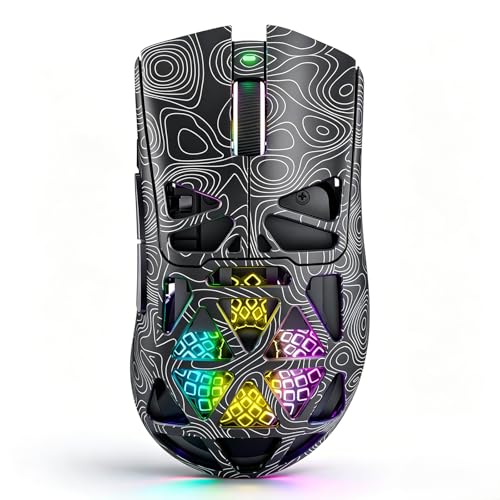
Redragon M801 Wireless Gaming Mouse
The Redragon M801 Wireless Gaming Mouse is aimed at players who want wireless freedom, several programmable controls, and a rechargeable design.
It includes nine programmable buttons, five memory profiles, adjustable sensitivity up to 16,000 DPI, and a stated battery range of up to 35 hours with RGB enabled or 70 hours with RGB disabled.
The nine-button layout provides fewer direct MMO bindings than the 12-side-button models. Supplied compatibility lists Windows versions from XP through Windows 10 and mention limited Mac support, so operating-system requirements deserve attention before setup.
View the Redragon M801 Wireless Gaming Mouse
Redragon Gaming Mouse, MMO Mouse Gaming UP 12400
The Redragon Gaming Mouse, MMO Mouse Gaming UP 12400 prioritizes control density, offering 19 programmable buttons and 12 side buttons for extensive action-bar assignments.
It includes five memory profiles, two working modes, adjustable polling from 125Hz to 1000Hz, and eight removable weights of 2.4 grams each. Those features support players who want separate configurations or prefer tuning the mouse balance.
The high button count can be unnecessary for simpler keybinds and may take time to configure. The supplied data identifies it as a PC and laptop MMO mouse, but does not provide a specific operating-system compatibility list.
View the Redragon Gaming Mouse, MMO Mouse Gaming UP 12400
Logitech G305 Lightspeed Wireless Gaming Mouse
The Logitech G305 Lightspeed Wireless Gaming Mouse fits players who prefer a straightforward shape and only need a modest number of mouse-based commands.
Its HERO optical sensor reaches 12,000 DPI, while LIGHTSPEED wireless specifies a 1ms response time. The mouse uses one AA battery and advertises up to 250 hours of continuous gaming, with receiver storage built into its compact design.
Its supplied specifications do not identify a large MMO button array, making it less suitable for players who want many abilities assigned to the thumb. It is better matched with keyboard modifiers and a simpler action layout.
View the Logitech G305 Lightspeed Wireless Gaming Mouse
INPHIC A9 V2 Explorer Wireless Gaming Mouse
The INPHIC A9 V2 Explorer Wireless Gaming Mouse is a flexible choice for players who switch between a desktop, laptop, tablet, or phone.
It supports dual Bluetooth pairing, 2.4G wireless, and USB-C wired use. The 12,800 DPI sensor has six listed sensitivity levels, while silent clicks and a rechargeable battery suit shared spaces or late-night sessions.
An optional Windows-only driver handles DPI, polling rate, and button mapping, so advanced customization may be more limited on macOS, Android, and iOS. The supplied specifications also do not identify an MMO-style 12-button side panel.
View the INPHIC A9 V2 Explorer Wireless Gaming Mouse
Redragon Wireless Gaming Mouse
The Redragon Wireless Gaming Mouse combines a 12-button side panel with wireless operation, making it a direct alternative to wired MMO mice.
It offers 16 programmable buttons, five memory profiles, adjustable sensitivity up to 16,000 DPI, and polling settings from 125Hz to 1000Hz. Its built-in 1000mAh battery is specified for more than 70 hours with RGB disabled, and wired use remains possible while charging.
The extra controls are useful for complex layouts but may feel excessive for players who use only a few mouse bindings. The supplied information references PC and laptop gaming but does not specify broader operating-system support.
View the Redragon Wireless Gaming Mouse
What to Consider Before Choosing a WoW Mouse
Choose the Number of Buttons You Will Actually Use
Button quantity should reflect your class, interface layout, and comfort with modifiers rather than serving as a specification contest.
- Six to nine controls: suitable for movement, utility abilities, push-to-talk, and a few frequently used commands.
- Eleven controls: useful for broader general gaming and MMO bindings without a full side keypad.
- Sixteen to 19 controls: appropriate for players who want many direct action-bar assignments and profile-based layouts.
Wired Versus Wireless
Wired models avoid battery charging and are straightforward for a stationary PC, while wireless models reduce cable restrictions around the desk.
Among these options, the Razer Basilisk V3 X, Redragon M801, Logitech G305, INPHIC A9 V2, and Redragon Wireless Gaming Mouse provide wireless operation. Check whether your preferred model uses a USB receiver, Bluetooth, or both, because those connection methods suit different PC setups.
Sensor Resolution Is Not the Main WoW Decision
Every listed mouse provides enough advertised sensitivity range for ordinary desktop use and MMO cursor movement. Higher DPI figures do not automatically make a mouse better for World of Warcraft, where grip, button reach, and consistent control are more relevant selection factors.
Software, Profiles, and Operating-System Support
Programmable controls normally require the manufacturer’s configuration software, so confirm that the software supports your PC before purchase. The INPHIC A9 V2 specifically identifies its optional driver as Windows-only, while the Redragon M801 lists Windows compatibility and limited Mac support.
Frequently Asked Questions
How many mouse buttons are useful for WoW?
There is no universal number. A nine-button mouse can cover common utility commands, while a 12-button side panel or 19-button design better suits players who want many abilities directly accessible.
Is a wireless mouse suitable for World of Warcraft?
Yes, provided its connection method fits your computer and you are comfortable managing battery charging or replacement. The listed wireless models include rechargeable and replaceable-battery designs, with different advertised battery specifications.
Is the Corsair Scimitar better than a Basilisk for WoW?
The Scimitar is the stronger fit for extensive MMO bindings because it provides 17 programmable buttons and a movable side cluster. A Basilisk is more suitable when you want fewer controls, a thumb rest, and a general-purpose ergonomic shape.
Final Recommendation
For the most demanding action-bar layouts, choose the Corsair Scimitar RGB Elite or Redragon Wireless Gaming Mouse. The Scimitar favors a wired setup, while the Redragon provides wireless operation and charging during use.
Choose the Razer Basilisk V3 X for a balanced wireless design, the wired Basilisk V3 for 11 accessible controls, or the Logitech G305 for a simpler layout. The Redragon M801 and INPHIC A9 V2 are reasonable alternatives when wireless flexibility matters more than a dedicated 12-button MMO grid.
This best gaming mouse for wow guide is based on the documented specifications supplied for each model, not independent hands-on testing.
For related hardware decisions, compare these picks with our guide to gaming mice for RPGs on PC and our recommendations for gaming mice for PvP.


Write Your Review
No reviews yet. Be the first to share your experience!