

The best cheap gaming headphones for PC depend first on connection type. Choose a 3.5 mm wired model for straightforward setup, or a wireless headset when a compatible dongle, Bluetooth, and battery charging fit your routine.
These recommendations are compared using supplied specifications, compatibility details, and intended use. Advertised surround audio, noise cancellation, and battery figures are manufacturer claims, not independent measurements.
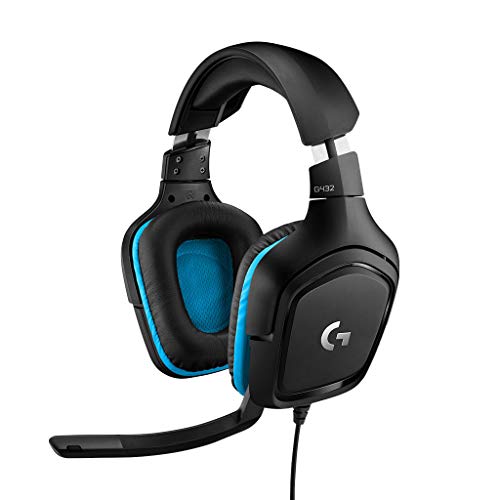
- Best wired all-rounder: Logitech G432 Wired Gaming Headset – Black, with USB DAC or 3.5 mm connections and optional DTS software audio.
- Best for a lightweight wired setup: Razer BlackShark V2 X Gaming Headset, with a 3.5 mm jack and a stated 240 g weight.
- Best low-cost wired option: Tatybo Gaming Headset for PS5 PC, with a braided cord and flexible microphone.
- Best wireless feature set: Wireless Gaming Headset, 7.1 Surround Sound, with 2.4 GHz, Bluetooth, and wired modes. Confirm platform and microphone limitations first.
Pros
- Large 50mm audio drivers
- Convenient flip-to-mute 6mm boom microphone
- DTS Headphone:X 2.0 surround sound support
- Versatile 3.5mm and USB DAC connectivity
- Comfortable lightweight frame with rotating ear cups
Cons
- DTS Headphone:X 2.0 requires Logitech G HUB software
- Advanced surround sound unavailable on standard console connections


Pros
- Dual 2.4GHz and Bluetooth wireless connections
- Low advertised latency down to 20ms
- Up to 50-hour battery life without lighting
- Fast 2.5-hour USB-C recharging
- Large 50mm dynamic drivers
Cons
- Not compatible with Xbox consoles
- Bluetooth mode unsupported on PS5 and PS4
- Microphone disabled on Nintendo Switch over Bluetooth

Pros
- Lightweight 240g frame for extended comfort
- Broad compatibility via standard 3.5mm audio jack
- TriForce 50mm drivers for distinct frequency tuning
- Cardioid microphone with targeted voice pickup
Cons
- Surround sound requires Windows 10 64-bit
- Xbox One may require a separate stereo adapter

Pros
- Large 50mm audio drivers
- Lightweight build under eight ounces
- Comfortable memory protein ear cushions
- Flexible microphone with integrated mute control
- Standard 3.5mm cross-platform compatibility
Cons
- USB plug only powers lighting without audio transmission
- Incompatible with Xbox 360
- Requires an adapter for PlayStation 3 use
Pros
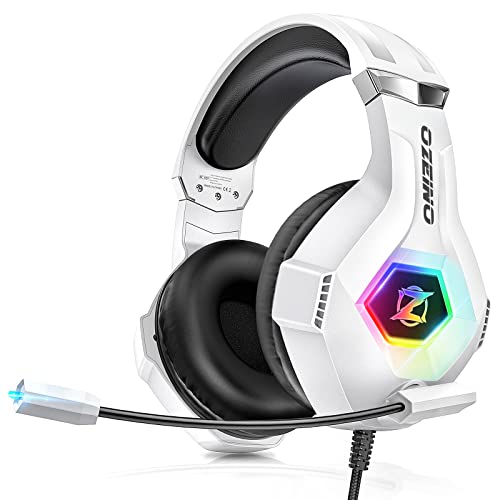
- Wide compatibility across consoles, PC, and mobile
- Adjustable 360-degree noise-cancelling microphone
- Comfortable padded protein ear cushions
- Includes 3.5mm PC splitter cable
Cons
- USB connection required solely for LED lighting
- Older Xbox One controllers require an unincluded adapter

Pros
- Lightweight 240-gram frame with memory foam padding
- Versatile 3.5 mm cross-platform compatibility
- On-earcup volume wheel for quick adjustments
- Passive noise isolation via closed earcups
- Tuned 50 mm drivers for clear sound separation
Cons
- Wired 3.5 mm cable restricts player movement
- Lacks wireless audio capability

Pros
- Extremely lightweight 0.66-pound frame
- Foldable design enables compact storage
- Comfortable memory foam ear cushions
- Flexible noise-filtering microphone
- Plug-and-play 3.5mm analog connection
Cons
- Requires audio splitter for PC connectivity
- Older Xbox One controllers require separate adapter

Pros
- Versatile 2.4GHz, Bluetooth 5.4, and 3.5mm connectivity
- Up to 100 hours of rated battery life
- Includes both USB-A and USB-C wireless adapters
- Retractable microphone with background noise cancellation
- Breathable fabric ear cushions for reduced heat buildup
Cons
- No wireless support for Xbox consoles
- Microphone does not work wirelessly on Nintendo Switch
- PlayStation 5 requires 2.4GHz dongle, Bluetooth unsupported

Pros
- Versatile 2.4GHz, Bluetooth, and 3.5mm connections
- Up to 100-hour rated battery life
- Simultaneous Bluetooth pairing for incoming mobile calls
- Large 50mm composite diaphragm drivers
Cons
- Xbox consoles require a wired 3.5mm connection
- Wireless functionality on consoles requires USB dongle
Recommended Cheap Gaming Headphones
Logitech G432 Wired Gaming Headset – Black
The G432 connects to PC or Mac through a USB DAC or 3.5 mm cable, and its 50 mm drivers support game audio and chat. DTS Headphone:X 2.0 requires Logitech G HUB software, so the positional audio feature is not simply a hardware-only mode.
Pros: Two connection options for computers, a flip-up mute boom microphone, and compatibility with several consoles. Cons: USB wireless stereo support is specified for PlayStation, while Switch wireless audio is specified only when docked. Who should skip it: Anyone seeking a wireless headset or software-free DTS processing.
Wireless Gaming Headset, 7.1 Surround Sound (Gray-Pink)
This Valorise model offers 2.4 GHz USB and Type-C transmitter connections, Bluetooth 5.4, and a 3.5 mm cable. The maker lists up to 45 hours in 2.4 GHz mode with lighting and microphone enabled, and up to 100 hours in Bluetooth mode with both turned off.
Pros: Multiple connection methods, a retractable microphone, and use while charging are specified. Cons: Wireless operation is not compatible with Xbox Series, and Switch microphone support is listed as invalid. Battery life depends on mode and feature use. Who should skip it: Xbox users or anyone who needs reliable Switch voice chat.
WESEARY Wireless Gaming Headset for PS5, PS4, PC
WESEARY lists 2.4 GHz, Bluetooth, and 3.5 mm modes, with advertised 2.4 GHz latency of 20 ms or less. Its stated battery life is up to 35 hours with lighting or 50 hours without it, and the wireless modes are not compatible with Xbox.
Pros: Three connection choices, a single-click microphone mute, and stated 2.4 GHz support for PC and PlayStation. Cons: PS5 and PS4 require the USB and Type-C connections together; Bluetooth is not compatible with those consoles, and Switch microphone support over Bluetooth is unavailable. Who should skip it: Xbox owners or buyers who want a simple one-connector console setup.
Razer BlackShark V2 X Gaming Headset
This wired headset uses a 3.5 mm jack and weighs a stated 240 g. Razer lists 50 mm drivers, a cardioid microphone, and closed earcups; software-enabled 7.1 surround sound is specified only for Windows 10 64-bit.
Pros: Lightweight construction, memory foam cushions, and broad 3.5 mm platform compatibility. Cons: The surround feature has a Windows-specific requirement, and Xbox One may need a separately purchased stereo adapter. Who should skip it: Buyers who require wireless connectivity or surround processing across every listed platform.
Tatybo Gaming Headset for PS5 PC
Tatybo is a wired 3.5 mm headset with stated 50 mm drivers, a braided cord, and a flexible microphone with mute control. Its USB connector powers the lighting only, so it should not be treated as a USB audio connection.
Pros: Broad stated 3.5 mm compatibility and a reinforced cable design. Cons: PC use may require the included one-to-two audio splitter, and the listed Xbox 360 and PS3 limitations matter for older systems. Who should skip it: Anyone who needs wireless audio or does not have the required PC audio connections.
Ozeino Gaming Headset for PC, Ps4, Ps5
This wired headset uses a 3.5 mm connection, with a separate USB connector for LED lighting. Ozeino lists compatibility with PC, PlayStation, Xbox, Switch, and mobile devices, although PC use requires the included audio splitter and older Xbox One controllers may need an adapter.
Pros: A flexible microphone, breathable over-ear pads, and a wide range of stated 3.5 mm compatibility. Cons: The lighting needs USB power, and the advertised 7.1 description is not accompanied by a documented software or platform requirement. Who should skip it: Buyers who want a single USB audio connection or wireless freedom.
Razer BlackShark V2 X Wired PlayStation
This PlayStation-focused version has a 3.5 mm jack, stated 240 g weight, memory foam cushions, and an on-headset volume wheel. Its HyperClear cardioid microphone and closed earcups are useful wired features, while the supplied information describes cross-platform use through the analog jack.
Pros: Lightweight design, direct volume control, and compatibility beyond PlayStation through 3.5 mm. Cons: It is wired, and the supplied specifications do not give a software surround-sound requirement for this version. Who should skip it: Buyers who prioritize wireless audio or specifically need documented Windows surround features.
SENZER SG500 Gaming Headset with Noise Cancelling
The SG500 is a foldable, wired 3.5 mm headset with memory foam padding and a bendable microphone. It is listed for modern devices with a 3.5 mm jack; PC users need an audio splitter, and some older Xbox One controllers require an adapter.
Pros: Folding construction helps with storage, and the microphone can be positioned as needed. Cons: The claimed surround capability is not detailed by platform, and the analog connection may require an adapter or splitter. Who should skip it: Anyone wanting wireless audio or a straightforward PC setup without checking connector requirements.
Wireless Gaming Headset, 7.1 Surround Sound (Black-Blue)
This is another color variant of the Valorise wireless model, with the same listed 2.4 GHz, Bluetooth 5.4, and 3.5 mm options. Its stated battery figures and platform caveats match the Gray-Pink version, so choose between these listings based on the preferred color rather than expecting different connection features.
Pros: Wireless and wired choices, a retractable microphone, and use while charging are specified. Cons: Wireless is not compatible with Xbox Series, and Switch microphone support is listed as unavailable. Who should skip it: Anyone needing Xbox wireless support or Switch voice chat.
NUBWO Wireless Gaming Headset with Mic for Ps5 Ps4
NUBWO lists 2.4 GHz wireless, Bluetooth 5.3, and a 3.5 mm wired mode, plus a stated 100-hour battery life. Its 2.4 GHz mode is specified for PC, PS5, and PS4; Xbox Series is listed for wired 3.5 mm use only.
Pros: Three connection modes and simultaneous Bluetooth phone pairing are described, with a claimed one-button call answer function. Cons: The advertised zero-latency claim is not an independently measured result, and the listed console wireless compatibility is limited. Who should skip it: Xbox Series users seeking wireless audio or buyers who do not need multi-device features.
How to Choose Cheap Gaming Headphones
Check the connection before audio features
A 3.5 mm headset is often the most direct choice for a compatible controller, laptop, or PC audio port. Some computers need a splitter for separate microphone and headphone sockets. USB lighting does not necessarily carry audio, as the Ozeino listing explicitly describes its USB plug as lighting-only.
For wireless models, verify the exact mode supported by your device. A 2.4 GHz USB dongle and Bluetooth are different connections, and Bluetooth microphone support can vary by platform. The supplied listings specifically exclude Xbox wireless use on both Valorise versions and WESEARY.
Interpret surround-sound claims carefully
Some listed surround features depend on software or a particular operating system. Logitech requires G HUB for DTS Headphone:X 2.0, while the Razer BlackShark V2 X specifies software-enabled 7.1 for Windows 10 64-bit. Generic 7.1 or 3D audio wording is not enough to establish identical behavior across platforms.
Match fit and microphone design to your sessions
Weight, ear-cup material, and microphone placement can help narrow choices, but comfort is personal. The Razer models list a 240 g weight, while the Logitech G432 uses rotating ear cups and a flip-up mute microphone. Consider whether a fixed wired setup or retractable boom better suits your desk and storage needs.
Frequently Asked Questions
Are cheap gaming headphones suitable for PC voice chat?
Yes, when the headset microphone connects correctly to the computer. Check whether your PC has a combined headset jack or separate audio and microphone sockets; several wired models specify a splitter for the latter setup.
Which type is better for competitive games, wired or wireless?
A compatible 3.5 mm wired headset avoids battery management and dongle setup. Wireless models offer freedom from a cable, but compare the specified connection mode, platform support, and advertised latency rather than assuming all wireless options behave alike.


Write Your Review
No reviews yet. Be the first to share your experience!