

For a balanced mix of resolution and speed, consider ASUS TUF Gaming VG27AQ3A: its 27-inch QHD Fast IPS panel reaches 180Hz and supports variable refresh rate. For a larger curved QHD screen, compare LG and SANSUI; for competitive Full HD, consider ASUS TUF VG277Q1A or SANSUI 240Hz.
This specification-based comparison includes listed products with advertised refresh rates of at least 144Hz, or a clearly stated high-refresh mode. Check current listing details and connection requirements before buying, since features and prices can change.

Pros
- Fluid 180Hz refresh rate with 1ms response time
- Sharp 27-inch QHD Fast IPS display
- Simultaneous ELMB and variable refresh rate technology
- G-Sync compatible and FreeSync Premium support
- Wide 130% sRGB color gamut coverage


Pros
- Dual-mode support for 4K 72Hz or 1080p 144Hz
- Wide 95% DCI-P3 color gamut coverage
- AMD FreeSync tear-free gaming support
- VESA 100x100mm mounting compatibility
- Slim ZeroFrame bezels for multi-monitor setups
Cons
- 4K resolution capped at 72Hz refresh rate
- Stand only supports tilt adjustments
- HDMI inputs limited to version 2.0

Pros
- Smooth 240Hz refresh rate via DisplayPort and HDMI
- Immersive 1500R curved 32-inch screen
- High 3500:1 contrast ratio
- Built-in FreeSync support
- DisplayPort cable included in the box
Cons
- Low pixel density with 1080p at 32 inches
- No integrated speakers
- Stand adjustment limited strictly to tilt

Pros
- High 180Hz refresh rate with 1ms GtG response
- Detailed 32-inch QHD resolution
- Immersive 1000R curved screen design
- AMD FreeSync for tear-free gaming
- Versatile dual HDMI and DisplayPort inputs
Cons
- Stand ergonomics limited to tilt adjustment
| Model | Resolution and refresh rate | Panel or shape | Key trade-off |
|---|---|---|---|
| ASUS TUF VG27AQ3A | 2560 × 1440, 180Hz | 27-inch Fast IPS | Higher resolution needs more GPU rendering power than 1080p. |
| LG 32GS60QC-B | 2560 × 1440, up to 180Hz | 32-inch, 1000R curved | Large curved VA-style model; listed data does not specify panel type. |
| SANSUI WQHD 32-inch | 2560 × 1440, 180Hz | 32-inch, 1500R curved Fast VA | HDMI supports up to 144Hz; use DisplayPort for 180Hz. |
| ASUS TUF VG277Q1A | 1920 × 1080, 165Hz | 27-inch; panel type not specified | 1080p has lower pixel detail than QHD at this screen size. |
| SANSUI 32-inch 240Hz | 1920 × 1080, 240Hz | 32-inch, 1500R curved | Large screen paired with Full HD resolution. |
| Acer Nitro VG270K L1 | 3840 × 2160 at 72Hz, or 1920 × 1080 at 144Hz using DFR | 27-inch IPS | 4K and 144Hz are not listed as simultaneous modes. |
| ZZA 27-inch 4K | 3840 × 2160, advertised 144Hz | 27-inch flat; panel type not specified | Brand and model support evidence is limited in supplied specifications. |
Recommended Monitors by Gaming Setup
Best QHD Balance: ASUS TUF Gaming VG27AQ3A
The ASUS TUF Gaming VG27AQ3A combines a 27-inch 2560 × 1440 Fast IPS panel with a 180Hz maximum refresh rate. FreeSync Premium, G-Sync compatibility, and Adaptive-Sync support give compatible graphics cards variable-refresh options; ELMB Sync is specified to operate with VRR.
Its QHD resolution offers more image detail than Full HD, while 180Hz supports smoother display updates when the PC can deliver suitable frame rates. The specification lists HDR-10 support, 1ms response time, 130% sRGB, and integrated speakers. HDR support alone does not establish strong HDR brightness or contrast.
Pros: QHD resolution, Fast IPS, 180Hz, and broad adaptive-sync support. Cons: A PC must render more pixels than at 1080p to use QHD; listed data does not give brightness or detailed HDR performance.
Who should skip it: Players prioritizing maximum frame rates at lower GPU demand may prefer a 1080p monitor.
Browse more 1440p monitors if QHD is your priority.
Best 32-Inch Curved QHD Choice: LG 32GS60QC-B
The LG 32GS60QC-B pairs a 32-inch QHD screen with a pronounced 1000R curve and up to 180Hz. AMD FreeSync, Dynamic Action Sync, and gaming display modes target responsive play, while HDMI ×2 and DisplayPort provide PC connection options.
LG lists 1ms GtG, HDR10, and up to 99% sRGB. These are manufacturer specifications, not independent measurements; the HDR10 label does not establish high-end HDR performance. Confirm which input and settings enable the desired resolution and refresh rate, since the supplied details do not specify that combination for every port.
Pros: Large QHD image, steep curve, high refresh rate, FreeSync, and two HDMI ports plus DisplayPort. Cons: The 1000R curve is pronounced and may not suit every desk or viewing preference; listed data does not specify panel type.
Who should skip it: Buyers seeking a flat display or a smaller desktop footprint should compare 27-inch models. See more 32-inch gaming monitor options.
Best 32-Inch Curved QHD Port Details: SANSUI WQHD
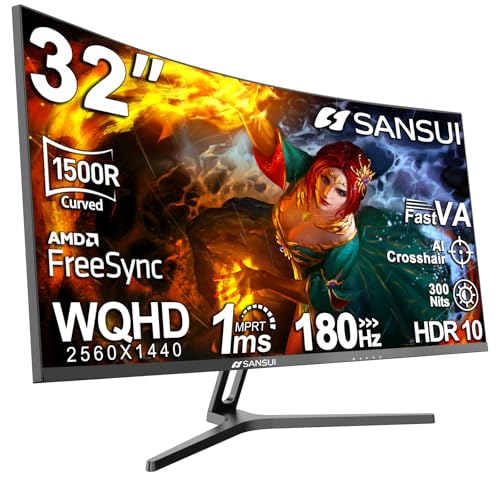
This SANSUI 32-inch model specifies 2560 × 1440 resolution, a 180Hz refresh rate, a 1500R curve, and a Fast VA panel. Its connection limits matter: HDMI supports up to 144Hz, while DisplayPort 1.4 supports up to 180Hz. Use DisplayPort when targeting the full listed refresh rate.
The tilt stand and 100 × 100mm VESA compatibility allow basic angle adjustment or mounting with a compatible VESA arm. The monitor has no built-in speakers, so plan on headphones or separate audio. Listed color coverage includes 125% sRGB and 95% DCI-P3; gamut figures do not establish color accuracy.
Pros: QHD at 180Hz over DisplayPort, curved 32-inch screen, and VESA mounting support. Cons: HDMI is limited to 144Hz, and speakers are not included.
Who should skip it: Skip this model if HDMI-only connectivity is essential for reaching 180Hz or built-in audio is required.
Best 27-Inch Full HD Option: ASUS TUF Gaming VG277Q1A
The ASUS TUF VG277Q1A uses a 27-inch 1920 × 1080 display with a 165Hz maximum refresh rate. Its 1ms MPRT claim is paired with ELMB and Adaptive-Sync, while FreeSync Premium supports variable refresh with compatible systems. ASUS also lists Shadow Boost for improving visibility in darker game areas.
HDMI and DisplayPort are included, along with cables for both connection types. ASUS specifies Adaptive-Sync support with NVIDIA GeForce GTX 10-series, GTX 16-series, RTX 20-series, and newer graphics cards. Confirm the GPU, cable, and display settings needed for the intended refresh rate.
Pros: 165Hz, adaptive-sync features, supplied HDMI and DisplayPort cables, and dark-scene adjustment. Cons: Full HD provides less detail than QHD on a 27-inch screen; 1ms MPRT is a stated response metric, not a guarantee of identical pixel transitions in all conditions.
Who should skip it: Choose a QHD option instead if sharper desktop text and additional image detail matter more than keeping rendering demands lower.
Best Listed Refresh Rate: SANSUI 32-Inch 240Hz
This curved SANSUI monitor specifies Full HD resolution and a 240Hz refresh rate over both HDMI and DisplayPort 1.4. FreeSync and a 1ms MPRT claim are listed, making it a high-refresh option for players whose PC can output the required frame rate.
The 32-inch 1500R screen gives games a broad, curved view, but 1920 × 1080 spreads Full HD across a large panel. It has no built-in speakers. The listing recommends a viewing distance of about 1.2 meters, a useful fit consideration rather than a universal requirement.
Pros: 240Hz listed on HDMI and DisplayPort, FreeSync, curved screen, and VESA 100 × 100mm compatibility. Cons: Full HD is relatively low detail for a 32-inch display, and external audio is needed.
Who should skip it: Skip it if QHD sharpness, a compact screen, or integrated speakers are priorities.
Best Resolution Flexibility: Acer Nitro VG270K L1
Acer lists a 27-inch IPS panel with 3840 × 2160 resolution at up to 72Hz, or 1920 × 1080 at up to 144Hz using DFR. These are alternative modes: the supplied specifications do not support describing this display as 4K at 144Hz simultaneously.
This choice suits users who value a 4K workspace or detailed content and can switch to Full HD for a higher refresh rate. FreeSync is listed. The product details mention both 1ms and up to 0.5ms GtG claims, but do not clarify the conditions for the faster figure.
Pros: IPS, 4K mode, and a specified 144Hz Full HD mode. Cons: DFR requires choosing between resolution and refresh rate; it does not provide 4K at 144Hz according to the supplied data.
Who should skip it: Skip it if you require QHD or 4K and 144Hz at the same time.
4K 144Hz Listing to Verify: ZZA 27-Inch 4K
ZZA advertises a 27-inch 3840 × 2160 display at 144Hz, with HDMI 2.1, DisplayPort 1.4, Adaptive Sync, tilt adjustment, and VESA mounting. The listed connections are relevant to a PC or console setup, but the supplied details do not identify panel type or specify refresh-rate support for each input and resolution combination.
The listing also claims 100% sRGB and a 4000:1 contrast ratio, but these figures are not independently verified here. Confirm the exact model documentation, port bandwidth, and return terms before relying on 4K at 144Hz. No built-in speakers are listed.
Pros: Advertised 4K 144Hz, HDMI 2.1, DisplayPort 1.4, Adaptive Sync, and VESA support. Cons: Supplied specifications leave panel type and port-specific refresh behavior unclear; no speakers are listed.
Who should skip it: Choose a model with clearer documentation if verified port behavior and established model details are essential.
How to Choose a 144Hz Gaming Monitor for a PC
Choose Resolution and Refresh Rate Together
Refresh rate describes how often the monitor can update its image; it does not guarantee matching game frame rates. A PC must render enough frames to benefit fully. QHD at 180Hz offers more pixels and a higher refresh ceiling, but demands more GPU rendering than Full HD.
Check the monitor’s exact mode limits. Acer’s DFR modes separate 4K at 72Hz from Full HD at 144Hz. SANSUI’s QHD monitor reaches its listed 180Hz through DisplayPort, while HDMI tops out at 144Hz.
Match Adaptive Sync to Your Graphics Card
FreeSync, Adaptive-Sync, and G-Sync compatibility can reduce tearing when supported by the monitor, GPU, connection, and settings. The ASUS VG27AQ3A lists FreeSync Premium, G-Sync compatibility, and Adaptive-Sync. The VG277Q1A specifies Adaptive-Sync support for listed NVIDIA GPU generations and FreeSync Premium. Verify current compatibility guidance for your exact graphics card.
Check Screen Size, Curve, and Desk Fit
Both 32-inch QHD choices are curved, but use different curves: 1000R on LG and 1500R on SANSUI. The 32-inch Full HD SANSUI instead prioritizes 240Hz. Compare screen size and curve with your seating distance, desk depth, and preferred viewing position before selecting.
For more screen-size comparisons, see our guides to IPS gaming monitors and 32-inch gaming monitors.
Confirm Ports, Mounting, and Audio
Use the port that supports your intended resolution and refresh rate, then confirm the graphics card has a matching output and suitable cable. SANSUI lists DisplayPort 1.4 for 180Hz on its QHD model and HDMI for up to 144Hz. Several listed models omit built-in speakers, so plan separate audio where needed.
VESA compatibility is specified for both SANSUI models and the ZZA display, each listing 100 × 100mm. Confirm that a mount supports the monitor’s VESA pattern and weight using manufacturer documentation; the supplied data does not provide monitor weights.
Frequently Asked Questions
Does a 144Hz monitor make games run at 144 FPS?
No. A 144Hz refresh rate is the display’s maximum update rate for a supported mode. Game frame rate depends on the PC, game, settings, and connection; the monitor cannot make the computer render additional frames.
Can Acer’s listed 4K mode run at 144Hz?
The supplied Acer specifications list up to 72Hz at 3840 × 2160 and up to 144Hz at 1920 × 1080 using DFR. They do not specify 4K at 144Hz.
Which monitor suits competitive games?
For the highest listed refresh rate, the SANSUI Full HD model specifies 240Hz. ASUS VG277Q1A offers 165Hz at Full HD, while ASUS VG27AQ3A provides 180Hz at QHD. Choose based on GPU output, preferred resolution, and the games you play, not refresh rate alone.




Write Your Review
No reviews yet. Be the first to share your experience!