

The best gaming headset depends first on whether you prefer a simple wired connection or the freedom of wireless play. For PC, the Logitech G PRO X Wireless Lightspeed adds 2.4 GHz audio and software customization, while the Razer BlackShark V2 X offers a lighter wired alternative.
For a lower-cost wired pick, consider the Logitech G432 or Razer BlackShark V2 X. The HyperX Cloud Alpha Wireless stands out for its advertised battery life, while the SteelSeries Arctis Nova 7 Wireless Gen 2 combines wireless and Bluetooth audio. Product details below are specification-based comparisons, not claims of independent performance measurements.

Pros
- Large 50mm audio drivers
- Convenient flip-to-mute 6mm boom microphone
- DTS Headphone:X 2.0 surround sound support
- Versatile 3.5mm and USB DAC connectivity
- Comfortable lightweight frame with rotating ear cups
Cons
- DTS Headphone:X 2.0 requires Logitech G HUB software
- Advanced surround sound unavailable on standard console connections
Pros
- Low-latency Lightspeed 2.4 GHz wireless connection
- Over 20 hours of rated battery life
- Durable steel and aluminum frame construction
- Includes both leatherette and velour ear pads
- Clear sound imaging from 50 mm drivers
Cons
- Console support is limited to stereo audio
- Nintendo Switch wireless audio requires docked mode

Pros
- Lightweight 240g frame for extended comfort
- Broad compatibility via standard 3.5mm audio jack
- TriForce 50mm drivers for distinct frequency tuning
- Cardioid microphone with targeted voice pickup
Cons
- Surround sound requires Windows 10 64-bit
- Xbox One may require a separate stereo adapter
Pros
- Wide compatibility across consoles, PC, and mobile
- Adjustable 360-degree noise-cancelling microphone
- Comfortable padded protein ear cushions
- Includes 3.5mm PC splitter cable
Cons
- USB connection required solely for LED lighting
- Older Xbox One controllers require an unincluded adapter

Pros
- Lightweight 240-gram frame with memory foam padding
- Versatile 3.5 mm cross-platform compatibility
- On-earcup volume wheel for quick adjustments
- Passive noise isolation via closed earcups
- Tuned 50 mm drivers for clear sound separation
Cons
- Wired 3.5 mm cable restricts player movement
- Lacks wireless audio capability

Pros
- Durable aluminum frame construction
- Comfortable memory foam ear cushions
- Detachable Discord and TeamSpeak certified microphone
- Large 53mm drivers provide detailed audio
- Broad multi-platform wired compatibility
Cons
- Virtual 7.1 surround sound unsupported on consoles
- Wired configuration limits user movement

Pros
- Advertised 80-hour battery life with quick charging
- Versatile 2.4GHz wireless and Bluetooth 5.2 connectivity
- Glasses-friendly memory foam ear cushions
- Flip-to-mute microphone with AI noise reduction
- Comprehensive 10-band EQ customization via Swarm II
Cons
- Lacks Xbox console compatibility
- QuickSwitch toggles connections instead of simultaneous audio mixing

Pros
- Advertised 300-hour wireless battery life
- Low-latency 2.4GHz wireless connectivity
- Dual chamber drivers for clear audio separation
- DTS Headphone:X spatial audio support
- Durable aluminum frame with memory foam ear cushions

Pros
- Universal 3.5mm cross-platform compatibility
- Detachable directional microphone with mute switch
- Lightweight build with memory foam padding
- Compatible with Windows Sonic spatial sound
Cons
- Restricted to a wired analog 3.5mm connection
- Lacks dedicated USB audio or wireless support
Pros
- Simultaneous 2.4GHz and Bluetooth wireless audio mixing
- Advertised 50-plus hour battery life with fast charging
- ClearCast Gen 2 mic with hardware noise reduction
- Cross-platform USB-C dongle with included USB-A adapter
- Durable steel frame paired with memory foam cushions
Cons
- Sonar AI microphone enhancement restricted to PC
How to Choose a Gaming Headset for PC
Start with the connection and devices you use. A 3.5 mm headset can connect directly to compatible audio jacks, though some PCs need separate headphone and microphone plugs or a splitter. USB wireless models require their included wireless connection, and advertised software features may be limited to particular operating systems.
Next, weigh microphone design, fit, and battery needs. A flip-to-mute or detachable mic can simplify everyday use, while memory foam and adjustable headbands address comfort preferences rather than guaranteeing a fit. For wireless models, compare the stated battery life and whether Bluetooth is available alongside the gaming connection.
Recommended Gaming Headsets
Logitech G432 Wired Gaming Headset: Straightforward Wired Value
The G432 uses 50 mm drivers and a 6 mm boom microphone that mutes when flipped up. It connects to a PC or Mac by USB DAC or 3.5 mm cable, providing options for different audio setups.
Pros: Two connection methods, a flip-to-mute microphone, and DTS Headphone:X 2.0 support through Logitech G HUB. Its rotating ear cups and lightweight leatherette padding are useful for storage and longer sessions.
Cons: The listed DTS feature requires G HUB, so it is not a plug-in-and-use surround feature on every setup. Console audio support is described as USB wireless stereo sound only for PlayStation, while Nintendo Switch wireless stereo is specified when docked.
Who should skip it: Skip it if you want wireless PC audio or need surround processing without installing software.
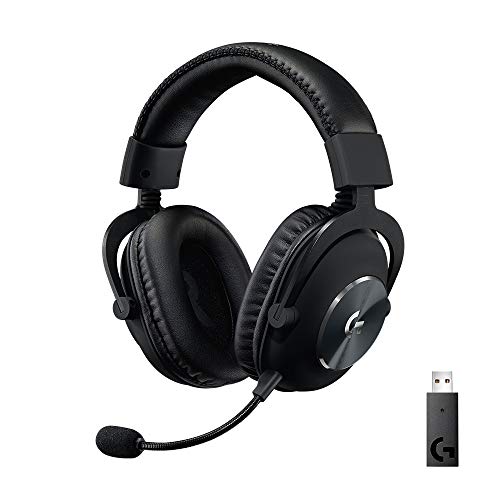
Logitech G PRO X Wireless Lightspeed: Wireless PC Features
This wireless headset uses a 2.4 GHz connection, with an advertised battery life of more than 20 hours and range up to 15 meters. Its 50 mm PRO-G drivers and DTS Headphone:X 2.0 surround features target players seeking positional audio options.
Pros: Memory foam pads include leatherette and breathable velour options, and the aluminum fork and steel headband provide a metal frame. Logitech G HUB offers audio and microphone settings, and the headset is listed for PlayStation and docked Switch use.
Cons: It costs more than the wired choices in this list, and its console compatibility is specified as USB wireless stereo sound only. G HUB is needed for the listed configuration options.
Who should skip it: Skip it if you prefer a wired headset or want confirmed surround processing on a console.
Razer BlackShark V2 X: Lightweight Wired Pick
The BlackShark V2 X weighs 240 g and uses 50 mm TriForce Titanium drivers, closed earcups, and a HyperClear cardioid microphone. Its 3.5 mm connection supports PC, Mac, PlayStation, Xbox One, and Switch according to the supplied compatibility information.
Pros: The low listed weight, memory foam cushions, and passive noise isolation suit players seeking a relatively lightweight wired design. Software-enabled 7.1 surround sound is available on Windows 10 64-bit.
Cons: The 7.1 software feature is limited to Windows 10 64-bit, and the headset has no wireless connection. An older Xbox One controller may require a separately purchased stereo adapter.
Who should skip it: Skip it if your PC uses another operating system and software surround is a priority, or if you need wireless audio.
Razer BlackShark V2 X Wired PlayStation: Simple Console Connection
This PlayStation-oriented variant connects through a 3.5 mm jack and is also described as compatible with other popular platforms. It has 50 mm TriForce Titanium drivers, a bendable cardioid microphone, and a volume wheel on the headset.
Pros: Its 240 g design, memory foam cushions, and onboard volume control provide practical features for wired play. The microphone can be positioned near the mouth, and the closed earcups are designed to reduce sound leakage.
Cons: The supplied details do not specify wireless use or a software surround feature for this PlayStation variant. A 3.5 mm connection also means cable length and device jack placement matter.
Who should skip it: Skip it if you need wireless PC audio or specifically want a documented Windows surround feature.
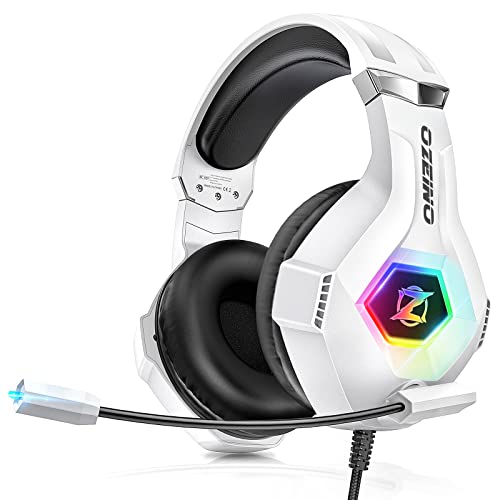
Ozeino Gaming Headset: Low-Cost Wired Setup
The Ozeino connects through a 3.5 mm jack and lists compatibility with PC, PlayStation, Xbox, Switch, laptops, and mobile devices. Its microphone rotates, while the USB connector powers the headset’s LED lighting rather than carrying audio.
Pros: The broad stated device compatibility and rotatable microphone suit a basic multi-device setup. A PC connection may use the included one-to-two 3.5 mm splitter for separate microphone and audio plugs.
Cons: The product information describes its audio as stereo surround, so the 7.1 wording should not be treated as proof of a particular processing method. The USB connector is for lighting only, and older Xbox One controllers may need an extra adapter.
Who should skip it: Skip it if you want wireless audio, software controls, or a clearly documented PC surround implementation.
Turtle Beach Stealth 600 Wireless Multiplatform: Wireless and Bluetooth
This model supports low-latency 2.4 GHz wireless and Bluetooth 5.2, with a QuickSwitch button for changing between them. Its listed compatibility covers PlayStation 5, PlayStation 4, PC, and mobile devices, and its advertised battery life is up to 80 hours.
Pros: Simultaneous wireless options, built-in EQ modes, a mappable control wheel, and a flip-to-mute microphone offer flexibility. The memory foam cushions are described as glasses-friendly, and quick charging is listed.
Cons: The stated platform list does not include Xbox or Switch, so confirm support before buying for those systems. Battery life is an advertised maximum, not a guarantee for every use pattern.
Who should skip it: Skip it if your main setup is Xbox or Switch, or if you want wired-only simplicity.
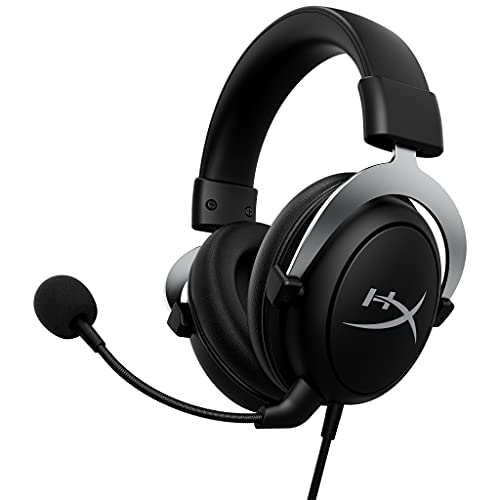
HyperX Cloud II: Wired Comfort and Detachable Mic
The Cloud II has 53 mm drivers, memory foam ear cushions, a padded headband, and a durable aluminum frame. Its detachable, noise-canceling microphone and hardware-driven virtual 7.1 surround are listed for PC and Mac.
Pros: The detachable microphone and closed earcups make it adaptable for gaming and everyday listening. The supplied compatibility details include PC, Mac, PlayStation, Xbox One, Switch, and mobile, with stereo audio on consoles and mobile devices.
Cons: Virtual 7.1 is specified for PC and Mac, not the listed consoles. The headset is wired, and the supplied details do not specify a 3.5 mm connection method for every device variant.
Who should skip it: Skip it if you need wireless play or want virtual surround features on a console.
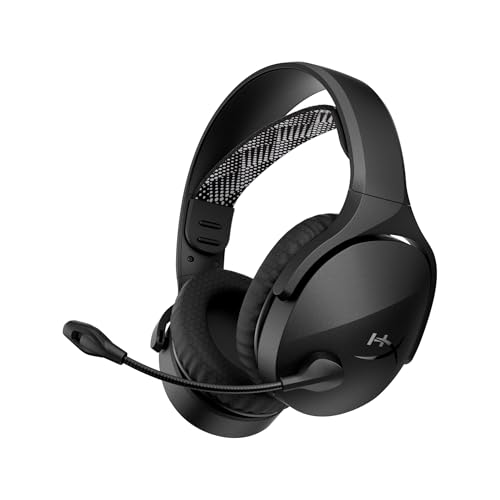
HyperX Cloud Alpha Wireless: Long Advertised Battery Life
The Cloud Alpha Wireless uses a 2.4 GHz connection and advertises up to 300 hours of battery life. Its dual-chamber drivers separate bass-heavy lows from mids and highs, while DTS Headphone:X spatial audio and a detachable noise-canceling microphone are also listed.
Pros: The stated battery capacity is notably long, and memory foam, breathable leatherette, and an aluminum frame support extended PC use. DTS spatial audio is intended to provide virtual localization and immersion.
Cons: This is a wireless gaming headset, and the product details focus on PC rather than naming a broad list of console platforms. Its 300-hour figure is an advertised maximum, not an independently verified runtime.
Who should skip it: Skip it if you need a wired headset or need explicit compatibility with a particular console before purchasing.
JBL Quantum 100M2: Detachable Microphone and 3.5 mm Audio
The Quantum 100M2 is a wired headset with a detachable directional microphone and memory foam padding. Its 3.5 mm connection is listed for PC, PlayStation, Xbox, Switch, mobile, Mac, and VR devices.
Pros: The detachable mic can be removed when not needed, and Windows Sonic compatibility is listed for Windows 10 PCs and Xbox One. A single 3.5 mm jack offers a straightforward option for devices with a compatible combo port.
Cons: It does not offer wireless audio, and Windows Sonic support is specified for Windows 10 and Xbox One rather than every platform. A PC with separate microphone and headphone jacks may require an appropriate splitter.
Who should skip it: Skip it if wireless connection options or dedicated onboard controls are essential.
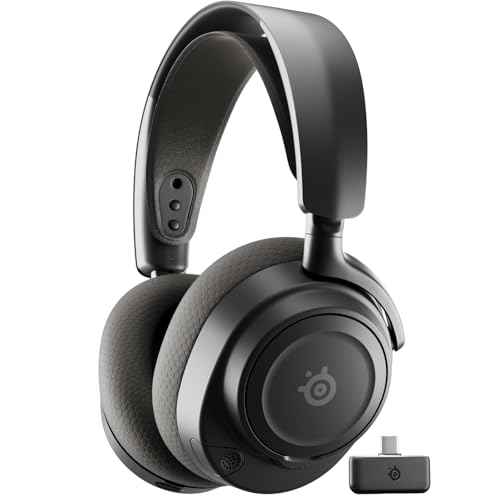
SteelSeries Arctis Nova 7 Wireless Gen 2: Audio Mixing and Presets
The Arctis Nova 7 Wireless Gen 2 supports simultaneous 2.4 GHz and Bluetooth audio, allowing game and mobile audio to be mixed. It lists more than 200 game-specific presets, 50-plus hours of battery life, a USB-C wireless dongle, and a microphone with noise rejection.
Pros: Dual wireless connections and customizable audio presets suit players who want more control over game and phone sound. The steel frame, elastic headband, memory foam cushions, and stated fast charging add practical convenience.
Cons: The supplied details do not list every compatible console or device, so check the exact platform requirements before purchase. Sonar AI enhancement is specified for PC, and the battery figure is an advertised duration.
Who should skip it: Skip it if you want an inexpensive wired headset or cannot confirm that the wireless dongle works with your platform.
Frequently Asked Questions
Is a wired or wireless headset better for PC gaming?
Wired models avoid battery charging and connect through a compatible audio jack or USB DAC. Wireless choices reduce cable clutter and may add Bluetooth, but check the connection type, supported devices, and stated battery life before choosing.
Does virtual surround sound work on every platform?
No. Several products specify software or spatial audio features for particular operating systems, such as G HUB for the Logitech G432 or Windows 10 64-bit for the Razer BlackShark V2 X. Check the exact model’s platform notes, and treat virtual surround as a processing feature rather than a guarantee of positional accuracy.
What should I check before connecting a headset to a PC?
Check whether the headset uses USB, a single 3.5 mm combo plug, or separate microphone and headphone plugs. Some listed models require a splitter or DAC depending on the PC’s available ports, and software features may require a compatible operating system.



Write Your Review
No reviews yet. Be the first to share your experience!