

The right cheap gaming headset for PC depends first on how you connect: choose wired 3.5 mm or USB for simplicity, or wireless if you value freedom of movement. The Logitech G432 and Razer BlackShark V2 X are straightforward wired choices, while the NUBWO and other wireless models add more connection options with extra compatibility checks.
This roundup compares the supplied specifications, not independently measured audio or microphone performance. Virtual surround sound, latency, and battery figures are manufacturer claims, so treat them as features to consider rather than guaranteed results.

Pros
- Large 50mm audio drivers
- Convenient flip-to-mute 6mm boom microphone
- DTS Headphone:X 2.0 surround sound support
- Versatile 3.5mm and USB DAC connectivity
- Comfortable lightweight frame with rotating ear cups
Cons
- DTS Headphone:X 2.0 requires Logitech G HUB software
- Advanced surround sound unavailable on standard console connections


Pros
- Dual 2.4GHz and Bluetooth wireless connections
- Low advertised latency down to 20ms
- Up to 50-hour battery life without lighting
- Fast 2.5-hour USB-C recharging
- Large 50mm dynamic drivers
Cons
- Not compatible with Xbox consoles
- Bluetooth mode unsupported on PS5 and PS4
- Microphone disabled on Nintendo Switch over Bluetooth

Pros
- Lightweight 240g frame for extended comfort
- Broad compatibility via standard 3.5mm audio jack
- TriForce 50mm drivers for distinct frequency tuning
- Cardioid microphone with targeted voice pickup
Cons
- Surround sound requires Windows 10 64-bit
- Xbox One may require a separate stereo adapter

Pros
- Large 50mm audio drivers
- Lightweight build under eight ounces
- Comfortable memory protein ear cushions
- Flexible microphone with integrated mute control
- Standard 3.5mm cross-platform compatibility
Cons
- USB plug only powers lighting without audio transmission
- Incompatible with Xbox 360
- Requires an adapter for PlayStation 3 use
Pros
- Wide compatibility across consoles, PC, and mobile
- Adjustable 360-degree noise-cancelling microphone
- Comfortable padded protein ear cushions
- Includes 3.5mm PC splitter cable
Cons
- USB connection required solely for LED lighting
- Older Xbox One controllers require an unincluded adapter

Pros
- Lightweight 240-gram frame with memory foam padding
- Versatile 3.5 mm cross-platform compatibility
- On-earcup volume wheel for quick adjustments
- Passive noise isolation via closed earcups
- Tuned 50 mm drivers for clear sound separation
Cons
- Wired 3.5 mm cable restricts player movement
- Lacks wireless audio capability

Pros
- Dual detachable USB and 3.5mm audio connections
- Detachable unidirectional noise-cancelling microphone
- Convenient on-ear volume and mute controls
- Comfortable memory protein ear padding
- Broad multi-platform gaming compatibility
Cons
- Virtual 7.1 surround sound only functions on PC
- Surround sound features require a USB connection

Pros
- Extremely lightweight 0.66-pound frame
- Foldable design enables compact storage
- Comfortable memory foam ear cushions
- Flexible noise-filtering microphone
- Plug-and-play 3.5mm analog connection
Cons
- Requires audio splitter for PC connectivity
- Older Xbox One controllers require separate adapter

Pros
- Versatile 2.4GHz, Bluetooth, and 3.5mm connections
- Up to 100-hour rated battery life
- Simultaneous Bluetooth pairing for incoming mobile calls
- Large 50mm composite diaphragm drivers
Cons
- Xbox consoles require a wired 3.5mm connection
- Wireless functionality on consoles requires USB dongle
Logitech G432: A flexible wired pick for PC and consoles
The Logitech G432 uses 50 mm drivers and connects to a PC or Mac through its USB DAC or a 3.5 mm cable. Its 6 mm boom microphone flips up to mute, and DTS Headphone:X 2.0 requires Logitech G HUB software.
Pros: Two connection choices, a flip-to-mute microphone, and rotating ear cups make it a practical option for users switching between compatible devices. Cons: It is wired, and its advertised DTS surround feature depends on software rather than working as a standalone hardware mode.
Who should skip it: Skip it if you want wireless play or prefer not to install Logitech G HUB for the surround feature.
Razer BlackShark V2 X: Lightweight wired headset with a focused mic
The BlackShark V2 X connects through a 3.5 mm jack and is listed at 240 g. Its 50 mm drivers, closed earcups, memory foam cushions, and cardioid microphone suit PC players who want a simple wired setup.
Pros: The low listed weight, passive isolation design, and microphone pickup pattern are useful considerations for longer voice-chat sessions. Cons: The 7.1 surround feature is software-enabled and specified for 64-bit Windows 10; it is not a wireless headset.
Who should skip it: Skip it if you need wireless connectivity, or if your PC does not meet the stated Windows requirement for surround audio.
Razer BlackShark V2 X Wired PlayStation: A lower-cost 3.5 mm alternative
This PlayStation-branded version also uses a 3.5 mm connection and 50 mm drivers, with a bendable cardioid mic, memory foam cushions, and an on-headset volume wheel. Its listed compatibility includes PlayStation 5, with the 3.5 mm jack supporting other popular platforms.
Pros: The physical volume control and flexible microphone make everyday adjustments convenient, while the wired connection avoids battery management. Cons: The supplied details do not specify a PC-specific surround feature for this version, so do not assume it matches every software feature of the other BlackShark model.
Who should skip it: Skip it if you need wireless use or want confirmed PC surround software support as a deciding feature.
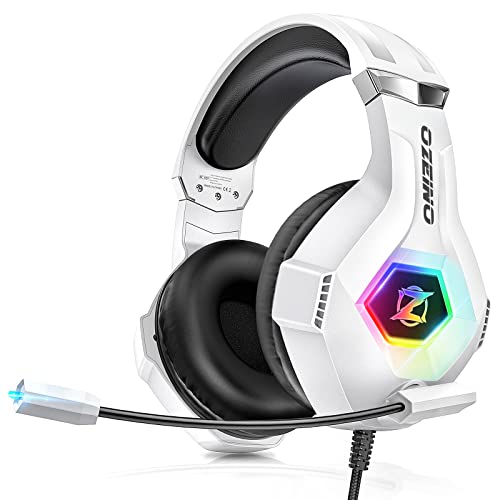
Ozeino Gaming Headset: A basic wired choice with PC splitter requirements
The Ozeino connects through 3.5 mm and lists support for PC, PlayStation, Xbox, Switch, laptops, and mobile devices with the appropriate jack. On a PC, its supplied guidance calls for a 1-to-2 audio splitter, while its USB connector powers the LED lighting only.
Pros: Broad stated analog compatibility and a rotatable microphone suit a shared headset for several devices. Cons: PC microphone and audio connections may require the splitter, and USB does not carry headset audio according to the supplied details.
Who should skip it: Skip it if you want a single USB audio connection or do not want to manage separate PC audio and microphone plugs.
Tatybo Gaming Headset: A lightweight wired option for basic chat
Tatybo specifies 50 mm drivers, a flexible microphone with mute control, a braided cable, and a 3.5 mm connection for compatible devices. The listing describes the headset as weighing less than 8 oz, making weight a useful point of comparison for buyers seeking a lighter wired model.
Pros: Its analog connection and microphone mute are uncomplicated, and the braided cord is a documented construction feature. Cons: It requires a compatible 3.5 mm jack, and the supplied information does not give detailed PC surround software or USB audio support.
Who should skip it: Skip it if your PC lacks a compatible headset jack or you need wireless audio.
SENZER SG500: Foldable wired headset for storage and travel
The SENZER SG500 has foldable ear cups, telescopic arms, memory foam padding, and a 3.5 mm connection. The listing specifies a splitter for PC use, so check whether your desktop has separate headphone and microphone ports or whether the needed adapter is included.
Pros: Its folding design may make storage easier, and the bendable microphone can be positioned for voice chat. Cons: PC setup can require an audio splitter, and the supplied data does not identify a USB audio connection.
Who should skip it: Skip it if you need a wireless headset or want to avoid checking PC port and splitter compatibility.
EKSA E900 Pro: Wired USB and 3.5 mm flexibility
The EKSA E900 Pro includes removable USB and 3.5 mm cables, a detachable microphone, and onboard volume and mute controls. Its 7.1 virtual surround feature is specified for PC when connected by USB, while the 3.5 mm option supports compatible devices without that stated surround mode.
Pros: The two cable types provide useful flexibility, and a detachable mic can be removed when voice chat is not needed. Cons: Its surround feature depends on using USB with a PC, and its wired design will not suit someone seeking cable-free play.
Who should skip it: Skip it if you want a wireless model or need virtual surround over a 3.5 mm connection.
NUBWO Wireless Gaming Headset: Multiple modes and long advertised battery life
The NUBWO offers 2.4 GHz wireless for PC, PS5, and PS4, Bluetooth 5.3 for mobile devices, and a 3.5 mm wired mode. The manufacturer claims up to 100 hours of battery life; its Xbox Series compatibility is limited to the wired connection according to the supplied details.
Pros: Multiple connection modes can accommodate a PC and mobile device, and the 3.5 mm option is useful when wireless is unsuitable. Cons: The 100-hour figure is an advertised claim, not an independently confirmed result, and the supplied compatibility details do not list Xbox wireless support.
Who should skip it: Skip it if you need wireless Xbox Series audio or want a headset that never needs charging.
Valorise Wireless Gaming Headset: Wireless modes with platform caveats
This headset advertises 2.4 GHz wireless, Bluetooth 5.4, and 3.5 mm wired audio. Its stated battery estimates vary by mode and lighting or microphone use, and the product data explicitly excludes Xbox wireless compatibility.
Pros: The combination of wireless and wired modes offers flexibility, and the listing specifies use while charging. Cons: Compatibility differs by mode, Switch microphone support is listed as unavailable through Bluetooth, and advertised battery life depends on configuration.
Who should skip it: Skip it if you need Xbox wireless support or require the microphone to work on Switch through Bluetooth.
WESEARY Wireless Gaming Headset: A dual-mode option with explicit connection rules
WESEARY lists 2.4 GHz and Bluetooth modes, plus advertised battery life of up to 35 hours with lighting or 50 hours without it. For PS5, PS4, PC, laptop, and Mac use, its instructions say to connect the USB and Type-C transmitter components together; neither wireless mode supports Xbox.
Pros: The stated 2.4 GHz mode has a latency claim of 20 ms or less, and the headset offers a lighting-off battery estimate. Cons: Setup has a specific dongle requirement, Bluetooth is not listed for PS5 or PS4, and Xbox is unsupported in both modes.
Who should skip it: Skip it if you need Xbox compatibility or want a simpler receiver setup for PC or console.
How to choose a cheap PC gaming headset
Check your PC ports before choosing a connection
A 3.5 mm headset may use one combined headset jack or separate headphone and microphone ports. Models such as the Ozeino and SENZER specify a PC splitter, while the Logitech G432 and EKSA E900 Pro provide USB options. Confirm the exact cable and port arrangement before buying.
Choose wired or wireless based on how you play
Wired models avoid battery management and usually connect directly, but cable length and port access matter. Wireless sets add mobility, yet you must verify whether your PC uses the supplied USB or Type-C receiver, Bluetooth, or both. Do not assume a listed wireless mode works on every console.
Treat surround sound and latency as claims to compare
Virtual surround features may require specific software, operating systems, or connection modes. For example, the Logitech G432 requires G HUB for DTS Headphone:X 2.0, and the Razer BlackShark V2 X lists Windows 10 64-bit for its 7.1 software feature. Advertised latency figures for wireless models are not independent measurements.
Prioritize fit and microphone controls that match your routine
Weight, cushion material, rotating cups, and headband adjustment can help narrow choices, but fit is personal. For frequent calls, consider whether you prefer a flip-up mute, a detachable mic, or a separate mute control. The listed features describe design, not a guarantee of comfort or voice quality.
Frequently asked questions
Can a 3.5 mm gaming headset work with a PC?
Yes, if the PC has a compatible headset jack. If it has separate headphone and microphone ports, a splitter may be needed for models whose instructions specify one. Check the headset cable and the PC’s port layout before purchase.
Does virtual 7.1 surround sound guarantee better positional audio?
No. A surround label describes a processing feature, not a guarantee of improved performance for every game or listener. Check the required software, operating system, and connection mode, then consider whether standard stereo better fits your setup.


Write Your Review
No reviews yet. Be the first to share your experience!