

The best keyboards for game development depend on how you divide time between coding, editor shortcuts, documentation, and gameplay. For a primary work keyboard, a full-size layout keeps function keys and a number pad available, while a compact model saves desk space.
Among these options, the RedThunder K10 Wired offers a full-size layout and included wrist rest, while the TMKB 60% Mechanical has specified linear switches and full-key rollover. Compact membrane models cost less in features and space, but may require shortcuts for navigation. These recommendations are based on the supplied specifications, not independent performance measurements.

Pros
- Durable all-metal keyboard panel
- Quiet low-noise key travel
- Four adjustable mouse DPI settings up to 7200
- Broad compatibility with PC and major consoles
- Convenient 12-key multimedia shortcut layout
Cons
- Anti-ghosting is limited to 26 keys
- Rainbow backlighting lacks full per-key RGB customization

Pros
- Space-saving 68-key layout with dedicated arrows
- Detachable Type-C cable for easy travel
- Quiet membrane operation suitable for shared rooms
- 26-key anti-ghosting for accurate key registration
Cons
- Uses membrane switches instead of authentic mechanical switches
- No integrated number pad for data entry

Pros
- Compact 68-key layout saves desktop space
- Detachable USB Type-C cable aids portability
- Integrated RGB lighting with 10 dynamic modes
- Broad plug-and-play compatibility across PCs and consoles
Cons
- Uses crater membrane keys instead of mechanical switches
- Compact footprint lacks a dedicated numeric keypad

Pros
- Complete 3-in-1 desktop gaming accessory bundle
- Reinforced steel plate ensures keyboard rigidity
- Ergonomic memory foam faux-leather wrist rest included
- Adjustable optical mouse sensitivity up to 7200 DPI
Cons
- Uses mechanical-feel membrane switches instead of authentic mechanical
- Anti-ghosting is restricted to 26 specific keys

Pros
- Compact 60% layout maximizes mouse room
- Smooth 45g linear red switches
- Detachable USB-C cable enhances portability
- Durable double-shot keycaps resist fading
- Full 61-key anti-ghosting rollover
Cons
- Lacks dedicated arrow and navigation keys
- Limited to wired USB-C operation

Pros
- Shared single USB receiver for both peripherals
- Rechargeable internal batteries for keyboard and mouse
- Durable metal top plate and double-shot keycaps
- Adjustable mouse tracking up to 3200 DPI
Cons
- Battery life rated at only 8 hours with backlighting
- Limited support for Mac OS systems
- Long initial charging requirement of eight hours
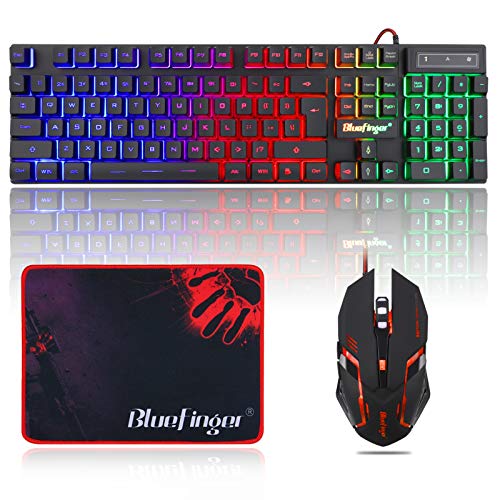
Pros
- Complete keyboard, mouse, and mouse pad bundle
- Internal steel plate strengthens keyboard durability
- Four adjustable mouse DPI sensitivity settings
- Braided USB cables resist everyday wear
- Driver-free setup across multiple operating systems
Cons
- Rainbow lighting lacks per-key RGB customization
- Maximum mouse sensitivity capped at 2000 DPI

Pros
- Compact layout frees up significant mouse space
- Detachable Type-C cable aids portability
- Quiet membrane typing with simulated mechanical feel
- Retains dedicated physical arrow keys
Cons
- Uses membrane switches instead of true mechanical switches
- Anti-ghosting is limited to 26 keys
- Lacks a dedicated numeric keypad
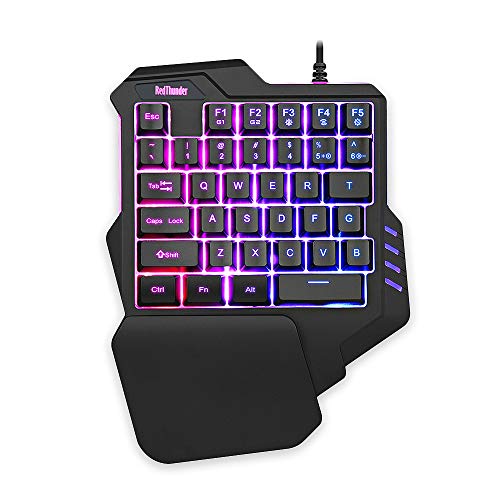
Pros
- Compact footprint saves desk space
- Full 35-key anti-ghosting capability
- Built-in wrist rest for ergonomic support
- Hardware macro recording without additional software
- Driver-free plug-and-play connectivity
Cons
- Limited key count unsuitable for general typing
- Only two macro recording shortcut options
- Backlighting restricted to preset colors and modes
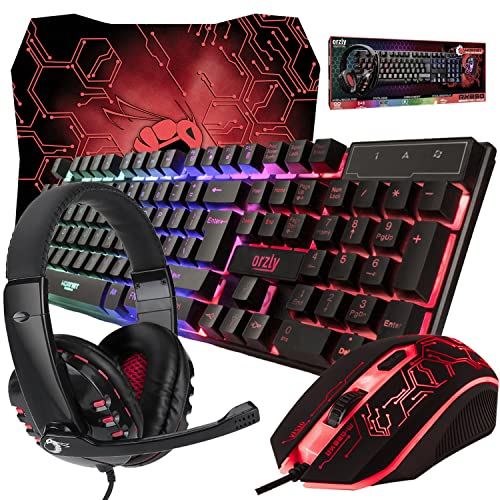
Pros
- Complete all-in-one setup ready out of the box
- Broad compatibility across consoles and PC platforms
- Spill-resistant keyboard design with anti-ghosting support
- Lightweight ambidextrous mouse suitable for either hand
- Headset includes convenient in-line volume controls
Cons
- Membrane keyboard lacks mechanical key switches
- Mouse sensitivity restricted to four fixed DPI presets
- Mouse switches rated for only one million clicks
How to Choose a Keyboard for Game Development
For coding and engine work, consider whether you rely on dedicated arrow keys, function keys, or a number pad. Compact layouts free up mouse space, but some functions may require Fn-layer combinations, which can slow workflows that use those keys often.
Switch type and rollover matter for different reasons. The TMKB specifies linear red mechanical switches and 61-key rollover, while the membrane options describe a mechanical feel rather than mechanical switches. Anti-ghosting figures vary by model, so compare the stated key limits against your gaming needs rather than assuming every key can register together.
Connection and operating-system support are also worth checking against your development machine. Several picks use wired USB, and some list macOS or Linux compatibility, but the product information does not establish that every special function works identically across systems.
Recommended Keyboards
RedThunder K10 Wired: Full-Size Layout with Wrist Rest
The wired RedThunder K10 has 104 keys, including function keys and a numeric keypad, plus 26 anti-ghosting keys. That familiar layout suits developers who regularly use navigation controls, number entry, and editor shortcuts without switching layers.
Pros: Full-size layout, built-in steel plate, 26-key anti-ghosting, and an included memory-foam wrist rest. The bundled mouse is specified at up to 7200 DPI.
Cons: It takes more desk space than compact boards, and the listed mechanical feel does not mean it uses mechanical switches. It is a wired keyboard and mouse set.
Who should skip it: Developers who want a small footprint, a wireless setup, or documented mechanical switches should consider another option.
TMKB 60% Mechanical: Compact Board with Linear Switches
The TMKB has 61 keys, red linear switches with a stated 45-gram actuation force, and 61-key rollover. Its compact ANSI layout and detachable USB-C cable may suit developers who want mechanical switches and more room for mouse movement.
Pros: The product specifies 50 million keystrokes of switch durability, double-shot keycaps, adjustable LED lighting, and plug-and-play compatibility with Windows, Linux, and macOS.
Cons: A 60% layout omits dedicated function and navigation rows, so common development shortcuts may involve Fn combinations. The supplied information does not detail remapping software.
Who should skip it: Choose a larger board if your editor workflow depends on dedicated function keys, arrow keys, or a number pad.
AULA T102: Full-Size Wired Combo for General Use
The AULA T102 combines a 104-key keyboard with a wired mouse. Its listing specifies 26-key anti-ghosting, 12 multimedia combinations, adjustable lighting, and compatibility that includes Windows and Mac systems. The full layout can be useful for coding alongside general desktop work.
Pros: Full-size keys, quiet membrane-style typing as described by the listing, adjustable backlighting, and a bundled mouse make this a straightforward all-in-one setup.
Cons: The supplied specifications do not identify mechanical switches or dedicated programming features. The keyboard and mouse are wired, and the listing does not clarify the extent of Mac-specific key support.
Who should skip it: Skip this combo if you need confirmed macOS shortcut behavior, mechanical switches, or a compact keyboard footprint.
GEODMAER 65%: Compact Membrane Board with Arrow Keys
This GEODMAER 68-key model keeps separate arrow keys while omitting the number pad. It uses a detachable Type-C cable and lists 26 no-conflict keys, making it a compact option for developers who want arrows without choosing a 60% layout.
Pros: Separate arrow keys, compact dimensions by design, media shortcuts, adjustable backlighting, and a wired connection. Its membrane construction is described as quiet.
Cons: It is a membrane keyboard with a mechanical feel, not a mechanical-switch model. The 65% layout lacks a number pad and dedicated full-size navigation cluster.
Who should skip it: Developers who need full-size navigation keys or confirmed mechanical switches should look elsewhere.
CHONCHOW Mini RGB 60%: Portable Compact Alternative
The CHONCHOW is a 68-key compact keyboard with a detachable USB Type-C cable, adjustable lighting, and compatibility listed for Windows, Mac, and several consoles. Its small footprint may help when desk space is limited or the keyboard needs to travel.
Pros: The listing describes curved keycaps, foldable feet, a detachable cable, and multiple lighting adjustments. Plug-and-play USB connection avoids a stated need for additional drivers.
Cons: The supplied information does not specify switch type, rollover capacity, or dedicated programming features. A compact layout can mean relying on secondary functions for everyday development shortcuts.
Who should skip it: Avoid choosing it on the assumption that it has mechanical switches or extensive key rollover, since those details are not specified.
Other Options in This Roundup
The wireless RedThunder K10 provides a 2.4 GHz keyboard-and-mouse connection through a shared USB receiver. Its listed keyboard battery is 3000 mAh, and the listing claims up to eight hours of use with lighting on. Those details may appeal to cable-conscious setups, but wireless charging and battery management add considerations that wired models avoid. Mac keyboard support is described as limited.
The BlueFinger combo is a wired 104-key option with 19 non-conflict keys, a mouse, and a mouse pad. The Orzly RX-250 bundle adds a headset and mouse to a full-size membrane keyboard with 19-key rollover. Both can make sense when peripherals are also needed, though neither listing specifies mechanical switches.
The RedThunder one-handed keypad is a supplement rather than a complete keyboard. It has 35 anti-ghosting keys and two macro recording keys, which may help with a limited set of repeated inputs, but it cannot replace a standard board for general coding.
The second GEODMAER listing describes the same 65% layout and key features as the other GEODMAER model, but it is a separate product listing. Confirm the exact listing and its compatibility details before purchase.
Related Keyboard Guides
For more layout comparisons, see our guides to keyboards for gaming and typing and 60% gaming keyboards. Browse the wider Gaming Keyboards category for additional options.
Final Recommendation
Choose the wired RedThunder K10 if you want a full-size layout, mouse, and wrist rest in one set. The TMKB is the stronger fit for someone who specifically wants documented linear mechanical switches and a compact board, while the GEODMAER retains separate arrows in a smaller membrane layout.
For game development, prioritize the keys and operating-system support your editor actually uses over lighting or bundled accessories. Verify layout and shortcut compatibility for your system before choosing a compact keyboard.


Write Your Review
No reviews yet. Be the first to share your experience!