

The best gaming mouse for MMO play gives you useful command access without making its layout or software a poor fit. For a large thumb grid and a lower-complexity wired setup, consider the Redragon M908; for wireless flexibility and swappable layouts, compare Razer’s Naga models. This guide evaluates the supplied specifications, not independent performance measurements.
Choose the button arrangement first. A 12-button thumb grid can keep many game commands close at hand, while smaller or interchangeable layouts may suit players who switch between genres. Next, decide whether a cable, 2.4 GHz wireless, or Bluetooth connection fits your setup, and check which operating system supports the configuration software.

Pros
- 18 programmable buttons including 12-key side grid
- Pixart PAW3327 sensor with up to 12400 DPI
- Includes eight-piece modular weight tuning set
- Five onboard memory profiles for rapid switching
Cons
- Macro remapping software is incompatible with macOS
- Lacks wireless connectivity options

Pros
- 19 programmable buttons for comprehensive macro control
- Dual 2.4 GHz wireless and Bluetooth connectivity
- Up to 400 hours of battery life
- Focus Pro 30K sensor tracks on glass
- Dual-mode tactile and free-spin scroll wheel
Cons
- Requires replaceable batteries instead of onboard USB recharging
- Advanced tuning requires the Razer Synapse desktop software

Pros
- Interchangeable side plates for multiple game layouts
- Flexible HyperSpeed, Bluetooth, and wired connectivity
- High-resolution 50,000 DPI optical sensor
- Up to 280 hours of battery life over Bluetooth
- Versatile multi-mode tilt scroll wheel
Cons
- Full software customization is not supported on macOS
- Wireless charging docks and accessories sold separately

Pros
- 15 programmable buttons for complex keybinds
- Dedicated eight-button MMO side panel
- Ergonomic grip shape for extended sessions
- Five onboard DPI switching levels
- Customizable dynamic RGB lighting modes
Cons
- Tethered wired design limits placement flexibility
- Advanced keybinds require dedicated software setup

Pros
- Swappable 2, 6, and 12-button side plates
- Up to 300 hours of battery life on Bluetooth
- Customizable scroll wheel tension and scroll modes
- Focus Pro 30K optical sensor tracks on glass
- Durable Gen-3 optical switches prevent double-clicking
Cons
- Wireless charging dock and puck sold separately
- Relatively heavy design at 0.48 pounds

Pros
- 19 programmable buttons for complex macros
- Modular weight tuning with eight removable weights
- Five onboard memory profiles for custom layouts
- Wide DPI adjustment range up to 12400
Cons
- Software download required for macro and lighting customization
Pros
- 12 dedicated programmable side buttons
- Dual 2.4GHz wireless and USB-C wired modes
- Pixart 3335 sensor with adjustable 16000 DPI
- Up to 80 hours of battery in Eco mode
- Full wireless configuration through dedicated software
Cons
- Battery life drops to 45 hours with RGB enabled
- Key remapping requires proprietary driver software

Pros
- 16 programmable buttons for complex keybinds
- High-accuracy 33,000 DPI optical sensor
- Versatile Slipstream wireless, Bluetooth, and wired connections
- Native Elgato Stream Deck software integration
- Low-latency 1,000Hz polling rate support

Pros
- Adjustable eight-piece weight tuning set
- Nine programmable buttons with macro support
- Five onboard memory profiles
- Durable Omron micro switches and Teflon feet
Cons
- Official operating system support limited to Windows
- Lacks wireless connectivity options

Pros
- Flexible tri-mode wireless and wired connectivity
- Four modular magnetic side plates included
- Up to 16 programmable macro buttons
- Web-based configuration saves directly to onboard memory
- Large 1000mAh rechargeable battery capacity
Cons
- Ergonomic contour is restricted to right-handed users
- Honeycomb shell design leaves internals open to debris
How These MMO Mice Differ
These recommendations range from straightforward wired MMO designs to wireless mice with multiple connection options and removable side plates. Maximum DPI figures and button counts are specifications, not proof that one model will perform better for every player. Comfort, reach, and software needs depend on your hand and setup.
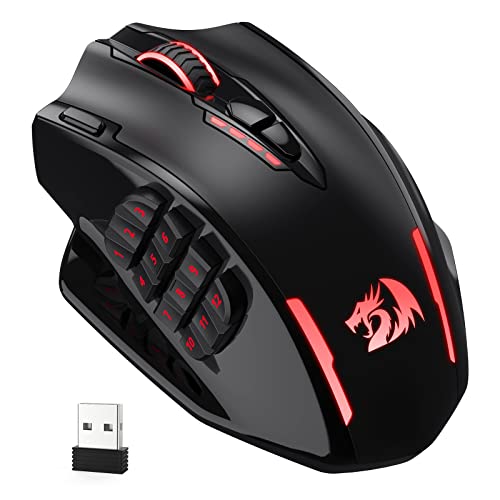
Redragon M908 Wired MMO RGB Gaming Mouse 12400 DPI
The M908 has 18 programmable buttons, including 12 side buttons, five memory profiles, and an adjustable weight set. Its Pixart PAW3327 sensor, 1,000 Hz polling rate, and wired USB connection make it a feature-rich option for players who want a thumb grid without wireless configuration.
Pros: Extensive remapping, onboard profiles, adjustable weights, and a wired connection. Cons: The supplied information lists Windows versions for programmable use, while Mac is specified for normal use only; the layout may be excessive if you need few side commands. Who should skip it: Players seeking a compact mouse or documented full customization on macOS.
Redragon M908 Wired MMO Gaming Mouse 12400 DPI
Razer Naga V2 HyperSpeed Wireless MMO
This wireless model combines 19 programmable buttons with 2.4 GHz HyperSpeed and Bluetooth connectivity. Its stated battery life is up to 250 hours over 2.4 GHz or 400 hours over Bluetooth, and the Focus Pro 30K sensor supports players who want wireless use alongside extensive remapping.
Pros: Two wireless connection choices, a high button count, and long stated battery life. Cons: It does not include the swappable side plates found on Naga V2 Pro models, and the supplied specifications do not describe a wired play mode. Who should skip it: Players who require a cable connection or interchangeable thumb layouts.
Razer Naga V2 HyperSpeed Wireless MMO
Razer Naga V3 Pro Wireless MMO Gaming Mouse
The Naga V3 Pro includes magnetic side plates with 12, 6, or 2 buttons, making its layout adaptable for MMO, MOBA, and other game types. It supports HyperSpeed Wireless, Bluetooth, and USB-C wired mode, with a Focus Pro 50K sensor and up to 155 hours on HyperSpeed or 280 hours on Bluetooth.
Pros: Three side-plate layouts, three connection modes, and broad customization through Razer Synapse on Windows. Cons: Full customization is specified for Windows; macOS supports core functions and onboard settings. Wireless charging accessories are sold separately. Who should skip it: Buyers who do not need interchangeable plates or its wider feature set.
Razer Naga V3 Pro Wireless MMO Gaming Mouse
Redragon M811 Wired RGB MMO Gaming Mouse 10000 DPI
The M811 offers 15 programmable buttons, including eight side buttons, and five default DPI levels. Its wired design and dedicated software suit MMO players who want several thumb commands but prefer fewer side buttons than a 12-button grid provides.
Pros: A middle-ground button count, remapping, and customizable lighting. Cons: It is wired, and the supplied details do not state a polling rate, sensor model, or battery information. Who should skip it: Wireless users or players who specifically want a 12-button thumb grid.
Redragon M811 Wired RGB MMO Gaming Mouse 10000 DPI
Razer Naga V2 Pro Wireless MMO Gaming Mouse
The Naga V2 Pro includes magnetic 12-, 6-, and 2-button side plates, up to 19 plus one programmable buttons, and a HyperScroll Pro wheel with adjustable scroll behavior. It connects through HyperSpeed Wireless or Bluetooth and supports USB-C charging, giving players flexible control layouts and connection choices.
Pros: Interchangeable thumb layouts, configurable scroll resistance, and up to 300 hours of stated Bluetooth battery life. Cons: Its stated HyperSpeed battery life is up to 150 hours, and the charging dock or wireless charging puck is sold separately. Who should skip it: Players who want a simple fixed-layout mouse or do not need its scroll and plate options.
Razer Naga V2 Pro Wireless MMO Gaming Mouse
Redragon Gaming Mouse, MMO Mouse Gaming UP 12400
This wired Redragon has 19 remappable buttons, 12 side buttons, five memory profiles, and adjustable weights. Its listed polling-rate range is 125 to 1,000 Hz, and its DPI adjusts from 100 to 12,400 through the supplied software, making it a configurable option for players who like to tune weight and controls.
Pros: Many programmable controls, stored profiles, and removable weights. Cons: It is wired, and the supplied information does not specify operating-system compatibility for the configuration software. Who should skip it: Wireless players or anyone who wants clearly documented software support for a particular operating system.
Redragon Gaming Mouse, MMO Mouse Gaming UP 12400
Redragon M913 Wireless RGB MMO Gaming Mouse 16000
The M913 provides 12 side buttons and 16 programmable buttons overall, with both 2.4 GHz wireless and USB-C wired modes. Its listed battery life is 45 hours with backlighting on or up to 80 hours in Eco mode, suiting players who want wireless flexibility without giving up a wired option.
Pros: Dual connection modes, programmable controls, and adjustable DPI settings. Cons: Its stated battery life is shorter with backlighting enabled, and the supplied details do not specify Bluetooth support. Who should skip it: Players who want Bluetooth or a stated battery life beyond these figures.
Redragon M913 Wireless RGB MMO Gaming Mouse 16000
Corsair Scimitar Elite Wireless SE MMO MOBA PC
This Corsair model has 16 programmable buttons, a MARKSMAN S sensor with up to 33,000 DPI, and 2.4 GHz SLIPSTREAM wireless, Bluetooth, and USB connectivity. Native Elgato Stream Deck integration adds a workflow option for users who already use that software, beyond MMO key mapping.
Pros: Multiple connection options, 16 programmable buttons, and Stream Deck integration. Cons: The supplied details do not give battery-life figures or describe interchangeable side plates, so those needs cannot be assessed from the available specifications. Who should skip it: Players who require documented battery runtime or adjustable side-button layouts.
Corsair Scimitar Elite Wireless SE MMO MOBA PC
Redragon M801 Gaming Mouse
The wired M801 has nine programmable buttons, five memory profiles, and a stated maximum DPI of 16,000. Its lower button count than the MMO-focused thumb-grid models may suit players who want some remapping without dedicating as many controls to the mouse.
Pros: Programmable profiles, a wired connection, and adjustable weights. Cons: Nine buttons provide fewer dedicated commands than the 12-side-button options, and the supplied compatibility information lists Windows rather than macOS. Who should skip it: Players who need a dense MMO thumb grid or documented Mac support.
SM809 Pro Tri-Mode MMO Gaming Mouse
The SM809 Pro combines 2.4 GHz wireless, Bluetooth 5.0, and USB-C wired connectivity with four magnetic side panels. The panels offer different layouts, including a nine-button thumb grid, and its configuration is described as browser-based with onboard storage and compatibility with Windows, Mac, and Linux.
Pros: Three connection modes, interchangeable panels, and stated compatibility with several operating systems. Cons: The supplied information does not state battery runtime, and its browser-based configuration depends on the named driver website. Who should skip it: Buyers who prefer established desktop configuration software or want documented battery-life figures.
SM809 Pro Tri-Mode MMO Gaming Mouse
How to Choose an MMO Mouse
Match the Button Layout to Your Games
Count the commands you genuinely want on the mouse before prioritizing the highest button total. A 12-button grid can accommodate many MMO keybinds, but a smaller layout can be easier to navigate if your rotation uses fewer mouse commands. Swappable plates make more sense if you move between genres and want different thumb layouts.
Choose Wired, Wireless, or Multi-Mode
Wired models such as the M908, M811, and M801 avoid battery management. Wireless models vary: some offer 2.4 GHz and Bluetooth, while others also specify wired use. Check the exact connection modes rather than assuming a wireless mouse includes Bluetooth or a cable-play option.
Check Software and Operating-System Support
Button remapping and macros may depend on configuration software. The supplied details identify Windows support for some models, limited Mac functionality for the Naga V3 Pro, and broader stated compatibility for the SM809 Pro. Confirm that the available software supports your computer before relying on custom profiles.
Consider Weight, DPI, and Extra Controls
Removable weights on several Redragon models let users adjust the mouse’s weight, but they do not guarantee a preferred feel. DPI describes sensor sensitivity settings, not overall suitability for MMO play. Scroll-wheel features, profile storage, and lighting are secondary to a comfortable grip and reachable buttons.
Frequently Asked Questions
How many buttons should an MMO mouse have?
There is no single ideal count. Choose enough programmable controls for the actions you want readily available, then consider whether you can distinguish and reach them comfortably. A 12-button grid offers more mapped options than a nine-button design, but more buttons are not automatically better for every player.
Is a wireless mouse suitable for MMO gaming?
Several listed models advertise 2.4 GHz wireless connections for gaming, and some also support Bluetooth or wired operation. Compare the specific connection modes and stated battery information. Do not assume all wireless models offer the same choices or runtime.
Do these mice work with Mac?
Compatibility and customization support vary by model. The M908 listing specifies normal use on Mac but names Windows for programmable use, while the Naga V3 Pro lists core Mac functions and onboard settings. The SM809 Pro claims compatibility with Mac, Windows, and Linux. Check the exact software requirements for your preferred mouse.



Write Your Review
No reviews yet. Be the first to share your experience!